
 Carylee Gali
1 min read
What is HIPAA-Compliant Two-Way Texting?
 Jo Galvez : 7/21/26, 8:00 AM
💡 EHIPAA-compliant two-way texting is secure, consented messaging between a practice and patients that meets HIPAA's privacy and security rules....

Booking one appointment by phone rarely takes one call. Your scheduler offers Tuesday at 10, the patient needs to check with work, and by the time they call back on Thursday the slot is gone.
The inefficiency in most medical offices isn't a staffing problem. It's a count of manual steps that no longer need a person doing them.
That distinction changes what you buy and in what order. A practice that adds headcount to keep up with confirmation calls has bought more capacity for a task that shouldn't exist.
A practice that automates the confirmation gets the same result and frees the person for work only a person can do, like the patient standing at the window with a billing question.
The numbers back this up. Atlas Medical Center brought its no-show rate down from 14.20% to 4.91% in three months after moving patient communication to text, based on our internal data. Covina Arthritic Clinic now processes more than 1,100 appointment confirmations a month, none of them by phone.
Seven categories of technology do most of this work: digital records, e-prescribing, secure texting, online booking, automated reminders, telemedicine, and review collection.
Each one takes a specific step away from your staff. Some of that step removal shows up in the schedule within weeks. Some of it, like reviews, compounds over a year.
What follows covers what each tool actually changes on the floor, which ones to add first, and where the compliance limits sit, since several of these touch protected health information the moment you turn them on.
Some physicians still keep paper charts. Most of the industry has moved on. Electronic health records (EHRs) and electronic medical records (EMRs) pull every piece of health data your staff collects into one file that opens on any workstation.
What changes day to day is smaller than the term suggests, and more useful:
| Friction With Paper | What Digital Does Instead |
|---|---|
| Chart is in the other exam room, or in someone's hand | Two people open the same record at once |
| Ink smudges, a folder gets soaked, a page goes missing | File stays intact and backs itself up |
| Front desk squints at a dosage or a last name | Typed text, no interpretation needed |
| A wall of cabinets holds ten years of charts | That room becomes exam space or a second billing desk |
Patients can enter much of their own history before they arrive, using a laptop or phone. They can go back and correct a date or a medication later, pending your approval. That's data capture your front desk no longer types in twice.
Digital forms hold protected health information, so security and confidentiality rules apply the same way they do to a chart in a locked cabinet. Check that anything storing or sending that data runs on HIPAA-compliant software.
Handwriting is where paper prescriptions fail. A 5 gets read as a 50. Two patients with similar last names end up with each other's scripts. The pharmacy calls back to confirm a dose, and someone at your front desk has to track down the prescriber mid-clinic.
E-prescribing removes the reading step. The order goes from the chart to the pharmacy as typed data, and what the prescriber selected is what the pharmacist sees.
Four things change once the script is electronic:
The record follows the patient too. Their prescription history sits in their chart, so the next provider who opens it sees what's active without asking them to remember.
Patients answer texts. Voicemails sit unheard for days, and your front desk can spend a morning leaving them.
The problem isn't the channel. It's where the message lives. A staff member texting a patient from a personal phone puts protected health information on a device your practice doesn't control, with no business associate agreement behind it and no way to audit who read what. Standard consumer messaging apps give you no record of any of it.
A HIPAA-compliant patient communication platform keeps that traffic inside a system built for it. Messages are encrypted, logged, and tied to the patient's record, and the thread stays with the practice when an employee leaves.
What two-way texting changes on the floor:
Based on our internal data, Atlas Medical Center cut its no-show rate from 14.20% to 4.91% within three months of moving patient communication to text.
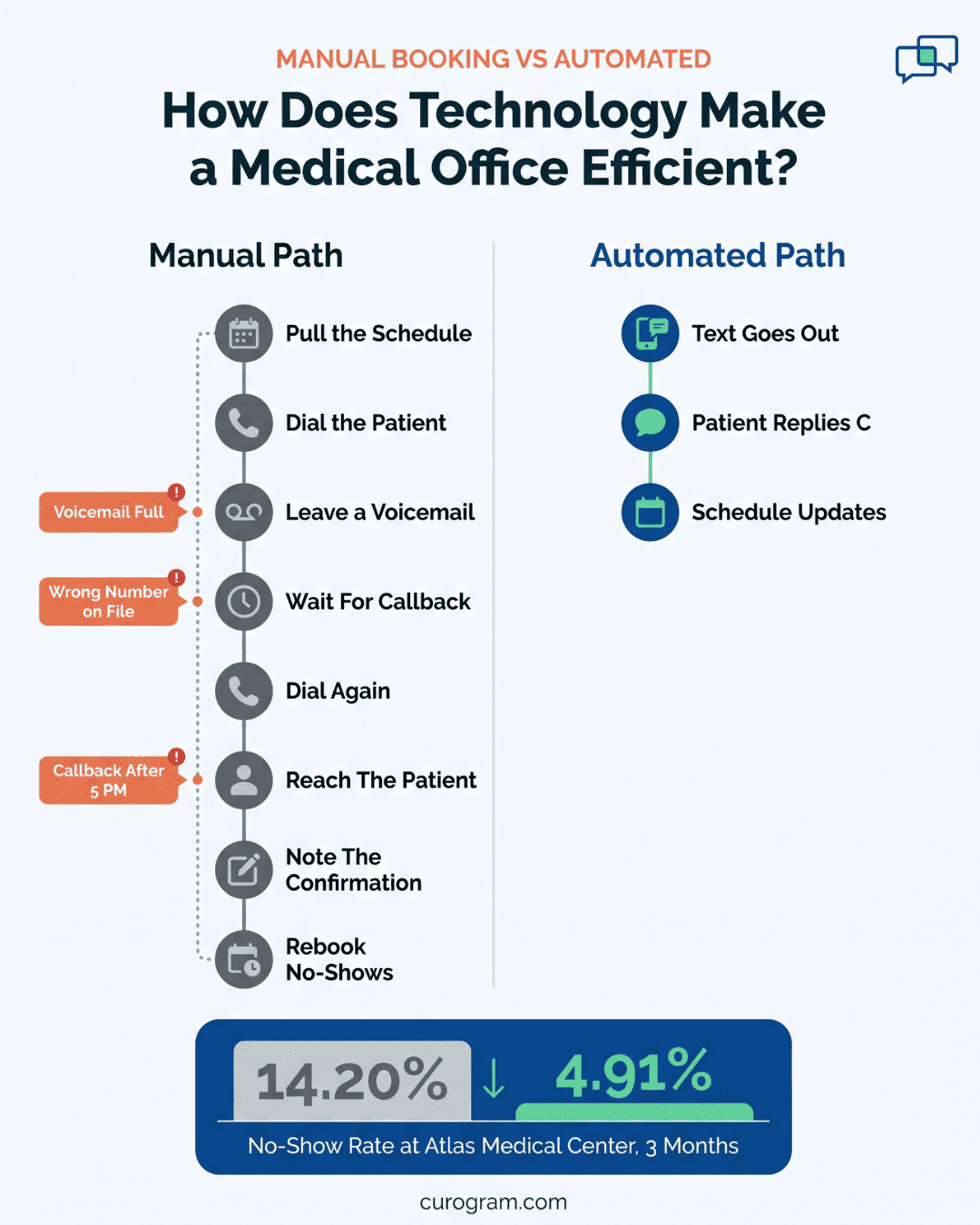
Booking one appointment by phone rarely takes one call. Your scheduler offers Tuesday at 10. The patient needs to check with work. They call back Thursday, that slot is gone, and the search starts over. Multiply that by every new patient and every reschedule.
Manual booking also drops things. A slot gets written down twice, a cancellation never makes it into the system, and the provider sits with an open room nobody knew about.
Online booking changes who does the searching. Send patients a link to your live schedule and they pick from what's actually open, at whatever hour suits them. The calendar updates as they book, so double-booking stops being a possibility rather than something staff catch later.
| Step | By Phone | By Link |
|---|---|---|
| Finding an open slot | Staff read options aloud, one at a time | Patient sees the full week |
| When it happens | Business hours only | Any hour |
| Confirming | Callback, voicemail, callback | Reply to a text |
| Updating the calendar | Someone types it in | Updates on booking |
Covina Arthritic Clinic now handles more than 1,100 appointment confirmations a month this way, based on our internal data.
One caution on the tooling. Appointment requests carry names, phone numbers, and often a reason for the visit, all of which is PHI (Protected Health Information).
Use HIPAA-compliant online scheduling tools, such as Curogram, so that data stays inside a system covered by a business associate agreement.
Most no-shows aren't refusals. The patient booked in March for a June visit, and June arrived without warning.
Automated reminders close that gap on a schedule your staff sets once. A common pattern runs three touches:
| When | Channel | What It's For |
|---|---|---|
| One week out | Email or text | Enough notice to move it without losing the slot |
| Two days out | Text | Catches the patient who forgot after booking |
| Morning of | Text | Address, parking, arrival time |
Ask patients how they want to hear from you at registration, then store it. Older patients often still want the call.
Working parents answer texts and ignore voicemail. Sending every reminder by phone means your front desk spends the morning dialing people who would have replied to a text in nine seconds.
The content matters as much as the timing. A reminder that names the provider, the date, and a way to reply gives the patient something to act on. One that only says "you have an appointment" gives them nothing to confirm or move.

Telemedicine isn't new, and that's the point. The workflow is settled: the patient joins by video or phone at their appointment time, the provider documents in the chart the same way, and the visit closes out like any other.
What changes is what the patient had to arrange to get there. A visit that once cost half a day now costs 20 minutes.
Those are the reasons people cancel. Remove them and the slot holds.
Curogram lets you run virtual visits without building anything new. You get a virtual clinic with waiting rooms, so patients join a room and providers pull them in when ready, and the two-way texting and internal staff messaging described earlier run in the same platform.
One limit worth planning around: licensure follows the patient, not the provider. You generally need a license in the state where the patient is physically sitting during the visit.
Virtual care widens your draw across the states you're licensed in, which is real reach for rural patients and for anyone who moved an hour away but wants to keep their doctor. It doesn't remove the license requirement, and it doesn't extend to patients overseas.
Your Google listing is the first thing most prospective patients see. Based on our internal data, 90% of new patient leads check a practice's Google Business Profile before they call. They're reading what the last 20 patients said, and how recently they said it.
Volume and recency do the work. A practice with 12 reviews from 2022 reads as closed. One with steady reviews from last month reads as busy.
The ask has to go to every patient, not the ones you expect to be happy. Filtering for positive feedback breaks the FTC's 2024 rule on consumer reviews and violates Google's policy, and the risk isn't worth it.
One Curogram client collected 1,064 new 5-star reviews in three months by texting every patient the same request after their visit, with roughly 90% landing at five stars.
Two things to watch when you reply:
Reviews also tell you where the friction sits. When four people in a month mention the wait time, that's your schedule, not your staff.
None of this is about technology for its own sake. It's about where your staff's hours go.
A front desk that spends its morning dialing voicemails isn't a front desk with a training problem. It's a front desk running manual steps that don't need a person anymore.
Every tool covered here removes one of those steps: the handwriting a pharmacist has to interpret, the callback that never comes, the review nobody thought to ask for.
The gains stack. Atlas Medical Center cut no-shows from 14.20% to 4.91% in three months, based on our internal data. Covina Arthritic Clinic now handles more than 1,100 appointment confirmations a month without a phone call.
Start where the pain is loudest. For most practices, that's the phone. Reminders and two-way texting take the least setup and show a change in the schedule within weeks, which makes them an easier case to bring to whoever signs off on new software.
One thing worth holding to: everything you add has to be covered by a business associate agreement, and it has to talk to the EHR your team already lives in. A tool that makes staff copy data between systems has added work, not removed it.
Book a demo and we'll show you how Curogram runs alongside your current EHR. You'll see the actual workflow your front desk would use, on your own schedule and your own patient volume.
1 min read
Jo Galvez : 7/21/26, 8:00 AM
💡 EHIPAA-compliant two-way texting is secure, consented messaging between a practice and patients that meets HIPAA's privacy and security rules....

1 min read
💡 Patient engagement improves health outcomes through five practices. Patient education raises care plan compliance, because patients who...
1 min read
.jpg?width=30&name=square-formal-photo%20(1).jpg) Mira Gwehn Revilla : 4/12/26, 1:00 PM
Mira Gwehn Revilla : 4/12/26, 1:00 PM
💡 A patient communication platform is a tool that helps medical practices manage all patient messages from one place. It handles two-way...