
1 min read
What Makes Communication Technology HIPAA Compliant
 Carylee Gali : 3/8/22, 7:00 AM
💡 HIPAA-compliant communication technology keeps patient health data safe each time it is stored, viewed, or sent. A compliant tool needs unique...
9 min read

Your patients already have a direct line to your practice. It sits in their pocket, and they check it constantly throughout the day.
About 91% of U.S. adults now own a smartphone, according to the Pew Research Center. A 2025 Reviews.org survey found that the average American checks their phone 186 times a day. So when patients want to confirm an appointment, ask a quick question, or pay a bill, their phone is the first place they turn.
That shift creates a real opportunity for your practice and your staff. Texting is much faster than endless phone tag, and most patients prefer it. Telehealth, which expanded quickly during the COVID-19 pandemic, now feels about as ordinary as ordering takeout from an app.
But there's a catch.
Every time your team uses a phone or tablet to communicate with patients, protected health information (PHI) can slip into the conversation. It might be a lab result, a medication name, or a diagnosis connected to a patient's full name. Send that information through the wrong app, and your practice could face a HIPAA violation, significant fines, or even criminal charges.
The Health Insurance Portability and Accountability Act of 1996 (HIPAA) doesn't prohibit mobile devices. Instead, it requires you to protect the data that travels through them. That sounds simple. It isn't, because you control your own devices but not your patients' phones.
This guide explains how to be HIPAA-compliant when using mobile devices. You'll learn why mobile tools have become so important in modern healthcare, which security steps protect your team's devices, and why consumer texting apps fall short. You'll also discover how a secure messaging platform closes the gaps your practice can't close on its own.
First, let's look at why mobile devices have become the new front door to your practice.
Remote healthcare isn't a new concept. As early as 1879, physicians suggested using the telephone to reduce unnecessary office visits. What has changed over time is the technology that patients and providers carry with them every day.
Smartphones and tablets made it possible to reach almost anyone, almost anywhere. For healthcare, that opened the door to patient-centered care models that are both affordable and efficient.
Patients also use their phones to find and evaluate providers. They search on Google, scroll through social media, and read reviews on healthcare rating websites. If your practice is difficult to reach on mobile, it becomes much harder for new patients to choose you.
For your staff, a mobile device can function like a portable office. Apps support task management, data storage, time tracking, health record access, medical education, and patient monitoring.
Each of these tools can save valuable time. Each one can also interact with patient data, which is why mobile device security needs to be a priority from the very beginning.
Ask patients how they prefer to hear from you, and many will choose text messaging over phone calls or email. It's convenient, it fits into a busy schedule, and nobody has to wait on hold. Text messages also get noticed, with open rates near 98%, which is far higher than email.
Texting benefits your front desk as well. Practices using Curogram's two-way texting have reduced phone call volume by 50%. A short text reply takes only seconds, while a single phone call can easily consume several minutes.
Here's what that could look like in a sample practice (illustrative example).
Imagine your front desk spends 4 hours a day on the phone. Cutting that time by 50% frees up 2 hours daily, or about 10 hours each week, which adds up to roughly 500 hours a year your team can put back into patient care.
| Illustrative example | Before texting | After a 50% drop in calls |
|---|---|---|
| Phone time per day | 4 hours | 2 hours |
| Phone time per week (5 days) | 20 hours | 10 hours |
| Hours saved per year (50 weeks) | — | About 500 hours |
That recovered time can go toward booking more appointments, caring for more patients, and attracting new ones.
However, it also raises an important question:
How do you keep PHI safe when so much patient communication happens on a phone?
HIPAA is a federal law that protects medical records and other health information, including data shared or stored on mobile devices and in the cloud. Its Privacy Rule controls how covered entities, such as doctors and health plans, can use and disclose that information. Vendors that handle PHI on behalf of those entities, known as business associates, are responsible for protecting it as well.
HIPAA's Security Rule adds specific standards for electronic PHI. That includes the text messages, files, and photos stored on your team's phones.
So what counts as protected health information? It's any health information that can be connected to a specific individual.
Common examples include:
Even a short text message can contain PHI. A message like "John Smith, your Lisinopril refill is ready" connects a name to a medication, and that's enough.

The good news is that you can secure the devices your practice owns and manages. These eight steps cover the essentials:
These steps work well for phones your practice manages. The difficult part is the other end of the conversation.
You can't set a passcode on a patient's phone, and you can't make them update their software or stay off public Wi-Fi. If PHI lands on an unsecured device through an unsecured channel, your practice may still be held responsible.
Asking every patient to follow a security checklist isn't realistic. In fact, it's close to impossible, which is why the communication channel you choose matters just as much as the device itself.
It also pays to watch for regulatory changes. In January 2025, the U.S. Department of Health and Human Services proposed Security Rule updates that would make encryption and multi-factor authentication required in most situations. As of fall 2026, the final rule hasn't been published, but adopting these habits now puts your practice ahead of the curve.
|
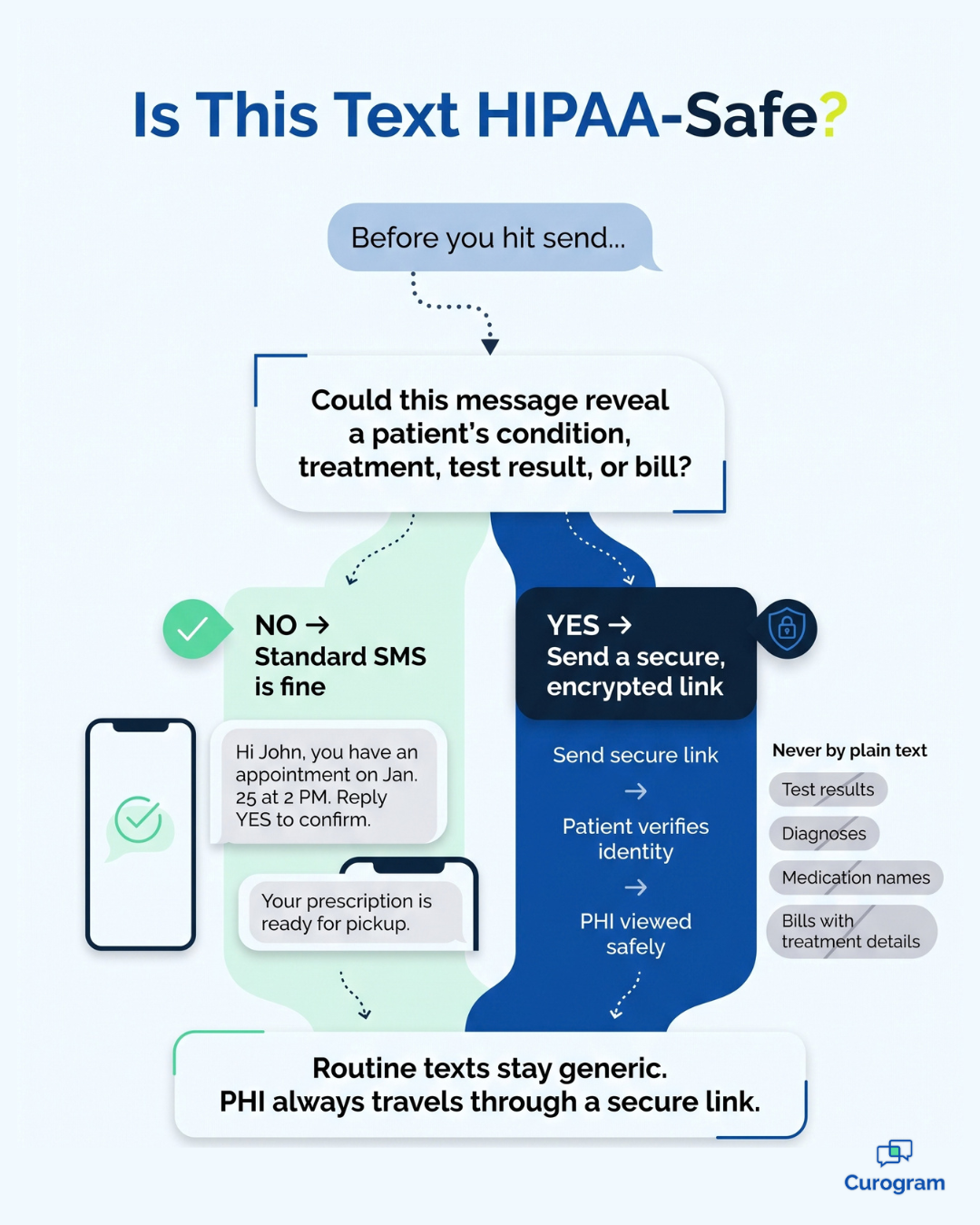
Before anyone on your team hits send, have them ask one question: could this message reveal a patient's condition, treatment, test result, or bill to anyone who sees the screen? If the answer is yes, it needs a secure, encrypted channel. If the message only shares a date, a time, or a general reminder, a standard text is usually fine. Post this rule near your front desk, and you'll prevent most texting mistakes before they happen. |
Device safeguards add helpful layers of protection, but they can't control what happens once a message leaves your hands. That's where your choice of messaging tool makes all the difference.
Standard SMS isn't encrypted, so it isn't a safe way to send PHI. Popular consumer apps fall short, too. The free version of Google Voice isn't HIPAA-compliant, and neither is WhatsApp. The same applies to other consumer messaging apps like Facebook Messenger and Telegram.
A major reason is the business associate agreement (BAA). HIPAA requires a signed BAA with any vendor that handles PHI for you, and consumer messaging apps generally won't sign one. Without that agreement, your practice carries the risk.
A HIPAA-compliant texting platform solves this problem by giving sensitive information its own secure path.
Here's how that works in practice with Curogram:
| Message type | Generic text (fine for standard SMS) | Contains PHI (send through a secure link) |
|---|---|---|
| Appointment reminder | "Hi John, you have an appointment on Jan. 25 at 2 PM. Reply YES to confirm." | "John Smith, your cardiology visit for heart disease is on Jan. 25." |
| Test results | "You have a secure message from your provider. Tap the link to verify your identity and view it." | "Your blood sugar result is 140 mg/dL." |
| Billing | "You have a $50 balance. Tap the secure link to view and pay." | "John Smith, your bill for diabetes treatment is $200." |
| Prescriptions | "Your prescription is ready for pickup." | "John Smith, your Lisinopril 10 mg refill is ready." |
The pattern is easy to follow. Routine texts stay generic, while anything containing PHI travels through an encrypted link that asks the patient to confirm their identity before viewing it.
With Curogram, your team can message patients, staff, and outside providers from a desktop computer or a mobile device. You can send appointment reminders, schedule visits, share secure documents, and collect payments, all from one place. When you compare platforms, start by deciding who you need to reach: patients, your internal staff, other providers, or all three.
Curogram also integrates with most EHRs, whether they are cloud-based, server-based, app-based, or browser-based. That means less double entry and fewer copy-and-paste errors. It also helps practices across the country keep patient communication secure on any type of device.
The result is genuine peace of mind. Your team keeps the speed and convenience of texting, and your patients' information stays protected.
Mobile devices aren't going anywhere. Your patients rely on their phones for nearly everything, and your team depends on them to work more efficiently. The real question isn't whether to use mobile tools, but whether you're using them safely.
HIPAA compliance on mobile devices comes down to two responsibilities. The first is protecting the phones and tablets your practice controls. That means passcodes, encryption, remote wipe, current security software, and smart habits like avoiding public Wi-Fi.
The second responsibility is harder because it reaches beyond your office walls. You can't secure every patient's phone, and you can't trust consumer apps with PHI. Standard SMS, WhatsApp, and the free version of Google Voice were never designed for health information, so using them to share test results or treatment details exposes your practice to fines, legal trouble, and lost patient trust.
A secure messaging platform handles both sides of the equation. It keeps routine reminders simple and sends sensitive details through encrypted links that verify the patient first. Your staff still gets the speed of texting, and your patients still enjoy the convenience they expect.
The benefits add up quickly. Fewer phone calls mean more time for check-ins, new patients, and quality care. Clear rules about what belongs in a text mean less guesswork for your team, and a single platform that works on any device makes consistency much easier.
Ignoring mobile compliance isn't a shortcut. It's a gamble with your patients' privacy and your practice's reputation.
If you're ready to give your team a safer way to text patients and share documents, Curogram can help. It's designed specifically for medical practices and integrates with most EHRs. Book a demo of Curogram's HIPAA-compliant messaging platform to see how it fits your workflow and how much phone time your team could win back.
1 min read
Carylee Gali : 3/8/22, 7:00 AM
💡 HIPAA-compliant communication technology keeps patient health data safe each time it is stored, viewed, or sent. A compliant tool needs unique...

1 min read
 Joshua Inciso : 5/19/20, 5:17 AM
💡 No, FaceTime is not HIPAA compliant for telehealth. Apple does not sign a business associate agreement (BAA) for FaceTime, and HIPAA requires one...

1 min read
.jpg?width=30&name=square-formal-photo%20(1).jpg) Mira Gwehn Revilla : 3/15/26, 11:00 AM
Mira Gwehn Revilla : 3/15/26, 11:00 AM
💡 SMS, RCS, and WhatsApp each serve a different role in healthcare messaging. SMS works on every phone and costs $0.01–$0.05 per message, but it...