
 Carylee Gali
Is Email HIPAA Compliant? How to Send HIPAA Compliant Emails
Email is a convenient way to communicate with patients, but is it HIPAA compliant? Learn how to ensure your patient communications are secure.
Most HIPAA problems don't start with a hacker. They start with someone on your team who is trying to be helpful.
A nurse texts a lab result so a worried patient doesn't have to wait. A front desk lead emails a photo of an insurance card to billing so a claim goes out on time. A provider snaps a picture of a wound and sends it to a colleague for a quick second opinion between visits.
Each choice saves a few minutes. Each one can also put protected health information (PHI) on a device or channel your practice doesn't control or monitor.
That's the tricky part about communication technology. The same phones, laptops, and apps that make your practice faster can also make it easier for patient data to leak. And the risk is far from unusual. Between 2009 and 2025, more than 7,400 large healthcare data breaches were reported to federal regulators, involving over 1 billion patient records.
It sounds like an IT problem. It isn't.
It's a daily workflow problem. It lives at your front desk, in your exam rooms, and on the phones your staff carry in their pockets.
So what actually makes a texting app, email system, or patient portal HIPAA compliant? It's not a badge on a vendor's website. It's a specific set of safeguards, policies, and signed agreements that protect PHI every time it moves from one person to another.
In this guide, you'll learn what HIPAA requires and who has to follow it. You'll see which technical features your communication tools need and what a real breach can cost. You'll also get a simple test for deciding which messages are safe to send by standard text. Finally, you'll see how secure tools help your team work faster without cutting corners on patient privacy.
Your practice runs on fast communication. Patients want quick answers. Staff need to coordinate care. Providers share updates across offices every day.
But the faster information moves, the more places it can end up. A text on a personal phone can expose patient data. So can an unencrypted email or a shared login on a front desk computer.
The good news? You don't have to pick between speed and security. HIPAA-compliant communication technology is built to keep patient data safe while your team works the way patients expect.
The Health Insurance Portability and Accountability Act (HIPAA) is a federal law that protects patient data. It has four main goals. It keeps PHI private, makes it safe to move health records, cuts down on tech threats, and sets standard formats for how data is used.
In short, HIPAA lets you use new tools while keeping patient data safe.
Here's who it applies to:
| Who | What it means | Examples |
|---|---|---|
| Healthcare providers | Practices of any size that send health information electronically, such as for billing | Physicians, dentists, clinics, therapists |
| Health plans | Organizations that provide or pay for medical care | Insurers, HMOs, Medicare, Medicaid |
| Healthcare clearinghouses | Groups that turn nonstandard health data into a standard format, or the reverse | Billing services, repricing companies |
| Business associates | Vendors that create, receive, store, or send PHI for one of the groups above | Billing firms, IT providers, communication platforms |
The first three groups are called covered entities. Business associates are not, but they still must follow key parts of HIPAA. They also have to sign a business associate agreement (BAA) with each covered entity they serve.
That last row matters most here. Any texting, email, or patient engagement vendor that handles your PHI is a business associate.
The U.S. Department of Health and Human Services (HHS) wrote two main rules to protect patient data. They are the Privacy Rule and the Security Rule. Together, they ask you to keep PHI private, accurate, and there when it's needed.
The Privacy Rule sets national standards for how you protect health data in any form. That covers paper charts, spoken words, and digital records.
It also explains when you can share PHI without a patient's written consent.
Valid reasons include:
In most of these cases, you should still share only the smallest amount of data the situation needs.
The Security Rule covers electronic PHI (ePHI). It sets rules for how digital health data is stored, opened, and sent.
It splits its rules into three types of safeguards: administrative, physical, and technical. Most of what makes a texting or email tool compliant falls on the technical side. Let's look at that next.
Texting, email, and online portals are now a big part of healthcare. But as more practices use them, the risk of data breaches grows too.
The Security Rule sets the standards that keep PHI safe as it moves through these tools.
When you size up a platform, look for these six features:
One detail trips up many practices. Under the current Security Rule, automatic logoff and encryption are called "addressable." That doesn't mean optional.
It means you must put them in place, or write down why an equal option makes more sense for your practice. In real life, you should expect encryption from any tool that carries PHI.
Encryption also helps after a breach. Data that is properly encrypted generally doesn't count as "unsecured" PHI, which can spare you from breach notice duties. As more practices shift to EHRs, online booking, and telehealth, these safeguards matter more than ever.
|
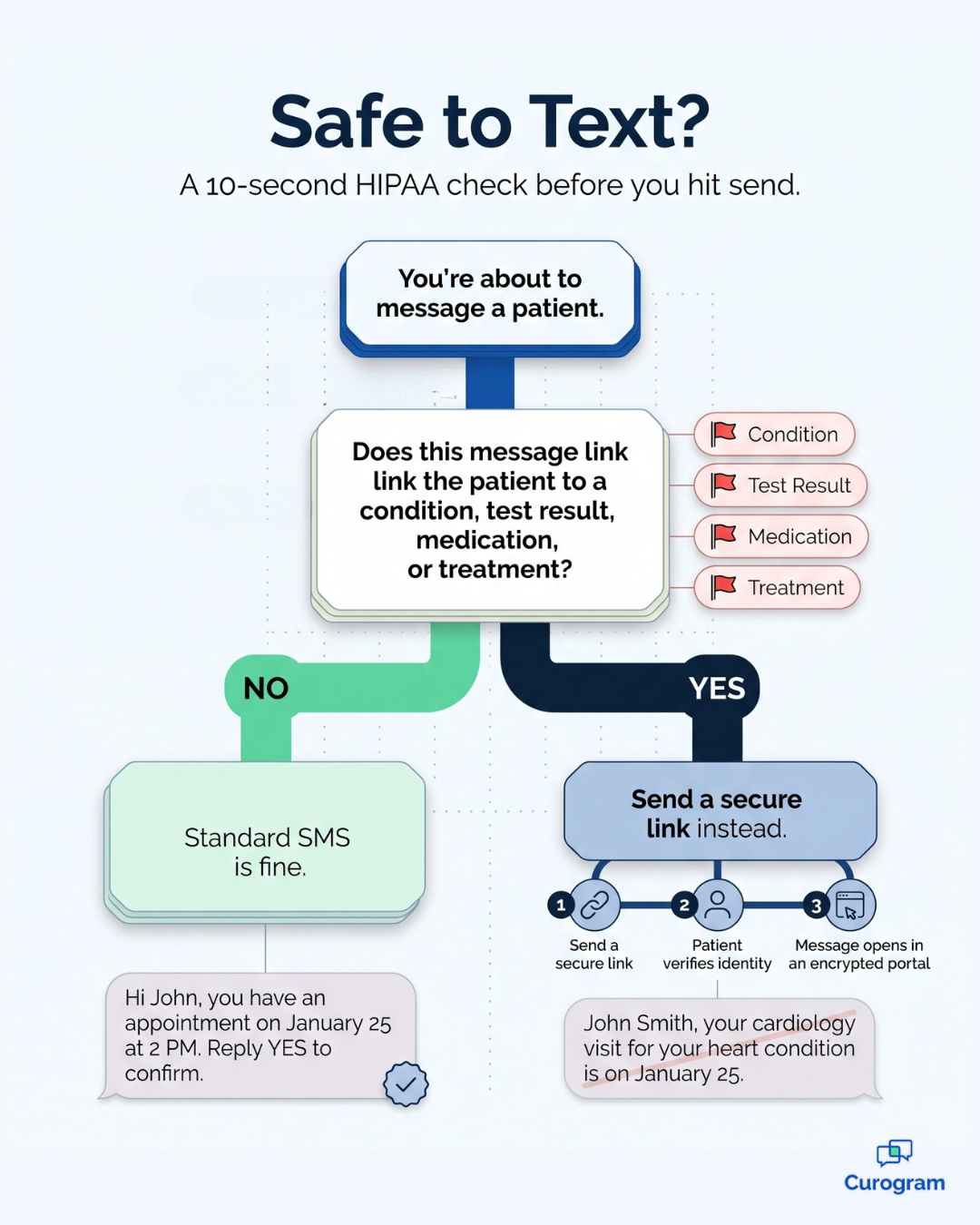
Standard SMS works well for reminders, but it isn't encrypted. Before you hit send, ask one question: does this message link a patient to a condition, test result, medication, or treatment? If yes, it doesn't belong in a regular text. Safe for standard text: "Hi John, you have an appointment on January 25 at 2 PM. Reply YES to confirm." Needs secure messaging: "John Smith, your cardiology visit for your heart condition is on January 25 with Dr. Williams." When you need to share sensitive details, send a secure link instead. The patient confirms their identity, then reads the message in an encrypted portal. |
Compliance isn't only about staying out of trouble. Practices that switch to secure tools often see faster replies, more work done each day, and happier patients.
Here's what secure tools make possible:
Speed matters here, too. About 98% of text messages get opened, far more than email or voicemail.
Think about what that means for your team. Say your front desk takes 120 calls a day, and secure messaging shifts just 25% of them to text. That's 30 fewer calls daily. At 4 minutes per call, your staff gets back about 2 hours every day (illustrative example).
HIPAA sets the standard for patient data security. If your practice handles digital patient data, every tool that touches ePHI needs to meet that standard.
When staff use an unsecured channel, such as regular texting, to share patient details, that data can end up in the wrong hands. That's a HIPAA violation, even if no one meant any harm.
The numbers show how big this problem has become.
Here's what the HIPAA Journal reports for large breaches (500 or more records) sent to federal regulators:
| Period | Large breaches reported | Records affected |
|---|---|---|
| 2009–2025 (total) | 7,418 | More than 1 billion |
| 2024 | 738 | About 289 million |
| 2025 | 804 | About 138.5 million |
What does this mean for you? In 2025, there were about 2 large healthcare breaches every single day. Hacking and other IT incidents caused more than 80% of them. The 2024 spike came largely from one attack on Change Healthcare, which affected about 192.7 million people.
A breach can lead to federal investigations, fines, required corrective action plans, and lost patient trust. That's why smart practices act before something goes wrong.

Three steps make a big difference:
Train your team. Teach staff what PHI is, which channels are safe, and how to spot risks like phishing emails. Most mistakes happen because people simply don't know the rules.
Secure your networks. Set up protected networks and system controls, especially for remote work and telehealth, where devices often leave the office.
Run a security risk analysis. HIPAA requires you to assess your current setup on a regular basis. A good review shows where PHI lives, who can reach it, and where the gaps are.
A HIPAA-compliant communication platform gives you a stronger base for data security and accuracy. Over time, that supports better patient satisfaction and outcomes.
Today, almost anyone's personal data can be found online with enough effort. Every digital message that includes health details creates one more chance for a breach.
Technology has helped healthcare move forward in big ways. But as more care happens through screens and phones, the number of breaches keeps climbing.
Many providers don't realize that one message on an unsecured app can break a patient's privacy. HIPAA closes that gap. It requires safeguards that protect health data at every step.
HIPAA also helped the industry move from paper charts to digital records. It supports safer data sharing and better teamwork between providers. Without it, no group would be legally required to protect patient data, no matter how much they wanted to.
Most of all, HIPAA protects patients. People want their health records kept private. They also need protection from anyone who might misuse that data.
Communication technology isn't the enemy of HIPAA compliance. Unsecured habits are.
Your team will always look for the fastest way to get things done, especially on a busy day. If the fastest option is a personal phone or a regular email, that's what people will use. The fix isn't to slow everyone down. It's to give your staff tools where the fast way and the safe way are the same thing.
Start with the basics you learned here. Make sure every tool that touches PHI has unique logins, automatic logoff, encryption, audit logs, and integrity controls. Confirm that each vendor has signed a BAA with your practice before any PHI moves through it.
Then look at how your team actually communicates day to day. Which messages go out by plain text? Which ones should move to a secure channel? A simple rule helps: if a message links a patient to a diagnosis, test result, medication, or treatment, it needs encryption.
This is where the right platform makes a real difference. Curogram helps practices send appointment reminders and general updates by standard text, then move sensitive conversations to secure, encrypted messaging. Patients get the speed of texting, with a 98% open rate, while your PHI stays protected behind identity checks and secure links.
The payoff goes beyond compliance. Curogram practices have reported up to a 50% drop in call volume, which frees your front desk to focus on the patients standing in front of them.
Protecting patient data doesn't have to mean working harder or slowing down. With the right setup, it becomes part of how your team already works.
Ready to see what secure patient communication looks like in your practice? Book a demo to see how Curogram keeps patient conversations secure and find the right fit for your workflow.

Email is a convenient way to communicate with patients, but is it HIPAA compliant? Learn how to ensure your patient communications are secure.

 Joshua Inciso : 5/19/20, 5:17 AM
Is FaceTime HIPAA compliant? The short answer is no, but it's not the only reason FaceTime isn't suitable for clinic-patient communications.

Is texting HIPAA compliant? Uncover rules, privacy concerns, and tips for safe communication with patients while staying secure.