
Why a Unified Data Model for Healthcare Equates to Better Patient Care
See how unified data helps healthcare practices give providers the full chart, stop retyping intake forms, and send reminders that match each...
10 min read

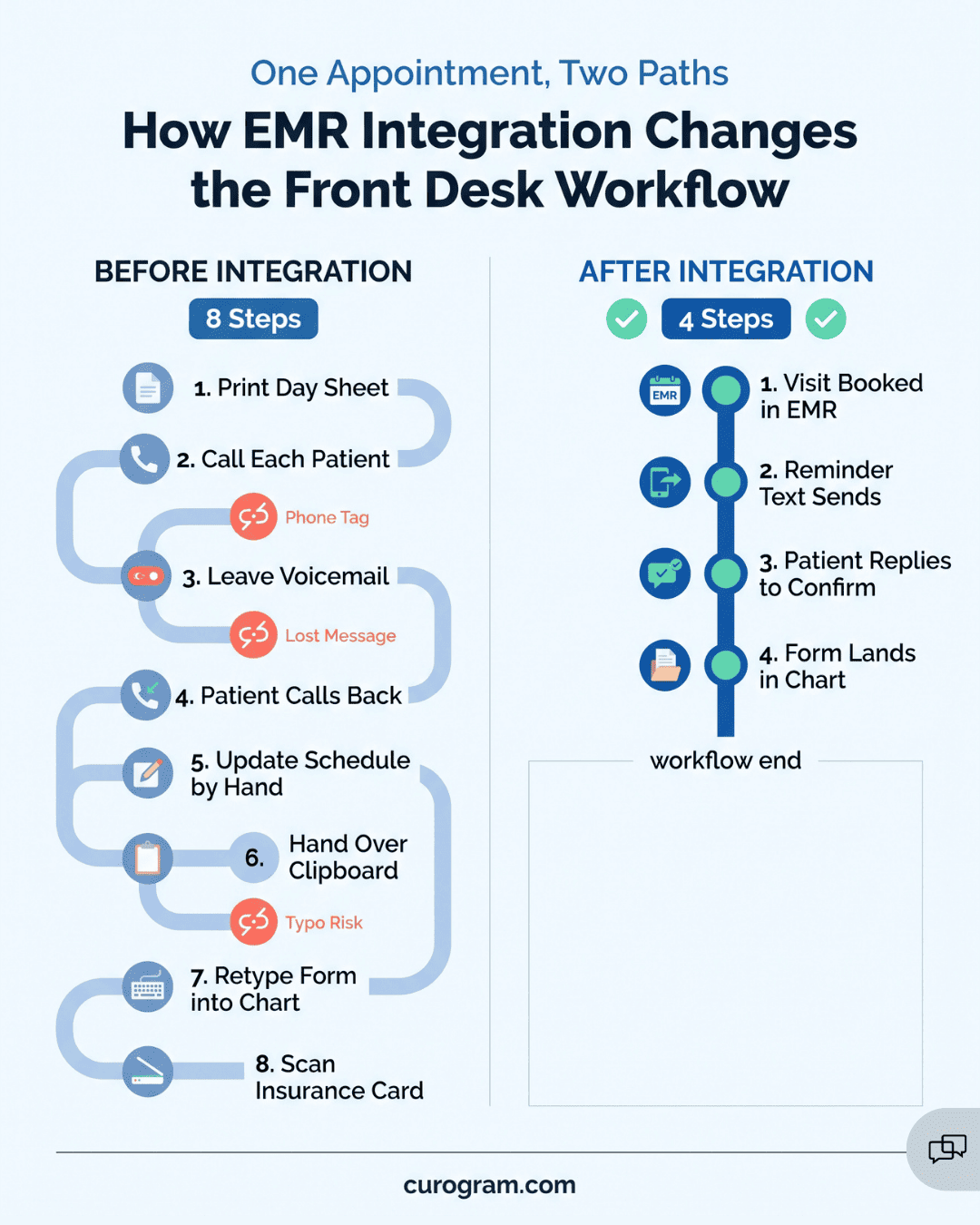
Most practices treat EMR integration as an IT project, with a vendor call, a login, and a go-live date. Most of the change, though, happens at the front desk.
Without integration, your scheduler, intake forms, phone line, and texting tool each hold one piece of the patient’s story. Your team connects them by hand.
Paper forms get typed into the chart, reminder lists get printed and dialed, and prep instructions go out by voicemail with no record in the EMR. When a patient calls to confirm, someone stops checking in the person standing at the window.
Once those tools connect to the EMR, most of that hand work goes away. The difference shows up in numbers you already track: no-shows, call volume, and how fast you can answer an audit request.
The “before” side is expensive. A 2018 review in Health Policy put the average no-show rate at about 23%, and SCI Solutions estimates each empty slot costs about $200. HIPAA penalties start at $145 per violation and can reach $2,190,294.
The “after” side is measurable too. Based on our internal data, patients on Curogram confirm more than 75% of their appointments, and practices see phone volume drop by up to 50%.
Below, we lay out both states side by side. First comes what the “before” costs you in revenue, compliance, patient trust, and staff time. Then comes what changes once your systems connect.
Most clinics add their tools one at a time. The scheduler came first, the intake forms came later, and the phone line covers everything else. These systems don’t talk to each other, so your team becomes the link between them.
| Task | Where it starts | What your team does by hand |
|---|---|---|
| Intake | Paper clipboard or emailed PDF | Types each answer into the EMR chart |
| Reminders | Printed day sheet from the scheduler | Calls each patient and leaves voicemails |
| Confirmations and questions | Patient phone calls | Answers, then updates the schedule |
| Insurance cards | Front desk copier | Scans the card and attaches it to the chart |
Picture 8:15 a.m. on a Monday. Patients are calling back about Friday’s voicemails, and two people stand at the window with half-done clipboards. Last week’s forms still need to be keyed into the chart.
Patients feel it too. They write their address on a form they already filled out last visit. Then they wait on hold to confirm an appointment they would rather confirm with a one-word text.
After integration, forms write straight to the EMR and reminders send from the schedule without anyone dialing. Those hours go back to the patients in front of you.
The same five problems show up in most clinics that run on separate tools:
These problems are the “before” baseline for many clinics. The rest of this blog will illustrate just how transformative the “after” state can be.

Disconnected tools cost your practice in three places you can track. Empty appointment slots show up in monthly revenue. Missing message logs show up during a HIPAA audit.
Patients feel the third cost, and you see it in your reviews and rebooking rates. Someone who waits on hold, fills out the same form twice, and arrives without prep instructions may not book their next visit with you.
A reminder that says only “You have an appointment on 10/24” leaves too much out. It doesn’t say when to arrive, whether to fast, or how to reschedule. A patient who isn’t sure often just doesn’t come.
A 2018 review of 105 studies in the journal Health Policy put the average no-show rate at about 23%. An SCI Solutions report found that each empty slot costs a physician about $200. For one provider, the math looks like this:
| Illustrative example | Amount |
|---|---|
| Missed visits per day | 2 |
| Revenue lost per missed visit | $200 |
| Lost per week (5 clinic days) | $2,000 |
| Lost per year (250 clinic days) | $100,000 |
The phone queue costs you, too. Every hour your front desk spends returning confirmation calls or retyping intake forms is an hour not spent filling open slots, sending claims, or booking patients who are overdue for checkups and screenings.
That workload wears people down, and replacing someone who quits isn’t cheap. A Center for American Progress review found the typical cost is about 21% of the worker’s yearly salary.
For a front desk role paying $40,000, that’s about $8,400 (illustrative), spent while the empty slots keep costing you.
HIPAA expects two things from your patient messages: they stay secure, and you keep a record of them. Disconnected setups break both, usually in small ways no one notices on a busy day. A staff member texts a reminder from a personal cell phone. A nurse gives prep instructions by phone, and nothing goes into the chart.
Intake forms cause the same problem when they sit in a folder or an inbox instead of the EMR. Any one of these gaps can turn into a finding. Fines for HIPAA violations now run from $145 to $2,190,294 per violation, under HHS’s inflation-adjusted amounts that took effect January 28, 2026.
A breach that affects 500 or more patients brings a second cost. You must report it to HHS and the local media, and it appears on HHS’s public breach portal, where patients and reporters can look it up.
Audits test the same weak spots. A payer, an accreditor, or HHS may ask what you told a patient and when. If that answer is spread across call logs, sticky notes, and three separate apps, you may not be able to show the record at all.
Patients feel these gaps directly. They sit on hold to confirm a visit, then fill out the same history form they completed last year. A colonoscopy patient who never got the prep instructions may arrive unprepared, and the procedure gets canceled.
After a few visits like that, patients start to doubt the practice. Some quietly book somewhere else. Others post online reviews about the hold times and paperwork, even when the care itself was good.
New patients read those reviews early. Based on our internal data, 90% of new patient leads check a practice’s Google Business Profile before they visit its website.
Most patients judge your care partly by how your front desk runs. They also expect to reach you by text. In Sinch’s 2026 patient survey, 90% of respondents said they prefer healthcare messages by text, and 30% said they would consider switching providers if texting weren’t offered.
Your front desk absorbs most of this work. Picture your coordinator at 4:30 p.m. with a page of reminder calls still to make, two voicemails about a bill, and a stack of paper intake forms to type in before tomorrow.
Software could send those reminders and file those forms. She stays late to do them anyway.
Weeks like that wear people down. Good staff leave, and the ones who stay cover the open desk while training the next hire. Patients hear it in a rushed answer at the window.
The problems in this section also feed each other:
Integration cuts into each step, starting with the reminders that never went out.
After integration, your messaging platform pulls appointments straight from the EMR schedule and writes patient replies back to the chart. Your team keeps booking visits the same way it does today. Nobody exports a call list or copies a form between screens. The six changes below come from that one connection.
Here are the undeniable benefits of integrated healthcare systems:
Once your EMR connects to your messaging platform, reminders go out from the schedule on their own. You choose the timing, such as three days before and again the day before. When someone books or moves a visit, the reminder updates with it.
Each text can carry the prep steps for that visit type, and the patient answers with one reply.
Example text: Hi Maria, this is Lakeside Family Medicine. Your lab visit is Thu 10/24 at 9:00 AM. Please don’t eat for 8 hours before. Reply C to confirm or R to reschedule.
A patient who replies R frees the slot days ahead, while you still have time to fill it. Some practices using automated reminders report up to 75% reductions in no-shows.
Based on our internal data, patients on our platform confirm more than 75% of their appointments. Our clients’ no-show rates run 53% below the industry average. Each visit you keep is worth about $200, the average cost SCI Solutions puts on an empty slot.
With intake connected to your EMR, a new patient’s paperwork moves like this:
Nobody on your team retypes a date of birth, so the typo that gets a claim denied has fewer chances to happen. Changes to demographics, insurance, or medications show up in the chart once the patient submits them. Your provider walks in with the current list instead of last year’s.
Your front desk also works from one screen. Separate forms inboxes and second logins go away. Based on our internal data, clients see front desk productivity rise by 30% or more.
Two-way texting lets your team reply to patients from a HIPAA-compliant platform that connects to your EMR. Every message is saved and time-stamped, which gives you an audit trail if a payer or HHS asks what was said.
Most threads are short:
Patient: Running 10 min late, is that OK?
Front desk: Yes, see you at 2:10. Your copay is the same as last time.
While one patient types back, your coordinator can answer the next text, confirm a visit, or send a reschedule link. A phone call holds that same person until it ends.
Based on our internal data, practices using our texting see phone volume drop by up to 50%. Patients get answers sooner, and the front desk phone stops ringing through every check-in.
Asking about an old balance at the front desk, with three people in line behind the patient, is uncomfortable for everyone. Paper statements avoid that moment, but they’re slow to get paid.
With integrated text-to-pay, the patient gets a secure payment link by text and pays from their phone:
| Step | Paper statement | Text-to-pay |
|---|---|---|
| Bill arrives | Envelope in the mail | Text with a secure link |
| Patient pays | Mails a check or calls with a card | Taps the link and pays |
| Payment is recorded | Your billing team keys it in | Posts to the EMR and billing system on its own |
Payments come in sooner, so your cash flow is steadier. Your billing team stops hand-posting checks and card payments. Your front desk can greet the next patient instead of bringing up a bill.
With integration, every reminder, message, and form your practice sends is tied to the patient’s record in the EMR. When someone asks for proof, you have one place to look.
| Audit question | Where the answer lives |
|---|---|
| Did this patient get prep instructions? | The sent reminder, with its date and time |
| How did your team answer a refill question? | The text thread in the patient’s record |
| When did the patient update their insurance? | The submitted intake form in the chart |
Your team also stops sending reminders from personal phones, and paper forms stop disappearing from folders. Pulling a patient’s records takes one search, not a dig through call logs and sticky notes. If HHS investigates a complaint, that record is the evidence you’ll hand over.
Think back to the coordinator making reminder calls at 4:30 p.m. With reminders, intake, and payments running from the EMR, most of that list is gone. She now has time to walk a first-time patient through check-in, or to call back someone confused about a referral.
Patients notice it at the window. Their wait is shorter, their prep instructions arrived days ago, and the person at the desk already knows why they’re there.
You can track the change in two places: higher patient satisfaction scores on your post-visit surveys, and new reviews online. When our clients ask every patient for a review after the visit, the count climbs fast.
Based on our internal data, one three-month stretch brought in 1,064 new five-star reviews, with about 90% of all reviews rated five stars.
Most of the work in the “before” picture is small, repetitive, and stuck with the same few people at your front desk.
Connect reminders first. Each confirmed visit protects about $200 in revenue, and intake forms, texting, and payments all build on that same link to your EMR schedule.
Run one test before you decide. For a single day, have your front desk mark every call that was only a confirmation, a prep question, or a balance check. That tally shows how much of the day could run from your EMR on its own.
Then book a Curogram demo and bring that number with you. We’ll show you reminders, intake forms, and two-way texting running from your own EMR schedule.
See how unified data helps healthcare practices give providers the full chart, stop retyping intake forms, and send reminders that match each...
Learn how integration with your EHR replaces confirmation calls, paper forms, and mailed statements with texts that sync, so your front desk works...

EMR integration boosts compliance and protects patient data. Learn why it’s a HIPAA lifesaver.