
EMR Integration Success Story: A Small Clinic’s Actual Experience
Learn about the actual EMR integration success story of a small practice. This is how one clinic fixed its workflow and boosted patient satisfaction.
11 min read
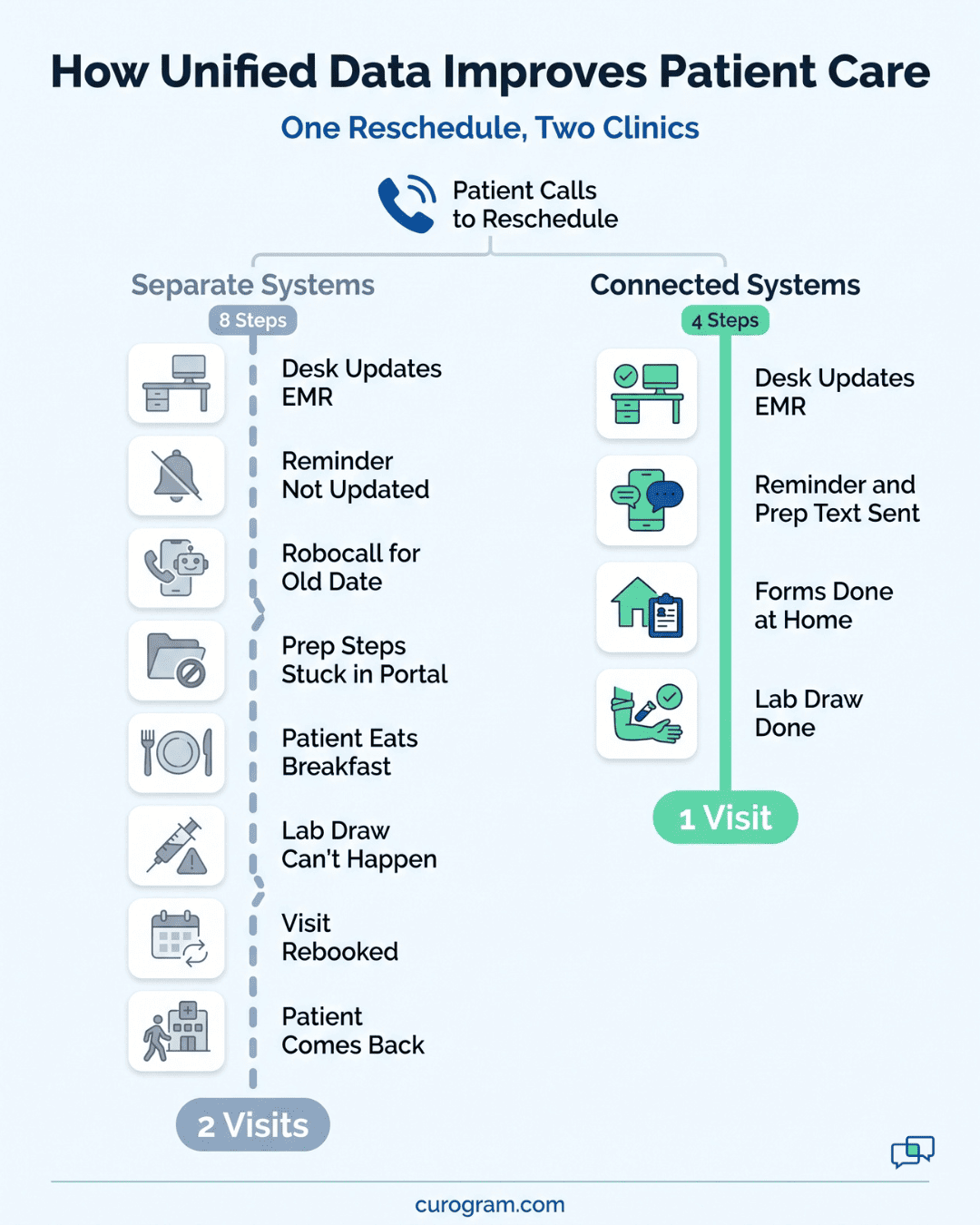
Two clinics get the same call from a patient who needs to move her lab visit to Thursday.
At the first clinic, the front desk updates the EMR. The separate reminder system never gets the change, so she still gets a robocall about the old date. Her fasting instructions are buried in a portal she never opens, so she arrives after breakfast and the lab draw gets pushed again.
At the second clinic, the same EMR update changes the reminder, the prep text, and the intake form together. She gets one Thursday reminder with the fasting steps included and finishes her forms at home. Check-in takes a quick ID and insurance confirmation.
Both clinics have the same staff, the same EMR, and the same patient. What differs is whether their systems share data.
A unified data model for healthcare closes that gap. Unified data improves patient care by putting the right information in front of the right person when they need it. That means the full chart for the provider, clean details for billing, and accurate messages for the patient.
Fragmented healthcare data creates the opposite result across your clinic. Providers treat patients with only part of the picture. Staff lose hours reconciling records by hand, and patients start to wonder why their care feels so disjointed.
The sections below cover seven risks that come from split systems and seven wins that come from connecting them. They also cover what to look for in a platform that links to the EMR you already run.
Your clinic creates data all day long. Schedules, test results, intake forms, billing records, and message logs grow with every visit.
The trouble starts when each one sits in its own system. Picture a patient whose allergy is in the EMR, whose lab result from last week is in the lab portal, and whose new insurance card is in the clearinghouse. No one on your team sees all three on one screen during the visit.
Fragmented healthcare data puts patients at risk, slows down providers, and costs administrators money. The seven problems below show where it does the most damage.
A provider can only act on what's on the screen. When lab results sit in one portal, allergies in another, and imaging somewhere else, no single system shows the full chart.
Take a patient whose kidney labs came back abnormal last week. The results landed in the lab portal, not the EMR. Your provider prescribes a new medication during the visit and never sees them, because the result was stored somewhere the provider wasn't looking.
Without unified data, clinicians spend part of each visit logging into two or three systems, checking the fax tray, or pulling a paper chart. That time comes straight out of the visit. It delays treatment and raises the odds of a missed detail.
Value-based care contracts reward outcomes and safety. Both depend on the provider seeing the whole record at the point of care.
Your front-line staff feel split systems first. They're the ones carrying data from one screen to the next by hand.
| Role | What They Retype | Where It Goes |
|---|---|---|
| Intake staff | Demographics from paper forms | EMR |
| Billing staff | Insurance details | Separate clearinghouse |
| Nurses | Notes | EMR and patient portal messages |
Every retyped field is a chance for a mistake. A wrong digit in a member ID or a misspelled last name gets carried into the next system along with everything else.
The repeat work also wears people down. Your team spends hours keying in details that a connected system should fill in on its own. Over time, that adds to burnout and turnover and both are costly for administrators who are already stretched thin.
Patients notice the gaps between your systems before anyone else does. When your reminder tool doesn't get schedule updates, the messages it sends can be wrong or can contradict each other.
Two common examples:
Each mix-up costs you something. An empty slot can't be billed, a confused patient leaves less satisfied, and some go on to post a negative online review.
Patients follow instructions more closely when every message they get matches. Once messages start to clash, they stop trusting what your clinic tells them. In a crowded local market, that trust is hard to win back.

Split systems hit your revenue cycles hard. The trouble often starts at the front desk, long before a claim goes out.
When intake details don't flow straight into billing, one small gap sets off a chain of work:
Each denial adds to a growing pile of rework. Your staff lose hours fixing errors that started on an intake form, and higher-value billing work waits.
Collections slow down too. Without a text-to-pay link in the messages patients already get, they have to wait for a mailed statement or call your office to settle up. Those delays strain cash flow and leave administrators short when operating costs come due.
HIPAA sets strict rules for how you handle patient information. Split systems make those rules harder to follow, because your staff fill the gaps with whatever tools are handy.
Picture a medical assistant who needs to tell a patient their referral was approved. The office line is tied up, so they text the patient from their own cell.
Down the hall, a coworker emails a lab report from a regular inbox because it's faster than the portal. Both messages send patient information through channels your practice doesn't control.
Administrators often don't learn about these workarounds until an incident happens. Without one secure, compliant way to message patients, your practice is open to legal, financial, and reputational risks.
Split systems also hide how your clinic is really doing. Each tool holds one piece of the story, and none of them add it up for you.
Try answering three basic questions about last month:
| Question | Where the Answer Usually Sits |
|---|---|
| How many patients didn't show up? | Scheduling system |
| What % finished digital intake before arrival? | Forms tool |
| How fast are balances being collected? | Billing system |
Without a unified dashboard, getting those numbers means pulling a report from each system and lining them up by hand. When that's too much work on top of a full day, administrators end up making staffing and process decisions on guesswork.
The same problems then keep coming back. If you can't track no-shows or payment speed month over month, you can't tell whether a change to your reminders or billing steps made any difference.
The problems above rarely show up one at a time. Follow one patient through a single month:
Everyone in your clinic feels a different part of that chain. She sees poor service, and your staff get stuck with busywork. Your providers lose clinical control, while administrators watch costs and compliance risks climb as revenue drops.
All of it traces back to data silos. The fix is integration, so your whole care team works from one reliable record.
When your systems share data, the changes show up in the exam room, at the front desk, and in the billing queue. Providers see the whole chart during the visit. Your staff stop retyping the same details, and patients get messages that match their real appointment.
Each of the seven wins below ties to a specific workflow, with an example of what changes once the data connects.
With unified data, labs, imaging, medications, and allergies all appear in one view. Your provider doesn't have to rebuild the chart in the middle of the visit.
That single view means fewer repeat tests. If last month's lab work is already in the chart, no one orders it again, which saves the patient money and saves your team time.
It also lowers the risk of medication errors. When current prescriptions and known allergic reactions sit side by side, a provider can catch a conflict before sending the prescription.
Illustrative example: A cardiology clinic connects its EMR to its lab reporting system. Results land straight in the EMR and send the patient a notification. The clinic sees fewer duplicate tests and can adjust cardiac treatment sooner.
When patients fill out digital forms, their answers go straight into the EMR. Your front desk no longer has to read handwriting off a clipboard and type it in again, so the typos that come with retyping go away.
Clean data at intake pays off at billing. When the date of birth, member ID, and payer name are right the first time, fewer claims bounce back from insurers.
Your staff also get time back. The hours once spent keying in forms can go to checking patients in, answering messages, and following up on open balances.
Illustrative example: A family medicine practice drops paper intake and syncs its digital forms with the EMR. More than 85% of patients finish intake before the visit, and billing denials fall by 22% within three months.
When your reminder tool reads straight from the EMR schedule, it always has the latest change. A patient who moves a visit from Tuesday to Thursday gets a Thursday reminder, and no one on your team has to fix it by hand.
The same link lets you tie prep steps to the visit type. Book an abdominal ultrasound, and the instructions go out with the reminder:
Sample text: "Hi Maria, your ultrasound is Thursday at 10:30 AM. Please don't eat or drink after midnight. Reply C to confirm or R to reschedule."
When a patient replies, two-way texting tied to the EMR shows your staff which appointment and chart the message is about. They can answer without opening three screens or calling the patient back. Based on our internal data, automated texting has cut inbound calls by 24%.
Digital intake moves the paperwork out of your lobby. Patients fill out forms on their phones before the visit, so fewer people crowd around the front desk with clipboards in the morning.
At the desk, your staff review what's already in the EMR and confirm a few details with the patient. Checking a phone number and an insurance card is much faster than typing a page of handwriting. Charts are also more accurate, since patients entered the answers themselves.
| Check-In Step | Paper Intake | Digital Intake |
|---|---|---|
| Forms | Filled out in the lobby | Done at home |
| Insurance card | Copied or scanned at the desk | Uploaded by the patient |
| Data entry | Staff retype every field | Staff review and confirm |
Billing gets cleaner when intake data flows straight into it. The insurance details a patient entered at home are the same ones that go on the claim, so your billing team has fewer errors to fix later.
Collecting the patient's share also gets faster. A secure text-to-pay link puts the bill on the phone they already check:
Sample text: "Hi James, you have a $45 balance from your May 3 visit. Pay securely here: [link]. Questions? Reply to this text."
From there, it takes three steps:
When more patients pay on time, money owed to your practice comes in sooner and cash flow is steadier.
A unified system builds HIPAA safeguards into the tools your staff already use to reach patients. Three controls do most of the work:
| Safeguard | What It Means for Your Clinic |
|---|---|
| Encryption | Messages and forms are scrambled, so outsiders can't read them |
| Audit trails | Every message sent and every form opened is logged with a name and time |
| Access controls | Each staff member sees only what their role needs |
When the secure channel is also the fastest one, your medical assistant has no reason to text a patient from a personal cell.
Lab reports go out through the same channel, not from a regular email inbox. If a question ever comes up, the audit trail shows what was sent, who sent it, and when.
With unified data, the numbers that used to take a day of exports sit on one dashboard. Each one points to a choice you can act on:
Tracking these month over month tells you whether a change worked. Based on our internal data, Atlas Medical Center cut its no-show rate from 14.20% to 4.91% in three months after moving to automated reminders.
Results like that also give you real numbers to show owners or partners when they ask what the investment returned.
Curogram connects to the EMR you already use and handles the patient-facing work around it, including reminders, texting, intake, payments, and reporting. Your EMR stays the system of record, so nothing gets ripped out or rebuilt.
Curogram connects with virtually all major EMRs. It pulls in your schedule and patient details, so reminders, messages, and intake forms always match the chart. When your front desk moves an appointment in the EMR, the next reminder already shows the new time.
Reminders run off the EMR schedule. Patients confirm with a one-tap reply, and your staff see it right away. Based on our internal data, more than 75% of patients confirm their visits, and Covina Arthritic Clinic confirms over 1,100 appointments a month without manual follow-up calls.
Two-way texting gives patients an easy way to ask a question without calling. Across our clients, practices have cut phone volume by up to 50%.
Patients fill out forms and upload their insurance card before the visit. That data flows into the EMR and billing systems, so claims go out with fewer errors and get paid sooner. Text-to-pay links let patients settle their balance from their phone, which eases pressure on your cash flow.
Every message and form runs through encrypted channels with a full audit trail, built to meet HIPAA requirements.
For administrators, reporting dashboards track attendance, payment collection, and patient satisfaction. Those numbers show what the platform is returning for your practice.
Every problem covered here starts the same way. A lab result, a new appointment time, or an updated insurance card sits in one system while the person who needs it is working in another.
Our advice is to start with the schedule. Reminders touch almost every patient you see, so connecting them to your EMR first gives your front desk the quickest relief. It also gives you clean numbers early, like confirmation and no-show rates, to judge everything you connect after that.
You can do this without replacing your EMR. Curogram connects to it and adds communication, intake, billing, and patient surveys on top, all in one HIPAA-compliant platform.
Ready to see it with your own systems? Schedule a demo and our team will walk you through how Curogram connects to the EMR you already use.
Learn about the actual EMR integration success story of a small practice. This is how one clinic fixed its workflow and boosted patient satisfaction.
Learn how integration with your EHR replaces confirmation calls, paper forms, and mailed statements with texts that sync, so your front desk works...

 Carylee Gali : 2/8/22, 6:12 AM
Curogram integrates with Practice Fusion and all other electronic health records (EHR) programs. Discover the benefits of HIPAA-compliant two-way...