- Tebra's portal-based forms often have low completion rates due to email and portal delivery limits.
- When forms do get filled out, data doesn't always land in the right chart fields.
- Front desk staff end up typing the same data twice — once from the form, once into the chart.
- Curogram's Text-to-Chart Pipeline sends intake forms by text, and patients complete them on their phone in 2–3 minutes.
- Structured data writes back to Tebra chart fields for demographics, HPI, insurance, and more — no manual data entry needed.
You chose Tebra to run a modern practice. The promise was simple: patients fill out forms online, data syncs to the chart, and the paper clipboard goes away. But here's what you may have noticed — that's not quite what happened.
The forms exist. Patients can access them through a portal or email link. But the sync doesn't always work the way it should. Data lands in the wrong fields. Uploads crawl. And your front desk still types in the same info by hand. You went digital on paper, but not in practice.
This is the gap between having Tebra digital intake forms and having structured write-back that actually puts data where it belongs. It's the gap between text delivery that patients respond to and email links they ignore. And it's the gap between replacing manual data entry and simply moving it from one screen to two.
Curogram's Text-to-Chart Pipeline closes that gap. It sends a text link before the visit. The patient taps the link, fills in their details on their phone, and the data flows into the right chart fields. No portal login. No app to download. No re-entry at the front desk.
The concept is simple: if the form reaches the patient and the data reaches the chart, every step in between gets faster.
Your front desk stops typing. Your charts are filled before arrival. And your Tebra patient intake finally works the way you thought it would when you first signed up.
In this guide, we'll break down why Tebra's intake sync often falls short, how text-first intake forms solve the delivery and data problem, and what the shift from re-entry to review looks like in a real practice.
The Villain: The Sync That Doesn't
Tebra's digital intake is one of the most talked-about features on the platform. The idea sounds great — patients fill out forms before their visit, and the data syncs to their chart. But for many practices, the real-world result tells a different story.
The Sync Gap
Tebra digital intake forms sync failure and manual re-entry is a common pain point in user reviews. Forms don't always push data to the right chart fields.
A patient fills out their insurance info online, but the front desk opens the chart and finds it blank — or worse, in the wrong spot. The sync fails quietly. No alert. No flag. Staff don't find out until the patient is standing at the counter, ready to check in.
When this happens once, it's a small hassle. When it happens five or ten times a day, it becomes a real drag on your workflow.
The Delivery Problem
Even when the sync works fine, there's a bigger issue upstream: the form never gets filled out in the first place.
Tebra sends intake forms through email or the patient portal. But email open rates in healthcare hover around 20–30%.
And portal usage varies a lot from practice to practice. Many patients never set up a portal account. Others forget their login. The result is that a large share of patients show up without filling out their forms.
That means the front desk hands them a tablet — or worse, a paper form — and we're back to square one. The Tebra intake form portal completion rate is low, and without a text alternative, the form just sits unseen in an inbox.
The Cost of Manual Re-Entry
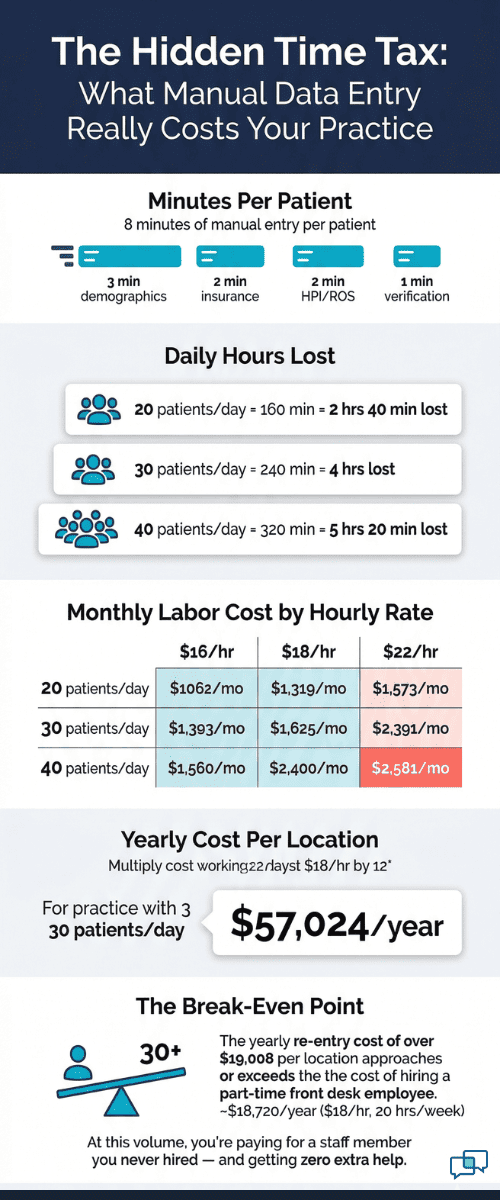
Let's do some quick math. Say your front desk spends about 8 minutes per patient on data entry — typing in demographics, insurance, HPI notes, and other details. If you see 30 patients a day, that's 240 minutes, or 4 full hours of staff time spent on data entry alone.
Here's a simple breakdown:
|
Daily Patient Volume |
Minutes Per Patient (Manual Entry) |
Total Daily Staff Time |
|
20 patients |
8 min |
2 hrs 40 min |
|
30 patients |
8 min |
4 hrs |
|
40 patients |
8 min |
5 hrs 20 min |
That time could go to patient follow-ups, phone calls, or scheduling. Instead, it goes to retyping what the patient already typed once.
The "Good Enough" Trap
Here's what makes this worse: Many practice owners don't even realize it's happening. They see "digital intake: active" in their Tebra dashboard and assume the problem is solved.
But they never measure the things that matter — how many patients actually finish the form before they arrive, how often data lands in the right field, or how much time staff still spend on re-entry.
They've checked the box for going digital. But the gains they expected — less typing, faster check-ins, more complete charts — never showed up. The practice is stuck in what we call the "good enough" trap.
The old workflow didn't really change. It just moved from paper to screen, with the same manual effort underneath.
This is the core issue with relying on portal-based intake alone. The form format doesn't match the chart structure. The delivery channel doesn't reach the patient. And the front desk becomes the bridge between the two — typing, checking, correcting, all day long.
There's a better path. And it starts with changing how the form gets to the patient and how the data gets to the chart.

The Guide: The Text-to-Chart Pipeline
If the biggest problems with Tebra's intake are delivery and data sync, then the fix needs to solve both at once. That's exactly what Curogram's Text-to-Chart Pipeline does.
How It Works
Instead of relying on a portal link or email, Curogram sends a text message to the patient before their visit. The patient taps the link in their text thread and opens the form right on their phone. They fill in their details in about 2–3 minutes and hit submit.
The form uses structured data fields that map straight to Tebra's chart. When a patient types their insurance ID, it goes to the insurance field.
When they describe their reason for the visit, it maps to HPI. Structured data write-back from text-delivered forms to the Tebra EHR means every answer flows to the right place.
This is not a PDF upload that staff have to read and retype. It's data going from the patient's phone to the chart, field by field.
Why Text Beats Portal and Email
SMS open rates sit around 98%. Compare that to the 20–30% open rate for email. Patients are far more likely to see, open, and act on a text than dig through their inbox or log into a portal they barely use.
And the timing helps too. Curogram sends the intake link in the same text thread as the appointment reminder. The patient sees the reminder, taps the link, and fills out the form — all in one flow. There's no extra step, no second platform, and no friction.
This is why text-first intake forms that chart sync through Tebra can replace the clipboard once and for all. The form reaches the patient through a channel they're already using. And the data reaches the chart without a human in between.
No Disruption to Your Tebra Workflow
One thing that matters a lot for Tebra practices: Curogram doesn't replace your EHR workflow. It works right alongside it. Your clinical staff still open the chart, view the data, and work in Tebra just like before. The only thing that changes is how the data gets there.
There's no new login. No new screen. No platform switch during the visit. The intake form is the only thing that's different — and from the staff side, the difference is that the chart is already filled when they open it.

Built for Growing Practices
For a solo practice seeing 15 patients a day, a few minutes of manual data entry might feel manageable. But when a Tebra practice grows to two or three locations and starts seeing 60+ patients a day, the math stops working.
At that scale, you'd need to hire more front desk staff just to keep up with data entry. Or you'd need to accept longer wait times and less complete charts.
Curogram scales without adding headcount. Every new patient gets the same text link, the same mobile form, and the same write-back to Tebra patient intake structured fields for demographics, HPI, insurance, and more. Whether you're at 15 patients or 150, the process is the same.
Based on our internal data, practices using Curogram's intake pipeline see staff time per patient drop from several minutes of manual entry to under two minutes of simple review. The front desk workflow shifts from typing to checking — and that shift compounds every single day.
The text-to-chart pipeline isn't about adding a new tool to your stack. It's about making the tool you already use — Tebra — actually work the way you expected it to.
The Success: Patient Arrives, Chart's Ready
When structured write-back works the way it should, the entire front desk experience flips. Let's walk through what that looks like in practice — from the patient's phone to the provider's screen.
The Patient Side: Two Minutes, Zero Friction
Here's a typical pre-visit experience with Curogram's pipeline:
- Two days before the visit, the patient gets a text: "Hi Sarah, your appointment with Dr. Reyes is on Thursday at 10 AM. Please complete your intake form here: [link]."
- Sarah taps the link. A mobile-friendly form opens in her phone's browser.
- She enters her name, date of birth, insurance details, and a brief note about why she's coming in.
- She hits submit. Total time: about two to three minutes.
No app to download. No portal to log into. No email to search for. The form lives right in her text thread — the same place she confirmed her appointment.
This is what it means when we say the Tebra intake form portal completion rate is low and a text alternative solves it. You're not asking the patient to do anything new. You're meeting them in the channel they already check 80+ times a day.
The Staff Side: From Re-Entry to Review
Now, let's look at what happens when Sarah arrives at the clinic.
Without Curogram, here's the old workflow:
- Sarah walks in. The front desk hands her a tablet or clipboard.
- She fills out the form in the waiting room (if she hasn't done it already).
- The front desk opens the chart, opens the form, and copies data field by field.
- They verify insurance. Re-enter demographics. Type the chief complaint.
- Total time: 8–10 minutes of active work per patient.
With Curogram:
- Sarah walks in. Her chart is already filled.
- The front desk opens Tebra and reviews what's there.
- Insurance: populated. Demographics: populated. Chief complaint: populated.
- They confirm a few key details, and Sarah heads to the exam room.
- Total time: under 2 minutes of review.
That's the shift — from re-entry to review. The front desk is no longer a data entry station. It's a check-in point.
What Complete Charts Do for the Provider
It's not just the front desk that benefits. When the chart is complete before the visit, the provider walks in prepared.
Instead of spending the first two minutes of a visit asking "So what brings you in today?" while scanning a half-empty chart, the provider already knows the chief complaint, the patient's history, and their current meds.
For practices with Tebra patient intake structured fields like demographics, HPI, and insurance already filled via text, the clinical flow gets smoother at every step. Nurses don't have to chase down missing info. Billing gets clean data from the start. And the provider can spend their face-to-face time on what matters most.
Real Results from Real Practices
Based on our internal research, a multi-location Tebra practice that switched to Curogram's text-to-chart pipeline saw pre-arrival intake completion rise from around 40% to over 85% within two months.
Front desk data entry time per patient dropped from 8 minutes to under 2. Clinical staff said charts were more complete at the start of each visit.
The office manager's takeaway was simple: they finally got the results they thought Tebra's built-in intake was going to deliver from day one.
These aren't outlier results. When you move from email and portal delivery to text, and from flat form uploads to structured data write-back, the impact shows up fast. Fewer errors. Less re-work. More time for patients.
Why Text-Delivered Intake Forms Solve What Patient Portals Can't
Patient portals were built with good intentions. Give patients a place to view records, send messages, and fill out forms. But the reality is that portals add friction — logins, passwords, setup steps — and most patients don't use them regularly.
Based on our internal data, Curogram clients consistently see appointment confirmation rates above 75% through text-based workflows. That same channel — SMS — is what drives intake form completion.
The patient doesn't need to remember a password or download an app. They tap a link in a text and fill out a form in minutes.
Curogram's forms are designed with structured fields that map to Tebra's chart elements. This means the data doesn't just arrive — it arrives in the right place. Insurance info fills the insurance field. The chief complaint maps to HPI. Allergies, meds, and demographics all land in their matching chart sections.
This is the key difference between a digital form and a digital workflow. A form on a portal is still just a form. The patient might fill it out, or they might not. If they do, someone might still have to copy the data over. A text-delivered form with structured write-back is a pipeline — it moves the data from patient to chart with no manual steps in between.
For practices already using Curogram's HIPAA-compliant two-way texting for appointment reminders and patient messages, adding intake forms to the same text thread is seamless.
The patient already trusts the channel. The practice already uses the platform. And the intake form becomes just one more step in a pre-visit workflow that runs on autopilot.
Curogram also integrates with any EMR, so even if your practice runs Tebra alongside another system, the structured write-back still works. Staff training takes about 10 minutes. And the cost is lower than most single-feature intake tools on the market.
If your patients ignore the portal and your staff retype the same data every day, the problem isn't the form. It's the delivery — and the data path. Curogram fixes both.
Conclusion: The Intake Your All-in-One Promised
Tebra set out to build an all-in-one platform. Scheduling, charting, billing, and digital intake — all under one roof. And for most of those features, it delivers. But intake has been the weak link for too many practices.
The form is digital. The workflow isn't. Data gets entered twice. Patients skip the portal. Staff fill the gaps by hand. And the practice pays for it in time, labor, and chart quality.
Curogram's Text-to-Chart Pipeline doesn't replace Tebra. It gives Tebra practices the intake workflow the platform was meant to have. Text delivery gets the form in front of the patient. Structured fields get the data into the chart. And write-back makes sure it's all there before the visit starts.
Tebra holds your patients' clinical records. Curogram fills them before the patient walks in. The EHR is the final stop. The text-to-chart pipeline is the delivery system. Together, they create the paperless intake experience that Tebra practices expected from day one.
Calculate your front desk time back. Schedule a demo to map exactly how many staff hours your practice loses and how text-to-chart pipeline eliminates it.
Frequently Asked Questions
No. Patients get a text with a link. They tap the link and fill out the form in their phone's browser. It takes about 2–3 minutes. No app, no portal login, no account setup. If a patient can tap a link, they can complete the intake.
Setup is fast. Curogram integrates with Tebra and most other EHRs without a long onboarding process. Staff training takes about 10 minutes. Most practices are live and sending text-delivered forms within a few days of signing up.
Staff can resend the text link at the front desk, and the patient can fill it out on their phone in the waiting room in 2–3 minutes. The data still writes back to the chart the same way. Either way, you avoid the paper clipboard and manual entry.

Mira Gwehn Revilla