10 min read

HIPAA Compliant Client Texting for Behavioral Health in Sigmund AURA

HIPAA Compliant Client Texting for Behavioral Health in Sigmund AURA
💡 To add HIPAA-compliant client texting for behavioral health in Sigmund AURA, pair the EHR with a dedicated 2-way SMS platform like Curogram. Sigmund's built-in messaging is one-way and portal-based, so client replies go nowhere. Curogram adds:
  • Real two-way texts from your practice number, with replies on one dashboard
  • No app, no portal login, and no account for clients
  • HIPAA, SOC 2 Type II, and 42 CFR Part 2 compliant from day one
  • Message routing for clinical, intake, billing, and MAT teams
  • No-show rates 53% lower than industry averages, based on our internal data
Sigmund keeps running your clinical work. Curogram handles the conversation your clients actually answer.

Your EHR's feature list looks complete. The daily reality often tells another story.

Sigmund AURA is a strong behavioral health EHR. It handles ASAM Criteria, AI notes, and complex compliance work well. But the tools it sells for client engagement do not match that depth. Portal messaging and one-way SMS reminders look fine on a sales sheet.

Here is where it breaks. A new client gets a reminder for group on Monday. They text back a simple question about parking. That reply lands nowhere, and no staff member ever sees it. The client feels ignored and skips the session.

Meanwhile, your front desk spends the whole morning on the phone. Staff confirm dozens of sessions by hand, one call at a time. Each call burns three minutes of hold music or voicemail. The portal sits open in another tab, unused by clients who never log in.

This gap costs real money. For behavioral health and substance use clients, a portal login is not a small ask. Many manage anxiety, depression, or cognitive strain. An extra app or new password becomes a true barrier to care.

The fix is not a new EHR. You should not rip out clinical work that already runs well. The fix is a missing piece: real two-way texting that sits beside Sigmund AURA.

Curogram fills that gap. Clients reply to a normal text. Staff see every message on one screen. There is no app and no login, just the phone your client already holds.

This guide shows how Sigmund AURA HIPAA-compliant client texting for behavioral health actually works. You will see the real cost of the current setup. You will see the simple way to fix it. And you will see the numbers that follow once your clients can finally text back.

The Villain: The Checkbox Suite

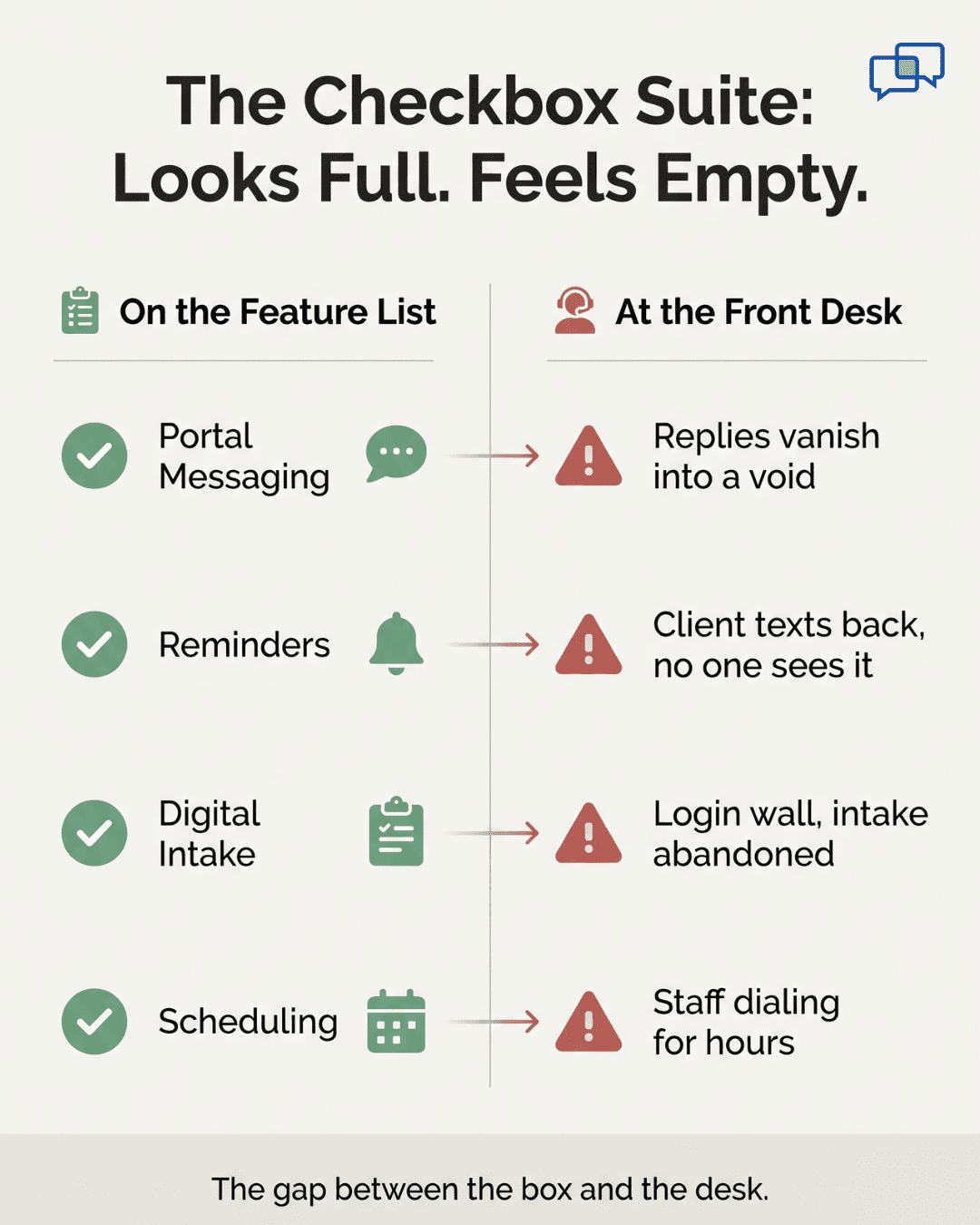
Sigmund AURA is a capable behavioral health EHR. It has real depth in ASAM Criteria, AI notes, and compliance flows. The trouble sits in the tools it sells for client engagement. Every box gets ticked: portal messaging, SMS reminders, digital intake, and self-scheduling.

A checked box is not the same as a working tool. Users often call these engagement features weak in daily use.

The screen needs too many clicks for simple tasks. Small setting changes can require vendor help, so even a basic tweak waits in a queue. And client replies to one-way reminders simply vanish.

The Checkbox Suite

It looks full on a feature list. It feels empty at the front desk. Good HIPAA texting for behavioral health EHR work needs more than a reminder that cannot hear a reply.

Watch how the gap plays out in one morning. A clinical director books a new IOP client for Monday. Sigmund sends a one-way reminder. The client texts back to ask where to park.

That message goes into a void, and no one answers. The client waits, feels unseen, and does not show. Front-desk staff never knew the client tried to reach them. So they spend the morning making manual confirmation calls instead.

They juggle 40 sessions, the portal, and a phone at once. Each call drags for about three minutes. That is hold time, voicemail, or no answer at all. The "automated" suite still leaves staff doing the work by hand.

Now put real numbers on it. Take a 15-clinician program as an example. Each clinician sees about 20 clients per week. The average session fee is $120.

That is roughly 1,200 sessions per month. At a 25% no-show rate, about 300 sessions are lost. At $120 each, that is near $36,000 gone every month. The math is simple, and it is brutal.

Here is the same picture in a table:

Factor

Example figure

Clinicians

15

Clients per clinician each week

20

Average session fee

$120

No-show rate

25%

Sessions lost each month

~300

Revenue lost each month

~$36,000


The staff cost stacks on top of that loss. Teams can spend two to four hours a day on manual confirmations. That is time they could spend on care, not phone tag.

Some practices even hire extra help just to manage messages. That can mean $35,000 to $45,000 a year in new payroll.

The pain is not only money, either. Every missed reply is a missed chance to keep a client in care. In behavioral health, one skipped session can break a fragile routine. The tool meant to help engagement quietly works against it.

So the administrator feels stuck. They picked Sigmund partly for these engagement tools. Switching the whole EHR would break the clinical work that runs fine. The feeling is clear: we paid for a full system, but the communication half barely works.

That is the real villain here. It is not the EHR itself. It is the gap between the feature list and the front desk. The next section shows the fix that does not touch your clinical setup.

Infographic comparing Sigmund AURA's checked engagement features with what actually fails at the front desk

The Guide: The Missing Communication Layer

Curogram runs as a parallel layer beside Sigmund AURA. It handles the client-facing work the built-in tools fumble. That means two-way texting, reminders, forms, and reviews. It also covers mass messaging, payments, and telehealth, all from one dashboard.

Sigmund keeps doing its core job the whole time. It still owns your clinical notes, compliance, and billing. There is no data migration and no rebuild. There is no need to lean on Sigmund's own integration roadmap.

The heart of the fix is Curogram's 2-Way Secure Messaging. It powers real-time, HIPAA-compliant texts between staff and clients. Messages go out from your practice's own number. Replies show up instantly on the Curogram dashboard.

This is true Sigmund AURA 2-way texting, not a one-way blast. A client can text back and get a real answer. Each thread routes to the right team by department. Clinical, intake, billing, and MAT program messages reach the people who handle them.

A Full Audit Trail

Nothing gets lost, and nothing slips past the record. That makes Curogram a Sigmund AURA secure texting solution your compliance officer can trust. It logs who said what, and when, for every client thread.

Setup does not depend on fragile API hooks. Curogram works alongside Sigmund without vendor-locked configuration. The communication layer runs on its own. So you are never stuck waiting on Sigmund's roadmap or its setting limits.

This matters most for behavioral health populations. For clients managing SUD, psychosis, depression, or cognitive strain, a portal login is not a minor step. It is a real barrier to care. The login screen turns away the people who need contact the most.

A text removes that wall. SMS needs no app download, no account, and no new password. The message arrives on the phone the client already carries. Strong behavioral health SMS communication with Sigmund users in mind reaches clients where they already live.

Privacy Gets Easier

In SUD treatment, 42 CFR Part 2 governs how you protect confidentiality. A plain text leaves no app icon on a shared device. Curogram acts as a 42 CFR Part 2 compliant texting platform, with consent tracking built in.

Think of it as a clean division of labor. Sigmund manages the clinical record with real depth. Curogram manages the conversation clients will actually answer. Neither tool fights the other for the same job.

This is the Sigmund client messaging upgrade most programs are missing. You do not swap your EHR. You do not retrain clinical staff on new charting. You simply add the layer that makes contact work.

Here is how the two systems split the work:

Job

Stays in Sigmund AURA

Moves to Curogram

Clinical notes and ASAM

Yes

No

Compliance and billing

Yes

No

Two-way client texts

No

Yes

Reminders and confirmations

Limited

Yes

Intake forms and payments

Limited

Yes

One dashboard for replies

No

Yes


The takeaway is plain. You keep the EHR that works for clinicians. You add the texting layer that works for clients. The result is one smooth system, built from the two tools each doing what they do best.

Front-desk staff reviewing confirmed appointments on a 2-way texting dashboard

The Success: Clients Text Back, Staff Stop Chasing

The shift shows up fast in the numbers. Curogram practices see no-show rates 53% lower than industry averages, based on our internal data. That is not a small trim. It is the gap between a full schedule and an empty one.

One example makes it real. Atlas Medical Center cut its no-show rate from 14.20% to 4.91%. That happened in just three months. Based on our internal research, that result is 3X better than the industry average.

For behavioral health programs, the stakes run even higher. No-shows in this field can run from 20% to 50%. Each empty chair is lost revenue and a client out of care. Recovering even a slice of those slots can mean tens of thousands of dollars a month.

Confirmation Rates Climb

Based on our internal data, Curogram clients see confirmation rates above 75%. Many also report a 10% to 20% lift in revenue from recaptured slots.

The real change is the shift from a black hole to a conversation. One-way reminders used to go out and die. Now messages flow both ways in real time. Confirmations, reschedules, and questions get handled in seconds, not hours.

Picture the new morning at a behavioral health program. An IOP client gets a text at 8 AM. It asks them to confirm the 10 AM group session. They reply with a single letter, "C," to lock it in.

Then they ask about the parking entrance in the same thread. Intake staff answer within minutes from the dashboard. The client arrives on time, calm and informed. They never logged into a portal, downloaded an app, or called the desk.

Staff Feel the Change

Before the day starts, they open one dashboard. They see which sessions are confirmed and which are at risk. No more morning spent dialing 40 numbers one by one.

That visibility changes how the team works. Front-desk staff stop chasing and start helping. They reach out only to the few clients who have not replied. The rest of their energy goes back to care, not phone tag.

The pattern holds across the day. A client texts to reschedule, and staff fill the open slot fast. Another asks a billing question, and it routes to the billing team. Every thread stays logged, sorted, and easy to find.

Here is the before-and-after at a glance:

Daily reality

Before Curogram

After Curogram

Client replies

Vanish into a void

Land on one dashboard

Confirmations

Manual phone calls

Quick texts, often a single letter

Staff morning

Hours of dialing

A glance at the dashboard

Reschedules

Phone tag for hours

Handled in seconds

No-show rate

High and steady

53% below industry average


The story is consistent. Clients text back because texting is easy. Staff stop chasing because replies come to them. The schedule fills because contact finally works.

Let us put the recovery in plain numbers. Take that same 15-clinician program from earlier. It was losing about 300 sessions a month to no-shows. Say a 53% drop saves roughly 160 of those sessions.

At $120 each, that is near $19,000 back every month. That is real revenue from chairs that used to sit empty. It also means more clients staying in active care. The texting layer pays for itself many times over.

There is a quieter win too. When staff stop dialing for hours, they get time back. That time can go to intake, follow-up, or simply better service. The same team handles more clients without burning out.


How Curogram's 2-Way Secure Messaging Works Beside Sigmund AURA

Curogram's 2-Way Secure Messaging is the engine behind every win above. Here is the simple flow it follows each day. A client books a session in your normal workflow. Curogram sends a reminder text from your practice's own number.

The client reads it on the phone they already use. No app, no login, and no new account stand in the way. They reply right in their texting app, the way they text a friend. That reply lands on the Curogram dashboard in real time.

Staff see the message the moment it arrives. There is no portal to refresh and no inbox to dig through. Each thread routes to the right team by department. A clinical note goes to clinical, a bill question goes to billing.

Why does this work so well for behavioral health? Because it removes the steps that push clients away. A login screen feels like a wall to someone in crisis. A text feels like a normal, human reply.

The platform stays compliant the whole time. Messages are encrypted in transit and at rest. Every exchange keeps a full audit trail for your records. Consent to text is tracked, with clear opt-in and opt-out built in.

For SUD programs, 42 CFR Part 2 support comes standard. A plain SMS leaves no app icon on a shared phone. That protects a client's privacy in a way a portal cannot. BAA execution comes standard with every account, so coverage starts on day one.

How does it fit your existing setup? It sits beside Sigmund AURA, not on top of it. Your clinical team keeps charting in Sigmund as always. Your front desk simply works from the Curogram dashboard for contact. The two run side by side, each doing its own job well.

The result is a single, calm communication hub. Clients reach you with a text. Staff reply from one screen. Every message stays secure, sorted, and saved.

Conclusion: Replace the Engagement Veneer — Keep the Clinical EHR

You do not have to choose between a strong EHR and tools that work. Sigmund AURA is built for behavioral health clinical care. Curogram is built for behavioral health client communication. Together, they form the complete stack.

Keep Sigmund AURA for what it does well. It runs your clinical notes, ASAM assessments, and compliance flows. Let it keep that job without any change. There is no migration and no risk to your records.

Add Curogram for the part that has been failing. Your clients get real two-way texts, not a portal they ignore. Staff see every reply on one clean dashboard. Confirmations, reschedules, and questions get handled in seconds.

The result is simple. Fewer empty chairs. Less phone tag. More clients who show up and stay in care.

Stop asking behavioral health clients to log into a portal built for general medicine. That extra step pushes away the very people who need care most. A plain text meets them where they already are. It is the difference between a missed session and a kept one.

See what real two-way texting looks like beside Sigmund AURA. The walkthrough takes just 15 minutes. You will watch Curogram set up for your own program. That means multi-service scheduling, department routing, and 42 CFR Part 2 needs.

Stop losing clients to a silent portal. Book a quick demo today and watch Curogram set up for your program's multi-service scheduling, department routing, and 42 CFR Part 2 needs in just 15 minutes.


Frequently Asked Questions

How does Curogram add 2-way texting without disrupting our Sigmund AURA clinical workflow?

Curogram runs as a separate communication layer beside Sigmund AURA. Your clinical team keeps charting in Sigmund with no change at all. Curogram handles only client texts, reminders, and forms. There is no data migration and no double entry.

Why do behavioral health and SUD clients respond to texts but ignore portal messages?

A portal needs a login, a password, and sometimes an app, which feels like a wall during crisis. A text needs none of that. It arrives on the phone they already use, so they actually read it and reply.

How does Curogram keep texting compliant with HIPAA and 42 CFR Part 2 for SUD programs?

Messages are encrypted in transit and at rest, with a full audit trail on every thread. Consent opt-in and opt-out is built in. A BAA comes standard, and no app icon appears on a shared device.

How quickly can staff see and answer a client's reply during a busy day?

Replies land on the Curogram dashboard the moment a client sends them. Staff see each message in real time, sorted by department. There is no portal to refresh, so questions get answered in seconds, not hours.

Why should we add Curogram instead of switching to a new EHR with better messaging?

Switching EHRs would break the clinical work Sigmund already does well. Adding Curogram keeps that strength and fixes only the weak communication half. You get real texting without retraining clinicians or risking your records.


Welligent 2-Way Texting for Case Managers | Barrier-Free Access

Welligent 2-Way Texting for Case Managers | Barrier-Free Access

💡 The best 2-way texting add-on for Welligent is Curogram. It lets case managers text clients by SMS with no app or portal login needed. Clients...

Read More
TherapyNotes Client Texting | Why Portals Fail in Behavioral Health

TherapyNotes Client Texting | Why Portals Fail in Behavioral Health

💡 TherapyNotes client communication texting behavioral health solves a real gap that hurts therapy, psychiatry, and counseling practices every day.

Read More
Set Up Client Texting for Proven EHR | Curogram

Set Up Client Texting for Proven EHR | Curogram

💡 Your Proven EHR two-way texting setup for staff workflow starts by adding Curogram beside your current EHR. Curogram turns on texting through the...

Read More