10 min read
SmartCare EHR Portal Alternative: Why Clients Choose SMS Texting
Mira Gwehn Revilla
:
June 14, 2026
Many clients managing serious mental illness or substance use cannot meet all three at once. Here is what gets in the way:
- A portal needs a login that clients forget or never set up.
- Stable internet is not a given during housing instability.
- Web menus add steps when focus is already stretched thin.
- One missed message can break the link to care.
- The barrier becomes the portal itself, not the client.
A client agrees to start therapy. She is nervous but hopeful. Your team sends a portal invite with a login link and a temporary password.
She opens it on her phone during a bus ride. The page loads halfway. The password reset email lands in a folder she rarely checks. By the time she gets home, the moment has passed.
This is how care slips away in behavioral health. Not from a lack of trust, but from one extra step at the wrong time.
SmartCare EHR is a strong system for clinical work. It holds notes, treatment plans, and records in one secure place. Yet its patient portal asks clients to do something many of them struggle to do.
A portal needs steady internet, a saved password, and the focus to read through a web menu. Those sound small. For someone facing serious mental illness, a substance use disorder, or housing instability, they stack up fast.
So the portal sits unused. Messages go unread. Appointments quietly turn into no-shows. The tool meant to connect people ends up keeping them at arm's length.
There is a simpler path. Most clients already text every day. They reply to friends, family, and pharmacies without a second thought. Text-based client communication meets them right there.
This article looks at why SMS engagement works when portals fall flat. We will name the real barrier, show how a text feels different to a client, and share results from our own data.
Think of texting as a portal alternative that adds a door rather than removing one. Clients keep every channel they had before. They just gain the one they actually use.
When you reach people on the device already in their hand, care stops waiting on a login.
The Villain: The Portal Paradox from the Client's Perspective
SmartCare EHR does many things well. It keeps clinical notes, treatment plans, and billing in one secure system. Your clinicians trust it. That is exactly why it belongs at the center of your practice.
But its patient portal carries a hidden flaw. We call it the Portal Paradox. The tool built to connect clients can quietly push them away.
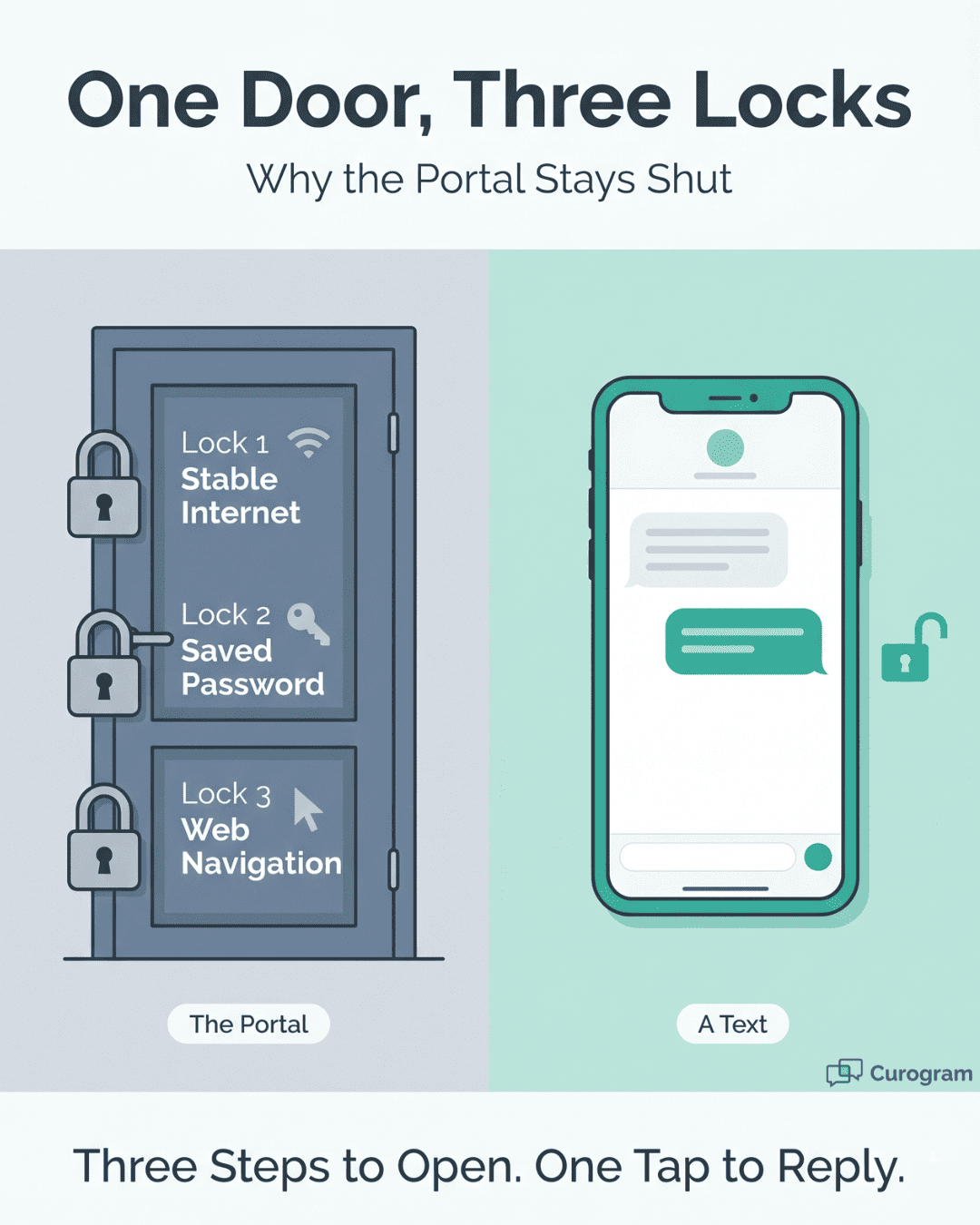
Here is the catch. A portal only helps a client who can actually use it. And using it asks for three things at the same time:
-
A client needs stable internet
-
A saved or remembered password
-
The focus to read a web page and tap the right buttons
Miss any one, and the door stays shut.
Walk Through the Workflow as a Client Lives It
A new client gets a portal invite by email. She opens it on a phone with spotty service. The reset link expires before she finds a quiet moment. She tries again, fails the login twice, and gives up.
Now picture your front desk. Staff call to confirm her visit. No answer. They leave a voicemail she never hears. They try the portal message. It sits unread. Two days of effort, and the appointment is still in doubt.
This loop repeats across your caseload every week. Each unread message is staff time spent with nothing to show for it.
The Cost Adds Up Fast
Phone tag eats hours that your team could spend on care. Unconfirmed visits turn into open slots no one filled. Each empty slot is lost revenue and a client who fell out of treatment.
There is a human cost too. Staff burn out chasing people who never meant to vanish. Clinicians watch progress stall between sessions. The work feels heavier than it should.
Now layer on the realities your clients face. Serious mental illness can make focus hard on a tough day. A substance use disorder can disrupt routines and devices. Court-mandated treatment brings stress that crowds out small tasks. Housing instability can mean no reliable Wi-Fi at all.
For these clients, the portal is not a bridge. It is one more wall.
The result feels personal. A client who wants help signs up, hits a login screen, and stalls. She does not lack motivation. She lacks a saved password and a strong signal at the right second.
From her side, the message is unfair. An organization whose whole mission is meeting people where they are now asks her to come to a portal instead. The gap between the promise and the experience is the Portal Paradox in plain view.
This is the villain we are up against. Not SmartCare EHR itself, which still anchors your clinical work. The villain is a single channel that asks too much of the people least able to give it.
The good news is simple. The barrier is the channel, not the client. Change the channel, and the same client who ignored a portal will answer within minutes. We will show you how next.

The Guide: What Texting Feels Like for Behavioral Health Clients
If the portal is the wall, texting is the open door. Curogram works as the Communication Bridge between your team and your clients. It moves behavioral health client communication from portal-dependent to SMS-direct.
The idea is plain. Reach clients on the device they already use all day. No new app. No login screen. No password to lose.
Here is what a client sees. A text arrives from your practice, just like a text from a friend. She reads it on her lock screen. She taps out a reply. The whole thing takes seconds, not steps.
That speed is the point. The same client who never opened the portal will answer a text right away. The channel changed, so the outcome changed too.
At the heart of this sits one core feature: Two-Way Texting. It lets clients and staff hold a real back-and-forth by SMS. Your team sends a question. The client texts back. The reply lands in one shared inbox your staff can manage.
This is not a one-way blast. A client can confirm a visit, ask to reschedule, or send a quick question. Staff answer from the same thread. The conversation feels human because it is one.
How it Fits with SmartCare EHR Matters Just as Much
Curogram does not replace your EHR. It works alongside it. Your clinical records, notes, and treatment plans stay right where they belong, inside SmartCare EHR.
Think of it as a clean split. SmartCare EHR holds the clinical data. Curogram handles the client-facing chat. One system runs your care. The other runs your conversations.
That means no rip-and-replace project. Your clinicians keep the workflow they know. You simply add a text layer on top of the system you already trust. This is the SmartCare EHR patient portal alternative SMS approach in action: same backbone, better front door.
Every message stays secure. Curogram is HIPAA-compliant, with encryption in transit and at rest. For substance use programs, it can be set up to respect 42 CFR Part 2 consent rules. Safety and simplicity travel together.
Connect This to the People You Serve
A client with serious mental illness may struggle to focus on a web menu. A text needs no menu. She reads one line and replies with one line.
A client with a substance use disorder may have a basic phone or spotty data. SMS still works. It does not need an app or strong Wi-Fi to land.
A client in court-mandated treatment is already under pressure. A simple text lowers the friction instead of adding to it. For CCBHCs serving wide and varied caseloads, that ease scales across thousands of clients.
This is where client texting accessibility becomes real. SMS reaches a basic phone, an old device, or a borrowed one. It does not assume a smartphone or a data plan. It meets people at whatever phone they hold.
Some worry that texting feels cold or less caring. The opposite tends to be true. A warm, timely text feels personal. It reaches a client in her own space, on her own terms.
A portal makes her come to you. A text lets you come to her. That small shift carries a big message: we will meet you where you already are.
The therapy itself still rests on human trust. A text cannot replace that bond. But it can protect the conditions that let the bond form, by keeping clients connected between sessions.
That is the Communication Bridge. It does not change your clinical care. It changes how easily your clients can reach it.
The Success: Communication That Meets People Where They Are
When you switch the channel, the numbers move. Clients who ignored the portal start replying. Visits get confirmed. No-shows drop. Here is what that looks like in practice.
Start with the gap in reach. The contrast between SMS and a portal is stark.
|
Channel |
Typical engagement |
What it asks of the client |
|
Patient portal (behavioral health) |
~15-20% login rate |
Internet, password, web navigation |
|
SMS text message |
~98% open rate |
Only a phone that receives texts |
The 98% figure is a widely cited industry benchmark for SMS open rates, well above email and far above portal logins. Multiple 2026 industry reports place the SMS open rate around 98%, compared with roughly 20% for email. When nearly every text gets opened, your message actually reaches the person.
Read that table again through a behavioral health lens. A portal reaches one or two clients in ten. A text reaches almost all of them. That is the SMS vs portal behavioral health gap in one view.
What High Reach Does to Real Appointments
Our own data shows the effect clearly. At Covina Arthritic Clinic, Curogram's two-way texting confirmed more than 1,100 appointments per month, based on our internal data. That is over a thousand visits held steady each month through simple texts. Staff no longer chased each one by phone.
The pattern holds for no-shows too. Across specialties, Curogram users see no-show rates 53% lower than the industry average, based on our internal research. Lower no-shows mean fuller schedules and steadier care.
One clinic shows the swing in sharp relief. Atlas Medical Center cut its no-show rate from 14.20% to 4.91% in just three months, based on our internal data. That drop is roughly three times better than the industry norm.
Why Does Texting Move These Numbers So Much?
Because it removes the steps that stopped clients before. A client can confirm a visit with one word. She can ask to move a time without a phone call. She can do it from a bus, a break room, or a couch. No login stands in the way.
That ease changes the math for your front desk as well. When clients reply by text, staff stop playing phone tag. They spend less time dialing and more time helping. The work gets lighter and faster.
Picture the morning huddle. Instead of a long list of unconfirmed visits, most are already locked in by text. Staff focus on the few that need a human call. The day starts calm instead of scrambled.
Engagement also protects continuity of care. In behavioral health, a missed visit is rarely just a missed visit. It can be the start of a client drifting out of treatment.
A timely text can be the nudge that holds a client in the program. A reminder she actually reads. A reschedule that keeps her on the books instead of off the radar.
This is what it means to meet people where they are. Not where your software wishes they were. Where they actually live, on the phone in their hand.
The win is shared. Clients stay connected with less effort. Staff reclaim hours of busywork. Clinicians see fewer gaps between sessions. The practice runs smoother end to end.
None of this asks clients to change. They keep texting the way they always have. Your practice simply joins the channel they already trust.

How Two-Way Texting Keeps Behavioral Health Clients Connected to Care
Curogram's Two-Way Texting turns a one-way reminder into a real conversation. That shift is what keeps clients engaged between visits.
Here is how it works in a normal week. Your practice sends a visit reminder by SMS. The client texts back to confirm. If she needs a new time, she says so in the same thread. Staff reply from one shared inbox, no phone call needed.
Every message routes through one place. Your team sees the full history at a glance. No one digs through voicemails or guesses whether a client replied.
For behavioral health, the small details carry weight. A client can reply STOP at any time to opt out, and Curogram manages that automatically. Messages stay HIPAA-compliant. For substance use programs, the setup can honor 42 CFR Part 2 consent rules.
Because it runs on standard SMS, it reaches a basic phone as easily as a new one. That makes it a true portal alternative for clients without a smartphone or steady internet.
The clinical record never moves. Notes and plans stay in SmartCare EHR. Curogram simply carries the conversation, keeping the device-side connection warm so clients return for the care they need.
Conclusion: Meet Your Clients on the Device They Already Use
The choice was never SmartCare EHR or Curogram. It is both, each doing what it does best.
SmartCare EHR gives your practice a clinical backbone. It holds notes, plans, and records in one secure system your clinicians trust. That work stays exactly where it is.
Curogram adds the missing piece: two-way HIPAA-compliant texting. It extends SmartCare EHR's reach all the way to the client's phone. The system that runs your care now connects to the device your client actually uses.
Think of the split this way. SmartCare EHR is for your clinical data. Curogram is for your clients' convenience. Together they build a practice that is both clinically strong and easy to reach.
That second half matters more than it seems. A flawless record means little if the client never confirms the visit. Care only works when people show up. Texting helps them show up.
The proof sits in the numbers. Over 1,100 visits confirmed each month at one clinic. No-show rates 53% lower than average. One practice cutting no-shows from 14.20% to 4.91% in three months. These come from our internal data, and they all start with reaching the client.
There is a deeper point here too. An organization whose mission is meeting people where they are should not ask those people to come to a portal. The mission and the method should match.
Texting makes them match. It removes the login, the password, and the wait. It puts care one text away.
Turn unread portal messages into texts clients answer fast. Book a Curogram demo and see two-way texting fit right alongside your SmartCare EHR setup.
Frequently Asked Questions
Curogram encrypts every text in transit and at rest, meeting HIPAA rules. For substance use programs, it can be set up to follow 42 CFR Part 2 consent requirements, so protected information stays handled by the right federal disclosure rules.
Clients reply STOP to stop texts at any time, and Curogram manages opt-outs automatically. Phone and portal options stay available alongside texting. You add a channel clients actually use without taking away any of the ones they already had.
Yes. Curogram's two-way texting runs on standard SMS, which works on any phone that receives texts, including basic models without internet. That makes it a strong fit for behavioral health caseloads where smartphone access is far from universal.
A portal asks for internet, a saved password, and focus to navigate a web page. A text asks for none of that. Clients managing mental illness or instability find one tap far easier than a multi-step login.
Pushing a portal does not fix its barriers; it just raises the effort. Curogram meets clients on the channel they already use, lifting SMS engagement without replacing your EHR. SmartCare EHR keeps the clinical record while texting carries the conversation.