
 Aubreigh Lee Daculug
Without that step, most Lytec front desks pay the "Re-Entry Tax," manually re-typing lengthy paper packets into Lytec at 10 to 15 minutes per patient.
With patient-entered forms, staff verify information instead of re-entering it. At 20 new patients a day, that can return 3 to 5 staff hours to your schedule every day.
Your front desk was hired to welcome patients, answer phones, and keep the schedule moving. Somewhere along the way, they also became full-time data entry specialists.
Every new patient arrives with a stack of paper that covers contact details, health history, medications, allergies, and insurance. Someone has to read every page and type it into Lytec, one field at a time, often between calls.
It sounds like a minor administrative task. It isn't.
Consider a typical new patient packet of 19 pages. Say re-keying it takes 10 to 15 minutes, and your practice sees 20 new patients a day. Your team loses 3 to 5 hours every day. That's nearly half of a full-time position devoted to copying handwriting.
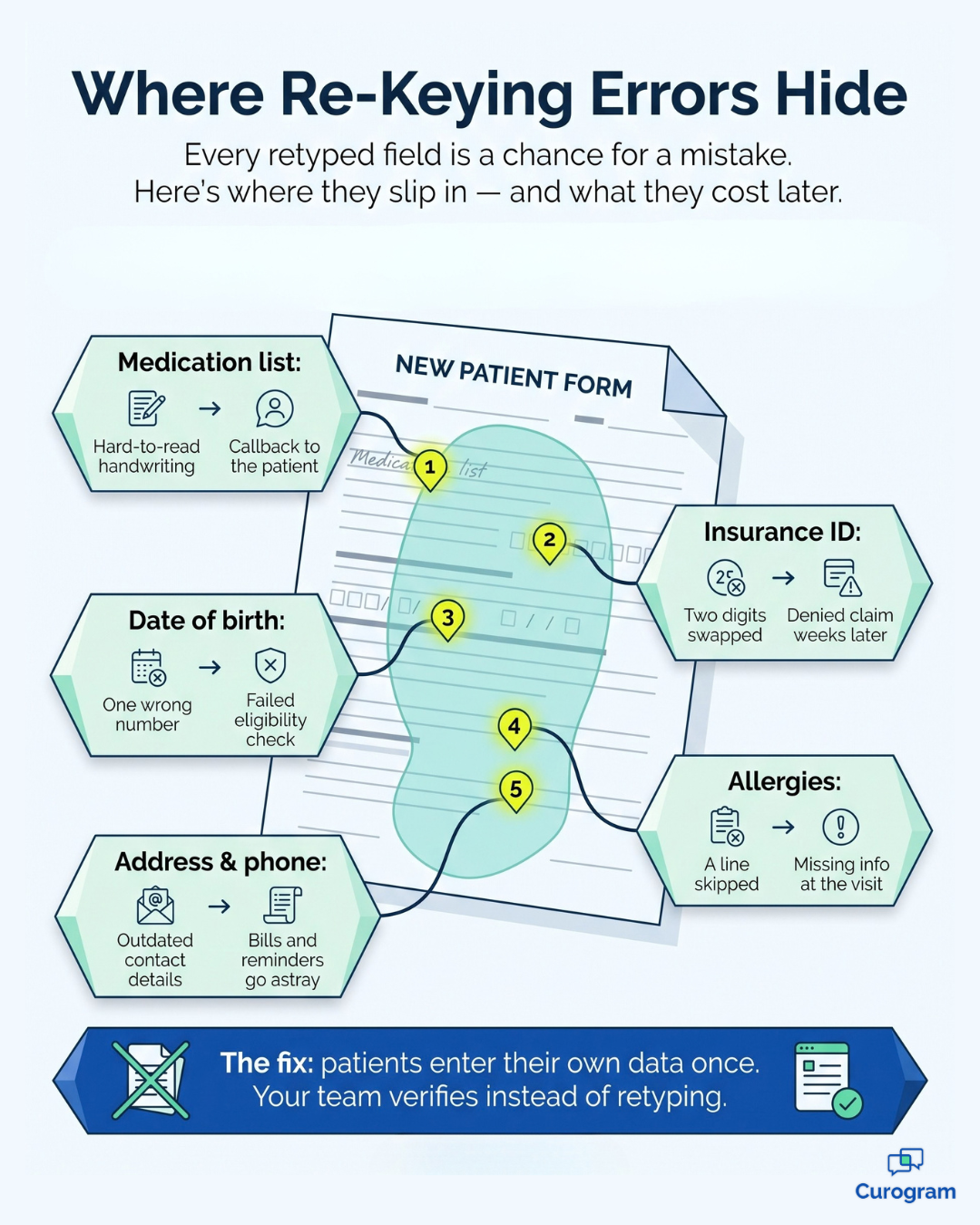
And the typing is only part of the cost. An unreadable medication list means a follow-up call, and a transposed insurance ID means a denied claim several weeks later. A just-in-case scan means the same information now exists in three separate places.
We call this the Re-Entry Tax: the hidden cost your practice pays whenever patient information is written once and typed twice.
Most Lytec offices know this problem well. What they're missing is a fix that works. Reseller add-ons promised digital forms, but few sent information back into Lytec as usable fields. So the clipboard stayed, and so did the typing.
There's a better approach. When patients complete their own forms on their phones before the appointment, the information shows up clean and complete. Your staff reviews it in seconds instead of rebuilding it from scratch.
This guide explains a Lytec new patient paperwork workflow for front desk staff that eliminates the typing step entirely.
You'll learn where the Re-Entry Tax comes from, how Curogram removes it, and what your front office looks like once the paper tray stays empty.
The Re-Entry Tax: What Paper Intake Really Costs Your Front Desk
Lytec performs its core responsibilities well. It keeps scheduling, charges, and patient accounts organized in one dependable system that most practices rely on every day.
But there's a gap at the front door. New patient information still enters the building on paper, and someone at the front desk has to transcribe every word of it into the system.
Consider how a typical morning unfolds. A new patient checks in, receives a clipboard, and returns a thick packet about 20 minutes later. Your front desk begins typing between phone calls, and that's when the complications start.
The handwritten medication list is difficult to read, so someone calls the patient back for clarification. The insurance ID gets two digits reversed. Then the packet gets scanned "just in case," and the same information now lives on paper, in a PDF, and in half-completed Lytec fields.
The hours accumulate faster than most office managers expect. Here's a sample calculation for a small practice.
| New patients per day | Minutes per packet | Staff time per day | Staff time per month |
|---|---|---|---|
| 10 | 10–15 | 1.7–2.5 hours | 35–53 hours |
| 20 | 10–15 | 3.3–5 hours | 70–105 hours |
Illustrative example only, based on 21 workdays per month.
For your team, those are hours taken away from the patients standing at the counter. At 20 new patients daily, that's roughly half of one front desk position dedicated entirely to data entry.
Then comes the downstream cost of intake re-entry errors: denied claims. A single mistyped subscriber ID can trigger a rejection weeks later. Your billing staff then searches through the patient account for a typo that started at check-in.
Your people feel this most directly. Your front desk lead eats lunch over the paperwork stack. Your office manager, who is also the unofficial IT department, can't handle "one more add-on with one more login."
And a fully booked new patient day starts to feel like something to dread.
From Retyping to Reviewing: A Smarter Approach to Patient Intake
The solution isn't a faster typist. It's removing the typing step altogether.
Curogram's Secure Online Forms function as a Pre-Visit Packet. Patients complete their intake on their own phones before the appointment, so the information is ready for a 30-second review instead of a 12-minute transcription job.
That's the central idea behind digital intake for front desk staff: your team stops entering information and starts verifying it.
What Your Staff Actually Sees
Forms go out automatically as part of the pre-visit text sequence, so nobody has to remember to send them. Completed submissions return as structured data, with insurance card photos already attached.
Before the day begins, your front desk can see at a glance which patients have finished their forms. That makes it simple to follow up with the few who haven't.
How It Connects to Lytec
Transparency matters here. On the Lytec side, the integration runs through CGM's FHIR API, which requires a purchased connector and developer approval from CGM.
Curogram manages that process with CGM on your behalf, so your office manager never files a developer ticket. Information arrives as structured fields rather than flat PDFs, and you'll see exactly which fields flow where before you commit. Any limitations are disclosed up front.
When you eliminate manual patient data entry, Lytec becomes a system your team reviews rather than one they feed by hand.
Built for Small Teams
Lytec's core customers are family practices, internal medicine groups, and small specialty clinics, and most have no dedicated IT staff. Any new technology has to install quickly and train even faster.
Staff learn Curogram in under 10 minutes, and if your team can send a text message, they can run the forms dashboard.
Because forms, texting, and reminders live on one platform, you get one login and one invoice instead of adding a sixth vendor.
What Changes When Your Front Desk Finishes on Time
The first improvement is time. Using the same sample calculation, a practice seeing 20 new patients daily can recover 3 to 5 staff hours every day. That's like adding part of a team member without a new hire.
These are the front desk intake time savings small practice teams notice first. But time is only the beginning.
The text messaging channel also delivers measurable engagement. Curogram client data from clinical settings shows confirmation rates above 75% on patient text messages.
The same data shows a 50% reduction in phone call volume and a front desk productivity increase of more than 30%.
Here's how the daily workflow changes:
- Before the visit: Patients complete their forms on their phones, at home, on their own schedule.
- At check-in: Staff confirm information that's already entered, so check-in can take about 90 seconds.
- After the visit: Billing works from accurate, patient-entered information, so fewer intake mistakes become denials.
- End of day: The paper tray is empty, and nobody stays late catching up on data entry.
That's what genuine CGM Lytec front office paperwork reduction looks like. Your team shifts from transcription to verification, and the entire office benefits.
Phones get answered because nobody is buried in re-keying, and your office manager actually leaves on time.
This is the kind of new patient check-in workflow medical office teams can rely on. It's how "The Empty Clipboard" becomes your everyday reality.
Give Your Front Desk Its Hours Back
Paper intake feels normal because it has always been there. But familiar isn't the same as efficient, and for most Lytec front offices, moving intake into a pre-visit text is the fastest operational improvement available.
Here's the simple division of labor.
Lytec is designed for your schedule, your charges, and your patient accounts. Curogram is designed for the patient's five minutes on the couch before the appointment.
Those five minutes matter far more than they appear. In the sample calculation above, they return 3 to 5 hours to your team every single day.
Lytec handles billing and scheduling reliably. Curogram handles the intake communication Lytec was never designed to manage, and together they close the gap at your front door.
Try a quick experiment this week. Time your next new patient re-entry, from the first field to the last, then multiply that number by your daily new patient count. Now imagine that number at zero. That's time your team could spend on patients, phones, and follow-up instead.
That's the real promise of a better Lytec new patient paperwork workflow for front desk staff. Patients enter their own information, your team verifies it in seconds, and billing receives accurate data from the very first visit. The paperwork stack at the front desk finally disappears.
You don't need a new EHR, and you don't need another add-on with another login. You need intake that's finished before the patient walks through the door.
See the workflow in action. Schedule a Demo with Curogram, and in 15 minutes we'll review your Lytec setup and patient volume together. We'll map your front desk workflow live and calculate the hours saved using your actual numbers.
Frequently Asked Questions