


8 min read

Join a Video Visit by Text — No App Needed

Join a Video Visit by Text — No App Needed
💡A CollaborateMD video visit with no app download for patients starts with one tap. The patient taps a link in a text. The visit opens right away.

There is no app store, no account, and no password. Most telehealth tools raise a download wall. At visit time, the patient is stuck installing software or resetting a login. So they join late, or not at all.

Curogram removes that wall. It sends a secure link from your practice's real number. That link opens a HIPAA-compliant video visit fast. This works for primary care, specialty, and follow-up visits.

It even helps patients who are not tech-comfortable. Because it is just a text, it reaches almost every patient with a phone.

Picture a patient waiting for a video visit. The clock hits the start time. But the screen asks them to download an app first. Then it wants a new account and a password.

So the patient hunts through the app store. They tap install and wait. They try a password they cannot recall. Minutes slip by, and the visit has not even begun.

This is the moment many virtual visits fall apart. The care is ready. The provider is ready. Yet a wall of setup blocks the door.

That wall costs practices real money and real trust. A patient who cannot join simply drifts off. Some reschedule, but many never come back. The visit turns into another no-show.

The frustrating part is that the patient wanted the visit. They set aside the time. They just could not get through the setup. The tool asked too much of them.

It does not have to work this way. A telehealth link can open with one tap. No app. No login.

There is no portal to hunt for and no fresh account to make. The visit lives inside a plain text message. The patient taps once, and they are in.

Curogram pairs with your CollaborateMD workflow to make that happen. The patient gets a text from your practice. They tap the link, and the visit opens. That simple.

This works for many kinds of care. Primary care, specialty, and follow-up visits all fit. The patient does not need to know how it works.

This article walks through the download wall and how to clear it. You will see how a one-tap video visit shifts the patient experience. You will also see why a plain text reaches almost everyone.

The goal is a visit that opens on the first try. Not a tech test. Just care that arrives when the patient is ready.

The Villain: The Download Wall

Every video visit starts with one question. Can the patient actually get in? For most telehealth tools, the answer hides behind a download and a login. That barrier is the download wall.

Why the Download Wall Stops Patients

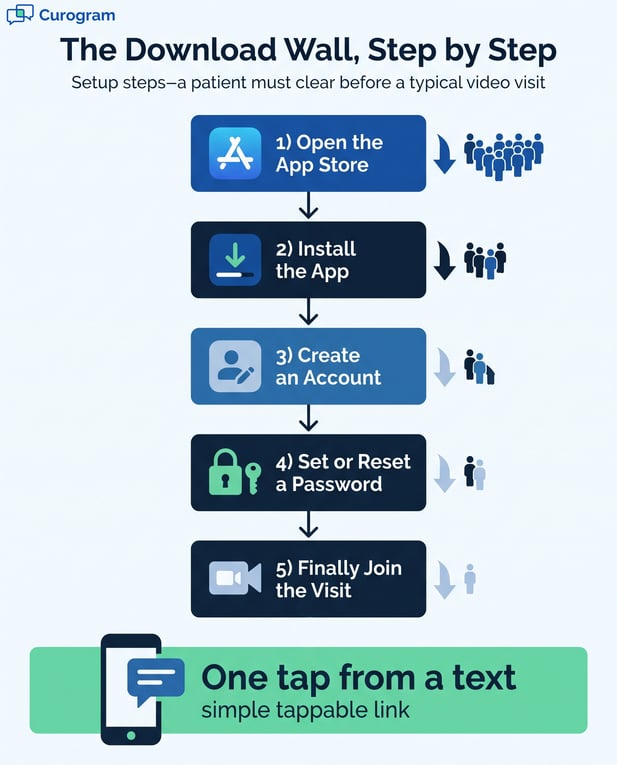
The wall is not one step. It is a stack of small steps, each a chance to quit. Any one of them can end the visit.

The App Store Detour

First, the tool asks for an app. The patient leaves the text and opens a store. They search, tap install, and wait for it to load.

On a slow signal, that wait drags. Storage warnings pop up. Some phones ask for a fresh update first. The patient stalls before the visit even starts.

Each pause is a chance to give up. A ringing waiting room does not help. By the time the app loads, the patient may be gone.

The Login and Password Trap

Next comes an account. The patient must make a username and a password. Many forget the one they set last time.

A reset email arrives late, or not at all. The patient toggles between apps to find a code. The clock keeps running.

So a telehealth visit with no portal login would save all of this. There would be nothing to remember and nothing to reset.

Who Feels the Wall the Most

The wall does not hit everyone evenly. It lands hardest on the patients who need care the most. Those are often the patients a practice most wants to keep.

Older and Less Tech-Comfortable Patients

Some patients rarely install apps. A store prompt feels foreign and risky. They worry about tapping the wrong button.

One odd screen can freeze the whole visit. The patient may call the front desk in a panic. Or they may just hang up and skip care.

For them, a patient-friendly video visit must skip setup entirely. The fewer choices they face, the more likely they are to join.

Every Specialty and Visit Type

The wall shows up across the board. Primary care, specialty, and follow-up visits all face it. A video call with a doctor with no download would fit each of them.

Think of a quick lab review or a med check. These visits are short by design. The setup should never take longer than the care.

Yet the result is the same everywhere. A ready patient meets a setup screen and gives up. 

Infographic: 5-step video visit download wall versus one-tap text link access

The Guide: The One-Tap Clinic

There is a simpler path. Meet the patient in the text they already have. Open the visit from there, with nothing to install. That is the one-tap clinic.

How Text-Launched Video Visits Work

The whole flow rides on a single message. There is no new tool and no new habit for the patient to learn. It works the way texting already does.

One Tap From the Text They Got

The patient gets a text near visit time. Inside is a link. They tap it once, and the visit opens in the browser.

There is no store, no wait, and no guesswork. The screen they wanted shows up on the first try.

This is a one-tap video visit that the patient can trust. It feels less like software and more like a normal message.

No App, No Account, No Password

The link needs no installation and no sign-up. There is no password to reset under pressure.

That makes it true telehealth with no app for the patient. They just tap and connect, the way they text a friend.

Staff also spend less time coaching installs by phone. The front desk can focus on care, not tech support.

Care That Feels Like Your Office

A safe link should feel familiar, not foreign. The message comes from a number the patient already knows. That small detail builds real trust.

A Link From Your Real Number

The text arrives from your practice's real line. It is not a random app or an unknown sender. That trust matters at visit time.

Patients open messages they recognize. A strange number gets ignored, and the visit slips away. A known one gets a tap.

So they join a virtual visit by text without a second thought. The channel itself does the reassuring.

One Thread With Reminders and Visits

The visit link sits in the same thread as your reminders. The patient scrolls up and sees a clear history. Everything about the visit lives in one place.

There is no email to dig through and no portal to open. The next step is always right there in the thread.

This ties into your

This ties into your appointment reminders and your two-way HIPAA-compliant texting. Together, they keep the visit inside a channel the patient already uses.


The Success: The Visit That Just Opens

When the wall is gone, the change is quick to feel. Patients stop treating a visit like a tech test. They simply show up.

From Download Wall to One Tap

This is the core shift. Joining care moves from a chore to a single tap. The change shows up in real numbers.

Patients Join On Time

With no setup, patients tap and enter at the start time. The visit begins when it should. Staff spend less time coaching installs by phone.

In our internal data, text reminders see over 75% confirmation rates. That is Curogram client data from clinical settings. It shows a text reaches and moves patients.

A patient who confirms by text is primed to join. The link then does the rest. One tap, and they are in the visit.

Fewer Missed Virtual Visits

A patient who joins on time is a visit that counts. Fewer slots go empty from setup trouble. The schedule holds together.

Each empty slot is care that did not happen. It is also revenue that walked out the door. A clean join keeps both in place.

That is the quiet payoff of a one-tap link. The wins add up across a busy week.

Access for the Patients Who Need It Most

The biggest win is reach. A text works on the phone in a patient's pocket. That is true for nearly everyone you serve.

Reaching Anyone With a Phone

Text sits on almost every device. There is nothing extra to own or learn. Most people already text every single day.

Public data backs this up. Almost all adults own a phone, and most own a smartphone. So a link by text meets patients right where they are.

This is where reach really shows. A text-based visit does not ask patients to adopt anything new.

A Private, Secure Connection

One tap does not mean less privacy. The visit runs over a secure, HIPAA-compliant link. A signed BAA covers it.

Ease and safety are not a trade-off here. The patient gets both at the same time.

So the join stays simple and secure at once. Patients get comfort without giving up trust.

The download wall versus the one-tap join

Step

The Download Wall

The One-Tap Clinic

Getting in

Find and install an app

Tap a link in a text

Account

Create a login and password

No account needed

Time to start

Minutes of setup

Seconds

Best fit

Tech-comfortable patients

Almost anyone with a phone


Female doctor in white coat smiling while using a laptop for virtual care in her office

ConclusionMake Joining a Visit Effortless

The download wall is a quiet drain on care. It looks small on paper. Yet it decides whether a patient joins at all.

Every extra step is a place to lose someone. An app prompt, a login, a password reset. Any one of them can turn a ready patient into a no-show.

When a visit opens from a text, patients show up. The wall that stopped them is simply gone. Joining care stops being a test of tech skill.

Think about what your CollaborateMD system does well. It holds the records, the codes, and the billing. It is built for your team's daily workflow.

Now think about what the patient needs at visit time. They need a door that opens on the first try. That door is a text with one tap.

CollaborateMD is for your records. Curogram is for their one-tap visit. Put together, virtual care actually reaches people.

The reach is real, and the numbers back it. Almost all adults own a phone, and most own a smartphone. A plain text meets nearly every patient you serve.

Public health guidance agrees on the value of easy access. Federal telehealth resources note that patients can join from a link on their phone. The fewer steps you add, the more people connect.

The patients who gain the most are often the hardest to reach. Older patients and less tech-comfortable patients feel the wall first. A one-tap link lifts it for them.

This is not about adding more tools to your stack. It is about removing the one barrier that blocks the visit. The text you already sent can carry the whole thing.

The privacy question still matters, and the answer is clear. The visit runs over a secure, HIPAA-compliant link. Ease and safety go together here.

Your team feels the change, too. Fewer setup calls reach the front desk. Staff can spend that time on care instead of tech support.

So stop letting an app download stand between your patients and their visit. Remove the wall, and let the visit open on its own. That is the shift, from download wall to one tap.

Ready to remove the download wall? Schedule a demo and watch a patient join a video visit with one tap.


Frequently Asked Questions

How does a patient join a video visit with no app download?

The patient gets a text from your practice near visit time. They tap the link inside, and the visit opens in the browser. There is no app store, no account, and no password. The whole join takes seconds.

Why does the download wall cause missed virtual visits?

At visit time, the patient must install an app or reset a login. That setup takes minutes the patient may not have. So the visit starts late or never connects. A one-tap link skips all of that friction.

How does a one-tap visit help patients who are not tech-savvy?

There is nothing to set up and nothing new to learn. The patient taps a familiar text and the visit opens. That removes the step most likely to trip them up. Patients of any comfort level can connect.

Why does a text reach almost every patient?

Text works on nearly every phone with no extra tool. Most people already read and reply to texts each day. So a link by text meets patients where they already are. It does not ask them to adopt anything new.

How does a one-tap visit stay private and secure?

The visit runs over a secure, HIPAA-compliant video link. A signed BAA covers the connection. So a fast join is also a private one. Patients get ease without giving up trust.


Join an Azalea Health Virtual Visit by Text Link

Join an Azalea Health Virtual Visit by Text Link

💡Text-link telemedicine visits for rural Azalea Health patients let a person see their provider from home. They tap one link in a text. No app and...

Read More
CollaborateMD Telehealth: Launch a Visit by Text

CollaborateMD Telehealth: Launch a Visit by Text

💡A CollaborateMD telehealth video visit by text link lets a practice add virtual care with no extra platform.The video call opens with one tap....

Read More
See How Lytec Patients Join a Video Visit With No App Download

See How Lytec Patients Join a Video Visit With No App Download

💡 Lytec patients can join a video visit with no app download. Curogram texts a secure link that opens the visit in one tap.Here is what that looks...

Read More