9 min read

See How Lytec Patients Join a Video Visit With No App Download

See How Lytec Patients Join a Video Visit With No App Download
💡 Lytec patients can join a video visit with no app download. Curogram texts a secure link that opens the visit in one tap.

Here is what that looks like in practice:

  • No app store, no account, and no password
  • The link opens a HIPAA-compliant video room
  • It works on any phone that can text
  • Patients of every age can join with ease
  • Fewer virtual visits get missed
Tapping a link beats fixing software minutes before a visit. More patients show up on time, ready to be seen by their provider.

Your patient booked a video visit. They felt ready and willing. Then the screen told them to download an app. That one step stopped them cold.

This happens more often than most practices think. A patient gets a telehealth link by email. The link sends them to an app store. They must install, sign up, and grant permissions. Each step adds friction the patient did not expect.

By the time they finish, the visit has slipped past. Some patients give up before they even begin. Older and nervous patients tend to drop off first. The booked slot becomes one more no-show. That is lost care and lost revenue.

Lytec does its core job very well. It books the visit and holds the schedule. But Lytec was not built to open a video room. That small gap is where visits quietly vanish.

Curogram closes that gap with a simple fix. It lets Lytec patients join a video visit with no app download. The patient gets a text, taps a link, and joins. No account. No password. No detour to the app store.

This article views telehealth from the patient's chair. We will name the villain first. It is the extra platform that locks honest patients out. Then we show the simple cure, which is text-first access.

You will see how a no-download virtual visit lifts attendance. You will see why one tap helps patients of every age. You will learn how it links to the Lytec appointment your team already set.

The goal here stays plain and clear. Make joining a visit as easy as reading a short text. When the barrier drops, the no-shows tend to drop with it.

Let us start with the problem patients feel most. The app and the login wall both block the road to care.

The Villain: The App Store Detour

Most telehealth tools ask the patient to do real work. They must download an app or create an account just to be seen. That sounds small to staff who use the tool daily. To a patient with a phone in their hand, it feels like a wall.

Picture the path a patient actually walks. The journey has more stops than anyone planned for it.

Step

What the patient must do

How it feels

1

Open the telehealth link

Hopeful

2

Get sent to the app store

Confused

3

Install the app and wait

Impatient

4

Create an account

Annoyed

5

Grant camera and mic access

Unsure

6

Log in with a new password

Stuck

7

"Still can't connect"

Defeated


Each row is a chance to quit. The more rows, the more people walk away. A no-login telemedicine flow erases most of that table. But the standard app forces every patient through all of it.

Who Gives Up First

Anxious patients and older patients tend to drop off the soonest. They did not sign up to troubleshoot software. They signed up to talk to their provider. When the tech gets hard, they simply stop trying.

This is the quiet cost of the extra platform. A failed login does not look like a crisis. It looks like an empty slot on the calendar. The patient is not angry, just gone. And the practice rarely learns why.

Consider a simple example to make it real:

A clinic books 40 video visits in a week. Say 8 patients hit the app-store wall and cannot get in. That is 8 lost visits from setup alone, not from a lack of care. This figure is an illustrative example, not a measured result.

Those 8 patients still needed help. They wanted to be seen. The barrier was never the doctor or the schedule. The barrier was the download and the login screen.


The Deepest Problem: How This All Feels

Seeing the doctor online starts to feel harder than driving in. That flips the whole promise of telehealth on its head. Virtual care was supposed to be the easy choice.

For staff, the pain shows up as last-minute calls. The phone rings five minutes before the visit. "I can't get the app to work." Now your team is doing live tech support, not patient care.

This is exactly the gap that no-app telehealth for Lytec patients is meant to close. The patient should not need a manual to join. They should not need a grandchild on the phone for help. They should just need a text and a thumb.

Lytec holds the appointment with no trouble at all. It knows the time, the patient, and the provider. What it does not do is open the video door for them. That last step is where the extra platform sneaks back in.

So the villain is clear and easy to name. It is the app-store detour and the account wall. It turns willing patients into missed visits. And it does this without anyone noticing in the moment.

The fix is not louder reminders or longer instructions. The fix is removing the steps that lose people. Take away the download. Take away the login. Then watch how many more patients simply show up.

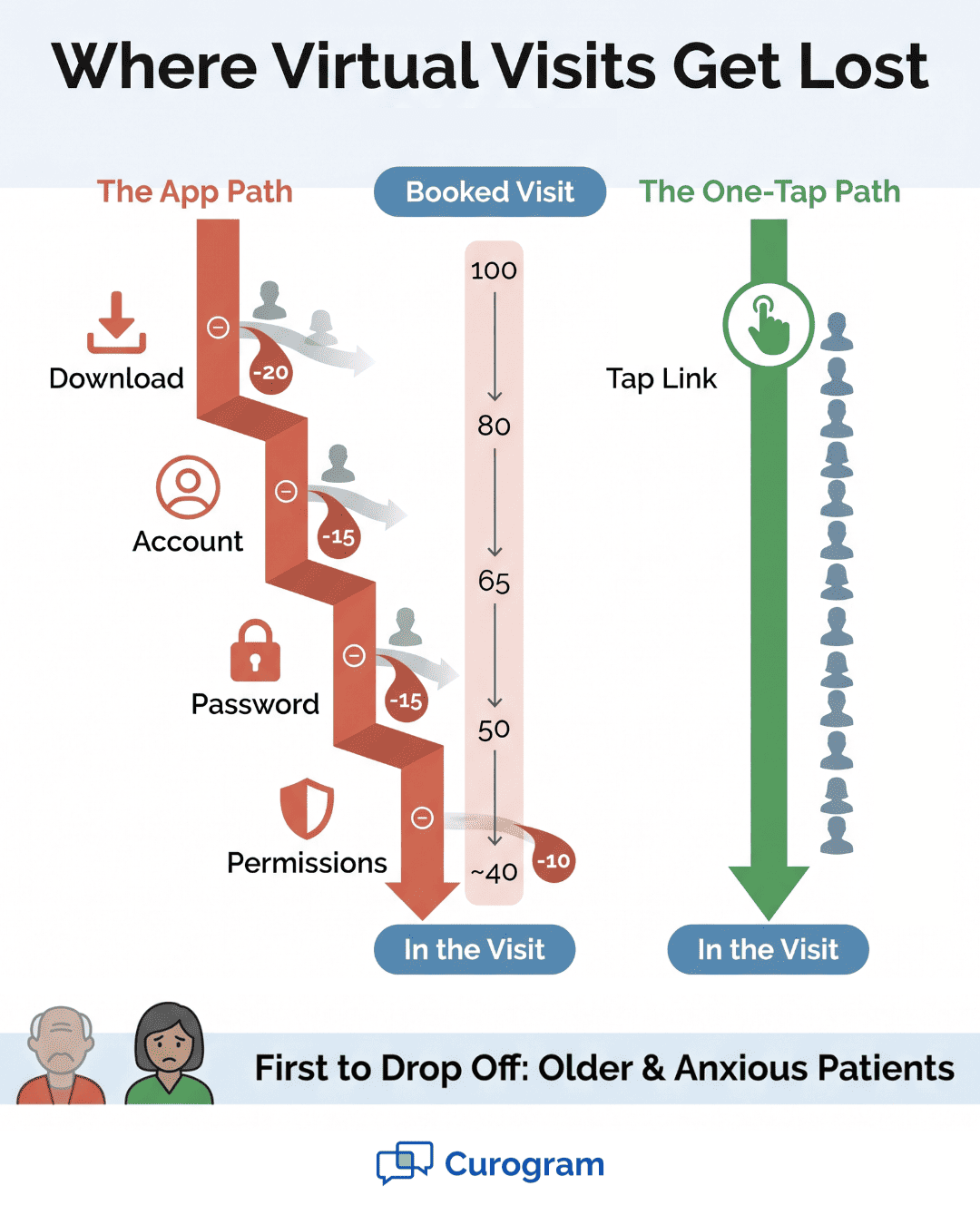
Infographic comparing the app-based video visit drop-off funnel with the one-tap join path

The Guide: The Tap-to-Join Bridge

The cure is refreshingly simple to describe. One tap from a text, and the patient is in the visit. No app store. No new account. No password to forget. The wall from the last section just disappears.

Curogram does this with a feature built for patients, not tech experts. It lets a Lytec patient join a video visit by text. Curogram sends a secure link by SMS. The patient taps it, and the HIPAA-compliant video room opens.

That is the entire flow from the patient's side. Read text. Tap link. See provider. There is no fourth step to trip over.

Here is the same idea shown as a clean path.

The old path

The Curogram path

Email link → app store

Text with a secure link

Install app

Tap the link

Create account

Video room opens

Log in

You are in the visit

Try to connect


The right column has no busywork. There is nothing to download and nothing to sign into. That is what no-app telehealth for Lytec patients looks like in real use. The patient does less, so more of them finish the journey.

The Link: Not a Generic Shortcut

The visit launches off the Lytec appointment itself. So the right provider is already in the room and waiting. The patient is not dropped into an empty space wondering what to click.

This tight link matters for trust. The patient taps and sees a familiar face, not a setup screen. The visit feels like a continuation of care, not a tech test. That smooth handoff keeps nervous patients calm.

Now think about the range of people you serve. A single clinic might see an 80-year-old and a 25-year-old on the same day. The older patient may distrust app stores. The younger patient may juggle ten apps already. Both still want the visit to be easy.

A one-tap flow fits both of them perfectly. Neither person has to learn a new tool. Both already know how to read a text and tap a link. That shared skill is the whole secret.

This is why patient-friendly telehealth for Lytec practices is not just a nice phrase. It is a real driver of attendance. When the tool meets people where they are, more of them show up. Access stops being a test that some patients fail.

Let us walk through one quick example:

Maria is 79 and dreads new technology. She gets a text at 1:55 for a 2:00 visit. She taps the blue link in the message. By 2:00, she is on video with her doctor.

There was no call to the front desk for help. There was no panic about a forgotten password. There was no missed visit and no rebooking. Maria just tapped and joined, like reading any other text.


That story scales across your whole panel. The same simple flow works for hundreds of patients. Each one skips the download and the login. Each one has one fewer reason to drop off.

The guide here is not a complex platform. It is the opposite of one. It is a text-to-video room with no front door to fumble. The patient reaches care through the channel they trust most.

Lytec still sets the stage in the background. It knows when and with whom the visit happens. Curogram simply opens the door at the right moment. Together they turn a booked slot into a live conversation.

The Success: The Visit That Actually Happens

Success here is easy to measure. It comes down to one number: the number of steps a patient must take. With the old way, that number was seven or more. With Curogram, the number is one. One tap, and the visit begins.

Zero patient setup is the headline. There is nothing to install and nothing to register. Text-first access means nearly any patient can join. If they can read a text, they can join the visit.

That shift sounds small, but it changes everything downstream. Joining becomes a single tap, not an app install. A tap is a habit your patients already have. An install is a hurdle many of them never clear.

Let us compare the two worlds side by side.

What changes

App-based visit

One-tap visit

Steps to join

7+

1

Account needed

Yes

No

Password needed

Yes

No

Works on any texting phone

Often no

Yes

Pre-visit help calls

Common

Rare

Patient feeling

Stressed

Calm


The right column is the goal for every visit. It removes the reasons patients drop off. And it does this for young and old patients alike. The one-tap video visit for Lytec patients treats access as a right, not a reward.

The Outcomes

The clearest outcome is fewer missed virtual visits. When the join is hard, no-shows climb. When the join is one tap, more booked visits actually happen.

We can ground this in our own internal data. It comes from Curogram's case studies file. The numbers below are about removing friction from appointments. They show what happens when barriers drop.

Based on our internal data, Atlas Medical Center saw a sharp drop in no-shows. Their no-show rate fell from 14.20% to 4.91% in three months. That came from making attendance easier with automated reminders. The same logic powers the one-tap join: less friction, more attendance.

Across many Curogram clients, no-show rates run 53% below the industry average, based on our internal research. That is a separate, broad benchmark, not Atlas's specific result. It points to one steady pattern. When you remove hurdles, more patients keep their visits.

Confirmation tells a similar story. Curogram clients see appointment confirmation rates above 75%, per our internal data. Patients respond when the tool is simple. A one-tap join leans on that same simplicity.

Less Pre-Visit Stress

Patients no longer dread the setup before the call. They do not fear a forgotten password. They do not need a family member to help. That calm is good for patients and good for outcomes.

Stress also drives those last-minute help calls. With one tap, those calls mostly stop. Your front desk gets quiet minutes before each visit. Staff can focus on care, not on tech support.

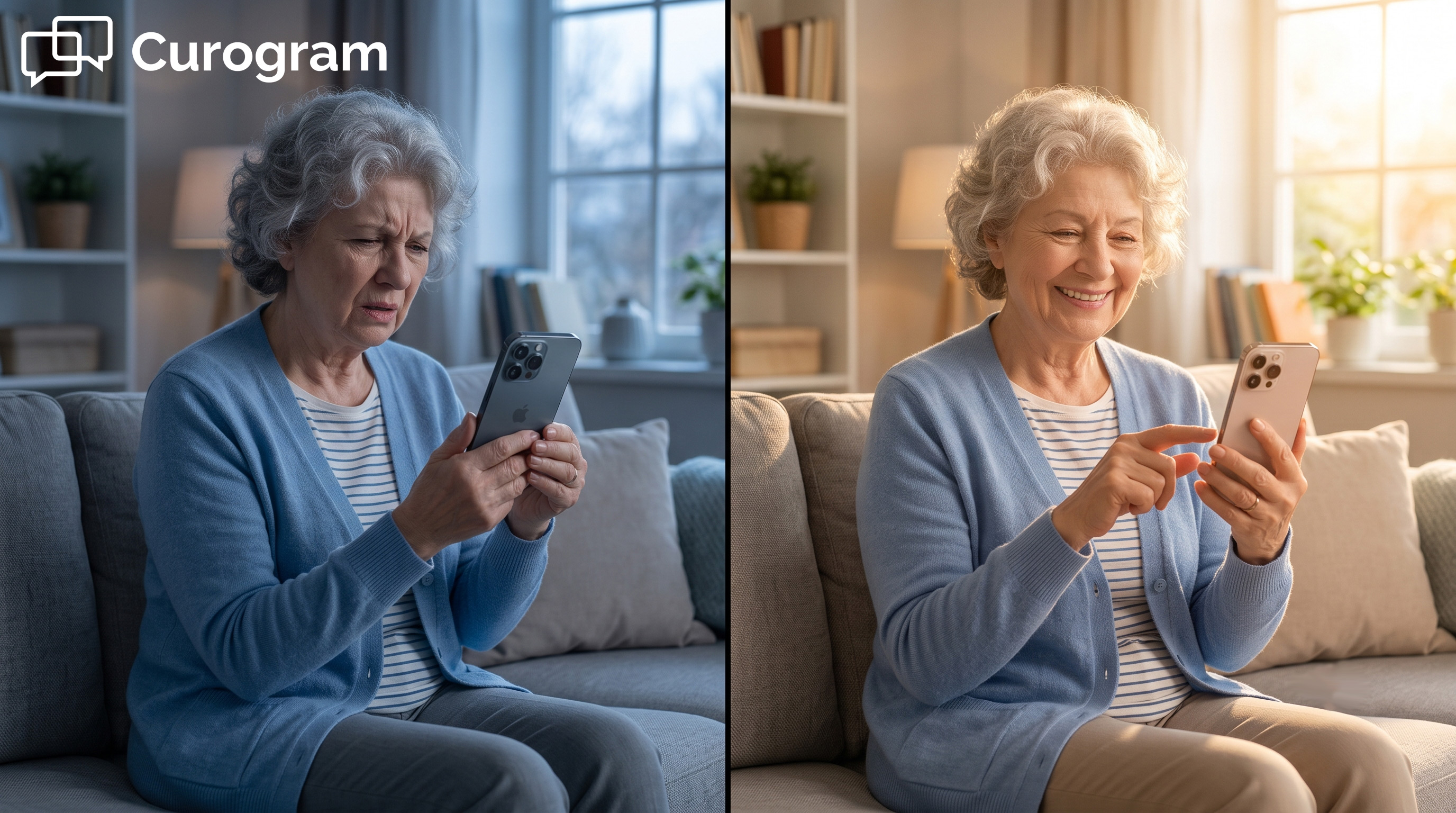
Senior patient comfortably on a no-app telehealth video call at home

How Curogram Turns a Lytec Appointment Into a One-Tap Visit

Curogram works as a calm layer on top of Lytec. Your front desk still books the video visit inside Lytec. Nothing about that core booking workflow has to change. Curogram simply opens the door for the patient.

The feature that does this is Text-to-Video Visits. When the visit time nears, Curogram texts the patient a secure link. The patient taps that link on any phone that can text. The HIPAA-compliant video room opens right away. No setup screen gets in the way.

There is no app to download and no account to create. This is true no-login telemedicine for Lytec patients. A password never stands between the patient and their own provider. That is the whole point of the design.

The visit also launches off the Lytec appointment itself. So the provider is already in the room and waiting. The patient is not left guessing or clicking around. They tap once and see a familiar face. The wait feels short and calm.

This is what patient-friendly telehealth for Lytec practices really means. The 80-year-old and the 25-year-old both join the same easy way. No one needs help from a grandchild or a manual. Access stops being a hard barrier and starts being a simple tap.

Your staff feels the relief too. Fewer panicked calls arrive in the minutes before a visit. Fewer patients drop out at the app-store wall. The schedule you built in Lytec actually holds together. So everyone wins back some time and calm.

Curogram does not replace Lytec or compete with it. It adds the one tap that Lytec was simply never meant to handle. Lytec sets the appointment, and Curogram opens the room. Together they make virtual care feel as simple as a quick text message.

Conclusion: Make Joining as Easy as a Text

The fix here is refreshingly simple. Tap the text, and you are in. No app store. No login screen. No detour standing between your patient and their provider.

Think about the two tools working together here. Lytec sets the appointment and holds your schedule. Curogram opens the door in one tap. Each tool does the one part it does best.

That split matters more than it first appears. Your front desk keeps the workflow it already knows. Patients skip the extra steps that used to lose them. The booked visit turns into a visit that happens.

We started by naming the real villain. It was the extra platform that locks patients out. The download, the sign-up, and the password wall. Each step was a quiet exit from care.

Text-first access removes those exits one by one. The patient gets a link and taps it. The video room opens, and the visit begins. Stress drops, and visit attendance climbs.

This helps every patient you serve. The 80-year-old joins as easily as the 25-year-old. No one gets left behind by clunky, hard software. That is what real access should feel like.

So here is the clear next move. Stop losing visits to the login screen. Stop letting the app store eat your schedule. Let the one tap do the work instead.

Give every patient — age 25 or 85 — a visit they can actually reach. Request a demo today and see no-app, no-login telehealth in action.


Frequently Asked Questions

How do Lytec patients join a video visit without an app?

They get a text from Curogram with a secure link. They tap it on any phone they own. The HIPAA-compliant video room opens at once. There is no app, account, or password to handle.

Why does no-app telehealth reach older patients better?

Older patients often stall at downloads and logins. A single tap skips all of that friction. They use a tool they already trust, which is texting. That comfort means more of them show up.

How does Curogram keep a no-login telemedicine visit secure?

Each visit link is unique and time-bound for safety. The video room is HIPAA compliant and encrypted. Patients join without making an account, so there is no extra password to lose or expose.

What device do patients need to join the one-tap visit?

Any smartphone that can send and read a text will work fine. No patient portal is required at all. The link does all the heavy lifting. Patients never download, install, or sign in to anything.

Why does text-first access lower missed virtual visits?

Most no-shows here come from setup, not from skipping care. Removing the app and login removes the main exit point. When joining takes just one tap, far more booked visits actually happen on time.


DrChrono Text Link Video Visits: No Download and HIPAA-Ready Telemed

DrChrono Text Link Video Visits: No Download and HIPAA-Ready Telemed

💡 Curogram gives DrChrono practices a faster way to run video visits — through a simple text link. Patients tap one link from their phone to join...

Read More
Dolphin Orthodontic Telemedicine Without an App or Download

Dolphin Orthodontic Telemedicine Without an App or Download

💡 Dolphin orthodontic telemedicine through Curogram sends a HIPAA-compliant video visit by text. Patients tap the link and connect in a browser —...

Read More
The OncoEMR Oncology Telehealth Experience: One Text, No App

The OncoEMR Oncology Telehealth Experience: One Text, No App

💡 The OncoEMR oncology patient telehealth experience text link video no app model lets cancer patients join visits in seconds. They get a text, tap...

Read More