
 Mira Gwehn Revilla
- The text holds only the time and a secure link, with no health details, so it fits HIPAA guidance for standard SMS.
- No portal account, Charm mPHR app, or password stands between the patient and the provider.
- Pew Research Center’s 2026 survey found 98% of U.S. adults own a cellphone, so the link reaches nearly everyone.
- Curogram clients average a confirmation rate above 75%, based on our internal data.
- Atlas Medical Center cut no-shows from 14.20% to 4.91% in three months using the same reminder thread.
Patients reach a CharmHealth video visit through one of three doors. They can check in from the PHR portal, open the Charm mPHR app, or tap a join link sent by email or text. Each practice picks which doors to offer, and it can add a consent form, an ID upload, or a set access window on top.
Every one of those steps makes sense to whoever set it up. To the patient, each is one more screen between them and their provider. We’d argue that’s where most telehealth no-shows begin: at the join, before anyone says hello.
The join step belongs to the visit itself, so it should take one tap. One-tap telehealth visits for CharmHealth patients, with no app download and no login, should be the default for follow-up care.
CharmTeleHealth is a sound tool at $20 per provider per month. CharmHealth itself is a capable EHR. The trouble lives on the patient’s side of the screen, which owners rarely see for themselves.
Front desks see it, though. It’s the call from a patient in a parked car who can’t find the right login. It’s a provider waiting in an empty video room for ten minutes, then marking a no-show for someone who meant to attend.
Curogram moves the whole join onto the channel patients already answer. Pew Research Center’s 2026 survey found 98% of U.S. adults own a cellphone, and 91% own a smartphone. Its visit link arrives in the same text thread as the reminder, and the visit opens in the browser.
Follow-up care feels this most. Behavioral health clients, integrative medicine patients on a protocol, and primary care patients with a chronic condition need visit after visit to stay on track.
The 20-Dollar Add-on (As Your Patients Experience It)
CharmHealth earns its place in a lot of small practices. It’s a cloud EHR with charting, e-prescribing, billing, and a patient portal. Turning on CharmTeleHealth is a settings change, and Charm’s pricing FAQ lists the fee at $20 per provider per month.
From the provider’s chair, the video visit works as designed. The appointment sits on the calendar, the provider clicks in, and the note lands in the same chart as the last office visit.
Text reminders come with limits. Charm’s $200 Provider Plan includes 1,000 messages a month, and each message past that costs $0.08.
A practice that sends a reminder, a confirmation, and a join link for every visit uses three messages per patient. When the allowance runs low, email starts to look like the cheaper channel for join links, and email is where links get buried.
Count the Doors on the Patient’s Side
Charm’s own help guide lists the ways a patient can enter a video visit. Each one asks something of the patient before they see a provider.
|
Join route |
What the patient needs first |
|
PHR portal check-in |
An active portal account and its password |
|
Charm mPHR app |
The app installed and signed in |
|
Join link by email or text |
The message found, plus any consent form or ID upload |
|
Zoom option |
The Zoom app installed on the phone or computer |
None of these is hard on its own. Trouble starts when the patient doesn’t know which door the practice meant. A reminder that points to the portal assumes the patient finished signing up, and plenty of patients got that invite at intake and never clicked it.
Timing adds its own trap. If the practice sets an access window, a patient who taps the link early can’t get in yet, and it’s easy to assume the link is broken. A required consent form has to be finished before the visit opens, which is a lot to read on a phone in the minute before a visit.
Walk One Patient Through the Join
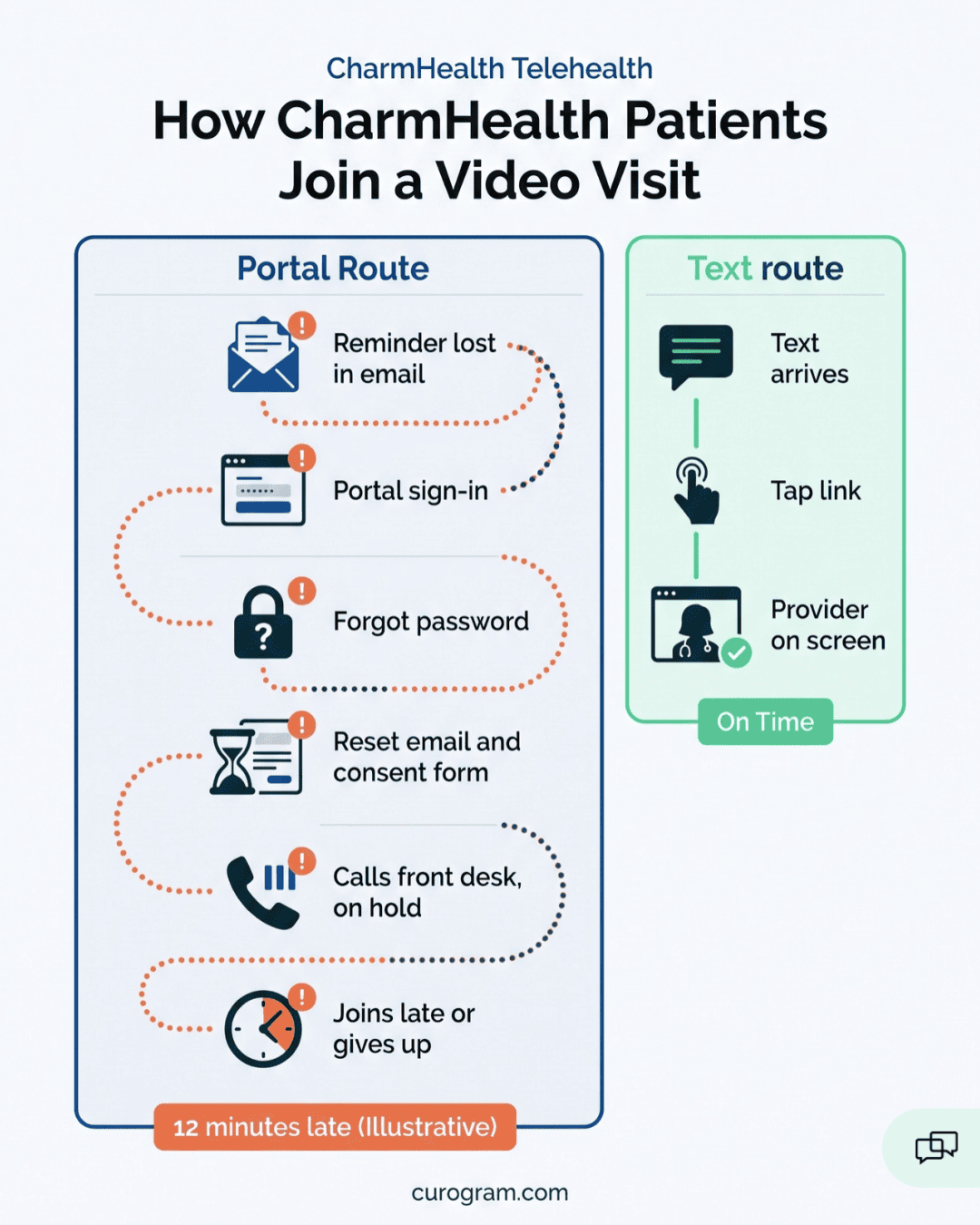
Take a follow-up booked during a patient’s lunch break. Her practice sends join instructions by email and routes check-in through the portal.
- The reminder lands in her inbox the night before, under two promo emails from her pharmacy.
- At visit time, she finds it and taps the link. It opens the portal sign-in page.
- She doesn’t remember the password she made at intake last year, so she taps “Forgot password.”
- The reset email takes a few minutes. A consent form waits on the other side of it.
- She calls the front desk from her car. Two patients are standing at the window, so she’s put on hold.
- She gets in 12 minutes late for a 20-minute slot, or she gives up and goes back to work.
This patient wanted to attend. She booked the visit, read the reminder, and tried to join on time. Your schedule will still show a late start or a no-show.
What a Failed Join Costs
Every practice’s mix is different, so the figures below are illustrative. Plug in your own visit volume and average visit value.
|
Virtual visits a month |
No-show rate |
Average visit value |
Lost per month |
Lost per year |
|
100 |
10% |
$150 |
$1,500 |
$18,000 |
|
100 |
20% |
$200 |
$4,000 |
$48,000 |
|
200 |
15% |
$175 |
$5,250 |
$63,000 |
Those totals only count the visit itself. They leave out the staff minutes spent on hold calls and the provider sitting in an empty room. As a rough, illustrative figure, count 5 to 10 minutes of front desk time for every patient who calls in stuck.
One more cost never makes the report. A patient who fought the login once may ask for an in-person slot next time, or skip the follow-up and wait until something gets worse.
The Patients Who Quit at the Login Screen
A therapy client can take weeks to book a follow-up after a hard stretch. If the first thing she sees is a password reset, she may close the tab and not call back. Nobody on staff learns why.
Some of your patients are 68, text their grandchildren every day, and have never logged into a portal. For a patient with arthritis in her hands, a tiny password field on a phone screen is its own small hurdle.
And the owner hears about it at the end of the day. A provider walks past the office and says, “Your video thing didn’t work again.” That makes three this week, and the front desk logged all three as no-shows.

The One-Tap Visit
Sample text, sent one hour before the visit:
“Hi Maria, your video visit with Lakeside Family Clinic starts at 3:00 PM today. Tap to join: [secure link]”
That’s the full set of instructions. Maria taps, her phone’s browser opens, she allows the camera and microphone, and her provider is on screen. She never visits an app store or makes an account.
Nothing in that text names a condition or a reason for the visit. Curogram’s HIPAA guidance limits standard SMS to generic details like the date and time. Anything sensitive stays behind the secure, encrypted link.
One Thread From Booking to Visit
Maria’s join link arrives in the same thread as her reminder and confirmation. She replied YES there two days ago, so she knows the sender. She doesn’t have to dig through email or remember which app the clinic uses.
That’s what no-app-download telehealth for patients should mean: the phone they already carry is the full setup. It’s also a text link video visit healthcare teams can send without training patients first. Pew’s 2026 data puts smartphone ownership at 91% of U.S. adults, which covers the browser side.
A family member can join the same visit from their own phone. So can a second provider or a staff member, which helps when a caregiver manages an older parent’s care from another city.
How Curogram Sits Beside CharmHealth
CharmHealth stays your system of record. Notes, orders, and billing live there, and your providers keep charting the way they do now.
Curogram works alongside it. We read the CharmHealth schedule so reminders, confirmations, and visit links go out at the right times. When staff move a visit in CharmHealth, the new time carries over to the reminder thread.
The connection runs through CharmHealth’s API, and CharmHealth decides who gets access to it. Our team files that request and handles the setup, which usually takes 1 to 2 weeks. Your staff doesn’t open tickets with Charm or map data fields.
Keeping CharmTeleHealth for Some Visits
You don’t have to pick one tool. Some practices keep CharmTeleHealth for visit types that need its consent and ID check flow, such as a first visit with a new patient.
Curogram then handles the follow-ups, where the patient already knows you and just needs to get in the room. Staff choose the path when they book, and the patient only ever sees one link.
What Changes for Your Staff
Very little changes at booking. Staff schedule the video visit in CharmHealth the way they do now, and the link goes out on its own.
Two checks matter. First, the patient’s mobile number has to be in the chart, since a landline on file means the text never arrives. Second, the patient needs to have agreed to receive texts. Appointment reminders count as informational messages, which need prior express consent under the TCPA, and most practices collect that at intake.
Where Join Friction Hurts Most
Join friction costs the most in care built on repeat visits. A one-time consult can absorb a rough start, but a plan that depends on check-ins every few weeks loses ground with each missed one. Three specialties show it clearly.
Integrative Medicine Follow-Ups
Integrative plans tend to run on short check-ins to adjust supplements, diet, or lab-guided changes. Telehealth for integrative medicine follow-ups only works if each check-in is easy to keep. One missed visit can push a protocol change back by a month.
Primary Care Check-ins
Patient-friendly video visits primary care teams can run between office visits help keep a blood pressure or diabetes plan moving. The provider reviews home readings, adjusts a dose, and closes the visit in 15 minutes. A failed join turns that into a phone tag loop.
Behavioral Health Sessions
For therapy and medication management, behavioral health virtual visit continuity depends on showing up week after week. A one-tap join lets a client meet from a parked car or a closed office door on a lunch break. They don’t have to explain a portal to anyone or wait for a reset email while the session clock runs.
The Attended Visit
Above 75%. That’s the average confirmation rate across Curogram clients, based on our internal data. Covina Arthritic Clinic confirms more than 1,100 appointments a month this way, with no staff member calling down a list.
Atlas Medical Center shows what that does to no-shows. Its rate fell from 14.20% to 4.91% in three months, which our case study puts at 3X better than the industry average.
Applied to an illustrative 100 virtual visits a month, that’s roughly 14 missed visits dropping to 5. Across our clients, no-show rates run 53% below the industry average.
Those results come from the reminder and confirmation thread, the same one your CharmHealth schedule already feeds. The video link travels on that same thread. A patient who confirmed by text is one tap away from the visit, with no new channel to learn.
One Follow-Up, Start to Finish
Take a worked example: a primary care patient booked for a 20-minute video follow-up on her blood pressure. The timing below is a sample schedule, and your practice sets its own.
|
When |
What she receives |
What she does |
|
2 days before |
Reminder text with date and time |
Replies YES |
|
1 hour before |
Join link in the same thread |
Nothing yet |
|
Visit time |
No new message |
Taps the link and allows the camera |
|
Right after |
Secure payment link |
Pays her copay from her phone |
|
Same day |
Review request |
Rates the visit |
On your side, each step looks like this.
- Booking. Staff schedule the visit in CharmHealth as usual. Curogram picks it up from the schedule.
- Confirmation. Her YES reply marks the visit confirmed. Nobody makes a reminder call.
- Join. At 2:00 PM, she taps the link. Her provider opens the visit and sees her on screen right at 2:00.
- Charting. The provider documents in CharmHealth, the same chart as her last office visit.
- Payment. She pays by text link before she’s left the parking lot, so no statement goes out by mail.
- Review. The request reaches her while the visit is fresh. She taps a rating from the same thread.
Curogram Highlight: One-Tap Video Visits
Curogram One-Tap Video Visits put a secure video link in the text thread your patients already use for reminders and confirmations. The patient taps it, the visit opens in their phone’s browser, and the provider is there. Patients don’t download an app, create an account, or reset a password.
Our platform reads your CharmHealth schedule, so visit links go out on time without staff copying them by hand. CharmHealth remains the chart. Your providers document there, and your billing stays where it is.
Each link is specific to that patient’s visit and opens a fully encrypted, HIPAA-compliant session. The text itself holds only generic details like the time, which keeps protected health information off standard SMS.
A few details matter on visit day:
- A family member, caregiver, or second provider can join the same visit from a different phone.
- Patients who confirmed by replying YES get the join link in that same conversation, so the sender is already familiar.
- After the visit, a secure payment link and a review request follow in the thread.
- You can keep CharmTeleHealth for visit types that need its intake steps and run Curogram for follow-ups.
Our team handles the CharmHealth API request and setup. Most practices are live in 1 to 2 weeks.
Conclusion: Make Virtual Care as Easy as a Text
CharmHealth holds the chart. What patients judge is a text, a link, and whether their provider shows up on time. That short stretch decides whether a virtual slot becomes a kept visit or an empty room.
Curogram gives CharmHealth patients a video visit they can join from the same thread that reminded them. It runs inside the platform you’d already use for reminders, two-way texting, forms, and payments.
Start with a number from your own front desk. Ask how many “I can’t join the video” calls they took this month, and how many virtual visits started late or not at all.
Then run the math on your own schedule. If one-tap visits save just 2 to 3 no-shows a month at $200 a visit, that’s $400 to $600 a month, or $4,800 to $7,200 a year. Set that against your Curogram quote, and count the CharmTeleHealth line items you could drop for follow-ups.
Schedule an integration demo. We’ll show the full patient path on a real phone: reminder, one-tap visit, payment link, and review request, all in one thread.