
 Aubreigh Lee Daculug
CureMD includes telemedicine in its suite. However, the patient's path into a visit can require a session code, a video application, or a portal login. Call it "The Download Step," and it is where older and less tech-comfortable patients drop off.
Curogram sends the visit link by text instead. One tap opens a secure visit in the phone's browser. Curogram clients average over 75% confirmation rates, and Atlas Medical Center cut no-shows from 14.20% to 4.91% in three months.
Most unsuccessful video visits never fail on video. The camera works, the physician is ready, and the connection is strong. The appointment collapses about ten minutes earlier, somewhere between an app store search and a forgotten password screen.
CureMD gives your practice a dependable clinical foundation. The platform has earned top KLAS rankings over the years, and telemedicine is built into the suite. Your providers can schedule, document, and bill a virtual visit inside a system they already understand.
The trouble sits on the patient's side of the screen. Before anyone sees the physician, the join process may require a session code, a separate telemedicine website, a video application, or a portal login. Each requirement seems minor on its own, but stacked together they become a wall many patients never get past.
This guide calls that wall "The Download Step." It is the detour between a scheduled virtual visit and a patient who appears on camera. It hits hardest with older adults, patients with limited English, and anyone who primarily uses a phone to call and text.
Those are often the patients telehealth was supposed to serve best. They live far from the clinic, struggle with transportation, or need frequent monitoring. Yet they are the most likely to get stuck before the visit begins, then either contact the front desk or give up.
The remedy isn't a new EHR. It's a shorter path: a visit link delivered by text that opens a secure video room in the phone's browser with a single tap.
Below, you'll see where virtual visits break down, why the join process matters more than the video platform, and how Curogram works alongside CureMD to close the gap.
You'll also find the attendance results behind the approach and the integration details your team should review before rollout.
Where Virtual Visits Break Before They Begin
Credit where it's due: CureMD offers a comprehensive suite that includes telemedicine, a Patient Portal, and an AI Contact Center that answers calls 24/7 in 14 languages. For scheduling, documentation, and records, it covers a remarkable amount of ground.
The gap is the join itself. None of those channels places a one-tap visit link directly in the patient's text messages, so the patient has to work their way in. That effort is where CureMD telemedicine patient join friction begins.
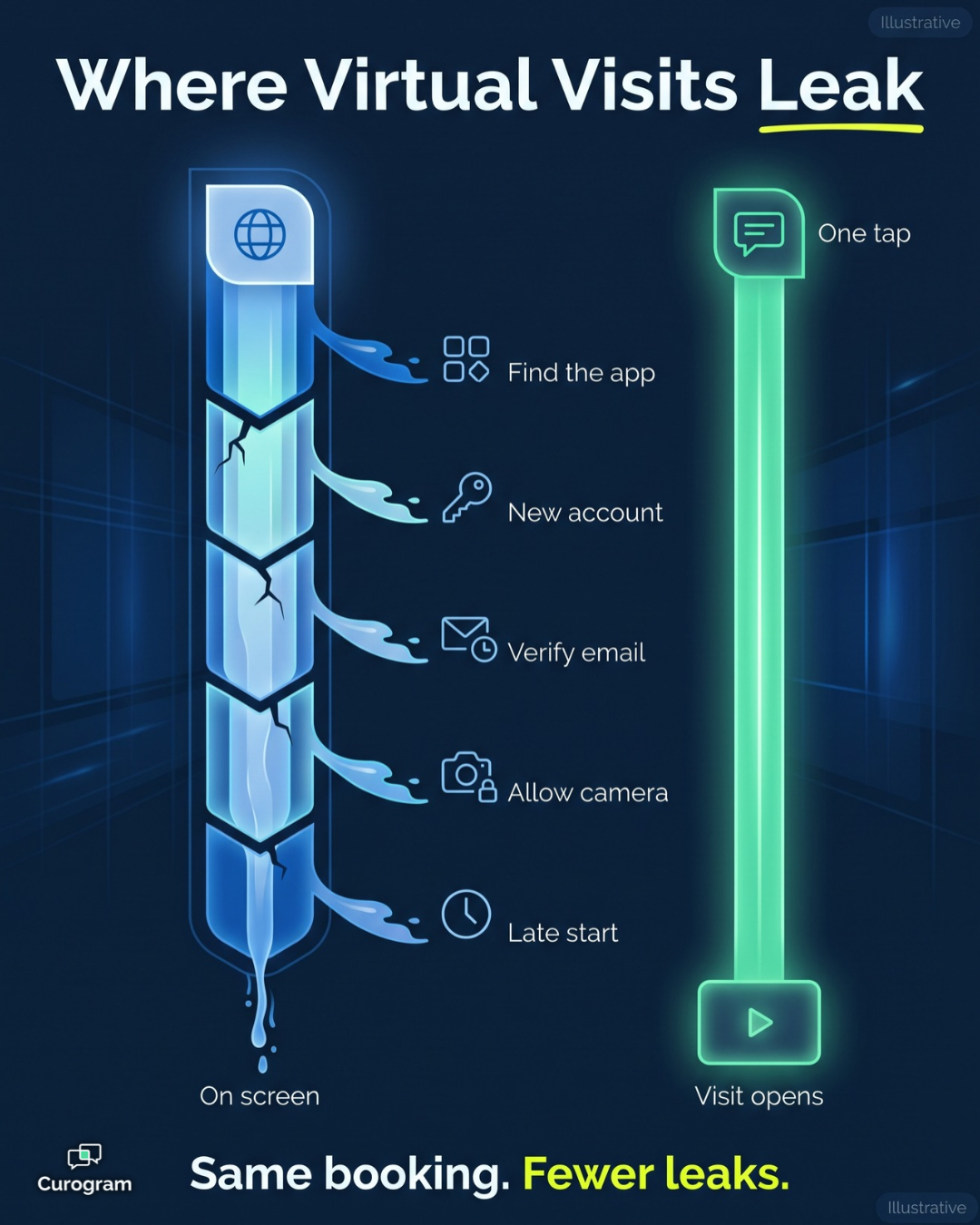
Here's how a typical pre-visit sequence can unravel:
- The visit is scheduled for 2:00, and the patient is instructed to get set up beforehand.
- At 1:50, the patient searches the app store and can't tell which application is the correct one.
- The application requests an account, so the patient creates yet another password.
- The verification email lands in the wrong inbox or disappears into a spam folder.
- A camera and microphone permission prompt appears, and the patient taps "Don't Allow."
- The clock passes 2:00, and the patient either calls the front desk or gives up entirely.
Every one of those steps is an opportunity to lose the appointment. And unlike a typical no-show, this patient genuinely intended to attend; they simply couldn't get through the door.
The financial impact accumulates quickly. Consider a hypothetical practice that conducts 40 virtual visits per week, with 10% of patients failing to join and an average visit value of $120. That's $480 in lost revenue every week, or nearly $25,000 annually, before you account for the staff time involved.
That staff time is significant, too. Each "how do I join?" call can consume 10 to 15 minutes of front desk attention, and many of those calls end without a completed visit.
Now consider who's on the other end of the line.
A 78-year-old patient texts her grandchildren every day, yet she has never installed an application without assistance.
She's dressed, seated, and ready at 2:00 with no way in, while the physician waits in an empty video room and the front desk fields its third troubleshooting call of the morning.
This isn't really a technology problem. According to Pew Research Center, 78% of U.S. adults ages 65 and older own a smartphone, and most of them text comfortably. The barrier is the setup process that comes before the visit, not the device in the patient's hand.
The One-Tap Visit: Telehealth Without the Detour
Curogram takes a different approach. Rather than asking patients to learn an unfamiliar tool, it reaches them through the channel they already use every day. With a 98% SMS open rate, a text message is far more likely to be noticed than a portal notification or a voicemail.
How a Text Link Video Visit Works
A text link video visit for medical practices is deliberately simple. Curogram sends the visit link in the same text conversation the patient already uses with your office. The patient taps once, and the visit opens directly in the phone's browser.
That single tap is the entire join process. There's no application to download, no account to create, and no portal to navigate, which means the experience is identical for a 28-year-old and a 78-year-old.
The message itself contains only the link, so no health information travels through the text. That design keeps the workflow consistent with HIPAA-compliant browser-based telehealth, where the secure session lives behind the link rather than inside the message.
How Curogram Connects With CureMD
Curogram connects to CureMD through a ready integration that uses CureMD's public API. Appointment data flows from CureMD into Curogram on a regular schedule: every 15 minutes for the next three days of appointments, and every 30 minutes for the following four days.
When a patient confirms or cancels by text, Curogram can write that status back to CureMD, and completed intake forms can be sent back as well.
To activate the connection, your practice provides its CureMD practice URL, a username and password, and an API key and secret.
The responsibilities stay clearly divided. CureMD remains your system of record for charting, billing, and documentation, while Curogram manages the patient-facing communication, including confirmations and the video visit itself.
Where It Fits in the CureMD Ecosystem
Curogram doesn't replace the tools you already rely on. The AI Contact Center can book or reschedule a telehealth appointment by phone, which is genuinely valuable, but joining a video visit isn't a phone call.
The Patient Portal serves patients who want access to records, results, and secure messages, yet it still requires a login before a visit can begin. Curogram fills the remaining gap with a link the patient can simply tap. The result is telehealth without app download or portal login hurdles, while CureMD continues doing what it does well.
From Booked to On Screen: The Attended Visit
Attendance is where this approach proves itself. Curogram's confirm-by-text method works well for in-person visits. The same logic extends naturally to virtual visits when the join link lives in the same conversation.
| What changes | Before: The Download Step | After: The One-Tap Visit |
|---|---|---|
| How the patient joins | Code, app, account, or portal login | One tap on a text link |
| Who gets stuck | Older and less tech-comfortable patients | Anyone with a smartphone that can open a link |
| Front desk load | Repeated "how do I join?" calls | Fewer setup calls to field |
| Provider experience | Waiting in an empty video room | A patient on screen at start time |
The clearest evidence comes from Atlas Medical Center. With Curogram's automated reminders and confirmations, the clinic cut its no-show rate from 14.20% to 4.91% in three months. That's 3X better than the industry average.
Across Curogram's clients, confirmation rates average above 75%. No-show rates run 53% below the industry average. Those gains come from one simple habit: asking patients to confirm by text, then keeping the entire conversation in a single thread.
Volume tells a similar story. Covina Arthritic Clinic confirms more than 1,100 appointments per month through Curogram. That shows how much one text thread can carry when nothing stands between confirmation and care.
For telehealth, this represents a shift toward "The Attended Visit." Virtual care stops being the appointment type with an asterisk. It becomes as dependable as an in-person slot.
Here's how it plays out.
A patient confirms on Tuesday. On Thursday at 1:55, the link arrives in the same thread, and at 2:00 she's on screen.
That reliability lets providers trust the virtual schedule as much as the in-person one.
It also opens the door to wider telehealth adoption for older patients. Many practices had quietly stopped offering them virtual visits. For any practice tracking CureMD virtual visit attendance, more booked visits that actually happen is the outcome that matters most.
Rolling Out One-Tap Telehealth Without Disrupting Your Workflow
Adding a new patient channel works best when your team knows exactly what changes and what stays the same. CureMD remains the center of your clinical workflow, so most of the adjustment happens at the front desk rather than in the exam room.
Before launch, a short checklist keeps the rollout smooth:
- Gather your connection details. Your administrator will need the CureMD practice URL, a username and password, and an API key and secret to activate the integration.
- Start with the patients who struggle most. Older adults and patients who regularly call for help joining are a natural first group, since they gain the most from a shorter path.
- Keep everything in one thread. Send the visit link in the same conversation that confirmed the appointment, so patients aren't searching through separate messages.
- Collect paperwork ahead of time. Curogram can send intake forms by text, and completed forms can be sent back to CureMD.
- Prepare a simple staff script. When a patient calls, your team can say, "Tap the link in your text," instead of walking them through an installation.
- Measure attendance after 30 days. Compare virtual no-shows and join-related calls before and after launch to see where the change makes a difference.
Sync timing also matters for planning. Because appointments refresh every 15 minutes for the next three days, near-term bookings reach Curogram quickly, which leaves time for confirmations and reminders to go out on schedule.
Finally, set expectations with your providers. Their charting, billing, and documentation stay in CureMD, so the main difference they should notice is a patient who appears on screen when the visit begins.
Let Every Patient Through the Virtual Door
CureMD handles the demanding clinical work behind a virtual visit. It schedules the appointment, maintains the chart, and manages billing. What it can't always guarantee, however, is that every patient reaches the video room on time.
That's the gap Curogram closes. One text and one tap open the visit in the browser, with no download, no new account, and no portal password to recover five minutes before the physician joins.
Consider the partnership in two halves. CureMD is designed for your clinical record of the visit, while Curogram is designed for your patients' access to it. One earns its value in the chart, and the other earns its value in the attendance column.
This matters most for patients who depend heavily on telehealth. Older adults, rural patients, and people managing chronic conditions often have the most to gain from a video visit, yet they're also the most likely to stall at "The Download Step."
When you remove that step, you stop sorting patients by technical comfort. Your team no longer has to predict who can handle an application and who will need a phone call to get connected.
Your front desk notices the difference. Fewer calls go toward walking patients through installations and password resets, so that time returns to the patients at the counter and the phones that keep ringing.
Your providers notice it in their schedules. Virtual blocks fill with patients who actually appear instead of empty rooms and delayed starts, which makes telehealth something you can plan around confidently.
Stop letting an app store determine which patients receive virtual care.
Schedule a Demo to see how Curogram works alongside CureMD. In about 15 minutes, you'll see the text-first channel your portal and AI Contact Center don't cover, using your own virtual visit schedule as the test case.