
 Mira Gwehn Revilla
- No Charm mPHR download, no portal password, no OTP code, and no new account to create.
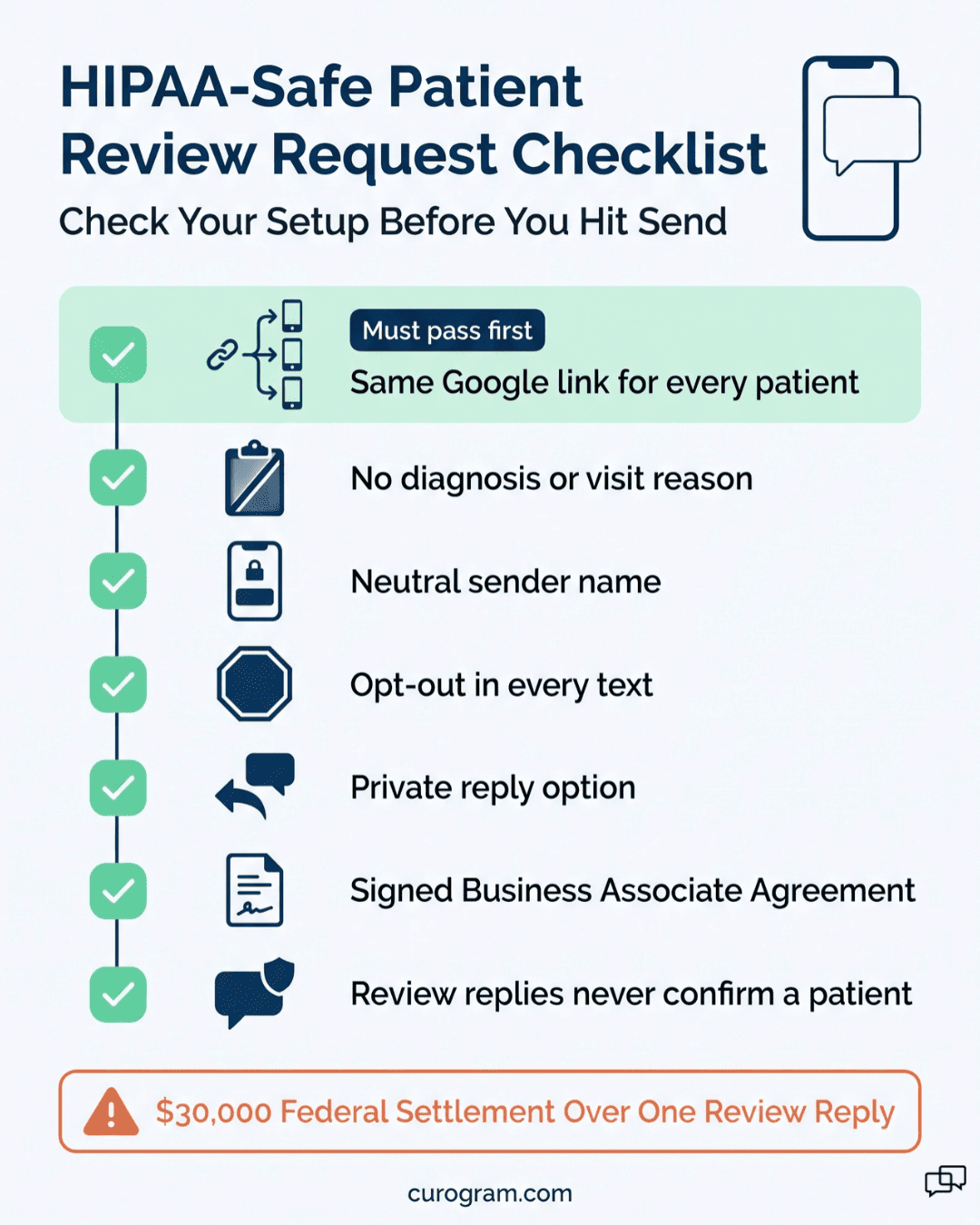
- Every patient gets the same Google link. Anyone with a concern can also reply in the thread to reach your office.
- The message carries no diagnosis, no visit details, and nothing clinical.
- Based on our internal data, one multi-location practice added 1,064 new 5-star reviews in three months, with 90% of patients giving five stars.
Your happiest patients already told you how they feel. They said it at the checkout window, in a thank-you card taped to the break room fridge, and to the nurse who walked them out. Almost none of them said it on Google.
That gap usually gets blamed on patients. Busy people, the thinking goes, just don’t write reviews.
Based on our internal data, they do write them when the ask is easy. One multi-location practice sent a short text after each visit, and 90% of its patients left 5-star reviews. That came to 1,064 new 5-star reviews in three months.
So the issue is where the request lands. CharmHealth gives practices real patient tools, including a portal with records, messages, and Feedback/Survey Forms. Each one sits behind a login. A survey link in a portal the patient never opens works like a survey that was never sent.
Our claim is plain. The channel decides whether a review gets written, and for most patients the right channel is their reminder text thread. A one-tap Google review link for healthcare reaches the patient on their phone, a few hours after a good visit, while the goodwill is still there.
The portal path and the text path differ by about five steps, and each step loses patients. Those lost patients show up later as a thin Google profile, and new patients pick doctors from the map pack, where stars and review dates sit next to every name.
For a small CharmHealth practice that can’t outbid larger groups on ads, recent reviews are the cheapest visibility it can earn.
The Unasked Review (As Your Patients Experience It)
CharmHealth doesn’t leave patients empty-handed. Its patient portal lets people see records, send secure messages, and fill out the practice’s Feedback/Survey Forms. For a patient who wants those tools, they work.
Every Patient Tool Starts With a Login
The trouble is the front door. To reach a survey, a patient has to create an account, remember a password, and often install the Charm mPHR app.
App store reviewers have called that app “primitive” and pointed to its “stripped down functionality.” Those are patient words, written by people who did try.
Most patients never get that far. A survey invitation inside a portal they don’t open is, in practice, an invitation they never got. And no CharmHealth add-on removes the login, which is where the patient drops off.
Federal data shows how low the bar sits. ONC’s 2024 data brief found that 65% of people were offered a portal and used it at least once in the past year.
One visit a year counts as a “user” in that number. A review request needs the patient there within a day or two of the visit, while the memory is fresh.
What the Portal Path Looks Like From the Patient’s Phone
Walk through it the way a patient does.
- The visit goes well. The patient leaves happy and thanks the front desk on the way out.
- Later that day, a portal notice email arrives. It lands in a promotions tab, or it gets a two-second glance between work emails.
- If the patient taps it, the portal asks for a password they set up 14 months ago.
- The reset email takes a minute. The new password needs a capital letter, a number, and a symbol, typed on a phone keyboard.
- By then the patient has a meeting, a kid to pick up, or dinner on the stove. The tab closes.
Three weeks later, that patient couldn’t tell you if you ever asked for a review.
Now compare a patient at the clinic across town that texts its review requests. One message arrives in the thread that already holds their reminders.
They tap the link, Google opens with the star bar showing, and they tap five stars. Call it eleven seconds, start to finish (an illustrative estimate, but most people who’ve left a Google review on a phone will recognize it).
The Drop-Off Shows Up on Your Google Profile
Based on our internal data, 90% of new patient leads look at a practice’s Google Business Profile before they ever visit its website. Your profile is the first impression, and people read its review count and review dates first.
Freshness counts too. BrightLocal’s 2026 Local Consumer Review Survey found that 74% of consumers look for reviews from the last three months. It also found that 31% will only use a business rated 4.5 stars or higher. A practice with 40 reviews, the newest from last spring, loses that patient to the one with 300 reviews from this quarter.
|
What the patient sees |
Portal survey path |
Text request path |
|
Where the ask arrives |
Portal or app inbox |
Same SMS thread as reminders |
|
Steps before rating |
Open email, log in, reset password, find form |
Tap link, tap stars |
|
Account needed |
Yes |
No |
|
Lands on Google |
Only if the survey links out |
Yes, on the first tap |
We’ve also looked at prospect profiles sitting under 3.0 stars where the care itself was solid. A handful of upset patients wrote reviews on their own. Hundreds of satisfied ones were never asked in a way they could finish.
The Patient Who Says It Every Visit
Every front desk knows a patient like this. She’s retired, she’s been coming for nine years, and at every checkout she says, “You all are wonderful.” She means it. She brings cookies at the holidays.
Setting up a portal account to say that in public isn’t going to happen. She doesn’t trust the app, and she’s locked herself out once already. To her, a thank-you shouldn’t need a password.
A practice owner reading this can probably name a dozen patients like her by first name. Across a full panel, it’s closer to a thousand. All of them would vouch for you, and right now none of them appear on Google.

The Review Engine Patients Never Have to Think About
Start from the patient’s side of the screen. Reading a text and tapping a link is the easiest thing a person does on a phone all day. So that’s the whole request. Think of it as a review engine: SMS review requests for medical patients that go out after each visit and open Google in one tap.
One Text in a Thread They Already Trust
The message arrives in the same thread as the patient’s appointment reminders. They’ve seen your number there before, so the text doesn’t look like spam or a stranger’s ask.
Timing is set by the practice. Most clinics send it a few hours after the visit, once the patient is home but before the day blurs. A typical message reads:
Hi Dana, thanks for coming in today. If you have a minute, we’d love to hear how your visit went: [Google review link]. If anything wasn’t right, just reply here and our office manager will follow up. Reply STOP to opt out.
That’s the full patient-facing step. No app opens. No login screen appears. These are review requests without portal login, and the patient’s only decision is whether to tap.
What the Patient Never Has to Do
Most of the work here is removing steps. A no-app patient feedback experience means the patient skips all of the following:
- Downloading the Charm mPHR app
- Creating or recovering a portal account
- Typing a one-time passcode
- Confirming a date of birth
- Finding a survey form inside a menu
Patients with a concern don’t hit a wall either. The same text that links to Google also invites a reply. A patient who waited 40 minutes in the lobby can type that into the thread. The note goes to your Curogram dashboard, and the office manager can call back the same day.
Every Patient Gets the Same Link
Google’s review policy bars businesses from asking only happy customers for reviews, a practice known as “review gating.” So every patient receives the same Google link, whatever kind of day they had. The reply option sits next to it, so a patient can choose to tell you directly, post publicly, or both.
The message also stays free of clinical content. It names no diagnosis, no provider specialty, and no reason for the visit. Behavioral health and addiction medicine clinics can set a neutral sender name. That way, a lock-screen preview says nothing about the kind of care.
How It Connects to CharmHealth
The plumbing is short. Curogram connects to CharmHealth through CharmHealth’s documented FHIR API. Access to that API is gated, so Curogram handles the setup request, and full integration usually takes one to two weeks. After that, a completed visit in CharmHealth is what triggers the review text.
CharmHealth also sells a Two-Way Text add-on, which is a separate tool. Its secure messages ask patients to click a link, enter a passcode that expires after two hours, and confirm their date of birth. That flow makes sense for lab results.
For a review request, it puts three steps in front of a one-tap task. Curogram is a patient-facing SMS platform, so for a routine review invitation, the patient just gets a text.
Why Automation Feels More Personal Here
Some owners worry an automated text will feel cold. In our experience, manual asking feels colder to patients, because it’s uneven. The front desk asks the chatty patient and skips the quiet one. On a day with three walk-ins and a phone that won’t stop, nobody gets asked at all.
Automated, patient-friendly review invitations for multi-specialty clinics treat everyone the same. Family medicine patients, integrative medicine patients after an IV session, and therapy clients all get the same courteous note at a sensible hour.
For text message review requests, integrative medicine and behavioral health practices see a particular benefit. Many of their patients keep their care private and wouldn’t post from a waiting room chair. A link they can tap from the couch that evening, alone, suits them better.
The Climbing Rating Your Patients Build for You
Based on our internal data, one multi-location practice added 1,064 new 5-star reviews in three months once its review request moved to text. About 90% of its patients gave five stars. The request went out automatically after every appointment, to every patient, as a text they could answer in seconds.
A Worked Walkthrough: One Visit, One Review
Follow a single patient through a CharmHealth practice running Curogram.
- 2:10 p.m. The provider finishes the visit, and the front desk checks the patient out. CharmHealth marks the appointment complete.
- 2:11 p.m. Curogram picks up the completed visit through the FHIR connection and queues the review text.
- 5:30 p.m. The text arrives in the patient’s existing reminder thread, in the window the practice chose.
- 5:42 p.m. The patient, now home, taps the link. Google opens to the practice’s review form with the star bar ready.
- 5:43 p.m. Five stars, plus one line: “Dr. Patel actually listened, and I was out in 30 minutes.”
Nobody at the front desk touched it. If the patient had replied with a complaint instead, the note would have gone to the dashboard for a callback.
What That Looks Like Across a Month
Now scale it up with illustrative numbers for a single-location clinic. The visit count and response rate below are assumptions, used only to show the math.
|
Illustrative input |
Value |
|
Starting Google rating |
3.8 stars from 120 reviews |
|
Completed visits per month |
400 |
|
Patients who leave a review |
20%, or 80 per month |
|
Average of new reviews |
4.8 stars (90% five-star) |
|
New reviews needed to reach 4.5 |
About 280 |
|
Time to get there |
About 3.5 months |
The arithmetic: 120 reviews at 3.8 stars adds up to 456 stars. Adding 280 reviews at 4.8 gives 1,800 stars across 400 reviews, which averages 4.5. At 80 new reviews a month, that’s three and a half months of normal patient flow.
That 4.5 line is worth chasing. BrightLocal’s 2026 survey found that 31% of consumers will only use businesses rated 4.5 stars or higher.
Curogram Highlight: Automated Google Reviews for CharmHealth
Automated Google Reviews is the Curogram feature behind everything in this article. It reads completed visits from CharmHealth and sends each patient a short text with a one-tap link to your Google review page.
Setup runs through CharmHealth’s FHIR API. Curogram files the gated access request and handles the connection, and most practices are live within one to two weeks. Your team picks the send time, the wording, and the sender name. A therapy clinic can use a plain, neutral name.
Your patients get:
- A text in the same thread as their appointment reminders
- One tap to your Google review page, with no app, login, or passcode
- A way to reply privately if something went wrong
- Standard STOP opt-out on every message
Your team gets:
- No manual asking at checkout and no sticky-note lists of happy patients
- Concerns sent to your Curogram dashboard for a same-day callback
- The same request for every patient, as Google’s rules require
- Messages with no diagnosis, visit reason, or clinical detail
The feature runs on the same platform as Curogram’s reminders and 2-Way Patient Texting. Based on our internal data, practices that use those reminders run a no-show rate 53% below the industry average. Your review request arrives in that same reminder thread, from a number patients already reply to.
Based on our internal data, one multi-location practice saw 90% of its patients leave 5-star reviews, adding 1,064 new 5-star reviews in three months. Every patient was asked, after every visit, by text.
Conclusion: Make the Five Stars as Easy as the Care
Your patients are willing to praise you. Many of them already do it out loud at checkout. The only thing standing between that praise and your Google profile is the number of steps you ask them to take.
CharmHealth’s portal has a real job. It holds records, lab results, and secure messages for the patients who want them. A review is a smaller thing, about eleven seconds of goodwill that fades by the next morning. That moment belongs in the text thread, where patients already read your reminders and reply without thinking twice.
Easy Google review requests for CharmHealth patients by text close that gap without adding work at the front desk. Every patient gets asked the same way. Concerns come to you first in a private reply. And the stars on your profile start to match the mood in your waiting room.
Try this tonight. Open your Google Business Profile on your phone and read it the way a new patient would. Check the date on the newest review, and count how many are from this year.
If the profile doesn’t sound like the people who thank you at checkout, the unasked review is why.
Schedule a demo with Curogram. We’ll show you the exact text your patients would receive, how private replies reach your team, and how the FHIR setup works for your practice.