
 Mira Gwehn Revilla
- CharmHealth’s built-in feedback forms send answers back into Charm, where only your team can read them. None of it reaches Google.
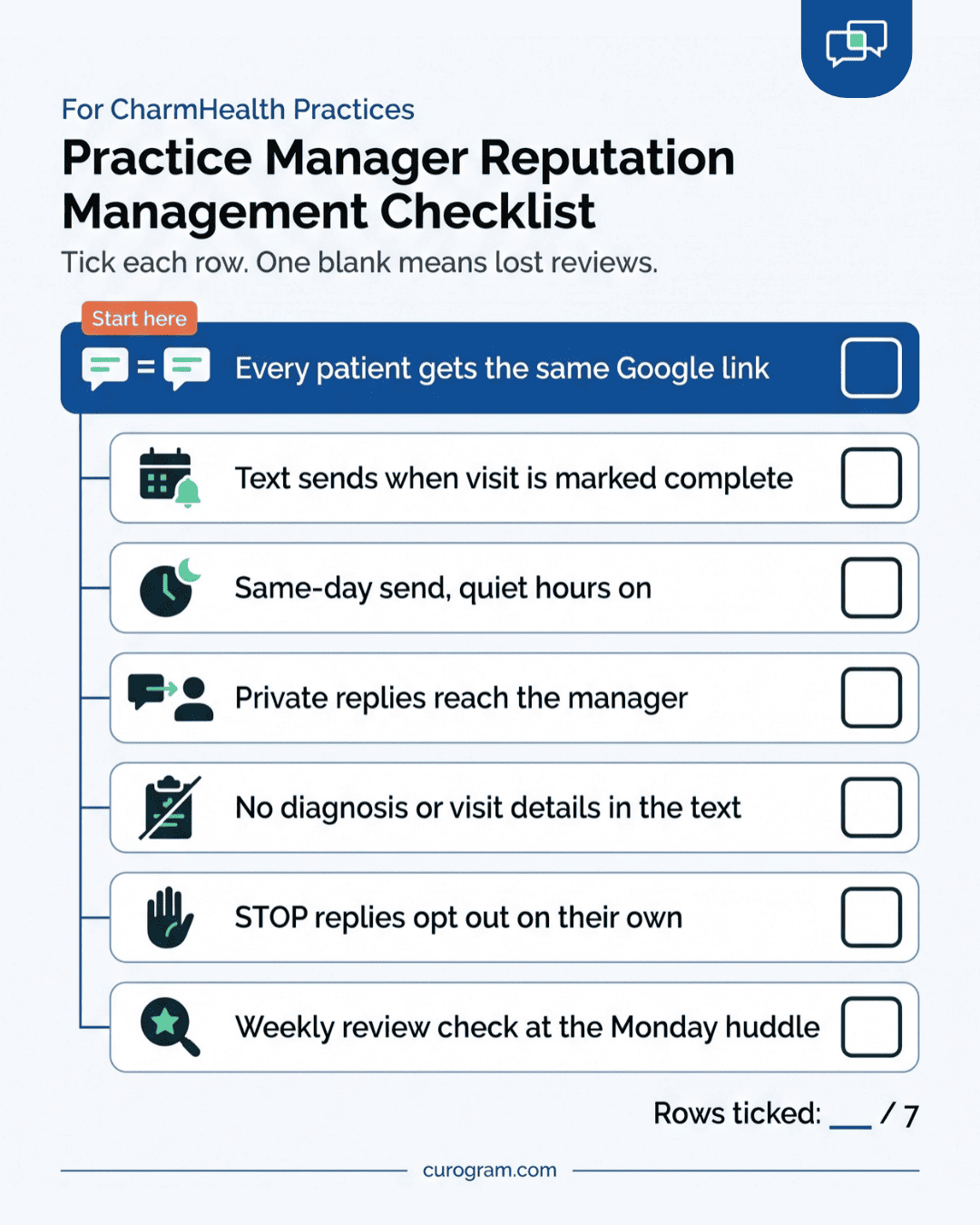
- Curogram’s text goes to every patient with a one-tap link to your Google Business Profile.
- That same text lets an unhappy patient reply in private, so your practice manager hears it first.
- Requests carry no diagnosis, visit type, or clinical detail, and a STOP reply opts the patient out on its own.
- Based on our internal data, one multi-location practice gained 1,064 new 5-star reviews in 3 months, and 90% of its patients left 5-star ratings.
A patient finishes a visit and walks to the front desk. Staff have a copay to collect, a follow-up to book, and a caller on hold about a referral. Asking for a Google review comes fourth on that list. Fourth almost never happens.
That missing step shows up on your Google Business Profile. Based on our internal data, 90% of new patient leads see that profile before they reach your website. So the page with two reviews from last spring is the first thing most new patients learn about you.
We think the review request belongs to the visit record. When CharmHealth marks an appointment complete, a text should go out with no one at the desk saying a word. Every patient should get the same ask, and anyone with a complaint should have a private way to reach you first.
A CharmHealth review request workflow after patient appointments built this way has four working parts:
- A trigger, which is the completed appointment in CharmHealth
- A send time you set once, so the text lands while the visit is fresh
- One message that holds both the Google link and a private reply option
- A short weekly check by the practice manager
We built Curogram’s review requests for offices with 1 to 20 providers. That includes solo primary care, behavioral health groups, and small multi-specialty practices. Each of them has the same checkout crunch, and each needs a workflow that runs without a script.
Signs, QR cards, and staff contests all lean on the same person at the same busy counter. An automated request leans on CharmHealth’s schedule instead, which marks each visit complete whether checkout is calm or packed.
The Awkward Ask
CharmHealth runs a lot of the day well. Scheduling, charting, e-prescribing, billing, and the patient portal all sit in one cloud system. That’s a big reason small practices pick it.
The gap opens after the encounter is signed. CharmHealth can send a feedback form by email or text when a provider signs the note, set up under Settings > Questionnaire.
You can send the form every visit or every fifth visit. Answers come back as a notice inside Charm, with a link for the provider to read them. It’s a fair tool for internal quality checks.
None of that feedback lands on Google. A patient who gives you top marks on a Charm form has told only you. Your public profile, the one new patients read, gets nothing from it.
Texting and telehealth both come with CharmHealth add-ons you can buy. Google reviews don’t. This is the one gap The Add-On Trap doesn’t even sell a module for.
How the Checkout Ask Falls Apart
Most offices try to fill the gap with people. The steps play out the same way almost every week:
- The practice manager tapes an “Ask for reviews!” note next to the monitor.
- Checkout gets busy. One patient is paying, two are waiting, and every phone line is lit.
- Asking someone to rate the practice in public feels like begging, so staff skip it.
- On a slow afternoon, one patient does get asked. They say “sure” and forget by the time they reach the car.
- Your profile adds two reviews a quarter. A competitor across town adds them every week.
We call this The Awkward Ask. It depends on one person remembering a delicate request at the worst moment of their shift. Each skipped ask turns into The Unasked Review, and those pile up month after month.
Why Staff Pick Who to Ask
Even a willing front desk asks only some patients. A mom who just heard her son needs a referral isn’t going to hear “Would you leave us a review?” at the counter. Neither is the man arguing about a $40 copay, or the client walking out of a hard therapy session.
So staff ask the patients who seem cheerful. That feels like good manners. It also creates a lopsided, hand-picked ask, and Google’s review rules bar “selectively soliciting positive reviews from customers.”
A manual workflow can’t fix this with training. Staff can’t read every patient’s mood, and asking a patient who looks upset feels wrong. The only clean fix is to ask everyone the same way, every time, which no person at a busy counter can do.
What a Thin Profile Costs
Based on our internal data, 90% of new patient leads look at your Google Business Profile before your website. For most new patients, that profile is the front door.
A thin or stale profile doesn’t have to scare off many people to cost real money. Take a practice that loses just 2 or 3 would-be new patients a month to a better-reviewed office nearby:
|
Lost new patients |
Per month at $150 a visit |
Per month at $300 a visit |
Per year |
|
2 a month |
$300 |
$600 |
$3,600 to $7,200 |
|
3 a month |
$450 |
$900 |
$5,400 to $10,800 |
These figures are illustrative, based on a $150 to $300 visit.
They also count only the first visit. A patient who stays with you for years is worth many times that number.
CharmHealth’s $200 monthly provider plan comes to $2,400 a year. That’s less than the low end of this table.
The Fixes That Fade
Most practice managers have worked through the usual list. Laminated counter signs. QR-code cards tucked into the checkout folder. A pep talk at the staff meeting, maybe a gift card for whoever gets the most reviews that month.
Each one gets a burst of effort. Then flu season hits, the schedule fills, and the QR cards sit in a stack by the printer.
The old complaint is the part that stings. A one-star review from three years ago, about a billing mix-up you fixed long ago, still sits near the top of the profile. Your practice doesn’t earn enough new reviews to push it down, so every new searcher reads it first.
The Review Engine on Autopilot
A patient at a sample practice, Maple Family Medicine, gets this text a couple of hours after a visit:
“Thanks for visiting Maple Family Medicine today. How did we do? Tap to leave a Google review: [link]. Had a problem? Reply here and our office manager will reach out. Reply STOP to opt out.”
That’s the whole review request.
The Trigger is the Completed Visit
Curogram’s review requests start from CharmHealth’s appointment data. When a visit is marked complete, Curogram queues the text. Nobody clicks send, and nobody picks which patients get it.
That’s what post-appointment review request automation means in practice. The request is tied to an event in the schedule, so it fires on every completed visit. A sick day at the front desk doesn’t change the count.
Taking the choice away from staff does two jobs. Staff time drops to zero per patient, so you automate patient review requests without staff scripts or checkout speeches.
Every patient also gets the same ask. Google’s review rules bar “selectively soliciting positive reviews from customers,” and a system that asks everyone stays inside that line.
Picking the Send Time
Review request timing after medical visits is a setting you choose once. We suggest a same-day send, after the patient has left the building. A gap of an hour or two lets them get home, while they still remember the nurse who drew their blood.
A few rules we use with CharmHealth practices:
- Set quiet hours, so a text from a 6 p.m. visit waits until the next morning.
- For procedures, think about a next-day send so the patient isn’t asked while still sore.
- For behavioral health visits, a next-day send also gives the patient room after a hard session.
- Cap the frequency. A patient seen every week shouldn’t get asked every week.
One Message, Two Ways to Reply
Every patient gets the Google link. The same message invites anyone with a problem to reply in private. Those replies show up on the practice manager’s Curogram dashboard, so someone can call the patient back that afternoon.
The private reply is an extra door. It never replaces the Google link, and no patient is screened out of the public ask based on how they answer. An upset patient gets a faster way to reach you than a one-star post.
What the Text Leaves Out
Curogram review requests carry no protected health information. The text names your practice and links to your profile. It doesn’t mention a diagnosis, visit type, test, or result.
Opt-outs run on their own. A patient who replies STOP stops getting texts, and the opt-out is logged without anyone on staff touching it. Curogram signs a Business Associate Agreement with your practice.
Behavioral health offices should check one more thing during setup. If the practice name itself reveals the type of care, we’ll talk through the display name patients see.
Setup on CharmHealth’s API
Curogram connects to CharmHealth through its FHIR API. CharmHealth reviews each API access request before granting it, so our team files that request and handles the testing. Your admin approves the connection inside your CharmHealth account.
Full setup usually takes 1 to 2 weeks. Staff training takes under 10 minutes, since there’s nothing to trigger by hand. The front desk learns where review alerts appear and what to do with a private complaint.
How It Compares to What You Have Now
Practices hunting for a CharmHealth Feedback Survey Forms alternative usually want one thing the forms can’t do. They want the patient’s words on Google.
|
Checkout ask |
CharmHealth feedback form |
Curogram review text |
|
|
What starts it |
A staff member’s memory |
A signed encounter |
A completed appointment |
|
Where answers go |
Wherever the patient follows up, if at all |
Inside Charm, for your team |
Your Google profile, plus private replies to your dashboard |
|
Reaches Google |
Only if the patient remembers |
No |
Yes, in one tap |
|
Staff effort per patient |
A conversation at checkout |
None |
None |
A front desk review workflow for small group practices has to fit inside tools staff already open. Curogram shows review activity on the same dashboard that runs reminders and two-way texting. One login and one bill cover all of it.

The Climbing Rating Without the Checkout Speech
Based on our internal data, a multi-location practice that struggled with patient feedback ran this workflow and gained 1,064 new 5-star reviews in 3 months. 90% of the practice’s patients left 5-star ratings.
Spread over 90 days, that’s about 12 new 5-star reviews a day. At two reviews a quarter, a checkout ask would need more than 130 years to match it.
Coverage explains most of that gap. Requests went out after every completed visit, so the practice heard from patients nobody would have asked at the counter.
A Worked Example: One Patient, One Tuesday
This table follows one visit at a sample 4-provider office. The send delay is set to 2 hours. Times and volumes are illustrative.
|
Time |
What happens |
Who does it |
|
10:40 a.m. |
The visit ends and the appointment is marked complete in CharmHealth |
Medical assistant, as part of normal checkout |
|
10:41 a.m. |
Curogram reads the status and queues the review text |
Curogram |
|
12:40 p.m. |
The text reaches the patient, who is now home |
Curogram |
|
12:43 p.m. |
The patient taps the link, picks 5 stars, and types one line |
Patient |
|
12:44 p.m. |
The new review appears on the Curogram dashboard |
Curogram |
Handling a Private Reply, Step by Step
A second patient that day replies to the text instead: “Waited 50 minutes past my time.” That reply moves through four steps:
- Curogram posts the reply to the practice manager’s dashboard as an open item.
- She reads it between tasks and checks the day’s schedule in CharmHealth.
- Before 3 p.m., she calls him, apologizes, and explains that a provider ran late after an urgent visit.
- She offers him the first slot of the morning for his follow-up, then closes the item.
His Google link was in the same text the whole time. Whether he posts a review is his call, and he now has a real answer to put in it.
Now scale it. Four providers seeing 20 patients each is 80 completed visits a day, or 400 requests a week. If 1 in 10 patients taps through, the office adds 40 reviews a week without a single checkout speech.
Curogram Highlight: Automated Google Review Requests
Automated Google Review Requests is the Curogram feature behind every step in this article. It reads completed appointments from CharmHealth and texts each patient a short request with a one-tap link to your Google Business Profile.
What you set once:
- The send delay after a completed visit
- Quiet hours, so no text lands late at night
- How often a frequent patient can be asked
- Who on staff sees private replies
Every patient gets the same public ask. Anyone with a problem can reply in private, and that reply goes to your practice manager’s dashboard. The texts carry no clinical detail, and STOP replies are handled on their own under a Business Associate Agreement.
Other Curogram tools feed it more completed visits. Based on our internal data, Atlas Medical Center cut its no-show rate from 14.20% to 4.91% in three months using automated reminders. Each kept appointment is one more patient who gets a review request.
Recall campaigns add to the count. At one multi-location practice, 35% of patients who got an SMS recall booked within a month. Recall texts alone brought in 1,240 patients. Those returning patients already know your office, which makes them likely reviewers.
Everything shows on one dashboard: reminders, two-way texts, recalls, and reviews. Your front desk learns one screen, and your practice pays one bill.
Conclusion: Retire the Ask, Keep the Reviews
Checkout is the busiest two minutes of any visit, and a review request is the easiest thing to drop there. Any plan that depends on staff remembering it will fade by the next flu season. So we’d move the ask off the counter and onto the schedule.
CharmHealth holds the clinical record of the visit. Curogram handles the hour after it, when a satisfied patient will tap five stars if the link is already on their phone. A patient who had a rough visit gets a private line to your practice manager in the same text.
Start with one number. Count the Google reviews your practice earned last month, then compare it with your completed visits. If you saw 1,500 patients and earned 3 reviews, that’s one review per 500 visits. That ratio is what The Awkward Ask costs you.
Next, look at what you already pay for. Many CharmHealth practices run separate add-ons for texting and reminders, and each one bills on its own.
Book an integration demo. We’ll map the post-visit trigger to your schedule and show the private replies live. We’ll also total up which CharmHealth add-ons the same subscription can replace.