
 Mira Gwehn Revilla

- CharmHealth’s own plugin, CharmTeleHealth, works well enough, but it bills $20 per provider each month on top of your plan.
- Patients get one text with one link and join in their phone’s browser, with no app, account, or password.
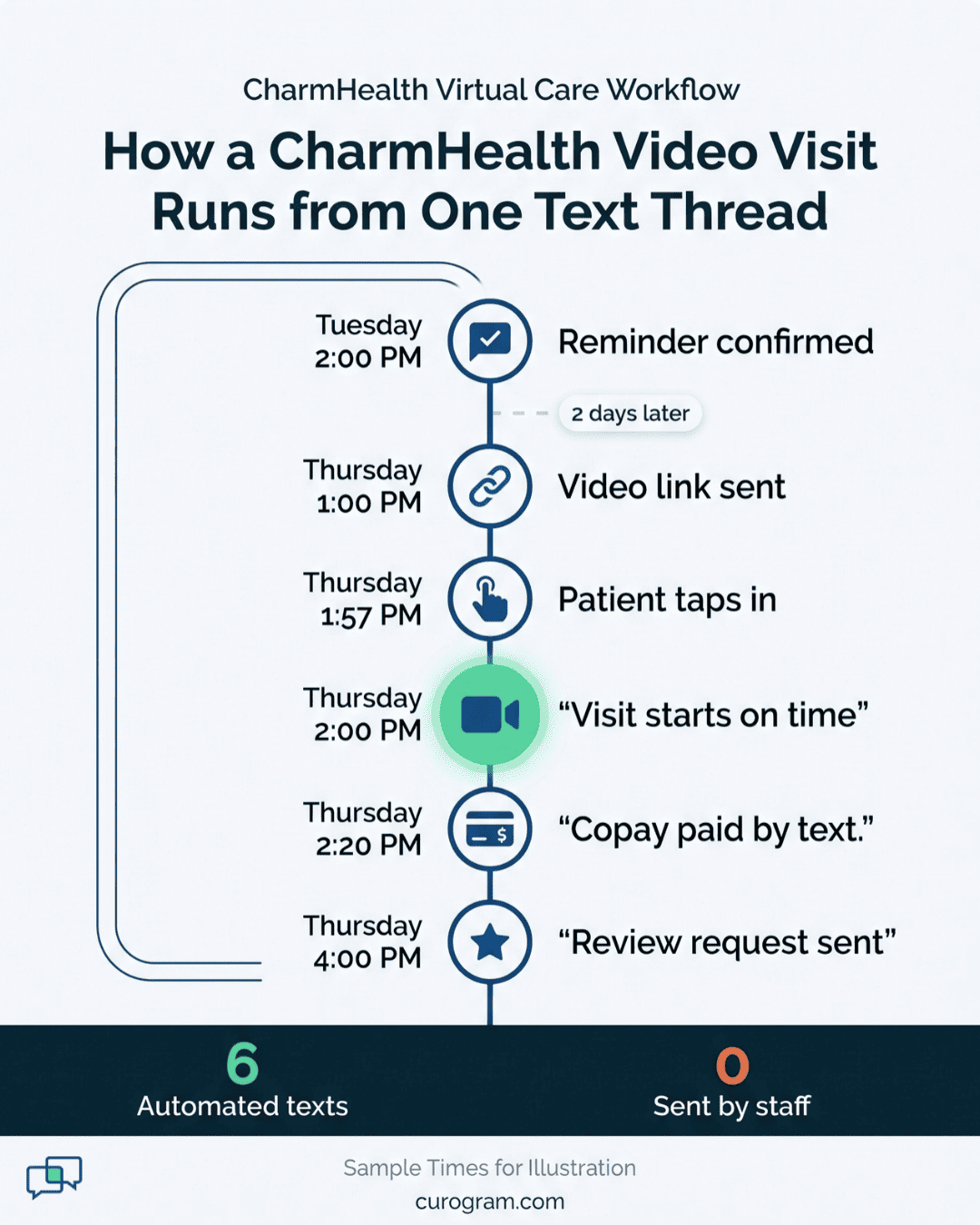
- The reminder, visit link, payment link, and review request all sit in one text thread.
- A five-provider group drops $100 a month, or $1,200 a year, in CharmTeleHealth fees.
- Based on our internal data, the reminder engine that delivers the visit link cut Atlas Medical Center’s no-shows from 14.20% to 4.91% in three months.
Twenty dollars is an easy number to approve. That’s what CharmTeleHealth costs per provider each month. Few practice managers argue when the fee notice pops up in CharmHealth.
The bigger cost sits in how the plugin is wired. Video visits through the plugin sit apart from the tools that remind, confirm, and bill the patient. Your reminder goes out through one add-on, and the visit runs in another. The bill waits in a portal the patient has never opened.
So when a patient can’t find the join button five minutes after start time, your front desk becomes the help line.
We think a video visit belongs in the same text thread as the reminder that booked it. If you want telemedicine with CharmHealth integration without extra add-on fees, look for a patient engagement platform that already includes video. Then the visit link lands in the thread your patient already reads.
Curogram works that way. A patient gets a text, taps one link, and the visit opens in the phone’s browser. Once the call ends, a payment link and a review request follow in that same thread, and CharmHealth keeps the chart.
For a five-provider group, the plugin alone runs $1,200 a year before a single patient logs on. That cost is easy to see on an invoice. Harder to see are the late starts, the “how do I join?” calls, and the copays that sit unpaid for weeks.
Those hidden costs are where most of the money goes. Based on our internal data, Curogram’s reminder engine helped Atlas Medical Center cut no-shows from 14.20% to 4.91% in three months. That same engine sends the video link.
The Twenty-Dollar Add-On
CharmHealth earns its place in a lot of small practices. It gives you charting, scheduling, e-prescribing, and billing at a price a three-provider clinic can carry. Its telehealth plugin, CharmTeleHealth, also works. Providers can launch a video call from the chart, and the call does what a video call should do.
Our issue is with how it’s sold. CharmHealth’s pricing FAQ lists telehealth at $20 per provider per month, and you have to accept a fee notice before it turns on. Other staff who join visits are billed on their own terms.
That pattern repeats across the add-on menu. Text messages past your plan’s monthly cap cost $0.08 each, and any message over 160 characters bills as two. Each tool shows up as its own line, with its own setup screen and its own settings to learn.
We call this the Add-On Trap. Each piece looks cheap, and the total shows up later.
One Visit, Four Separate Tools
Follow a single video visit through the add-on setup and count the handoffs:
- A reminder goes out through CharmHealth’s text notifications, which draw down the same monthly message cap as everything else.
- The patient tries to find the visit. The join path runs through the CharmHealth patient side, and many patients have never set up a login there.
- Your front desk picks up a call: “I got the reminder, but where’s the video?”
- Staff resend the link while the provider waits in an empty video room.
- After the visit, the invoice sits behind a portal login the patient won’t finish.
- Nobody asks for a Google review, because no add-on in the stack does that.
Six steps, and the patient has dealt with at least three different screens. Each switch is a place where someone drops off.
Where the Patient Gets Stuck
Staff feel the friction first. A 64-year-old patient with a follow-up for blood pressure gets a reminder text, then can’t remember a portal password she set two years ago. She calls. Your front desk walks her through a reset while two other lines blink.
CharmHealth’s own Two-Way Text add-on doesn’t fix this. Secured messages ask patients to click a link, type a one-time code that expires in two hours, and confirm their date of birth. That’s sound security. Even so, every added step is one more place for a patient to give up.
Video visits are short, often 15 minutes. A patient who spends eight of them on a login screen has burned half the slot before saying hello.
Your provider pays for that delay too. A 2:00 visit that starts at 2:08 pushes the 2:15 and the 2:30, and by late afternoon the schedule is off by 20 minutes.
What the Add-On Costs Before the First Visit
Start with the fee alone. CharmTeleHealth bills per provider, so the cost grows with your team:
|
Providers |
Monthly Fee |
Yearly Fee |
|
1 |
$20 |
$240 |
|
5 |
$100 |
$1,200 |
|
10 |
$200 |
$2,400 |
|
20 |
$400 |
$4,800 |
That’s before message overages. A visit text with a long link can run past 160 characters and bill as two. Send a reminder and a join link for every visit, and one appointment can use four messages from your cap.
Missed visits are the bigger number. As an illustrative example, take a practice running 120 virtual visits a month at $200 each. At a 14.20% no-show rate, about 17 patients never join, and $3,400 in visits disappears. Each of those empty slots still holds a provider who could have seen someone else.
The Practice Manager’s Fourth Screen
Meet the person who chose CharmHealth because it was simple. She now runs the EHR, the text add-on, the telehealth plugin, and the patient portal, each with its own settings.
At 2:07, Dr. Lin is sitting alone in a video room. Your front desk is re-texting a join link to a patient stuck on a login page. Nobody is checking whether the 2:30 patient has confirmed.
None of this shows up in a monthly fee. It shows up in a provider who runs 20 minutes behind by 4:00 and a manager who spends Friday sorting out which add-on sent which message.

One Platform for the Reminder and the Visit
Curogram includes telemedicine in the same patient engagement platform that runs your reminders, two-way texting, digital forms, and payments. You don’t buy a separate video module or set up a second vendor.
With consolidated telehealth and reminders, one platform sends the reminder, collects the “C” that confirms it, and delivers the video link when it’s time.
For your billing sheet, the video visits included with patient engagement platform pricing mean one fewer line. For your staff, they mean one place to look when a patient asks a question.
Your CharmHealth virtual care workflow keeps its shape. Providers still chart in CharmHealth and bill from CharmHealth. Curogram handles everything the patient sees: the texts, the link, the payment request, and the review ask afterward.
What the Patient Actually Taps
For the patient, the phone screen is the whole interface. A video visit text from Curogram reads something like this:
Hi Maria, your video visit with Dr. Patel is today at 2:00 PM. Tap here to join a few minutes early: [secure link]. Reply R to reschedule.
Maria taps the link. Her phone’s browser asks for camera and mic access, and the visit opens. She doesn’t download Charm mPHR, set up an account, or type a code.
This is the core idea behind single link video visit healthcare: the link is the whole setup. All a patient needs is a phone that gets texts and has a working browser. That covers patients who never installed a health app and never will.
Since the link lives in the same thread as last week’s reminder, Maria knows who sent it. She has already replied “C” to that number once.
HIPAA Compliant Telemedicine for CharmHealth Practices
Compliance comes down to what the text says and where the link goes. Standard SMS isn’t encrypted, so a Curogram visit text carries no diagnosis, no reason for the visit, and no test results. It carries a first name, a time, and a link.
That link opens a secure, encrypted page for the video session. Anything clinical stays behind it.
This is the same model HHS describes for telehealth on telehealth.hhs.gov: use a platform built for health data, and sign a Business Associate Agreement with any vendor that handles it. Ask every telehealth vendor for that agreement before the first visit, ours included.
Patients never see a portal or log in. They also don’t receive a code that expires two hours later, which means an evening visit doesn’t fail because a code sent at noon went stale.
How the CharmHealth Integration Gets Built
We’d rather give you the real timeline than a fast one. CharmHealth has a documented FHIR API, but access is gated.
A vendor fills out an API Request Questionnaire, signs a License Agreement, and tests in a sandbox. Then a practice admin grants access under Settings > Account > API Keys.
Our team handles the paperwork and testing. Your admin’s part is the final approval in CharmHealth, which takes a few minutes.
Plan on 1 to 2 weeks for full integration. During that window, keep CharmTeleHealth running so no visits get missed. Once the connection is live, appointments flow from the CharmHealth schedule into Curogram, and reminders go out on their own.
CharmHealth stays your system of record for charting, scheduling, and billing. Curogram reads the schedule and handles patient messages.
Where It Fits by Specialty
CharmHealth draws a lot of integrative medicine, primary care, and behavioral health clinics with 1 to 20 providers. Each group uses video a little differently.
An integrative medicine practice reviewing a supplement protocol at week six doesn’t need an exam room. A one-tap link keeps that follow-up from slipping off the calendar.
Primary care uses short video check-ins to keep patients engaged between annual visits, such as a medication check two weeks after a dose change.
Behavioral health has the most to gain. A patient who opens a familiar text and taps once is more likely to show up for a weekly session than one who has to log in somewhere first.
For small groups weighing a CharmTeleHealth alternative for small practices, these are the visits to test first.
One Virtual Visit, Start to Finish
Take an illustrative five-provider practice running CharmHealth. A patient books a Thursday 2:00 PM video follow-up for a medication check. With Curogram connected, the full thread looks like this:
- Tuesday, 2:00 PM. A reminder text goes out 48 hours ahead. She replies “C,” Curogram marks the slot confirmed, and nobody on staff makes a call.
- Thursday, 1:00 PM. A second text arrives with the secure video link.
- Thursday, 1:57 PM. She taps the link from the same thread and lands in the virtual waiting room.
- Thursday, 2:00 PM. Dr. Okafor joins on time. He runs a 15-minute visit and charts in CharmHealth as usual.
- Thursday, 2:20 PM. A payment link for the $40 copay arrives by text, and she pays before the chart is closed.
- Thursday, 4:00 PM. A review request goes out. Every patient gets the same ask, whatever their visit was like.
Six touches, all from one phone number. Staff sent none of them by hand.
If she had replied “R” on Tuesday instead, the slot would have opened two days early. Your front desk could fill it from the waitlist with two days’ notice.
Worked Math for a Five-Provider Practice
Now apply real case numbers to that same sample practice. Based on our internal data, Atlas Medical Center cut its no-show rate from 14.20% to 4.91% in three months on Curogram’s reminder engine. That engine is also what delivers the video link.
Assume the practice runs 120 virtual visits a month at $200 each:
|
Item |
Before |
After |
|
No-show rate |
14.20% |
4.91% |
|
Missed visits per month |
About 17 |
About 6 |
|
Visit revenue lost per month |
$3,400 |
$1,200 |
|
CharmTeleHealth fee per month |
$100 |
$0 |
That’s roughly $2,300 a month kept: $2,200 in visits that now happen, plus the $100 plugin fee. Atlas saw its results across all appointments, so treat this as a model for video visits and test it against your own numbers.
At 4.91%, about 6 patients still miss each month. Those are the calls worth making by hand, and your front desk now has the time to make them.
Run the Same Math on Your Schedule
You can build this table for your own practice in about 10 minutes:
- Pull last month’s virtual visits from your CharmHealth schedule, and count how many were marked no-show.
- Divide no-shows by total visits to get your current rate.
- Multiply missed visits by your average reimbursement for a video follow-up.
- Add your CharmTeleHealth fee, which is $20 times your provider count.
That total is what the add-on setup costs you each month. Bring it to a demo, and we’ll run your numbers against Atlas’s rates.
Curogram Highlight: Video Visits in the Reminder Thread
Curogram Telemedicine puts HIPAA-compliant video visits inside the same text thread your patients already use to confirm appointments. There’s no separate subscription and nothing for the patient to install.
For a CharmHealth practice, the setup is short. Appointments sync from your CharmHealth schedule. Curogram sends the reminder, collects the reply, and texts the secure video link before the visit. The patient taps once, and the visit opens in the phone’s browser.
Your provider joins from a computer, runs the visit, and charts in CharmHealth like any other encounter. Once the visit ends, the same thread can carry:
- a text-to-pay link for the copay or balance
- a digital form for the next visit
- a review request sent to every patient, with no filtering by score
Asking every patient keeps you on the right side of the FTC’s 2024 rule on fake and suppressed reviews. Filtering out unhappy patients before they reach Google is the kind of practice that rule targets.
For your front desk, the change shows up in the phone queue. Patients who would have called to ask “how do I join?” tap a link instead. Staff who used to resend links can work the schedule.
For your budget, the CharmTeleHealth line comes off. A five-provider group saves $1,200 a year on that fee alone, before counting the visits that now happen.
Setup takes 1 to 2 weeks, and our team handles the CharmHealth API approval steps. Your admin approves access once in CharmHealth settings.
Conclusion: Retire the Line Item, Keep the Visits
Video visits fail at the handoffs. A patient can’t find the link, can’t log in, or never confirmed in the first place. A $20 plugin doesn’t touch any of those problems, because it starts working only once the patient is already in the room.
Curogram puts the whole visit in one place your patients already check: their text messages. The reminder, the confirmation, the video link, the payment, and the review request all come from one number. Patients don’t download an app or create a login.
CharmHealth keeps doing what you bought it for. It holds your charts, runs your schedule, and handles billing. Curogram handles what the patient sees on the phone, and that’s the part that decides whether a booked visit turns into an attended one.
Before you renew any add-on, add up what you pay CharmHealth for telehealth, text overages, and portal workarounds each month.
Then estimate your missed virtual visits. As an illustrative example, if Curogram saves just 2 or 3 no-shows a month at $200 each, that’s $400 to $600 back, before the plugin fee comes off.
Book your CharmHealth integration demo and bring your provider count and add-on list. We’ll show you which line items Curogram replaces and what the net cost looks like for your practice.