
How EMR System Integration Cuts No-Show Rates in Half
Discover why phone reminders fail and how EMR system integration reduces no-show rates with timely, accurate texts that patients can answer in...
10 min read

A patient moves her Tuesday visit to Thursday. Your front desk updates the EMR, but your reminder tool runs off its own list. So the night before Tuesday, she gets a text about Tuesday.
She might show up two days early. Or she might decide the change never went through and stop trying. Either way, a slot on your schedule is wasted, and your team never saw it coming.
Small gaps like this add up across a full schedule. They’re why patient no-shows stay stubborn even at clinics that already send reminders.
Appointment reminders should read from your EMR, the same system your team uses to book, move, and cancel visits. Then every text knows the visit type, provider, location, and what the patient needs to do first.
That changes what a reminder can carry. A fasting lab draw comes with a note to skip breakfast. For a video visit, the secure link arrives 15 minutes before start time. And when a patient can’t make it, they reply “R,” pick a new time, and free the slot for your waitlist.
Your front desk feels the difference quickly. Reminder calls shrink to a short follow-up list. Replies that used to pile up as voicemails land in one shared inbox instead, already tied to the right chart.
Below, you’ll see the five reasons generic reminders fail and what changes once EMR data drives each message. You’ll also see results from real Curogram clients. A free checklist near the end lets your team audit its own setup, one step at a time.
Your providers can’t treat an empty chair. Every no-show leaves a gap in the schedule and wastes the prep your staff already did. It also costs revenue you can’t bill back.
Yet many clinics still fight patient no-shows with manual calls, generic texts, or robocalls. Those methods miss the five reasons patients actually skip visits.
No-shows and late cancellations cost more than revenue. They throw off provider schedules and push back care. They also create inequity, since a patient who wanted that slot was told to wait for a later date.
Meanwhile, your staff spend their time chasing patients instead of helping the ones in the lobby. Satisfaction drops, and some frustrated patients leave negative reviews or switch providers.
Generic reminders and disconnected workflows leave all of this in place. Clinics need reminders that pull live EMR data, carry the right details, and give patients a clear action to take.
A visit booked six weeks out is easy to lose. Between work shifts, school pickups, and family needs, a Tuesday 9:00 AM follow-up slips off the radar.
Generic appointment reminders often miss the window. A text sent a week early gets read and forgotten. One sent the morning of the visit leaves no time to set up a ride or ask for time off.
Many reminders also leave out a clear next step, such as “Reply C to confirm or R to reschedule.” If the prompt arrives at the wrong time or asks for nothing, the patient forgets. The slot goes empty, and care gets pushed back.
Many specialty visits need prep. A patient may need to fast 8 to 12 hours before labs, stop a blood thinner days before a procedure, or bring a referral and insurance card. Those steps are often said out loud at booking or tucked into a paper packet that never gets read.
The results are predictable. One patient eats breakfast before a fasting draw and gets sent home. Another realizes the night before that they didn’t stop a medication, so they cancel, too late for you to fill the slot.
A reminder that only says “You have an appointment tomorrow” can’t catch either case. If your reminders aren’t linked to your EMR, they don’t know the visit type, so they can’t send the right prep steps at the right time.
Plans change. A shift gets swapped, a child gets sick, a ride falls through. When that happens, a patient needs a fast way to move the visit.
If the only option is calling during office hours, the patient has to find a free moment between 8 AM and 5 PM. Then they wait on hold. A warehouse worker who can’t take a personal call on the floor, or a patient whose ride cancelled at 7 AM, will often just skip the visit.
Without two-way reminders, you don’t hear about any of this. The patient never calls, and your front desk finds out at 10:15 when the chair is still empty. By then, it’s too late to offer the slot to someone on your waitlist.
Today’s patients prefer texting over phone calls. But even when clinics text, too often the messages are generic: “You have an appointment at 10:00.” Without context—location, provider, type of visit—patients may ignore the reminder. Worse, disconnected systems sometimes send incorrect information when schedules change. That erodes trust in the practice and discourages attendance.
Your front desk can lose hours a day to reminder calls. The list for tomorrow’s schedule gets worked between check-ins, insurance questions, and walk-ins, and many calls end in voicemail.
When a patient does pick up, someone still has to open the chart and mark the visit confirmed by hand. Callbacks come in at random times, so a confirmation gets lost on a sticky note or never logged at all.
As the list grows each day, staff frustration grows, turnover risk rises, and patients still miss visits. Asking your team to call faster won’t close that gap. The fix sits in the workflow, which right now depends on a person, a phone, and a patient who happens to answer.
Your EMR already holds what a good reminder needs: the visit type, the provider, the location, and whether the slot is still booked. A standalone reminder tool never sees any of it. Once the two connect, each field changes what the patient receives and what your team does by hand.
When reminders connect directly to your EMR, they read from the same schedule your front desk books in. A change made in the chart updates the next reminder, with no second system to fix.
Say your team moves a patient’s visit from Tuesday at 9:00 AM to Thursday at 2:30 PM. The 24-hour reminder goes out Wednesday afternoon with the Thursday time. If the visit is canceled instead, no reminder goes out at all.
That ends the two most common sync errors: the patient who shows up for a slot that moved, and the patient who gets a reminder for a visit they already canceled. The date, time, provider, and location in each text match what’s in the chart.
An EMR-linked reminder reads the visit type, provider, and time, then builds the message around them. A cardiology patient might get this:
You have a cardiology appointment with Dr. Lee on Tuesday at 10:00 AM. Please bring your insurance card and recent test results.”
Every detail in that text comes from fields your team already fills in at booking. Nobody types it twice.
The message changes with the visit:
| Visit type | What the reminder adds |
|---|---|
| New patient | Photo ID, insurance card, arrive 15 minutes early |
| Cardiology follow-up | Recent test results, current medication list |
| Physical therapy | Wear loose clothing, bring your home exercise sheet |
| Specialist referral | Referral form from your primary care doctor |
When patients arrive with the right card, form, or results, check-in moves faster. Fewer visits stall at the desk while someone tracks down a missing document.
Prep instructions can ride along with the reminder, tied to the visit type your team picks at booking. Nobody has to remember which patient needs which handout.
An imaging patient who has to fast gets that rule in the evening text before the scan. That leaves time to plan meals around it.
For telehealth, the secure visit link lands 15 minutes before start time, so the patient isn’t digging through old emails at 2:59. A parent booking a pediatric visit gets the guardian consent form early and can sign it from home.
Each of these used to depend on a phone call or a paper packet. With the instruction attached to the visit itself, fewer patients cancel that morning or get turned away at the desk.
With two-way texting, patients answer the reminder itself. They can confirm, cancel, or ask to reschedule by text. Each reply lands in a shared inbox your whole front desk can see.
A typical cancellation runs like this:
The whole exchange happens by text, long before anyone wonders at 9:45 whether the patient is coming. Based on our internal data, confirmation rates on our platform run above 75%. That leaves your team following up on a short list instead of the full schedule.
When patients confirm by text, fewer of them call. Every text confirmation is also one call your front desk doesn’t have to make.
Based on our internal data, clinics using Curogram have seen inbound calls drop by 24% with automated texting. The strongest results show clinics cutting phone traffic by up to 50%.
Take an illustrative clinic that handles 120 calls a day at about 3 minutes each. That’s 6 hours on the phone. A 24% drop frees roughly 1.4 hours a day, or about 7 hours across a five-day week.
Your team can put that time toward patient service, billing, or follow-up care.
Once your reminders run through your EMR, every reply and every empty chair becomes a data point. Four numbers tell you the most about where to adjust.
| Metric | What it shows | What you might change |
|---|---|---|
| Confirmation rate | How many patients reply before the visit | Add or move a step in your reminder cadence |
| No-show rate by visit type | Which visits go empty most often | Add an earlier touch for those visit types |
| Average confirmation time | How fast patients respond | Shift when the first reminder goes out |
| Cancellation patterns | Which days and times lose the most visits | Plan staff schedules around those gaps |
Say your Monday new-patient visits miss more often than any other slot. You could add a 72-hour reminder for that visit type only, then check the rate a month later to see if it moved.
These results come from our internal data on Curogram clients.
| Practice | Result | Timeframe |
|---|---|---|
| Atlas Medical Center | No-show rate fell from 14.20% to 4.91% | 3 months |
| Covina Arthritic Clinic | More than 1,100 appointments confirmed by text | Every month, on average |
| Multi-location practice | 1,064 new five-star Google reviews | 3 months |
At Atlas, that drop came from automated reminders and confirmations replacing manual follow-up. At Covina, the confirmations used to depend on staff calling patients one by one.
For the multi-location practice, review requests went out with post-visit surveys sent to every patient. Pairing the ask with a visit that just happened gave patients an easy moment to respond.
From the patient’s side, a good reminder saves effort. The time is right, the prep steps are clear, and moving the visit takes one text reply instead of a call on hold.
Patients who have that kind of visit are more likely to come back and to recommend you. Some will say so in a Google review, and that reaches new patients. Based on our internal data, 90% of new patient leads look at a clinic’s Google Business Profile before its website.
Your schedule gets easier to plan, too. When most patients confirm ahead of time and the rest reschedule by text, your front desk knows by the night before which slots are open and still has time to fill them.
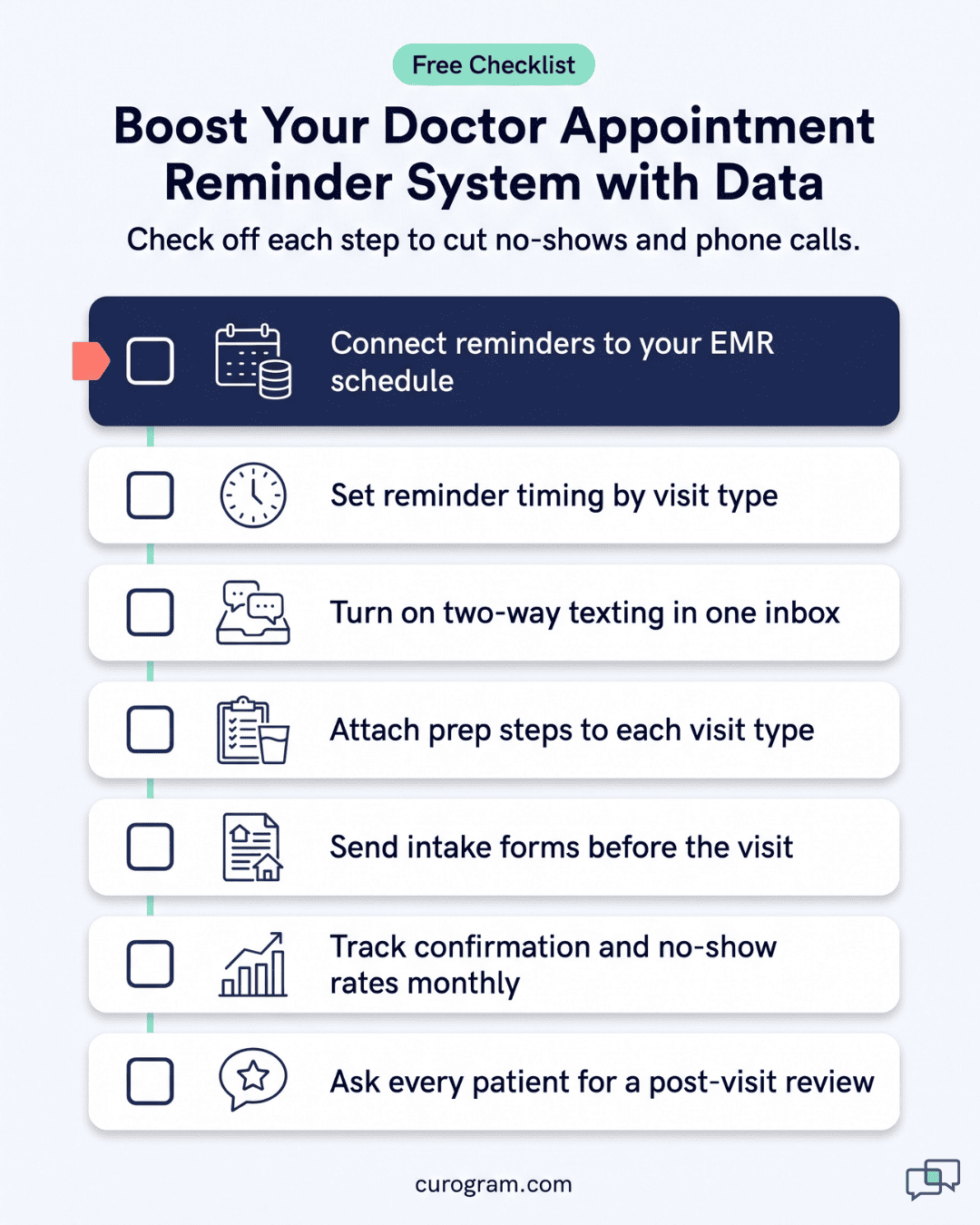
Curogram adds HIPAA-compliant, two-way texting to your practice and syncs with your EMR schedule. Every feature below reads from that schedule, so your team never keeps a second list.
With Smart Reminder Cadence, you set when texts go out for each visit type. A new-patient visit might get reminders at 72 hours, 24 hours, and 2 hours, while a quick follow-up gets just one.
Two-way texting lets patients confirm, cancel, or reschedule by reply. Your front desk sees each response as it arrives, in one shared inbox.
Prep steps travel with the reminder, matched to the visit. That might be a link for a video visit, fasting rules before labs, or a paperwork request before a first appointment.
Digital intake forms go out before the visit. Patients fill them in securely from home, and your staff imports the answers into the EMR.
After the visit, every patient gets a short survey and a review request. Those steps help you boost online reputation, and any unhappy reply reaches your team for follow-up.
Use this list to check your own setup. Each step either prevents a no-show or takes a manual call off your front desk.
Most empty chairs trace back to a reminder that didn’t know enough. It had the time, but not the visit type, the provider, or the prep the patient needed.
Your EMR already holds every one of those details. Once your reminders can read them, attendance stops depending on how many calls your front desk can squeeze into an afternoon.
With that connection in place, tomorrow’s schedule is mostly settled by tonight. Patients have confirmed by text, and the two who needed new times already picked them. The lab patient knows not to eat breakfast. Your team spends the morning on the people in the lobby instead of the phone list.
Curogram gives you that setup with HIPAA-compliant, two-way reminders that sync with your EMR. Based on our internal data, Atlas Medical Center cut its no-show rate from 14.20% to 4.91% in three months.
Book a demo and we’ll walk you through how Curogram reminders would run on your EMR, your visit types, and your schedule.

Discover why phone reminders fail and how EMR system integration reduces no-show rates with timely, accurate texts that patients can answer in...

 Carylee Gali : 3/17/22, 7:00 AM
Reduce patient cancellations at your practice with timely reminders, same-day follow-ups, and simple rescheduling options that keep your schedule...
 Mira Gwehn Revilla : 10/12/26, 5:00 PM
The reminder features a one-provider practice should insist on, the ones to skip, and how to run reminders with no dedicated scheduler.