
1 min read
FREE Checklist: Boost Your Doctor Appointment Reminder System w/ Data
💡Appointment reminders work best when powered by EMR data. Disconnected reminders only send generic alerts. But when reminders integrate with your...
16 min read

An empty exam room still costs you money. The lights stay on, the provider stays on payroll, and the front desk still fields calls. The only thing missing is the patient who was supposed to be there.
Multiply that by a few slots a week and the number gets uncomfortable fast. Some reports put the annual cost of no-shows at more than $150,000 per physician, and across the U.S. healthcare system the losses run into the billions.
Here is the part most practices miss. Those missed visits are rarely caused by patients who stopped caring. They are caused by patients who simply forgot.
That is the good news hidden inside a frustrating problem. Forgetfulness is fixable. A well-timed message, sent through the channel a patient actually checks, closes most of the gap on its own.
This guide walks you through how to remind patients of appointments in a way that works in a real clinic, not just on paper. You will find more than 20 ready-to-use templates for text, email, phone, and instant messaging. You will also see when to send each one, what to include, and how to stay HIPAA compliant while you do it.
We will cover the true cost of a missed slot, why patients skip visits, and how automated patient appointment reminders take the manual work off your staff. Along the way, you will get sample math you can run against your own numbers.
None of this requires new staff or a bigger budget. It requires better timing and a message patients can read in five seconds.
By the end, you will have a reminder system you can set up this month. Not a theory. A working plan.
The first wave of benefits shows up in your schedule within weeks:
Each of these is a direct swap: a message goes out, and something that used to go wrong stops going wrong.
The second wave is harder to see but worth more over time. Reminders give you a channel to prepare patients before they arrive, so you can send fasting instructions, parking details, or a document checklist without a phone call. A short line about your cancellation window reinforces policy without a confrontation at the front desk.
Predictable schedules also change how you staff. When you know who is coming, you plan coverage instead of reacting to gaps. That certainty, not the message itself, is where most of the value lives.
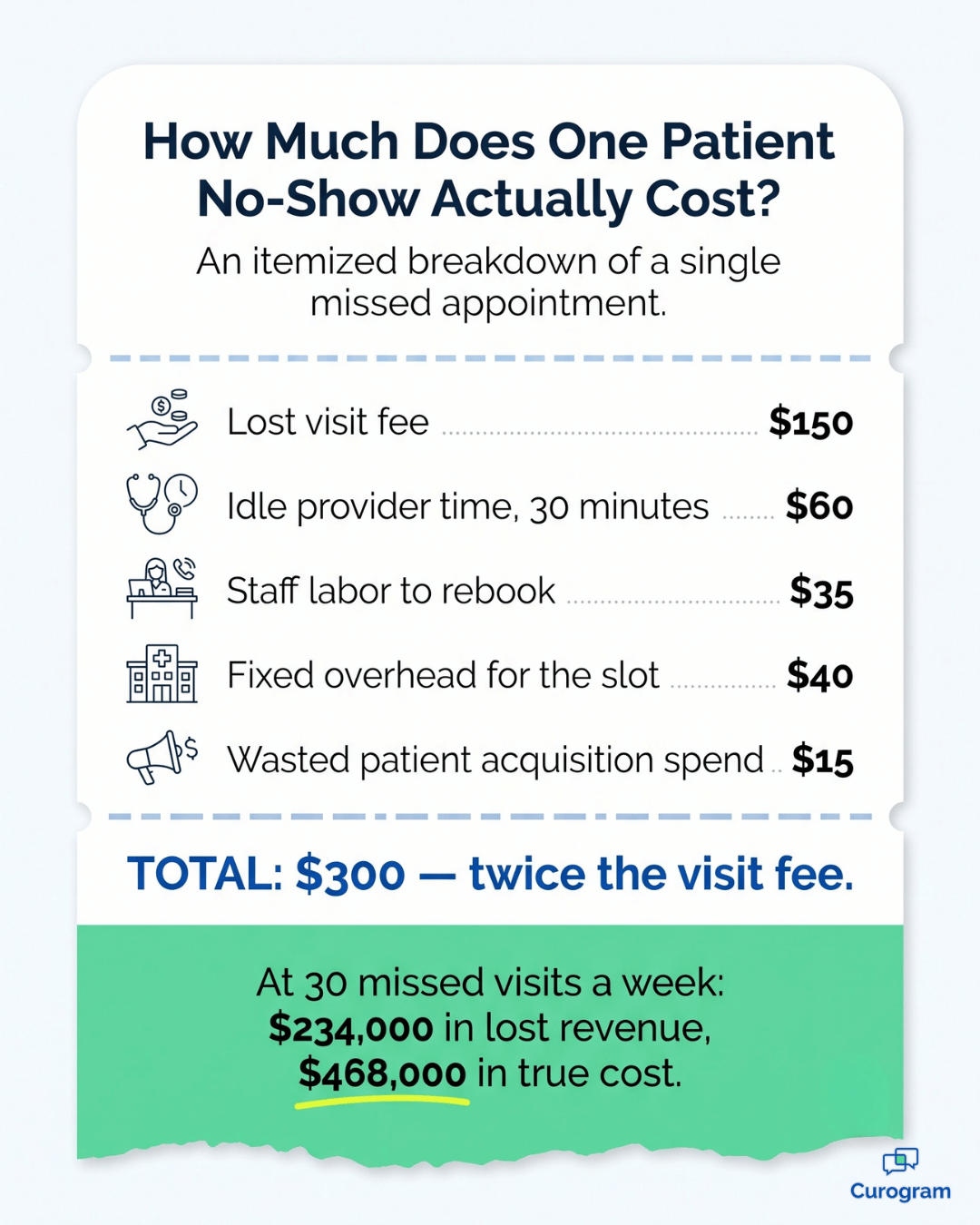
The cost of a no-show is bigger than the visit fee you did not collect. You also lose provider time, staff time, and the chance to see someone who needed that slot. Once you add those up, the true number usually surprises people.
Here is a sample calculation for a mid-sized practice. Swap in your own volume and visit value.
| Metric | Before reminders | After reminders |
|---|---|---|
| Appointments per week | 200 | 200 |
| No-show rate | 15% | 5% |
| Missed visits per week | 30 | 10 |
| Average revenue per visit | $150 | $150 |
| Lost revenue per week | $4,500 | $1,500 |
| Lost revenue per year | $234,000 | $78,000 |
That is a $156,000 annual swing from one change in workflow. For your team, it means the reminder system pays for itself many times over in the first month.
The table above only counts revenue. The damage spreads further than that:
Add those in and a single no-show costs you roughly twice the visit fee. That gap is exactly what reminders are built to close, which raises an obvious question: why do patients miss visits at all?
You cannot fix a problem you have not named. Most no-shows trace back to a small set of causes, and reminders address several of them directly.
Read it again and count. Four of the six are communication problems, not patient problems. That means most of your no-show rate is sitting inside something you fully control.
It also means wording matters as much as timing.
A reminder that arrives on schedule but confuses the reader solves nothing, which is why the channel you choose deserves as much thought as the message itself.
There is no single best channel. The strongest strategy for patient reminders blends text, email, and the occasional phone call, matched to what each patient prefers. Here is how the three main options compare.
Patient text reminders are the workhorse of any modern reminder program. They land instantly, they get read, and they take almost no effort to send.
Text messages carry a 98% open rate, and most are read within minutes. That immediacy is why texts beat every other channel for 24-hour confirmations. Patients can reply YES with one tap, and your schedule updates without a phone call.
A few things make texts work well:
For your team, texting also cuts inbound call volume. One practice reduced phone calls by 24% after moving confirmations to text.
Email is your channel for detail. When a patient needs prep instructions, insurance guidance, or a full intake packet, an email carries it better than a 160-character text.
Email also creates a searchable record, which helps when a patient says they never heard from you. The tradeoff is speed. Email open rates trail text badly, so treat email as your supporting channel rather than your final confirmation.
Use email for the booking confirmation and the one-week reminder. Save the text for the day before.
Calls are the most personal option and the most expensive one. A live voice still matters for older patients, complex procedures, and anyone who has missed visits before.
The drawback is labor. A staff member making 40 calls a day is a staff member not doing anything else. That is why most practices now use calls as a targeted follow-up rather than a first attempt.
The traditional answer is 24 to 48 hours before the visit. That window gives patients enough time to rearrange their day, and it gives you enough time to refill the slot if they cancel.
The modern answer is more selective. Automated messages handle the bulk of your outreach, and calls become the escalation step. If a patient has not responded to a text or an email, that is when a call earns its cost.
Your clinic policy should decide the rest. Track which patients you called and whether they showed. If your no-show rate spikes in a specific group despite other reminders, a targeted call strategy for that group is worth testing.
Touch 1 — At booking |
| Send an email or text confirmation the moment the appointment is made. This locks the date into the patient's calendar while the decision is fresh. |
Touch 2 — 3 to 7 days out |
| Send a text with the date, time, provider, and a confirm link. This is your cancellation window. Anything that frees up here can still be refilled. |
Touch 3 — 24 hours out |
| Send a short final text. This is the one that catches forgetfulness. |
Practices running this sequence with Curogram average a confirmation rate above 75%. One clinic processes more than 1,100 confirmations a month with no manual follow-up at all.

Below are more than 20 ready-to-use appointment reminders for patients, grouped by channel. Copy them, swap in your details, and adjust the tone to match your practice.
These are built for clarity and speed. Each one should fit on a single phone screen.
Email gives you room to explain. Keep the subject line short and put the date and time in the first line of the body.
Give your staff exact wording. It keeps calls short and consistent.
For patients who prefer WhatsApp or a similar app, confirm your platform meets HIPAA requirements first.
Do not launch all 26 at once. Pick three or four that match how your patients already communicate, run them for a month, then expand.
Whichever templates you start with, they all rely on the same handful of details being present.
A good reminder answers three questions instantly: when, where, and what do I do now. Miss any of the three and the patient has to call you, which defeats the purpose.
| Element | Why it matters |
|---|---|
| Patient name | Signals the message is real, not spam |
| Clinic name | Prevents confusion for patients seeing several providers |
| Date and time | The single most important detail in the message |
| Provider name | Matters most in multi-provider practices |
| Address or map link | Removes the last excuse for being late |
| Clear call to action | Tells the patient exactly what to do next |
| Contact number | Gives patients a fast way to reach a human |
| Brief instructions | Fasting, forms, arrival time, documents |
| Friendly, professional tone | Encourages a reply instead of a shrug |
| Brevity | Especially critical for text messages |
Not every element belongs in every message. A same-day text needs the time and the address; it does not need your full prep instructions.
So use this test before you launch anything. Read the message out loud at normal speaking speed. If a patient could not act on it within five seconds, cut a line and try again.
Once the wording passes, the only variable left is when you press send.
The optimal timing for patient appointment reminders involves multiple touchpoints: an immediate confirmation upon booking, a reminder a few days to a week before (especially if a cancellation policy is in effect), and a final reminder 24-48 hours prior to the appointment.
This addresses the "when" aspect of how to remind patients of appointments effectively and is relevant when considering "when should patients be called to remind them of appointment times?" or when to send other forms of patient reminders.
Recommended schedule for your patient appointment reminders:
This multi-step approach for patient appointment reminders maximizes visibility and effectiveness.
Automated patient appointment reminders send themselves. They pull from your schedule, fire at the right time, log the response, and update your calendar without anyone lifting a finger.
That difference is not just convenience. It is consistency. Manual reminders slip when your front desk gets busy, and they always get busy on the days you need reminders most.
Atlas Medical Center put this to the test and cut its no-show rate from 14.20% to 4.91% in three months, roughly three times better than the industry average.
Revenue is only half the return. The other half shows up in time your team stops spending on the phone.
Say a staff member spends two hours a day on reminder calls. Automation gives you back about 500 hours a year. That is a full quarter of one employee's salary, redirected toward patients who are actually in the building.
There is one condition attached to all of it, though, and it applies before you send a single message.
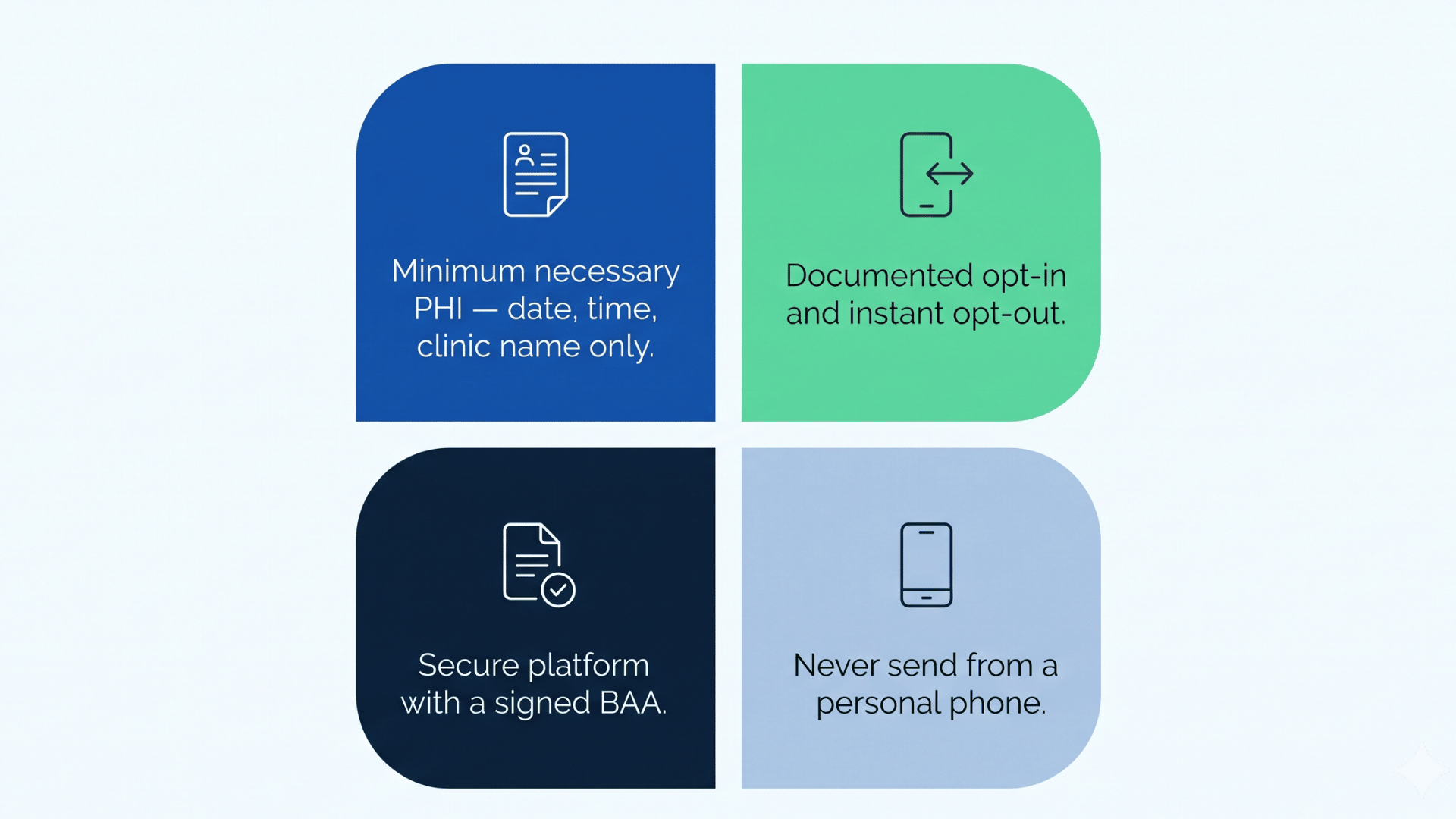
HIPAA allows you to send appointment reminders without separate patient authorization, because reminders count as treatment communication. That said, the rules around content and security still apply.
| Requirement | What it means in practice |
|---|---|
| Minimum necessary PHI | Include the date, time, and clinic name. Leave out diagnoses, test results, and procedure details. |
| Opt-in and opt-out | Document consent for texts and honor opt-out requests immediately. |
| Secure platform | Use a HIPAA-compliant system with a signed business associate agreement. |
| Reasonable safeguards | Verify contact details, and never send patient messages from a personal phone. |
Rules are easier to follow when you can compress them into one question.
Here is the one worth asking:
If a stranger read this message over the patient's shoulder, would anything sensitive be exposed?
If the answer is yes, cut the detail and link to a secure portal instead. For anything more complicated than that, check HHS.gov or bring it to your compliance officer.
Most of these safeguards are handled for you by the right platform, which makes your software choice the next decision that matters.
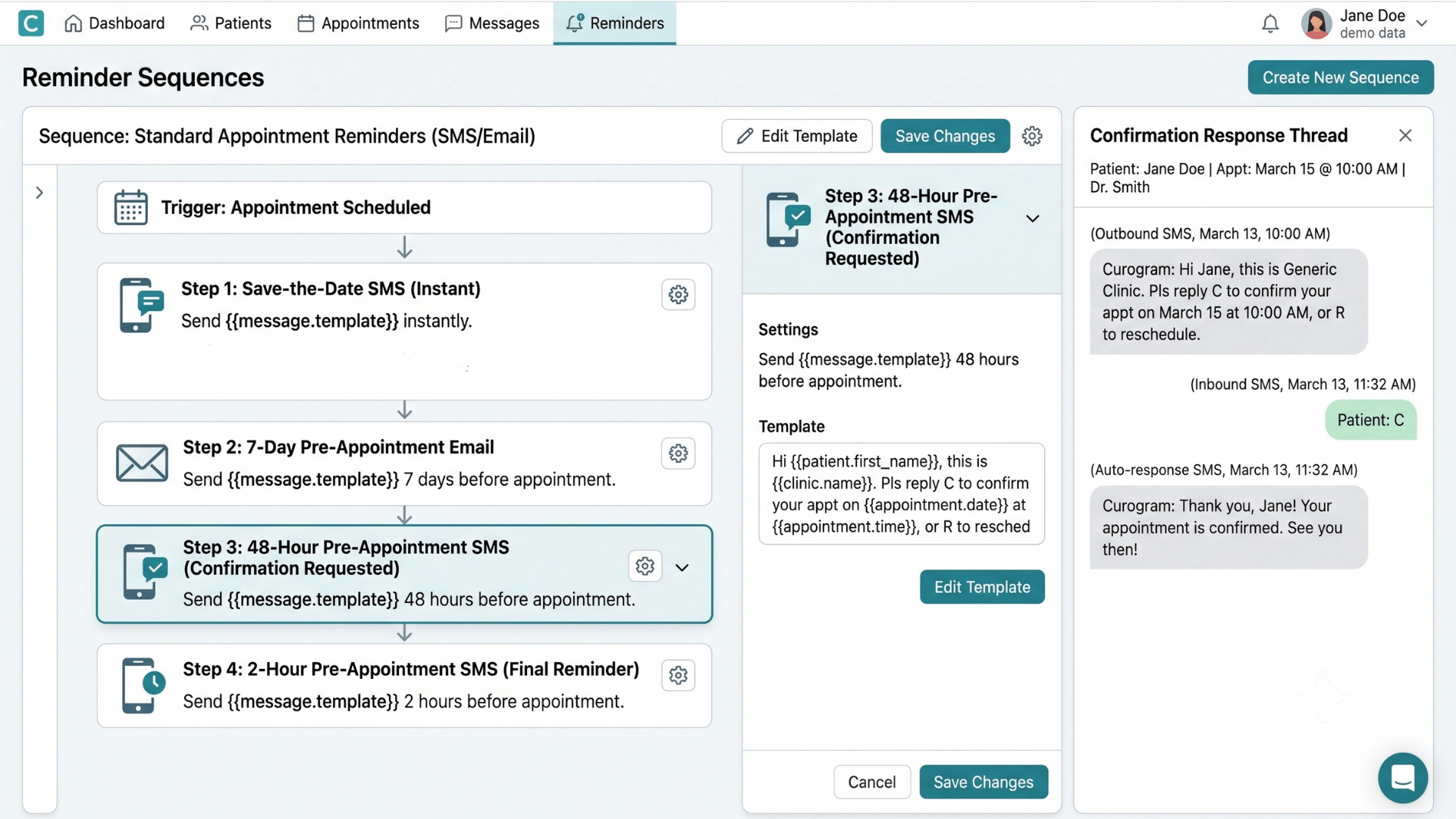
Selecting the best patient reminder software involves evaluating features like automation capabilities, integration with your current PMS/EHR, multi-channel support (essential for varied patient appointment reminders), customization options, HIPAA compliance, ease of use, and cost-effectiveness.
This decision impacts how to remind patients of appointments system-wide and is crucial for implementing effective automated patient appointment reminders.
Consider these features for your patient reminders software:
Great reminder wording will not save a broken process. Four habits decide whether your system holds up over time.
Tell patients how you will contact them and what happens if they miss a visit. A ten-second explanation at booking prevents most disputes later.
A wrong number means a reminder that never lands, and you will never know it failed. Verify the phone and email at every visit, not just at registration.
Online rescheduling turns a cancellation into a rebooking without a phone call. It also captures changes outside business hours, which is when most patients realize they have a conflict.
Small timing shifts often produce the largest gains, but only if you are watching. Practices that get the best results treat reminders as a living system rather than a switch they flipped once.
That review only works if you know which numbers to watch.
Track them monthly and compare against your starting point.
| Metric | What it tells you | Healthy direction |
|---|---|---|
| No-show rate | The bottom-line measure of reminder effectiveness | Down |
| Confirmation rate | How many patients actually engage with your messages | Up, toward 75% or higher |
| Cancellation notice period | Whether patients are giving you time to refill slots | Longer |
| Staff hours on reminders | The labor you are recovering through automation | Down |
| Slot fill rate after cancellation | How well your waitlist recovers open time | Up |
Numbers only help if you know what they are pointing at.
A falling no-show rate paired with a flat confirmation rate usually means your timing is fine and your call to action is weak.
The reverse pattern tells a different story. High confirmations with a stubborn no-show rate suggests patients are confirming out of habit and forgetting anyway, which is a case for a same-day text.
Change one variable at a time. Otherwise you will improve the number without ever learning what moved it.
The moment you send reminders, patients start replying. If those replies land in a shared inbox nobody owns, your reminder system turns into a backlog.

Every one of those paths needs a name attached to it. Without an owner, replies sit unread and patients learn that messaging you does not work.
Decide this in a ten-minute conversation before your first message goes out. It prevents months of confusion and protects the trust that makes the whole system function.
Reminders are not just logistics. They work because they tap three predictable patterns in how people behave.
That last point explains something most practices underestimate. The same information lands very differently depending on how it reads.
A message that sounds like a warning gets ignored, or worse, gets an opt-out. A message that sounds like a favor gets a reply. Write every reminder as though you are helping the patient, because you are.
Reminders are one of the few improvements in a medical practice where the effort is small and the payoff is immediate. You are not hiring, restructuring, or buying new equipment. You are sending the right message at the right time to people who already agreed to come in.
Start with the basics. Pick your channels, build a three-touch sequence, and write messages a patient can understand in five seconds. Then measure your no-show rate for 90 days and adjust from there.
The practices that treat this seriously see it in their numbers. No-show rates 53% below the industry average. Confirmation rates above 75%. Revenue gains of 10 to 20% once recovered slots are counted.
Those are not projections. They are results from clinics running automated reminders every day, using the same three-touch sequence described above.
The manual version of this work will always break down eventually, because it depends on a busy front desk having a quiet afternoon. Automation removes that dependency entirely. Your reminders go out whether the waiting room is empty or full, and every reply lands where someone can act on it.
That reliability is what turns a reminder policy into a reminder system. One depends on people remembering. The other simply runs.
If you are ready to stop losing revenue to empty slots, see how Curogram automates patient appointment reminders for your practice. You will get a walkthrough using your workflow and your EHR, so you can see exactly what your schedule looks like once forgetfulness stops costing you money.
1 min read
💡Appointment reminders work best when powered by EMR data. Disconnected reminders only send generic alerts. But when reminders integrate with your...
1 min read
💡Covina Arthritic Clinic boosted revenue by streamlining appointment confirmations with Curogram’s integrated system. By automating reminders and...
1 min read
💡 An appointment reminder email is a short, pre-written message a practice sends before a scheduled visit, confirming the date, time, provider,...