

50+ Best Appointment Reminder Text Examples & Templates (2025)
An appointment reminder text is a simple, automated message sent to clients before their scheduled service to help them remember the date and time....
15 min read
Alvin Amoroso : Updated on August 11, 2026
Every no-show leaves a paid-for slot sitting empty. The provider waits, the schedule gaps, and the revenue for that hour is gone.
A short, well-timed appointment reminder email is one of the cheapest ways to keep that from happening — and most practices still send them by hand, or not at all.
The payoff shows up fast. Atlas Medical Center cut its no-show rate from 14.20% to 4.91% in three months after switching on automated reminders, based on our internal data.
That's a no-show rate cut by roughly two-thirds. Each recovered visit is a real appointment that gets kept instead of lost, and the schedule fills the way it was supposed to.
The gains reach past the schedule, too. When reminders go out on their own, your front desk stops working through a call list to confirm each patient, and that time goes back to the people standing at the counter.
Patients get the date, time, and location in one place, with an easy way to confirm or reschedule. A wrong date gets caught before it becomes a missed visit.
There's a right way to build this, though. A reminder sent at the wrong time, missing the time zone, or pairing a patient's name with a diagnosis over open email either fails to land or crosses a HIPAA line.
The rest of this guide walks through the parts of a reminder that works, a library of templates you can copy and use, the timing sequence that catches the most patients, and how to automate the whole thing — so your schedule stays full without adding to anyone's workload.
Every no-show leaves a paid-for slot sitting empty. The provider waits, the schedule gaps, and the revenue for that hour is gone.
Missed appointments cost U.S. healthcare an estimated $150 billion a year, according to reporting on MGMA and industry figures. A short, well-timed appointment reminder email is one of the cheapest ways to protect that slot.
The payoff shows up fast. Atlas Medical Center cut its no-show rate from 14.20% to 4.91% in three months after switching on automated reminders, based on our internal data.
That's not a rounding error. Each recovered visit is a real appointment that gets kept instead of lost.
The gains reach past the schedule, too:
Every reminder that works is built from the same handful of parts. Each one does a job: get the email opened, make the details clear, and give the patient an easy next step. Get these right and you have a reliable appointment reminder email template you can reuse for any visit.
The subject line is the first thing a patient sees, and it decides whether the email gets opened. Make the purpose obvious at a glance. A vague subject line gets skipped or trashed.
What works:
Opening with the patient's first name makes the email feel human instead of machine-sent. It's a small touch that builds a little rapport before they read a word further. "Hi [Patient Name]," or "Dear [Patient Name]," both do the job.
This is the part patients actually came to read, so it has to be exact and easy to spot. Put the key facts on their own lines or in bold so nobody has to hunt for them. One wrong digit here can cause the missed visit you're trying to prevent.
Include every one of these:
The easier you make the next step, the fewer no-shows and phone calls you get. Give patients one-tap choices right in the email. Button-style links for "Confirm," "Reschedule," and "Cancel" work best.
No automated system yet? Spell out the manual path instead: "Reply to this email to confirm" or "Call us at [Phone Number] to reschedule." Clear instructions still beat leaving patients to guess.
Patients sometimes have a quick question before their visit, and they need a way to ask it.
Put your practice name, phone number, and a reply-to email address at the bottom of every reminder. Skip the no-reply address — it blocks the patient and reads as impersonal.
End on a warm, professional note that matches your practice's voice. "We look forward to seeing you," or "Best regards, The Team at [Practice Name]" both land well. Keep it short and human.

Here's the working library. Copy any appointment reminder email template below, swap the bracketed details for yours, and send. They're grouped three ways: everyday reminders, templates by practice type, and templates for specific situations.
One rule runs through all of them. A plain reminder ("you have a visit Tuesday at 2:30") is fine over standard email. Anything that ties a patient's name to a diagnosis, medication, or specific condition needs a secure link instead of open text — that's the line HIPAA draws, and every medical template below stays on the safe side of it.
These three cover most visits on your schedule.
Template 1: The 48-Hour Reminder
Subject: Appointment Reminder: Your Visit with [Practice Name] on [Date]
Hi [Patient Name],
A reminder about your upcoming visit with [Provider Name] on:
[Date] at [Time] [Time Zone]
We're located at [Full Address].
Reply "CONFIRM" to let us know you're coming. To reschedule or cancel, call us at [Phone Number] at least 24 hours ahead.
We look forward to seeing you.
The Team at [Practice Name]
Template 2: The 24-Hour Reminder
Subject: See you tomorrow — reminder from [Practice Name]
Hi [Patient Name],
A quick reminder that you're scheduled with [Provider Name] tomorrow, [Date], at [Time] [Time Zone].
Location: [Address or Secure Video Link]
Questions or changes? Call us at [Phone Number].
See you soon,
[Practice Name]
Template 3: The Day-Of Reminder
Subject: Your visit with [Practice Name] is today at [Time]
Hi [Patient Name],
A final reminder that your visit is today at [Time] [Time Zone].
Please [arrive 10 minutes early / bring your insurance card / etc.].
We're at [Address]. Running late? Call us at [Phone Number].
See you today,
The Team at [Practice Name]
Different settings need different details. Here are templates shaped to common practice types.
Template 4: Primary Care / Family Medicine
Subject: Reminder: Your Appointment at [Practice Name]
Dear [Patient Name],
This confirms your upcoming visit with [Provider Name] at [Practice Name].
Date: [Date]
Time: [Time] [Time Zone]
Please arrive 15 minutes early and bring your insurance card and photo ID. To review any visit details, use your secure link: [Secure Link].
Confirm here: [Link to Confirm]. To reschedule, call [Phone Number].
We look forward to seeing you.
[Practice Name] Team
Template 5: Dental Practice
Subject: Reminder: Your Dental Visit with [Practice Name]
Hi [Patient Name],
A reminder about your upcoming appointment with [Provider Name].
Date: [Date]
Time: [Time] [Time Zone]
Please arrive 10 minutes early. If you have questions about what to expect, see your secure link: [Secure Link].
Confirm here: [Link to Confirm]. Need to move it? Call [Phone Number].
See you soon,
The Team at [Practice Name]
Template 6: Behavioral Health / Therapy
Subject: Reminder: Your Session with [Provider Name]
Hi [Patient Name],
A reminder of your upcoming session with [Provider Name].
Date: [Date]
Time: [Time] [Time Zone]
Location: [Office Address or Secure Video Link]
To confirm, reply "CONFIRM." To reschedule, call [Phone Number] at least 24 hours ahead.
We look forward to seeing you,
[Practice Name]
Template 7: Specialty Clinic (Cardiology, Ortho, etc.)
Subject: Reminder: Your Appointment at [Practice Name]
Dear [Patient Name],
This confirms your specialist visit with [Provider Name].
Date: [Date]
Time: [Time] [Time Zone]
Location: [Full Address]
Any prep instructions are in your secure link: [Secure Link]. Please review them before you come in.
Confirm here: [Link to Confirm]. To reschedule, call [Phone Number].
Sincerely,
[Practice Name]
Template 8: OBL / ASC (Procedure Reminder)
Subject: Reminder: Your Upcoming Procedure at [Practice Name]
Dear [Patient Name],
This confirms your scheduled procedure with [Provider Name] on:
Date: [Date]
Arrival Time: [Time] [Time Zone]
Your prep steps and arrival instructions are in your secure link: [Secure Link] — please follow them closely. You'll also need a ride home.
Questions? Call [Phone Number].
We look forward to caring for you,
[Practice Name]
Template 9: Telehealth / Video Visit
Subject: Your Telehealth Visit with [Provider Name] Is Confirmed
Hi [Patient Name],
This confirms your video visit with [Provider Name].
Date: [Date]
Time: [Time] [Time Zone]
Join here a few minutes early: [Secure Video Link]
Before you connect: find a quiet, private spot and check your internet, camera, and mic. Trouble or need to reschedule? Call [Phone Number].
See you online,
The Team at [Practice Name]
Some moments need a tailored message. These templates cover the common ones.
Template 10: New Patient Welcome
Subject: Welcome to [Practice Name] — Your First Visit Details
Hi [Patient Name],
Welcome to [Practice Name]. We're glad you chose us and look forward to meeting you.
Your first visit:
With: [Provider Name]
Date: [Date] at [Time] [Time Zone]
Location: [Address]
Please complete your intake forms before you arrive: [Secure Form Link]. Here's what to expect on your first visit: [Info Link].
Anything change? Call [Phone Number].
See you soon,
The Team at [Practice Name]
Template 11: Intake Forms Needed
Subject: Action Needed: Complete Your Forms Before Your Visit
Hi [Patient Name],
A reminder about your visit with [Provider Name] on [Date] at [Time].
To save time at check-in, please complete your forms online before you arrive: [Secure Form Link]. They take about 10–15 minutes. Try to finish at least 24 hours ahead.
Trouble with the link? Call [Phone Number].
Thanks,
The Team at [Practice Name]
Template 12: Pre-Visit Prep Instructions
Subject: Please Review Before Your Visit on [Date]
Hi [Patient Name],
A reminder about your appointment with [Provider Name] on [Date] at [Time] [Time Zone].
This visit has a few prep steps. Please open your secure link and follow them before you come in: [Secure Link].
Questions about the prep? Call [Phone Number].
See you then,
[Practice Name]
Template 13: Recall / Overdue for Care
Subject: It's Time for Your Next Visit at [Practice Name]
Hi [Patient Name],
Our records show you're due for your next visit with [Provider Name]. Regular care helps us keep you on track.
Ready to book? Pick a time here: [Booking Link], or call us at [Phone Number].
We'd love to see you back,
The Team at [Practice Name]
Recall messages do real work. Curogram practices have reconverted patients at a 35% rate through SMS recall, recovering 1,240 patients in one program, based on our internal data. The same logic applies to email.
Template 14: Deposit or Pre-Payment Required
Subject: Action Needed: Secure Your Upcoming Appointment
Hi [Patient Name],
A reminder about your appointment on [Date] at [Time].
To hold your spot, a deposit of [Amount] is due by [Deadline]. Pay securely here: [Secure Payment Link].
The appointment isn't fully held until the deposit clears. Trouble with the link? Call [Phone Number].
Thanks,
[Practice Name]
Template 15: Outstanding Balance Reminder
Subject: A Reminder About Your Account with [Practice Name]
Hi [Patient Name],
A quick reminder that you have a balance on your account. You can view and pay it securely here: [Secure Payment Link].
Questions about your bill? Call us at [Phone Number] and we'll walk through it with you.
Thank you,
[Practice Name]

Template 16: No-Response Follow-Up
Subject: Just Checking In About Tomorrow's Visit
Hi [Patient Name],
Following up on your visit tomorrow, [Date], at [Time]. We haven't heard back and want to make sure you're set.
Confirm by replying "YES." If plans changed, call [Phone Number] as soon as you can.
We're holding your spot,
[Practice Name]
Template 17: Earlier Slot Opened Up
Subject: An Earlier Appointment Just Opened
Hi [Patient Name],
Good news — an earlier slot opened on [Date] at [New Time]. You're currently set for [Original Time].
Want the earlier one? Claim it here: [Link]. It's first come, first served.
No reply needed to keep your current time.
Best,
[Practice Name]
Template 18: Missed Appointment / Rebook
Subject: We Missed You — Let's Get You Rescheduled
Hi [Patient Name],
We're sorry we missed you for your recent visit. Things come up, and we'd like to get you back on the schedule.
Pick a new time here: [Booking Link], or call [Phone Number].
We hope to see you soon,
The Team at [Practice Name]
Template 19: Recurring / Standing Appointment
Subject: Your Upcoming Standing Visit with [Provider Name]
Hi [Patient Name],
A reminder for your recurring visit with [Provider Name].
Next visit: [Date] at [Time] [Time Zone]
No confirmation needed unless your availability changed. To move this one, call [Phone Number] at least 48 hours ahead.
See you then,
[Practice Name]
Template 20: Minimalist Text-Only
Subject: Appointment Reminder
Reminder: [Patient Name], visit with [Provider Name] on [Date] at [Time] [Time Zone]. Location: [Address or Secure Video Link]. Questions: [Phone Number].
Template 21: Branded HTML (Element Layout)
Subject: Your Appointment with [Practice Name] Is Confirmed
(This one describes the layout of a branded HTML email rather than plain text.)
[Practice Logo, top]
Hi [Patient Name],
Your appointment is set. See you soon.
[Colored box:] With [Provider Name] · [Date] · [Time] [Time Zone]
[Button:] CONFIRM MY APPOINTMENT
[Map graphic] Find us at [Full Address]
[Button:] GET DIRECTIONS
Need a change? [Button:] RESCHEDULE
[Footer: phone, reply-to email, practice hours]
Template 22: Post-Visit Review Request
Subject: Thanks for Visiting [Practice Name]
Hi [Patient Name],
Thanks for coming in. If you have a moment, we'd be grateful if you shared how your visit went: [Review Link].
It helps other patients find us and helps us keep improving.
Thank you,
The Team at [Practice Name]
A quick compliance note: keep review links open to all patients rather than screening who gets asked based on how happy they seem. Sorting out unhappy patients before the ask runs into FTC and Google policy trouble.
Template 23: Seasonal / Preventive Reminder
Subject: Time to Schedule Your [Flu Shot / Annual Physical] at [Practice Name]
Hi [Patient Name],
A friendly nudge that [flu season is here / you're due for your annual physical]. Booking early means more times to choose from.
Grab a slot here: [Booking Link], or call [Phone Number].
We look forward to seeing you,
[Practice Name]
Template 24: Casual, Friendly Tone
Subject: See you tomorrow?
Hi [Patient First Name],
Quick reminder about your visit with us tomorrow, [Date], at [Time]. Reply "YES" to confirm.
See you then,
[Practice Name]
Template 25: Formal Tone
Subject: Appointment Confirmation: [Date] at [Practice Name]
Dear [Patient Name],
This confirms your scheduled appointment with [Provider Name].
Date: [Date]
Time: [Time] [Time Zone]
Location: [Full Address]
Kindly confirm at your earliest convenience. To reschedule, contact us at [Phone Number].
Sincerely,
[Practice Name]
Template 26: Bad-Weather / Closure Notice
Subject: Important: Schedule Update for [Date]
Hi [Patient Name],
Due to [weather / an unexpected closure], we're adjusting the schedule for [Date]. Your visit with [Provider Name] is affected.
Please pick a new time here: [Booking Link], or call [Phone Number]. We're sorry for the disruption.
Thank you for understanding,
[Practice Name]
Template 27: Referral / Specialist Hand-Off
Subject: Your Referral Appointment with [Specialist Practice]
Hi [Patient Name],
This confirms the referral visit [Referring Provider] arranged for you with [Specialist Practice].
Date: [Date]
Time: [Time] [Time Zone]
Location: [Full Address]
Any records you need to bring are noted in your secure link: [Secure Link]. Questions? Call [Phone Number].
We look forward to caring for you,
[Specialist Practice]
A good template sent at the wrong time won't do much for your no-show rate. The right timing depends on your practice and your patients, but one sending sequence works almost everywhere. Space the reminders out, and each one catches a patient the last one missed.
This one isn't a reminder, but it's the first step in preventing no-shows. Send it the moment a patient books, so they know the appointment went through.
Include all the key details and a one-tap way to add the visit to their calendar (iCal, Google Calendar, Outlook). An appointment sitting on their calendar is one they're far less likely to forget.
For visits booked weeks or months out — a six-month dental cleaning, say — a reminder about a week ahead does real work.
It brings the appointment back to mind while there's still time to act. If the patient has a conflict they'd forgotten, they can reschedule now instead of no-showing later.
This is the reminder that matters most.
Many practices send at both marks and catch more patients for it.
A short reminder a few hours out can save an otherwise-lost slot. It's ideal for telehealth visits, where the patient just needs the join link, and for busy days when an appointment can slip a patient's mind. Keep it brief — the time and the location or link are all it needs to carry.
Sending reminders by hand falls apart fast. A front desk running through a list of 40 patients, typing each date and time, will eventually fat-finger a "2:30" into a "3:30" — and that patient shows up to a closed door or an empty slot.
Automation sends the same reminders on a schedule, every time, without pulling anyone off the phones.
The engine behind automation is your reminder or patient-communication tool. When you weigh options, look for a few things that matter for a practice:
One point worth checking before you commit: how the tool handles your EMR data. Curogram, for example, pulls schedule data from your existing system rather than asking you to rebuild it — the sync runs one way, from the EMR into the reminder tool, so your source of truth stays put.
Link your reminder tool to the system where your schedule already lives. Once connected, any appointment booked in your EMR can trigger the reminder sequence automatically — no separate list to keep in step.
Drop the templates from this guide into your software. Use merge fields to pull each patient's details in automatically, so [Patient Name], [Date], and [Provider Name] fill themselves from the record instead of being typed each time.
Build the sending sequence. A solid starting point for most practices:
Adjust the timing to your patient mix — a specialty clinic booking months out may want a 7-day reminder in the sequence too.
Before going live, send test reminders to yourself. Check that the merge fields fill correctly, the links work, and the email reads cleanly on a phone.
Once it's running, glance at your send reports now and then to confirm reminders are going out and confirmations are coming back.
Even a solid reminder can trip on small mistakes. These are the ones that quietly cost practices appointments.
A good reminder system isn't complicated. Pick a template that fits the visit, send it on a sensible schedule, and give patients an easy way to confirm or move the appointment. The practices that cut no-shows aren't sending fancier emails — they're sending consistent ones.
Start small. Copy two or three templates from this guide, set your confirmation and 24-hour sends, and test them on yourself before they go live. Watch your no-show rate over the next month and adjust the timing to your patient mix.
The results compound. Atlas Medical Center dropped its no-show rate from 14.20% to 4.91% in three months on automated reminders, based on our internal data. Every kept appointment is revenue you'd otherwise have lost — and a patient who got the care they came for.
Get reminders, confirmations, and reschedules running without adding to your front desk's workload. Book a Curogram demo and see the full setup in about 20 minutes.
Lead the subject line with "Appointment" and the date. Inside, put the provider, date, time with time zone, and location on their own lines, then add one-tap confirm and reschedule links so patients can act fast.
They put the visit back on a patient's radar while there's still time to act. Atlas Medical Center cut its no-show rate from 14.20% to 4.91% in three months using automated reminders, based on our internal data.
Send a confirmation right after booking, then a reminder 48 hours out and again 24 hours before. For visits booked far ahead, add a 7-day reminder, and a same-day text for last-minute nudges.
Keep the email itself generic — name, date, time, and location are fine. Anything tied to a diagnosis, medication, or specific reason for the visit belongs behind a secure link, not in the open email body.
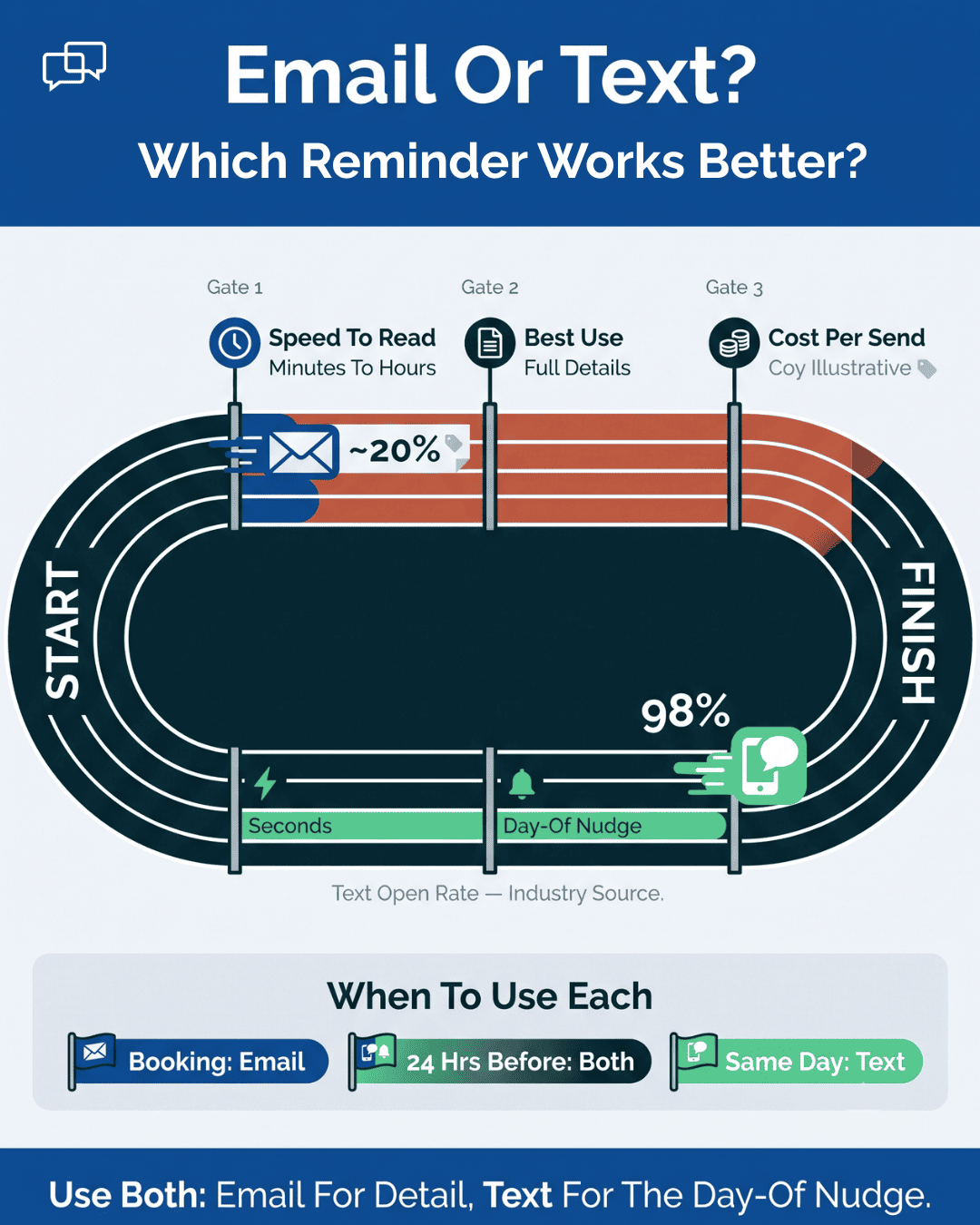
Patients read the two differently. Text open rates run near 98%, far above email, per industry data, so email carries the full detail while a short same-day text catches patients who never opened the email.
An appointment reminder text is a simple, automated message sent to clients before their scheduled service to help them remember the date and time....
💡 Knowing how to send a reminder text to someone is one of the fastest ways to cut no-shows. It also helps you build lasting trust with clients....
💡 Knowing how to remind patients of appointments is one of the fastest ways to protect your schedule and your revenue. Missed visits cost a...