
 Joshua Inciso
Curogram for Telemedicine: Features and Virtual Care Use Cases
 Jo Galvez : 4/12/26, 9:00 AM
Discover how Curogram enhances telemedicine with HIPAA-compliant communication, appointment reminders, and integrated patient engagement features.

AcuityScheduling does one job well: it puts a visit on the calendar. What happens next depends on what it’s connected to. The reminder text, the intake form, and the video link all come later.
Take two clinics that both book through AcuityScheduling. At the first, a staff member copies each new booking into a separate texting app, emails an intake PDF, and calls patients who haven’t confirmed.
At the second, the booking sends a 2-way reminder text and a link to an electronic form on its own. Both clinics offer telemedicine, but the second front desk skips the copying, the emails, and most of the calls.
Our view is simple. A telemedicine solution pays off when it connects to the schedule you already use. A tool that stands apart adds work, because every answer it collects has to be typed into your records by hand.
Texting adds a second hurdle. Regular SMS isn’t HIPAA compliant, and sending protected health information through it can lead to fines. Patients still want to text their clinic, so secure messaging has to be part of the tool you choose.
The stakes go beyond office work. For many patients in rural areas, a video visit is the most realistic way to get regular care. With AcuityScheduling integration, those visits are easier to book, remind, and run.
You’ll see the payoff in three places: your no-show rate, your front desk workload, and how patients reach your office. After those come the questions to ask vendors and the five features worth requiring.
If you already take bookings online, the gap shows up right after a patient clicks “confirm.” A new 10:15 visit lands in AcuityScheduling.
Then someone at your front desk copies it into a reminder tool, a texting app, or the EHR. Each copy is one more chance to enter the wrong date or phone number.
Plenty of clinics still hold off on adding telemedicine. The reasons tend to be the same:
Those concerns are fair. A tool that doesn’t connect to your schedule carries a cost of its own, though. Any data it collects, from intake answers to visit notes, has to be typed into your records by hand. An integrated tool removes much of that entry, so your staff spends more of the day with patients.
Virtual visits also widen the area you can serve. A patient who lives far from your clinic can see their doctor by video instead of making the drive. That makes frequent check-ins realistic when a condition needs close follow-up.
When you connect Curogram with AcuityScheduling, new bookings can trigger appointment reminders by 2-way text. Patients get the reminder on their phones and can text back, so your staff isn’t stuck making callbacks.
Some practices hold off on a telemedicine solution because they can’t picture what it changes day to day. Once it connects with AcuityScheduling, the effects show up in three places: your no-show rate, your front desk workload, and how patients reach your office without picking up the phone.
An empty 2:30 slot can’t be filled once 2:30 has passed. Across the US, those gaps add up. A report from SCI Solutions put the yearly cost of missed appointments at $150 billion, with each unused slot costing a physician about 60 minutes and $200 on average.
Text reminders give patients a nudge, and they give you time to react. Once AcuityScheduling connects with a telemedicine solution that offers SMS messaging, each new booking can trigger automated reminders.
You pick the timing, such as one text three days out and another the morning of the visit. If a patient replies that they can’t make it, your front desk has time to offer the slot to someone else.
Results can move fast. Based on our internal data, Atlas Medical Center cut its no-show rate from 14.20% to 4.91% in three months.
Three front desk jobs eat time every day: booking visits, answering the same patient questions, and collecting health details. Telemedicine tools take a share of each one off your staff’s plate.
| Task | Before | After |
|---|---|---|
| Scheduling | Phone calls back and forth to find a time | Patients pick an open slot in AcuityScheduling |
| Patient questions | Staff answer each one by hand | Automated text replies cover common ones, like office hours or parking |
| Health information | Paper forms retyped into the chart | Patients fill out electronic intake forms before they arrive |
Each row removes a step someone on your team used to do by hand. Based on our internal data, practices using Curogram have seen front desk productivity rise by 30% or more.
A patient with a quick question about fasting before a blood draw shouldn’t have to sit on hold over a lunch break. Many would rather text and get back to work. Paper forms carry a similar cost: time on a clipboard in your waiting room before the visit even starts.
Telemedicine tools give patients other ways to reach you. They can text your clinic and go on with their day. If it’s a common question, an automated reply answers it right away, and your staff doesn’t have to type it out again.
Intake moves to the phone too. Patients fill out electronic intake forms before an in-person visit, so they walk in ready and skip the extra wait.
Booking rounds it out. Once telemedicine is connected to AcuityScheduling, patients see open times online and book without calling. Based on our internal data, Covina Arthritic Clinic confirms more than 1,100 appointments a month by text.
A demo shows a vendor’s best features. Your questions show whether the tool fits the way your clinic already books, reminds, and checks in patients. Bring these to every vendor call, grouped so you can work through them in order:
| Area | Questions to ask |
|---|---|
| Scheduling | Can your telemedicine solution integrate with AcuityScheduling? Does it tell in-person visits apart from telemedicine visits? |
| Reminders | Can you add onboarding steps for patients to a reminder? Can reminders follow different rules by visit type? |
| Messaging | Does it offer 2-way, real-time texting with patients? Does it include messaging between staff? |
| Patient access | Does each patient get a unique link, so they don’t re-enter registration details? |
| Security | Is data sent securely? Is it HIPAA compliant, and will you sign a business associate agreement (BAA)? |
| Cost and setup | Are there extra integration costs? How long does setup take? How much staff training is needed? |
Ask for the answers in writing. If a reply on cost or setup time stays vague, follow up before you sign anything.
To increase productivity and improve workflow in your clinic, it’s essential that you integrate a telemedicine solution that offers all of the following features:
A patient calling about lab results often waits on hold while your front desk works through other calls. Your staff can’t speed that up when every line is already in use. Texting gives the patient a second way to reach you.
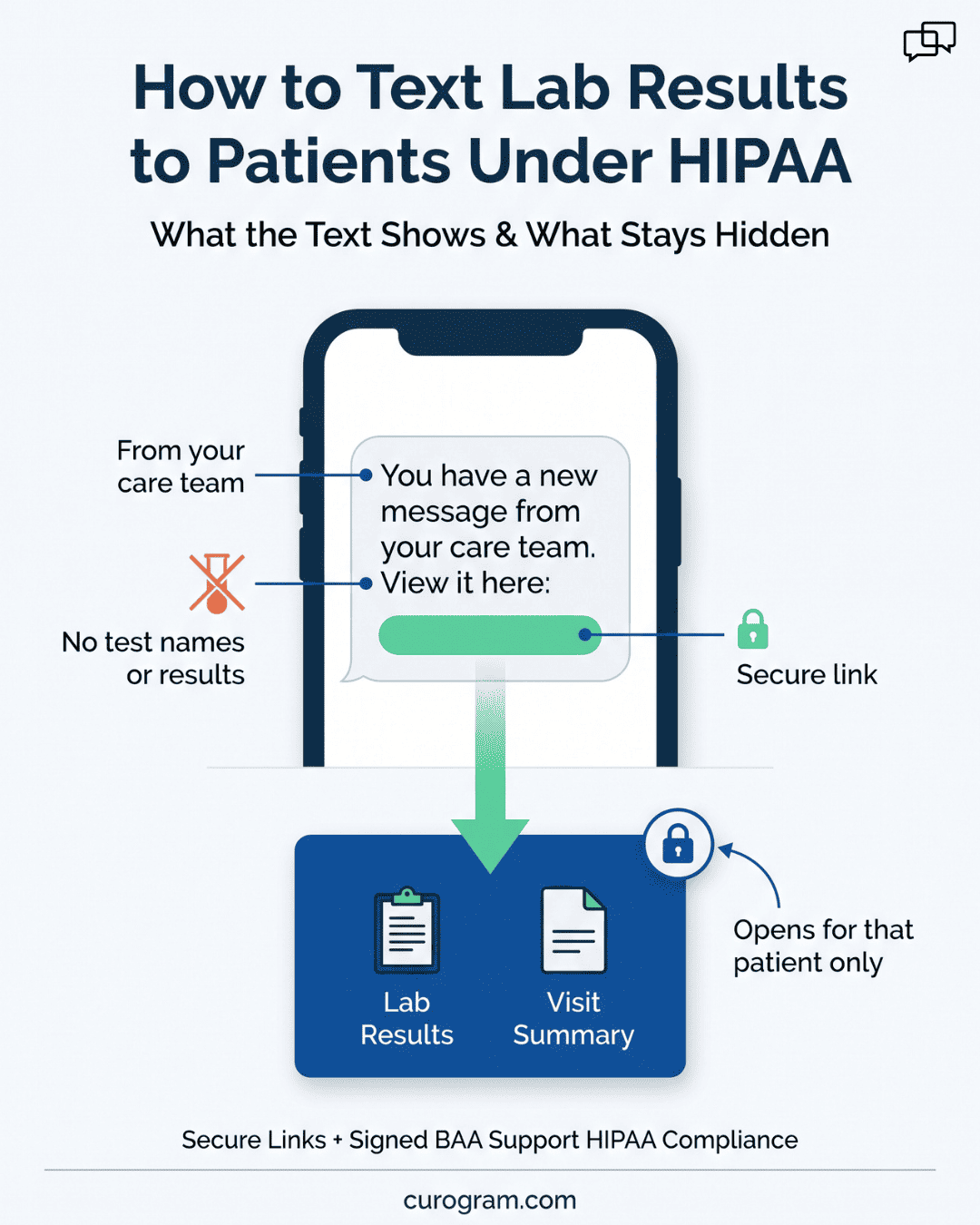
Plain SMS can’t carry health details safely. A secure link solves that. The text holds no medical information, only a link to a protected page meant for that patient:
“You have a new message from your care team. View it here: [secure link]”
Patients get lab results and visit summaries on their phones, and the sensitive details stay behind the link. When you compare tools, check that secure links are built in. It’s one part of keeping your texting HIPAA compliant, alongside the business associate agreement covered earlier.
A booking call rarely ends on the first try. The patient asks for Tuesday, your staff checks the calendar, Tuesday is full, and the back-and-forth begins.
Online self-scheduling hands that search to the patient:
Rescheduling works the same way. A patient cancels the old visit and picks a new slot without calling.
A telemedicine tool with AcuityScheduling integration also cuts errors. When staff book by hand, two patients can end up in the same slot by accident. Patients booking online can choose only from open times, so the calendar blocks that double booking.
Paper intake means a clipboard at check-in, and later someone on your staff types those answers into the chart. Electronic forms remove both steps. Curogram’s electronic patient intake forms work with AcuityScheduling in three steps:
AcuityScheduling can also collect intake details on its own. It asks patients to fill out forms when they book, so their answers sit with the appointment in one place.
A virtual waiting room handles check-in before the doctor gets involved, the way your front desk does in person. Its settings control who sees each patient and when:
Doctors see only the patients who are ready to start.
US clinic data puts no-shows close to 1 in 5 visits. A 12-year review at a large Veterans Affairs medical center found a mean no-show rate of 18.8% across 10 clinics. In the same review, a central phone reminder system lowered the rate only from 16.3% to 15.8%.
A reminder works harder when patients can answer it. With Curogram and AcuityScheduling integration, you can send reminders by 2-way text or set up automated smart reminders. A 2-way reminder might read:
“Reminder: your visit is Thursday at 10:15 AM. Reply C to confirm or R to reschedule.”
Each reply tells your front desk which slots are safe and which need filling. Based on our internal data, our platform-wide confirmation rate is above 75%.
AcuityScheduling handles the booking. Most of the hand work comes after the patient clicks “confirm”: the reminder, the intake form, the quick question, the link to the video visit. Each step done by hand is a chance for a missed text or a retyped form.
Curogram is a HIPAA compliant telemedicine platform built for that part of the visit. It gives your clinic secure HIPAA compliant texting, online patient intake forms and surveys, automated reminders, and scheduling tools that connect with AcuityScheduling.
Setup is short. Linking Curogram to AcuityScheduling takes 48 hours or less, and once it’s live you can start running virtual visits.
We built Curogram to take admin work off your front desk and make room for more patients on your schedule. Book a demo to see how it would fit the way your clinic runs today.
 Jo Galvez : 4/12/26, 9:00 AM
Discover how Curogram enhances telemedicine with HIPAA-compliant communication, appointment reminders, and integrated patient engagement features.

Curogram integrates with Epic seamlessly, creating cost-reducing efficiencies and reducing patient no-shows leading to increased revenue.

Curogram integrates easily with AdvanceMD and other electronic health records programs to enhance patient engagement and boost your bottom line.