
 Carylee Gali
EMR Integration Success Story: A Small Clinic’s Actual Experience
Learn about the actual EMR integration success story of a small practice. This is how one clinic fixed its workflow and boosted patient satisfaction.

It's 8:05, and the phones are already lit. Half the calls are patients asking when their appointment is. The other half are staff trying to reach tomorrow's patients before lunch.
Practices on M/D Systems know this pattern well. The system holds the schedule, the patient records, and the billing on a server in the office. Getting that schedule in front of patients still takes someone on the phone.
Curogram connects to M/D Systems so the schedule can reach patients by text. Appointments sync from your M/D Systems server into Curogram, and reminders, two-way texts, video visit links, and group messages all work from that schedule.
This guide covers what M/D Systems is and what the MD System integration syncs. It also covers setup and the Curogram features that fit a server-based practice.
Our view: on a server-based system, start with reminders and group texting. Both run straight off the appointment sync, so you see results in the first week.
M/D Systems, Inc. is a practice management and billing company. Its software runs on a computer system inside your office rather than in the cloud.
According to M/D Systems' product page, its in-office system handles appointment scheduling, patient demographics, patient activity, and billing. The company processes statements and insurance claims centrally and backs up data off-site each week.
Because everything sits on a local server, any outside tool has to connect to that server. A cloud app can't just log in through a web page, which shapes how the integration is built.
As of October 2026, Curogram's M/D Systems connection is live. This is what it does today:
|
Data |
Direction |
Status |
|---|---|---|
|
Appointments |
M/D Systems to Curogram |
Syncs automatically |
|
Appointment status (confirmed, canceled, no-show) |
Curogram to M/D Systems |
Not written back |
|
Completed intake forms |
Curogram to M/D Systems |
Not written back |
|
Insurance card and ID images |
Curogram to M/D Systems |
Not written back |
|
Integration fee from M/D Systems |
Not applicable |
None |
The gap that matters most is writeback. When a patient replies to confirm, that confirmation shows in Curogram but doesn't change the appointment in M/D Systems. Decide early whether staff will update status in M/D Systems or treat Curogram as the place to check.
Curogram connects through an Integration Agent, a small program installed with access to your M/D Systems database server. Setup usually takes 2 to 5 days.
Plan for one IT step. Someone with access to the office server, whether staff or your IT vendor, needs to allow the agent to run. After that, appointments flow into Curogram on their own.
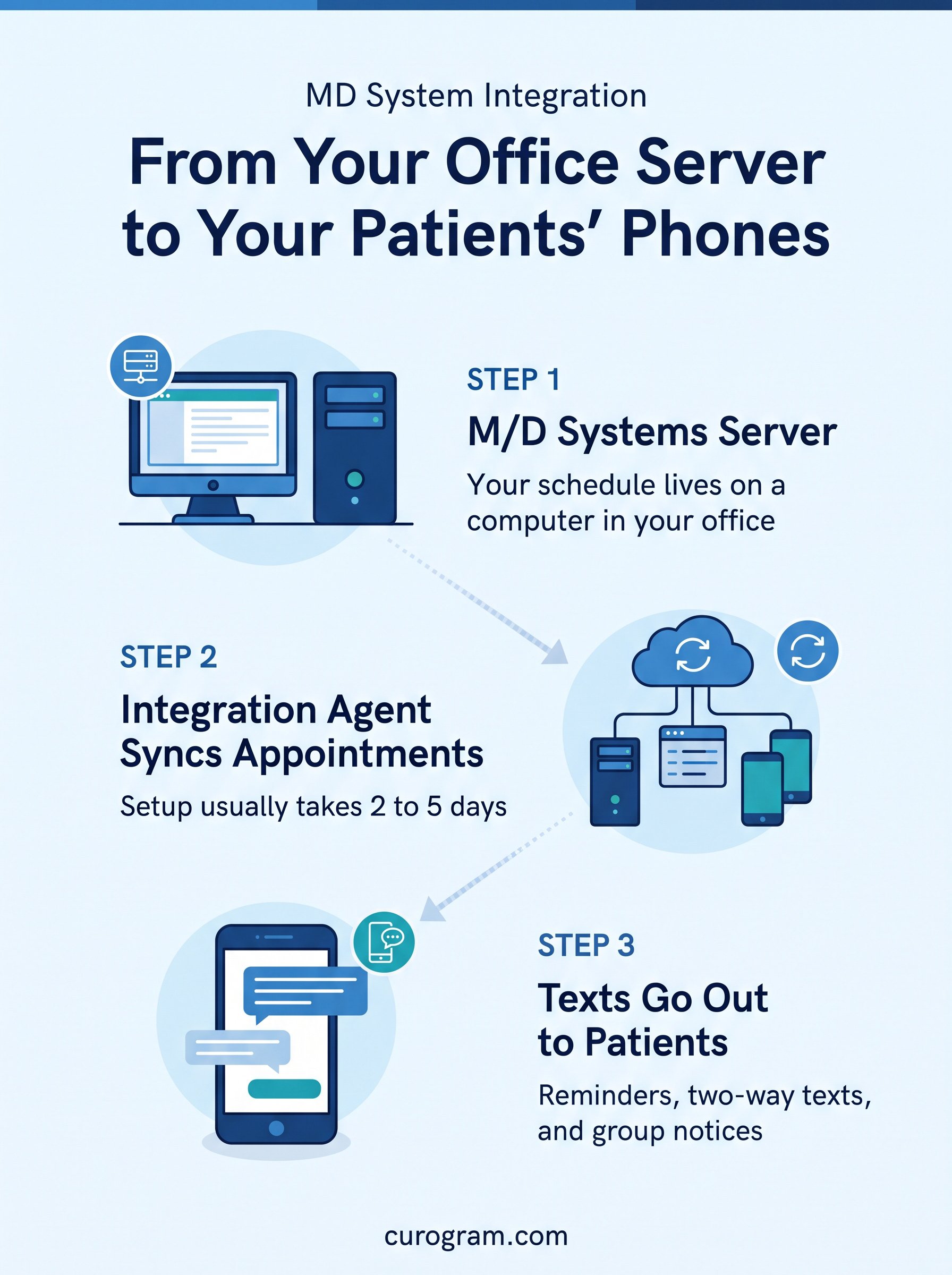
Most of what an M/D Systems practice gains from Curogram comes from one fact: the schedule leaves the server and reaches patients' phones.
Once appointments sync, reminders go out by text on a set schedule, such as two days and two hours before each visit. Patients reply to confirm or ask to reschedule, and staff stop calling down the list.
Reminder texts move the no-show rate. Atlas Medical Center cut its no-show rate from 14.20% to 4.91% in three months with Curogram's automated reminders, based on Curogram client data from clinical settings.
Patients text the same number they already call. Staff answer from a shared inbox in the browser, so a question about parking or a lab order doesn't tie up a phone line.
HIPAA allows texting with patients when the practice uses proper safeguards and has a business associate agreement with the vendor. Curogram sends messages that contain PHI as encrypted links that open without a username or password.
Since status doesn't write back, someone still needs a routine for confirmations and cancellations. Many offices have the front desk check Curogram's confirmation list each afternoon and update M/D Systems for the next day.
Forms work the same way. Patients can complete them online before the visit, but staff move the results into M/D Systems by hand. If forms are your top goal, raise it during setup so you can plan around it.
These features run on top of the M/D Systems appointment sync. None of them require patients to download an app.
Curogram's video visits open from a secure link sent by text or email. Patients join from a phone, tablet, or computer, and reminders can carry the link so staff don't paste it by hand.
Patients can fill out intake forms on their phones, upload documents, and send a photo of their insurance card. Staff can also message each other inside the platform, and message history is kept as an audit trail.
A snow day or a provider out sick used to mean a morning of calls. With group texting, the front desk filters the synced schedule and sends one message to every affected patient.
Other practices use the same approach. Practice Fusion offices run broadcast texts to bring overdue patients back. See also how Prime Clinical practices send crisis and closure alerts and how Tebra users engage patients with mass messaging.
One caution for M/D Systems offices: the sync brings in appointments, not your full patient list. Group texts to patients with upcoming visits work right away. For recalls to patients with no visit booked, plan how you'll build that list during setup.
Curogram Highlight: Mass Texting Built for Patient NoticesCurogram's Mass Text Messaging sends one message to anywhere from 100 to more than 10,000 patients. Patients who opted out of marketing are skipped, while closure and health alerts still go out. Replies land in one shared inbox, and delivery reports show who got each message and which ones failed. Patients read texts in their phone's normal messaging app. Curogram works alongside M/D Systems, which keeps your schedule, records, and billing. Curogram is HIPAA compliant and SOC 2 Type II certified. |

M/D Systems keeps your schedule and billing on a server in your office. Curogram connects to that server, pulls in appointments, and puts them to work by text.
Go in knowing the limits. Appointments sync in, but confirmations and forms don't flow back, so set a daily routine for updating M/D Systems.
Start with reminders and group texting, since both work as soon as the sync is live. Then add video visits and forms once the front desk is comfortable.
Want to see Curogram running on an M/D Systems schedule? Book a demo with Curogram and we'll walk through the setup, reminders, and group texting.
Learn about the actual EMR integration success story of a small practice. This is how one clinic fixed its workflow and boosted patient satisfaction.

Connect your EMR to a communication platform and ask four questions first. Of 126 EMRs we track, 67 are ready today and 42 write appointment statuses...

Discover why phone reminders fail and how EMR system integration reduces no-show rates with timely, accurate texts that patients can answer in...