
AthenaHealth Integrates With Curogram Easily
Curogram integrates with athenahealth within 48 hours, allowing you to create cost-saving efficiencies and improve patient communication with secure...
9 min read

Your practice runs on Epic, but your patients live on their phones. They want to confirm a visit with a quick text, complete paperwork before they arrive, and see a provider from home when a trip to the clinic doesn't make sense.
The gap between those two worlds is where front desk time disappears. Staff copy appointment details from one screen to another, call patients who never pick up, and chase paper forms in a crowded waiting room while the phones keep ringing.
Telemedicine and texting tools can close that gap, but only if they work with the EHR you already use. A separate tool adds another login and another round of manual entry. That's why many Epic practices hold off, assuming the connection will be slow, expensive, or too technical to manage.
Here's the good news: an Epic integration with Curogram is more direct than most practices expect. Curogram connects to Epic through its Integration Agent, which brings your Epic appointment data into Curogram using file uploads. Once your appointments flow in, your team can use Curogram's HIPAA-compliant 2-way texting, smart reminders, electronic patient forms, and multi-user telemedicine around the schedule you already manage in Epic.
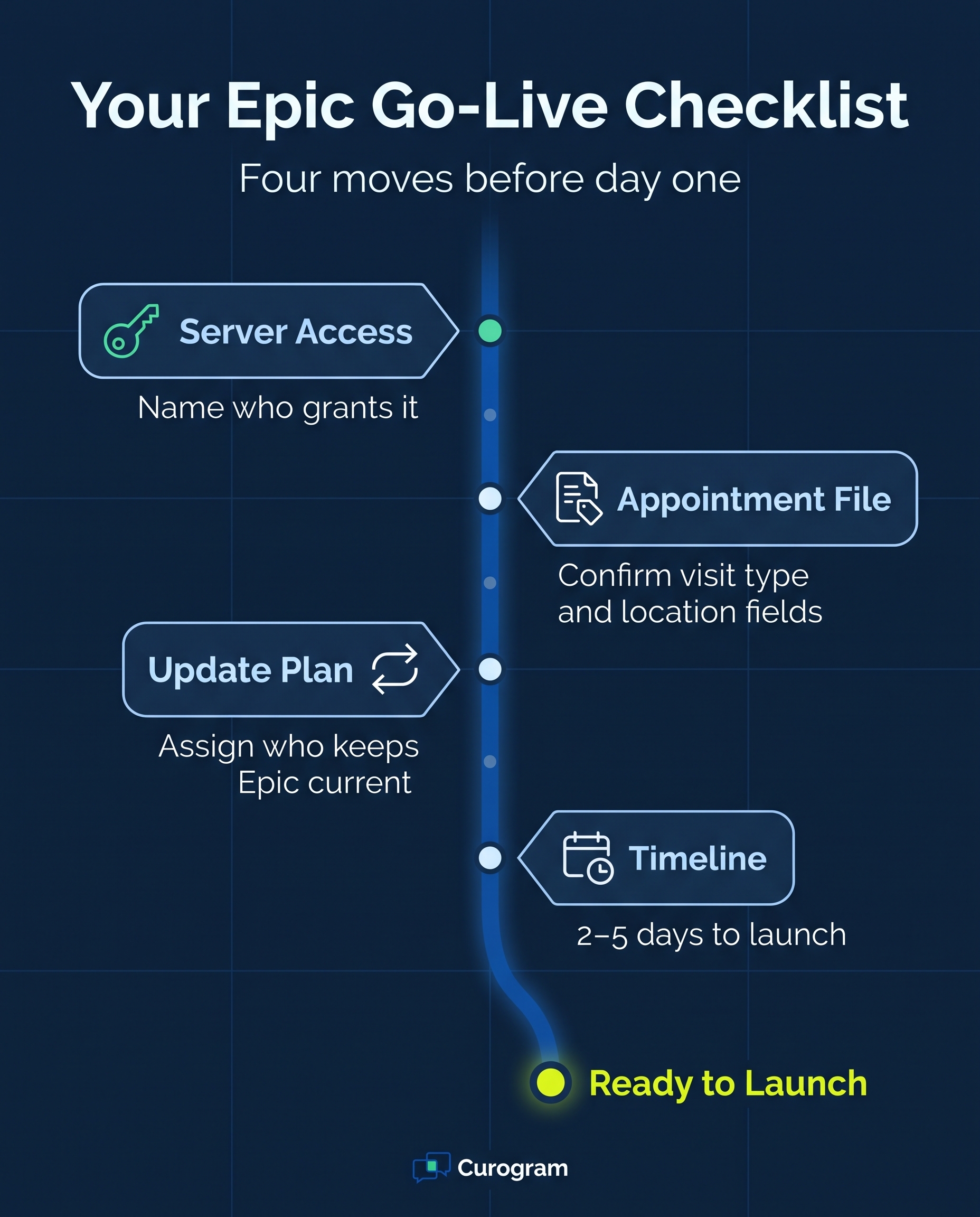
The typical setup timeline is 2 to 5 days. Because Curogram needs access to your Epic server, it helps to involve your IT contact early.
In this guide, you'll learn why connecting telemedicine to your EHR matters, what the Epic connection covers today, and where your team will still play a role, since some updates don't flow back into Epic. We'll also walk through how each Curogram feature fits into a typical clinic day, from the first reminder text to the virtual visit itself.
By the end, you'll know what to expect before going live and which questions to bring to your demo.
Digitalization is sweeping every industry, including healthcare, with a forecast of growth of 17.4% between 2021 and 2027, equating to $ 426.9 billion in investments by healthcare providers.
Using an EHR like Epic isn’t enough to be ahead in digital medicine. Choosing a telemedicine solution that integrates with Epic simplifies daily clinic work and has vast benefits.
Healthcare providers should know the potential benefits of telemedicine to their practice to overcome the hesitancy of integrating Epic with telehealth applications like Curogram.
Some of the most notable advantages of integrating a telemedicine solution with Epic include:
A well-integrated telemedicine solution is not the result of a complex installation by a healthcare provider. A good telemedicine software processes centralized data from multiple areas, requiring no additional effort. For example, Curogram can connect and create easy access to the database of numerous clinics or services under a provider's umbrella.
Healthcare providers work hard to ensure they record patient data accurately. But, with paper documents and non-integrated telemedicine solutions, HCPs transcribe data manually, increasing the chance of clinical and clerical errors. Inputting information into the EHR also takes up precious time that they could use to attend to patients.
When you integrate telemedicine software with Epic, it eliminates manual data entry and other redundant administrative tasks by automatically uploading patients' information electronically to your database. Integrating telemedicine into the EHR system leaves no room for human error, keeping medical information accurate.
Doctors use different methods to record medical information, making it difficult to process and centralize data. When integrated with your EHR, telemedicine software can transcribe data from any dictation method.
Healthcare providers face an enormous challenge in monitoring long-distance patients. They must track and frequently check on patients suffering from a chronic condition. Some patients can't find adequate transport to their healthcare facility if they live in a rural area, making it difficult for physicians to provide adequate care and diagnostics.
Remote patient monitoring also requires the following devices:
Telemedicine's virtual consultations allow more frequent communication between patients and healthcare providers.
A patient can send crucial information and even photographs of their condition to the doctor for adequate medical care. Wearable smart gadgets, also allow healthcare providers, using telemedicine software, to monitor a patient’s vital statistics, easily from a smartphone, tablet, or computer.
Connecting an EHR to a new platform has a reputation for being slow and complicated. Some projects drag on for months, with heavy paperwork, custom development, and lengthy training sessions.
Curogram's Epic connection is more direct. It runs through Curogram's Integration Agent and uses file uploads to bring your Epic appointment data into Curogram. The integration is ready to deploy, and the typical timeline is 2 to 5 days.
There is still some setup on your side. Curogram needs access to your Epic server, so plan to involve your IT contact or Epic administrator early. Curogram also signs a HIPAA business associate agreement (BAA), which spells out how it protects patient health information on your behalf.
Before you plan your workflows, it helps to know exactly which data moves and which doesn't.
| Data | Supported with Epic? | What it means for your team |
|---|---|---|
| Appointments from Epic into Curogram | Yes | Your Epic schedule drives Curogram's reminders and messages |
| Patient records as a separate sync | No | Patient profiles don't sync into Curogram on their own |
| Recalls from Epic | No | Recall lists stay in Epic |
| New appointments sent back to Epic | No | Bookings made outside Epic must be added in Epic |
| Appointment status sent back (confirmed, canceled, no-show) | No | Confirmations are tracked in Curogram, not updated in Epic |
| Intake forms, insurance cards, or ID images sent back | No | Staff move any needed details into Epic |
Since appointments flow in automatically, your team no longer has to rebuild the schedule in a separate system. And since the connection runs one way, decide upfront who will update Epic when a patient confirms, cancels, or completes a form.
Training doesn't need to be a major project, either. Start with the features your team will use every day, such as reminders and 2-way texting, and introduce additional tools as your workflow develops.

Collecting patient information makes up a large share of daily work at any practice, and your staff need that data before each visit.
Paper forms make the job slower and messier, and these issues appear frequently:
Curogram lets you send electronic patient forms that patients fill out on their phone or computer before the visit. This works for both in-person and virtual appointments, so patients with a video visit don't need to come into the office just to complete paperwork.
One thing to plan for: completed forms are not sent back into Epic through this integration. Choose who on your team will review responses and add key details to the patient's chart. Even with that step, digital forms cut down on clipboards, guesswork, and last-minute scrambles at check-in.
Keeping track of appointments becomes harder as your practice grows. Calling every patient before every visit simply isn't realistic for a busy front desk team.
Curogram sends customizable smart reminders by text, based on the appointments it receives from Epic. Whether the visit is in person or virtual, you can shape the message so patients know where to go and what to prepare. When patients reply to confirm, that response is tracked in Curogram, since status updates don't flow back to Epic.
The results can add up. Curogram client data from clinical settings show an average appointment confirmation rate above 75% among current clients.
Telemedicine is valuable, but in-person visits remain essential. Patients still need to see you for check-ups, lab work, and advanced diagnostic tests, so your reminders should reflect each type of visit.
A patient with a video visit may only need a short notification about 30 minutes ahead. A patient driving to your clinic needs more lead time and the exact location. With Curogram, you can set reminder content and timing for each kind of visit, so staff don't have to send these messages by hand.
How well this works depends on the appointment details in your Epic file. During setup, confirm that your Epic export clearly separates virtual visits from in-person ones.
Moving a patient through a virtual visit requires more than a video link. Front desk staff may need to check the patient in or collect information before the provider joins. General video applications like Skype or Zoom weren't built for this. They can't organize patients by status, and consumer versions raise serious HIPAA compliance concerns.
With Curogram's multi-user telemedicine, you can configure the workflow your clinic prefers. For example, your staff can meet with a patient first to complete intake steps. Once those steps are finished, the patient's status updates, and the provider can see them in their own virtual waiting room view.
Most patients would rather send a quick text than wait on hold. However, standard texting isn't secure enough for patient communication, which keeps many practices dependent on the phone.
Curogram offers HIPAA-compliant texting that lets patients:
Convenient access by text keeps patients more engaged in their care. It also takes pressure off your phone lines, so your front desk can focus on the patients standing in front of them.
Without online booking, scheduling a single visit can take five steps:
Rescheduling only adds more back-and-forth.
Curogram eliminates much of that effort with online appointment booking. Your staff set the available time slots, and patients choose the time that works best for them. Because new bookings aren't sent back to Epic through this integration, your team will still add them to the Epic schedule. Even so, patients spend less time on hold, and staff spend considerably less time playing phone tag.
|
A smooth launch comes down to a few decisions you can make before day one:
|
Telemedicine software has become an essential tool for medical practices of every size. The right setup helps your team spend less time on calls and paperwork and more time on patient care. However, it only delivers value if it integrates with the EHR you already use.
For Epic practices, Curogram offers a practical solution. Its Integration Agent brings your Epic appointments into Curogram through file uploads, with a typical timeline of 2 to 5 days. From there, your staff can send smart reminders, share electronic patient forms, text patients securely, and run virtual visits around the schedule they already trust. Each of these features builds on the appointment data your practice already maintains in Epic.
It's also important to understand which tasks remain in your team's hands. Confirmations, new bookings, and completed forms don't write back to Epic through this connection. A clear plan for who updates Epic, and when, keeps both systems consistent and accurate. Knowing this upfront means fewer surprises after launch and a cleaner handoff between your front desk and your clinical staff.
The payoff is a clinic day that runs with less friction. Patients receive clear, timely reminders and can contact your office conveniently by text. Virtual visits move from check-in to provider without a messy handoff, and your front desk spends less time chasing calls and paperwork and more time helping the patients standing in front of them.
Curogram pairs secure texting with telehealth, so you can expand your virtual care services without adding another disconnected tool to your practice. If you're ready to see how it would look in your own clinic, schedule a demo of Curogram's Epic integration. You can walk through the implementation steps in detail, ask about Epic server access, and explore the features your team would rely on every day.

Curogram integrates with athenahealth within 48 hours, allowing you to create cost-saving efficiencies and improve patient communication with secure...

Discover why phone reminders fail and how EMR system integration reduces no-show rates with timely, accurate texts that patients can answer in...
See how unified data helps healthcare practices give providers the full chart, stop retyping intake forms, and send reminders that match each...