
The #1 Cause of Administrative Burnout in Medical Practices
Admin burnout is fueled by poor integration. See how connected systems save staff time.
8 min read

Administrators rarely need convincing that the job got harder. They need numbers they can carry into a budget meeting.
Nearly 95% of medical groups told MGMA that regulatory burden rose over the past three years. Four in ten now staff multiple full-time administrative people per physician, purely to handle payer rules, audits and appeals.
Operating costs are higher for 84% of groups this year, by about 11% on average, with labor the main driver. Against that backdrop, five integration wins are worth ranking by what they return rather than by how well they demo.
Below: the five problems as they actually present. Then the five wins in order of payback, and the one feature to start with. Three of the five cannot be judged inside a month. Knowing which three is most of the value here.
A no-show is rarely one empty slot. It is a slot somebody else asked for on Tuesday and could not have.
Volatility is the operational word. A steady 8% rate can be staffed and budgeted for. A rate that swings between 4% and 18% cannot. Track the spread across twelve weeks as well as the mean.
Pull twelve weeks of your own data before anything else. The spread tells you more than the average, and no vendor asks for it.
Count the outbound calls your desk makes in one week, then multiply by two minutes. Most practices are surprised twice. Closure days are where it spikes. A burst pipe or a provider out sick means sixty calls before nine o'clock.
Uncounted calls are the ones that hurt. Voicemail tag, wrong numbers and callbacks never appear on anybody's schedule.
That work falls on the roles already hardest to keep. MGMA's May 2026 turnover poll names front-desk and administrative staff among the highest-turnover roles, alongside medical assistants.
A mistyped digit at intake does not stay at intake. It becomes a failed reminder, then a duplicate chart, then a denial.
AHIMA, citing Black Book Research, puts inaccurate patient identification behind 35% of all denied claims.
The dollar figures in that release are hospital scale. The rate is what transfers to a practice, and 35% is a large share of a denials pile.
Nobody owns this problem, which is why it survives. Intake belongs to the front desk and denials belong to billing, and the digit crosses between them.
The balance after insurance is the slow one. A statement goes out three weeks after the visit, when the patient has stopped thinking about it.
Rising costs make the lag hurt more. MGMA found 84% of groups reporting higher year-to-date costs in 2026, averaging about 11%.
Days in accounts receivable is the number to watch here. It moves faster than revenue does.
Ask what share of patient balance gets collected after the visit rather than at it. That share is usually worse than anybody guesses.
Reviews arrive from the two extremes. A delighted patient and an angry one both write; the satisfied middle does not.
That middle is most of your panel. Nobody asks them, so the public record skews to outliers.
Timing decides the response rate. A request that arrives the same day beats one that arrives next week.
A practice administrator can fix this with a process rather than a budget. Deciding who asks, and when, costs nothing at all.
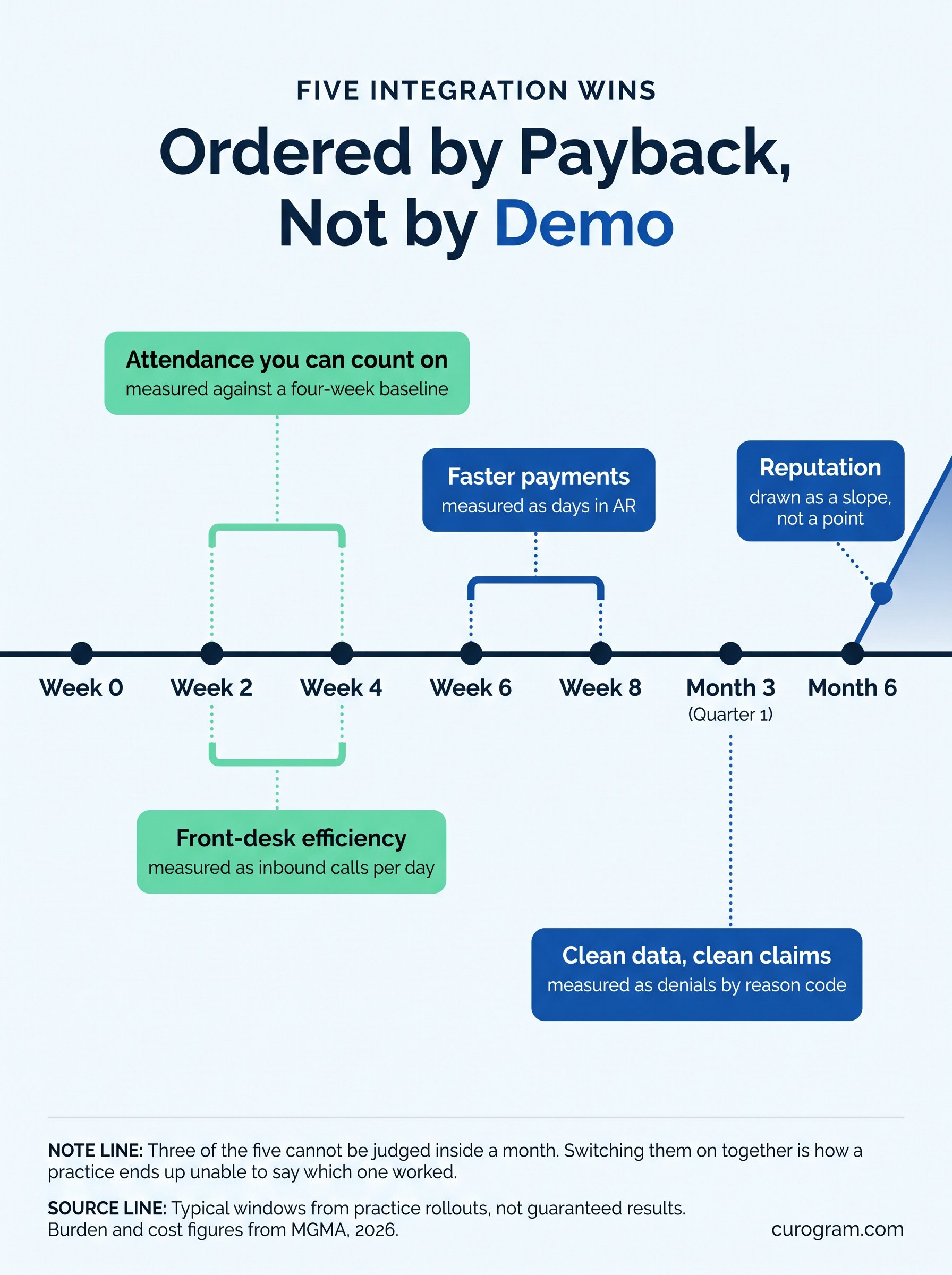 5 EMR Integration Benefits for Administrators You Can Deliver in Weeks
Appointment reminders that read the schedule know the visit type and the time. A reply that confirms or reschedules writes back to the chart.
Expect a modest effect. Pooled research puts the lift in attendance at roughly 11%, well under the figures vendors tend to quote.
Measure four weeks of your own rate before switching anything on. That baseline is the only honest way to judge the result.
Reschedule is the option most reminders leave out. Patients who cannot come Tuesday will say so, given somewhere to say it.
One broadcast replaces sixty calls. Closures, delays, flu clinics and a provider out sick all use the same mechanic. We walked through broadcasting office closures in Prime Clinical, which is the clearest version of this job.
Our writeup of mass texting in RamSoft covers the imaging side, where the list changes hour to hour. The test is where the list comes from. A list exported to a spreadsheet is out of date the moment it is saved.
Closure mornings also expose who is on the list. Patients booked that day, patients mid-treatment and patients who called yesterday are three different sends.
Intake sent by text and written straight to the chart removes the retyping step and the typo with it.
It also turns the patient into your data cleaner. Asking them to confirm their own address and insurance costs nothing and catches plenty.
Watch the denial rate by reason code for a quarter. Identification and eligibility denials are the ones this should move. Insurance capture is the expensive field. A photo of the card beats a typed member number every time.
A payment link in a text gets paid from a phone, usually in under a minute.
Two numbers tell you whether it worked. Days in accounts receivable, and the share of patient balances paid within seven days. Both are easy to pull monthly and hard to argue with at a budget meeting.
Send the link before the statement rather than after it. A balance explained at the visit gets paid faster than one arriving cold in an envelope.
Ask every patient rather than the memorable ones. Volume is what moves a star rating, and the quiet middle is where volume lives.
Route low scores to a person before they reach a public page. That is service recovery, and it is the half most practices skip.
Reviews accumulate rather than spike, so judge this one at six months.
Set a weekly target instead of a monthly one. Twenty requests a week is a number a desk can hit without being chased.
Sequence it by payback, and switch on one thing at a time. Two changes in the same week means you cannot attribute either result.
A workable order, with the number to watch beside each step.
|
Weeks |
What goes live |
What you measure |
|---|---|---|
|
1 to 2 |
Reminders and two-way confirmations |
No-show rate against your four-week baseline |
|
3 to 4 |
Shared inbox for the front desk |
Inbound call volume per day |
|
5 to 6 |
Mobile intake forms |
Demographic corrections per week |
|
7 to 8 |
Text-to-pay and post-visit surveys |
Days in AR, and review volume per month |
Nothing here needs the EMR replaced. The record system stays where it is and the layer above it does the talking. Hold to one change per fortnight even when it feels slow. Attribution is what that patience buys you.
Every patient message lands in one place that more than one person can see. A thread on somebody's personal phone does neither.
The audit trail matters as much as the convenience. An audit asks who saw what and when, and a shared inbox can answer.
Shared also means somebody else can answer. A message sitting unread because one person is on leave is the failure this removes.
Staff answering a message can see the next appointment without opening another window.
That is the whole efficiency argument in one sentence. Context switching is the tax, and removing it is the win.
Ask to see this in a demo rather than hear about it. Either the appointment sits on the same screen or it does not.
Relief shows up in the first fortnight, because inbound calls fall before anything else changes.
The same inbox handles one-to-one replies and broadcasts. We covered patient notifications in Office Ally, where both run from one place.
Decide who can press send before you need to. A closure notice at seven in the morning is a poor moment to sort out permissions.
Expect call volume to drop before anything else moves. It is the first number to change and the easiest one to report.
A filled cancellation is the fastest money an inbox makes. A waitlist message goes to six people and the first reply takes the slot.
Payment questions get answered in the same thread, which shortens the gap between a statement and a payment. Keep the waitlist short rather than long. Six names who answer beats sixty who do not.
An unhappy patient who gets a reply within the hour often does not write the review at all. Set a response time target and report against it weekly. Anything slower than a day is effectively no reply.
Log what each complaint was about as well as the date. Three of the same complaint in a month is an operational finding.
Week one is setup and one trained user. Pick the person who answers the most calls, not the most senior.
Week two adds the rest of the desk and turns on templates for the five questions you answer every day. Keep the phone line open throughout. A rollout that forces patients to change channel fails for reasons unrelated to the software.
Write the five templates down before anyone builds them. That list is almost always shorter than people expect.
Curogram HighlightCurogram's Mass Text Messaging builds the recipient list from the record rather than from an exported spreadsheet. Broadcasts and one-to-one replies share the same inbox, so a closure notice and the forty replies to it stay together. Threads attach to the patient chart, which keeps the audit trail in the same place as the conversation. |

Take a baseline before you take a demo. Four weeks of your own no-show rate, call volume and days in AR.
Those three numbers decide which win to start with, and they are the only ones that can prove it worked. Then switch on one thing at a time. The roadmap above is deliberately slower than most vendors will suggest.
Ask what each tool writes back to the chart. Reading alone makes a nicer dashboard and saves nobody any time. None of this requires replacing the record system. Burden figures suggest most groups have no appetite for that anyway.
Pick the win your own numbers point at. A tool chosen that way survives the budget conversation a year later.
Take those three baseline numbers into the vendor call and ask which one the product moves. A straight answer is a good sign.
If the answer is all three, ask which one moves first.
Budget season rewards whoever can show a before and an after. That is a measurement habit rather than a software choice.
Book a Curogram demo. One pass covers the shared inbox, the schedule read, and a broadcast going out.

Admin burnout is fueled by poor integration. See how connected systems save staff time.

.jpg?width=30&name=square-formal-photo%20(1).jpg) Mira Gwehn Revilla : 6/6/26, 1:00 PM
Mira Gwehn Revilla : 6/6/26, 1:00 PM
Track the right practice administrator KPIs to boost team efficiency in healthcare, catch slipping metrics early, and protect your revenue weekly.

Is your practice aligned with healthcare integration best practices? Here's a checklist on how to choose an integration-ready healthcare platform.