

Skip to the main content.

7 min read

Text-to-Pay for Multi-Specialty Practices: Simplifying Billing

Text-to-Pay for Multi-Specialty Practices: Simplifying Billing
💡Managing billing for different specialties in one practice is tough. Each department has its own workflow, and traditional systems can't keep up. The result? Delayed payments, frustrated staff, and unhappy patients.

Curogram’s text-to-pay solution changes that. It adapts to each specialty’s billing needs while keeping everything centralized. From imaging to dermatology to primary care, patients receive clear, mobile-friendly payment requests, and staff manage all billing through one automated platform—no switching systems or chasing balances.

The outcome is simple: faster payments, fewer billing headaches, and a smoother, more patient-friendly experience across your entire practice.

Running a multi-specialty practice means juggling different workflows every single day. Your imaging department needs to collect payments before scans.

Primary care handles co-pays after visits. Dermatology splits bills between medical and cosmetic services. Each specialty operates differently, and your billing system should adapt to that reality.

But most billing tools don't. They force every department into the same rigid process. When systems can't keep up with your practice's complexity, problems pile up fast. Staff spend hours reconciling payments across departments. Patients get confused by inconsistent payment experiences. Revenue gets delayed because nothing syncs properly.

That's where text-to-pay for multi-specialty practices becomes essential. It's not just about sending payment links. It's about creating a unified system that respects each department's unique needs while giving you centralized control. Think of it as one platform with the flexibility to handle every specialty under your roof.

Curogram's text-to-pay solution does exactly that. It automates patient billing across all your specialties while maintaining compliance and improving patient satisfaction. Whether you're managing 3 departments or 30, you get the same efficiency without added complexity.

Let's look at how it works and why it matters for practices like yours.

The Unique Billing Challenges in Multi-Specialty Practices

When Every Department Operates on a Different Schedule

Every specialty has its own billing rhythm. Imaging centers collect fees upfront before procedures. Primary care offices handle co-pays at checkout. Orthopedics deal with pre-authorizations and insurance complexities.

When you bring all these departments together, you're not just managing one workflow. You're managing five, ten, or more separate processes that rarely line up.

Different EMR systems make this worse. Your dermatology team uses one platform while gastroenterology uses another. Patient data lives in silos, and nobody has a complete view of what's happening with payments.

When it's time to reconcile accounts, your billing staff manually piece together information from multiple sources. This creates delays and increases the chance of errors.

The Real Cost of Billing Fragmentation

The impact shows up in your numbers. According to recent healthcare data, practices lose between 5-10% of potential revenue due to billing inefficiencies. Manual processes slow down collection times. Patients receive inconsistent payment experiences across departments. Your staff burns out trying to keep everything straight.


5-10%

Revenue lost annually due to multi-specialty
billing inefficiencies


This isn't just an administrative headache. It affects patient satisfaction too.

When someone sees your dermatologist and gets one type of billing experience, then visits your primary care office and receives a different payment request without secure messaging, they notice. Confusion about how to pay leads to delayed payments and frustrated patients who expect better from a professional healthcare organization.

Why Generic Billing Software Falls Short

Most billing tools are built for single-specialty practices. They work fine when everyone follows the same process, but they crumble under the weight of real-world complexity.

These systems can't accommodate different appointment types, varied co-pay structures, or specialty-specific payment rules. You end up forcing square pegs into round holes.

The lack of customization becomes a daily problem. Your imaging team needs to send payment requests before appointments. Your physical therapy department wants to collect after sessions. Generic software gives you one option and expects everyone to adapt.

When that doesn't work, practices often resort to managing multiple billing vendors, which defeats the entire purpose of having a unified system.

The Multi-Vendor Trap

Managing multiple vendors adds cost and complexity without solving the underlying problem. Each vendor has its own interface, reporting structure, and integration requirements. Your staff needs to learn different systems for different departments. Financial reporting becomes a nightmare because data comes from scattered sources. You're paying more to make things harder.

Then there's the integration challenge. Generic billing tools often claim to work with your EMR, but the reality is painful. Data doesn't sync properly.

Staff spend time manually entering information that should flow automatically. Updates in one system don't reflect in another. What should be seamless automation turns into supervised manual work with extra steps.

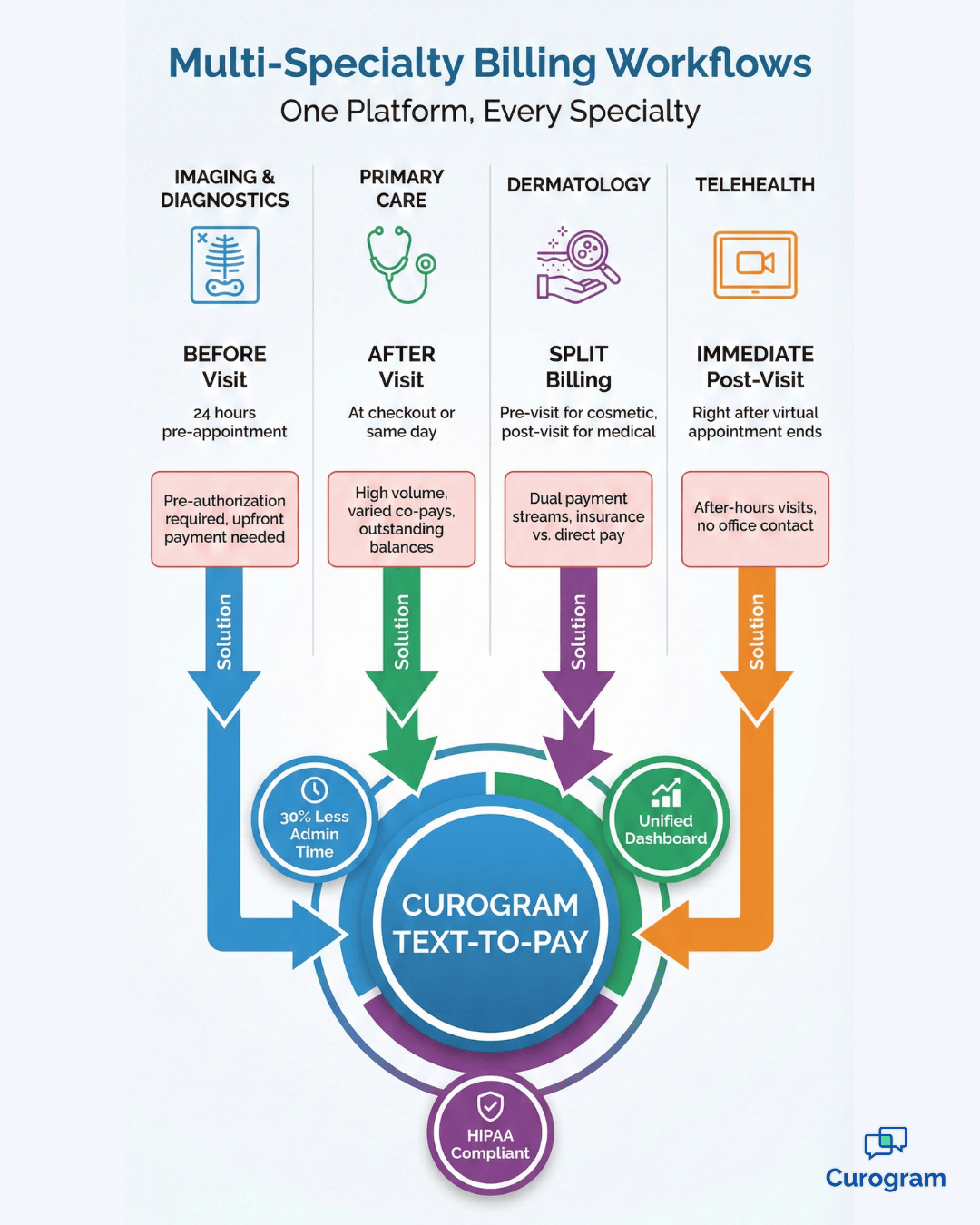
Multi-specialty billing workflows showing imaging, primary care, and telehealth payment timing

How Text-to-Pay Adapts to Multiple Specialties

One Dashboard, Multiple Workflows

Curogram's platform gives you a unified billing dashboard where all departments connect. Instead of logging into separate systems, your staff sees everything in one place.

Each specialty maintains its own workflow rules while feeding into centralized payment workflows healthcare. This means imaging can send pre-visit payment links while primary care sends post-visit reminders, all from the same system.

Smart automation handles the complexity behind the scenes. The system automatically adjusts timing based on appointment type. Message templates change depending on the department. Payment rules adapt to specialty requirements without manual intervention. You set the parameters once, and the platform takes care of the rest. This is how you automate multi-specialty billing without sacrificing flexibility.

Seamless EMR Integration Across Departments

Integration with your existing EMR systems happens seamlessly. Whether you use different platforms across departments or one practice-wide system,

Curogram connects to them all. Patient data flows automatically. Billing information updates in real time. There's no manual uploading of spreadsheets or double-entry of patient details. The system does the heavy lifting so your staff doesn't have to.

Flexible payment triggers give each department what it needs:

  • Send links before appointments for imaging and diagnostic procedures
  • Collect during check-in for urgent care or walk-in services
  • Request payment after services complete for primary care visits
  • Handle delayed billing for insurance-dependent specialties

The timing adjusts automatically based on the specialty and appointment type. Patients receive payment requests at the right moment, which dramatically improves collection rates. This scalable healthcare payment solution grows with your practice.

Customizable branding ensures consistency across your organization.

Each department can maintain its own identity within messages while using the same secure payment infrastructure. Your dermatology patients see dermatology branding. Your imaging patients see imaging branding. But on the back end, everything runs through one HIPAA payment system healthcare that keeps data secure and compliant.

Patient completing text-to-pay transaction at multi-specialty medical clinic front desk

Real Results from Multi-Specialty Implementation

Streamlined billing processes save significant administrative time. Practices using Curogram report reducing billing-related work by up to 30% while making it easier to collect payment across departments.

That's hours every week that staff can spend on patient care instead of chasing down payments or reconciling accounts across departments. When automation handles routine tasks, your team focuses on what matters.


Metric Before Text-to-Pay After Text-to-Pay
Administrative Time (per week)  15-20 hours 10-14 hours
Payment Collection Speed 14-21 days 3-7 days
Payment Collection Speed 35-45% 65-75%
Billing Errors (monthly) 20-30 errors 5-10 errors


Speed and Convenience Drive Collections

Payment collection speeds up across every specialty. Patients respond faster to text messages than to mailed statements or portal notifications.

The convenience factor matters. When someone receives a secure payment link right after their appointment, they can settle their bill immediately. No logging into portals, no searching for account numbers, no delays.

Centralized reporting gives leadership the visibility they need. CFOs and operations directors get unified financial data across all departments. You can see which specialties have the best collection rates, where payment delays occur, and how different workflows perform.

This level of insight is impossible when billing data lives in separate systems.


Measurable Impact on Practice Operations

A 45-provider clinic with six specialties implemented text-to-pay EMR integration across all departments. Within three months, cross-department billing time dropped 40%, and accounts receivable fell from 18 days to 11.

Patient satisfaction scores for billing rose 28 points, while billing staff saved 12 hours per week by eliminating manual reconciliation. Those hours were reinvested into better patient communication and scheduling.

These aren’t theoretical benefits—they’re measurable results from real multi-specialty practices.

Specialty-Specific Use Cases That Work

Scalability means the system works equally well whether you have one department or fifty. Adding a new specialty doesn't require rebuilding your billing infrastructure. You configure the new department's rules, connect it to the platform, and start sending payment requests. The same efficiency applies regardless of practice size.

Affordable pricing structures make text-to-pay accessible to practices of all sizes. You're not paying for features you don't need or capacity you won't use.

The system scales with your organization. Multi-specialty and multi-location networks get the same cost-effective pricing without sacrificing functionality. This matters when you're managing budgets across multiple departments.

Cloud-based infrastructure means deployment is fast and maintenance is minimal. There's no hardware to install or IT infrastructure to manage. Updates happen automatically.

Security patches get applied without downtime. Your staff logs in from anywhere with an internet connection. This flexibility becomes critical when managing operations across multiple specialties and locations.

Security and compliance are built into the foundation. Every transaction meets HIPAA requirements. Patient data stays encrypted during transmission and storage. Audit trails track every action. When regulatory audits happen, you have complete documentation of your billing processes. This peace of mind is essential when handling sensitive healthcare payments across diverse departments.


Conclusion

Managing billing across multiple specialties doesn't have to be complicated. The right system adapts to your practice instead of forcing you to adapt to it. When every department gets the workflow it needs while connecting to one centralized platform, efficiency jumps and problems disappear.

Curogram's text-to-pay solution delivers exactly that. It handles the complexity of multi-specialty billing while keeping the experience simple for your staff and patients.

Automated payment requests go out at the right time for each department. Secure transactions happen with a single click. Centralized reporting gives you the financial visibility you need.

The results speak for themselves. Practices reduce administrative time by 30%. Payment collection speeds up across all specialties. Patient satisfaction improves because billing becomes consistent and convenient. Your staff stops fighting with systems that don't work and starts focusing on patient care.

Whether you're running 3 departments or 30, the platform scales to meet your needs. Adding new specialties doesn't mean rebuilding your infrastructure. Affordable pricing means you get enterprise-level functionality without enterprise-level costs. Cloud-based deployment means you're up and running in weeks, not months.

Security and compliance stay locked down throughout. Every transaction meets HIPAA requirements. Patient data stays protected. Audit trails document everything. You get peace of mind knowing your billing practices meet regulatory standards across every specialty.

Ready to see how it works for your practice? Book a demo now  and watch Curogram adapt to your specific specialties in real time. 


Frequently Asked Questions

Can text-to-pay work with different EMR systems across departments?

Yes. Curogram integrates with multiple EMR platforms simultaneously. Each department keeps its existing system while connecting to the unified payment platform. Data flows automatically without manual intervention.

How does the system handle different payment timing requirements?

The platform uses flexible triggers that adapt to each specialty's needs. You configure when payment requests go out based on appointment type. Imaging sends pre-visit links. Primary care sends post-visit reminders. The system executes these rules automatically.

What if patients have questions about their bill?

Patients can reply directly to payment text messages. These responses route to the appropriate department based on customizable rules. Staff see the question and can respond or call the patient as needed.

Is training required for each department?

Initial training takes about 30 minutes per department. The interface is straightforward, and most staff pick it up quickly. Ongoing support is available whenever questions arise.

How long does implementation take?

Most multi-specialty practices complete implementation in 2-4 weeks. This includes EMR integration, workflow configuration, and staff training across all departments.