Skip to the main content.

8 min read

6 Strategies to Introduce Technology to Your Patients

6 Strategies to Introduce Technology to Your Patients
 💡 Introducing new technology to patients works best when practices teach it inside visits they already have, then support it afterward.

Six strategies cover most of the gap. Create a comfortable space by explaining why the tool exists, coach patients during rounds or checkups instead of scheduling a formal session. Provide written and digital instructions built around the questions your front desk already answers.

Bring family members and caregivers into the same session with proxy access set up, send short updates when the software changes, and ask open-ended questions that reveal where patients got stuck.

Use teach-back to confirm understanding — a patient who can show you how to request a refill learned it, while a patient who nods did not. Low adoption usually points to how a tool was introduced, not to patient interest or age.

Most practices measure a software rollout by whether staff can use it. Patients get the same tool in about 30 seconds at checkout, along with a URL and a promise that it's easy. Then the portal sits at 20% adoption and someone concludes patients don't want it.

They usually do. The introduction is what failed.

That's the argument of this piece: patient adoption is an operations problem your practice controls, and the fix costs minutes rather than budget. The strategies below work because they meet patients at the exact moment a tool stops making sense — the login screen, the first form, the reset link nobody can find.

Consider two versions of the same appointment. In the first, a patient leaves with a card that has a web address on it. In the second, a medical assistant opens the app on the patient's phone while the room is still occupied, watches them request a refill, and fixes the one step that confuses them.

The gap widens for patients carrying more than one system. Someone seeing a cardiologist, a primary care doctor, and a physical therapist may hold three logins already, none of them alike. Your tool arrives fourth. Age matters less than that load.

Six strategies follow. Each one addresses a place patients actually get stuck, and each fits inside work your team already does. None require a training coordinator or a budget line. What they require is that somebody watch a patient try, once, before the visit ends.

Create a Comfortable Space

Learning a new way to do something is hard after years of the old way. That's true for your staff during a rollout, and it's just as true at the front desk when a patient gets handed a tablet with no warning.

Someone who has called to book every appointment since 2019 may stop cold at an online scheduling link. The same patient often uses a remote monitoring app daily once a nurse sits with them for four minutes.

Multiple portals make this worse. A patient with a cardiologist, a primary care doctor, and a physical therapist may hold three logins, none of which look alike. Yours arrives fourth, and by then they've stopped reading the emails.

Comfort levels also vary by patient in ways that have little to do with age. Four things tend to close that gap:

  1. Explain what the tool does and why your practice chose it — fewer callbacks, faster refill requests, results without a phone tree.
  2. Questions and complaints are data. When three patients in one week trip on the same step, change how you introduce it.
  3. Answer plainly, without rushing, and skip the shorthand your staff uses internally.
  4. Patients should hear that their opinion affects what your practice keeps using.

Walking a patient through a new tool is patient education, the same as explaining a prescription.

It's also one of the few parts of the visit where the doctor-patient relationship gets built without a diagnosis attached. Patients who understand the reason behind a tool have less to push back on.

Set Training and Coaching Sessions

A study in BMC Med Inform Decis Mak found that training and coaching came up more often than any other factor in the successful introduction of medical innovation to nursing practitioners.

The study looked at clinical staff, not patients. The mechanic is the same either way: someone shows you once, watches you try, and answers the question you were too embarrassed to ask.

None of this requires a scheduled class. Coaching fits inside visits your practice already has:

Moment What it looks like
Rounds Open the app on the patient's own phone before you leave the room
Routine checkup Have them log in at the desk while the nurse pulls up their chart
Consultation Walk through one task — a refill request, a results check
Follow-up call Ask what they've tried since, fix the one step that failed


Troubleshooting belongs in that first pass. Show patients what a failed login looks like and where the reset link sits, so the first error doesn't end the relationship with the tool.

Questions will still come afterward, by phone or text, and answering them the same way each time is what keeps the instructions from drifting.

Language does most of the work here. Plain words, no shorthand, and a real explanation when a clinical term can't be avoided.

Jargon leaves patients confused and frustrated, and confused patients stop asking. Slow down, too — a patient who's still catching up on your last sentence never forms a question about it.

Then check what landed. The teach-back method has the patient explain the steps back to you, in their own words, or show you on the screen. If they can walk you through requesting a refill, they understood it. If they can only nod, they didn't.

Provide Instructional Materials

Every question your guide answers is a call your front desk doesn't take. A patient stuck on a password reset at 8 p.m. either finds the answer on paper or dials the office at 9 a.m. Write the materials against the questions your staff already fields most often.

Formats matter less than reach, and patients don't all reach the same way:

  • A printed guide with the steps in order, handed over at checkout
  • A PDF sent by email or text, saved to the phone they'll actually be holding
  • A link to a page on your site that stays current when the software updates

Screenshots beat description. Show the login screen as it looks on a phone, circle the button, and name it the way the app names it. Keep the whole thing to one page if the task is one task.

Brochures, pamphlets, and short how-to videos already sit at the front desk of most practices for prescriptions and procedures. New software deserves the same shelf.

Materials a patient takes home also get read a second time, often with a daughter or a caregiver sitting next to them, at whatever hour works for both.

Involve the Family or Caregiver

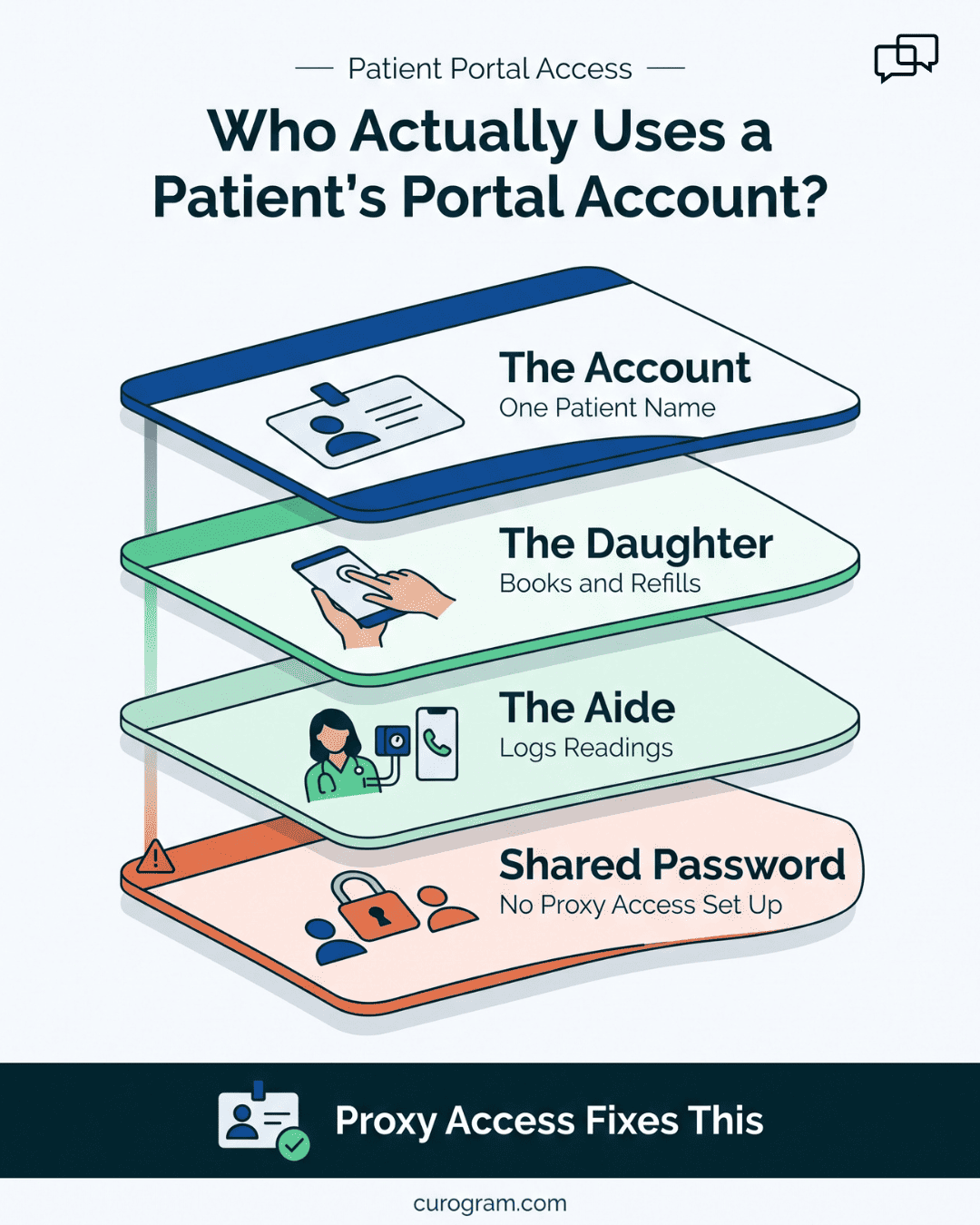
The person tapping through your patient portal often isn't your patient. It's a daughter on her lunch break, or a home health aide with a phone in one hand. Teach the patient, then teach whoever helps them.

Skip that step and the gaps show up fast. A refill request nobody submits until the pills run out. A telehealth visit that starts nine minutes late because the caregiver can't find the link in the text thread.

Blood pressure readings that never get logged because the aide didn't know the app expected them daily. Each one delays care for a patient who did nothing wrong.

Bring the caregiver into the same session as the patient. Show them where proxy access lives in your system and set it up before they leave, so the caregiver isn't sharing a login or calling your front desk for every password reset. Ask them to run one task while you watch.

Patients relax when someone they trust already knows the tool. The son who set up the app is the person they'll call at 7 p.m., not your answering service.

Patient portal account layers showing family and caregiver access without proxy setup

Provide Continuous Communication

Software changes after you've taught it. The portal login screen gets redesigned, a billing tab moves, an app update renames the button you told patients to press. A patient who learned it once now has instructions that no longer match the screen.

Send a short note when the change is one a patient will see. Skip the ones they won't. A message like "The portal now asks for a code by text when you sign in — here's how it works" takes 20 seconds to read and prevents a week of front desk calls.

Patient newsletters carry the slower updates, like a new feature or a scheduling change for the holidays.

A resource section on your website holds the current guides, so patients aren't following a PDF from two versions ago. Text messages handle anything urgent, since they get opened the same day.

Ask for Feedback

Silence isn't approval. Patients who feel lost with a new tool are the least likely to raise a hand, because saying so means admitting they couldn't work it out. The ones who speak up were probably fine already.

So ask first. Two questions at checkout, while the visit is still fresh, will surface more than a feedback form nobody opens.

Phrasing decides what you get back:

Ask this Not this
What made you stop the first time you tried the portal? Did you have any trouble with the portal?
Show me where you'd request a refill. Do you know how to request a refill?
What would you tell a friend to expect? Was the app easy to use?


Yes-or-no questions hand patients an exit, and most take it. Open questions make them describe the actual moment they got stuck.

Write the answers down somewhere your staff can see them. When four patients name the same screen in one month, that's a fix to your instructions, not a patient problem.

Conclusion: Be Patient with Your Patient

Adoption is an operations problem, not a patient problem. Practices buy scheduling software, portals, and remote monitoring tools to run better and treat better, then hand them over in 30 seconds at checkout and call the result low patient interest.

The six strategies above cost minutes, not budget. A guide written against the questions your front desk already answers.

A caregiver set up with proxy access before they leave. A text when the login screen changes. Patients who get that treatment use the tool, follow instructions more closely, and call less.

Some of them will still take three tries. The patient with four specialists and four logins isn't resisting you. She's out of room. Ask what stopped her, fix that one step, and try again next visit.

Curogram brings the pieces patients already understand into one place — two-way texting, telemedicine, digital intake forms, and text-to-pay — so there's less to teach in the first place.

Patients reply to a text without downloading anything or remembering a password. Based on our internal data, practices on our platform see appointment confirmation rates above 75%, and Atlas Medical Center cut its no-show rate from 14.20% to 4.91% in three months.

Request a demo and we'll walk your team through what patient adoption looks like when the tool meets patients where they already are.


Frequently Asked Questions

How long should staff spend introducing a new tool during a visit?

Four minutes with the patient's own phone beats a printed handout at checkout. Pick one task — a refill request or a results check — and have them do it while someone watches. Anything longer competes with the visit itself. Patients who complete one task on their own device rarely need a second walkthrough for the same feature.

Why do patients who use apps daily still refuse a patient portal?

Trust and load, not skill. A patient with four specialists may already hold four logins that look nothing alike, and yours arrives fifth. Health information also feels different from a flight booking, so a password prompt reads as risk rather than routine. Ask what stopped them at the specific screen, then fix that step.

How can a practice tell whether a patient actually understood the instructions?

Use teach-back. After you explain the steps, ask the patient to show you on the screen or describe them in their own words. A patient who can walk you through requesting a refill understood it. A patient who nods and thanks you did not. Nodding is the most common false signal your staff will see.

What should a practice do when several patients get stuck at the same screen?

Treat it as an instruction problem. When four patients in a month name the same step, your guide is wrong about that step, not your patients. Rewrite it with a screenshot of the real screen and the button labeled the way the software labels it. Then tell the patients who already gave up.

Why does caregiver access matter more than most practices expect?

The person tapping through the portal often isn't the patient. Daughters, sons, and home health aides submit the refills and join the video visits. Without proxy access set up, they share logins or call your front desk for every password reset. Show them where proxy access lives and have them complete one task before they leave the office.

How Telehealth Enhances Patient Engagement

1 min read

How Telehealth Enhances Patient Engagement

💡 Telehealth enhances patient engagement by removing the friction that keeps patients from acting on their health. Video visits, secure texting,...

Read More
15 Powerful Patient Engagement Strategies: Top Ideas for Patient Care

1 min read

15 Powerful Patient Engagement Strategies: Top Ideas for Patient Care

💡 Patient engagement strategies are the specific workflows that get patients participating in their own care: confirmations, education,...

Read More
What is Patient Engagement? Strategies, Platforms & Solutions

1 min read

What is Patient Engagement? Strategies, Platforms & Solutions

💡 Patient engagement is the working partnership between patients, their families, and the people treating them, where patients have the...

Read More