
Skip to the main content.

7 min read

Remote Patient Engagement SMS: Best Practices for Virtual Clinics

Homes at dusk linked by light trails to a clinic, showing remote patient engagement SMS
💡Remote patient engagement SMS lets virtual clinics send secure reminders, visit links, and follow-up steps right to patients' phones. With a HIPAA-compliant platform like Curogram, clinics can automate reminders, personalize each message, and track how patients respond.

Text messages are hard to miss. Curogram's texts reach a 98% open rate, so patients see reminders and telehealth links in time to act. Healthcare automation also cuts busywork, with Curogram users reporting 50% fewer inbound calls.

The impact on patient attendance can be large. Atlas Medical Center lowered its no-show rate from 14.20% to 4.91% in three months using Curogram's automated reminders and confirmations.

Virtual care got rid of the waiting room. It didn't get rid of the no-show.

Most virtual clinics recognize the pattern. A patient books a video visit, receives a confirmation email, and then forgets about it. The link sits buried in an inbox while your provider logs on, waits ten minutes, and moves on to documentation instead of patient care.

There's no front desk to catch the patient on the way in. There's no lobby where someone can hand over paperwork. Every interaction between your team and the patient happens digitally, usually on their phone.

That changes how engagement works. In a physical office, staff can resolve many problems face to face. In a virtual clinic, if the message doesn't land, the appointment often doesn't happen.

This is why remote patient engagement SMS has become an essential part of virtual care. Text messages reach patients where they already are, without a portal login, password reset, or app download. And they actually get read: Curogram's texts see a 98% open rate.

But sending texts isn't the same as having a strategy. Random reminders, vague wording, and messages sent at inconvenient times are easy to ignore. Texts sent through consumer messaging apps can also expose your practice to compliance risk.

A strong SMS approach does three things especially well for your clinic. It keeps patients informed and prepared for every appointment. It saves your staff time through healthcare automation. And it protects patient information at every step, so trust stays intact.

In this guide, you'll learn why texting matters so much in virtual care and five best practices for putting it to work. You'll also see how to build patient trust while staying HIPAA compliant, plus practical ways to improve patient attendance without adding work to your team's day.

Why SMS Is the Strongest Link in Virtual Patient Engagement

Patients now expect the same speed from their clinic that they get from their bank or pharmacy. Email gets filtered. Phone calls go to voicemail. Portal messages wait until someone remembers to log in.

Text messages are different. Curogram's texts reach a 98% open rate, which means nearly every reminder, update, or care instruction you send actually gets seen. For a virtual clinic, that can be the difference between a patient who joins on time and one who never clicks the link.

Here's what that looks like for your clinic:

  • Better patient attendance: Pairing SMS with an automated appointment reminder system keeps visits top of mind. Practices using Curogram's automated reminders and two-way texting report no-show rates 53% lower than the industry average.
  • Less manual work: Healthcare automation lets you schedule and personalize messages without extra staff time. Curogram users have cut inbound call volume by 50%.
  • Happier patients: People like fast, clear updates they can read on their own time, with no hold music required.

For your team, this means fewer empty video slots and fewer hours spent chasing confirmations by phone.

5 Best Practices for Remote Patient Engagement SMS

Knowing that texting works is the easy part. Consistent results depend on how you implement it. These five practices will help you build an SMS strategy that patients respond to and your staff can count on.

1. Start With a HIPAA-Compliant Texting Platform

Compliance comes first. Protected health information (PHI) must remain secure from the moment a message is sent until the moment it's read. A platform like Curogram encrypts messages and keeps a permanent audit trail, so you always have a record of what was sent and when.

Tip: Skip standard texting apps on personal or office phones. Choose a platform built for healthcare that secures PHI automatically, so your staff doesn't have to guess what's safe to send.

2. Automate Reminders and Follow-Ups

A well-built appointment reminder system cuts missed visits and keeps your schedule on track. O

nce it's set up, automation can send:

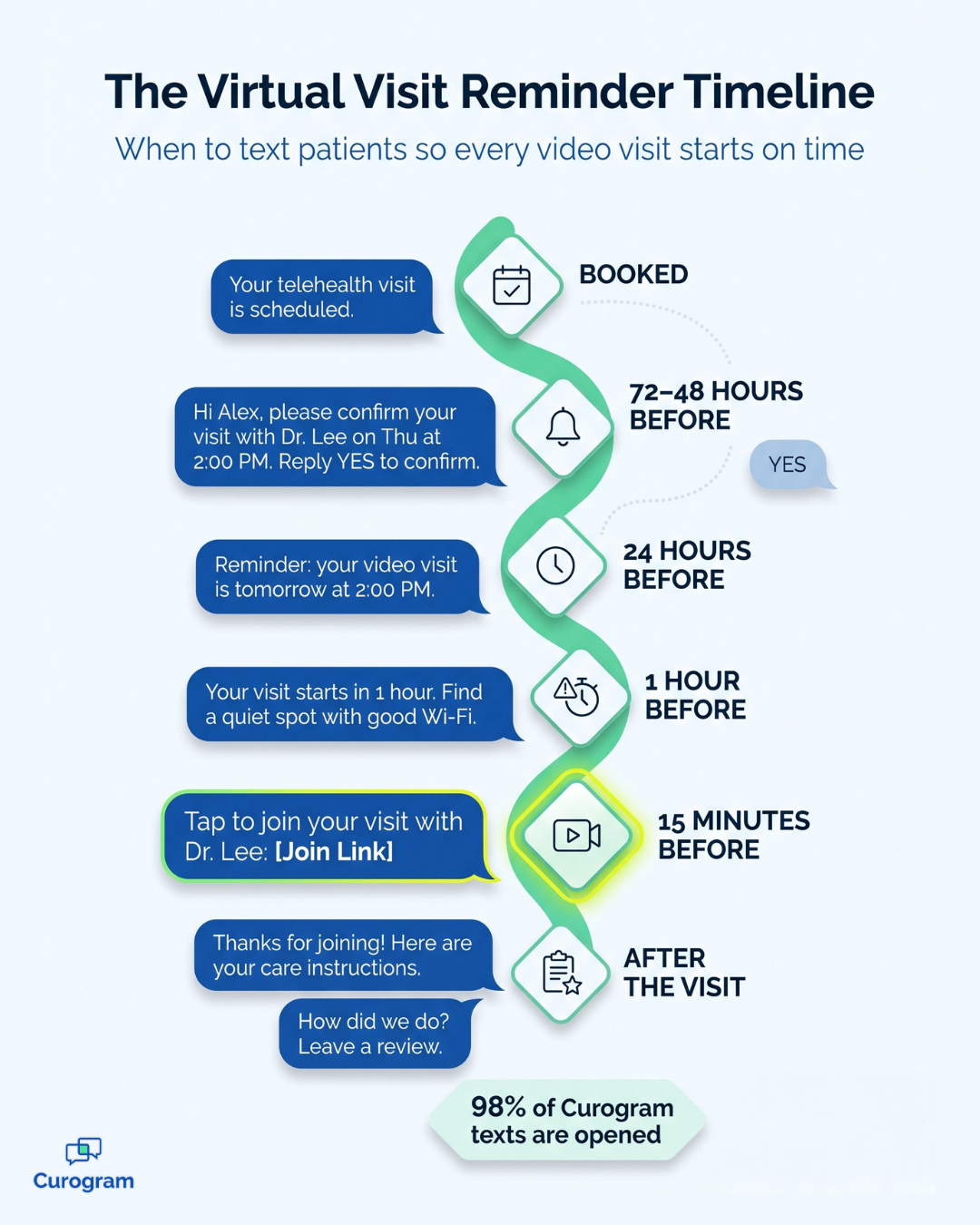
  • A confirmation request 48–72 hours before the visit
  • Reminders 24 hours and 1 hour before
  • Follow-up messages after the visit with care instructions or a feedback request, such as a link to your healthcare reputation management tool to collect reviews

Example:

A virtual therapy clinic could add one more touch: a reminder with the telehealth link 15 minutes before each session. The patient doesn't have to dig through email for the link.

It's right there when they need it, which makes late starts and last-minute cancellations less likely.

3. Make Every Message Feel Personal

Automation doesn't have to sound robotic.

A few details make a text feel like it came from a person, not a system:

  • The patient's first name
  • Visit details, including the date, time, and provider
  • Instructions that fit the type of visit

Compare these two reminders:

  • Generic: "Your appointment is tomorrow."
  • Personal: "Hi Alex, your telehealth visit with Dr. Lee is tomorrow at 2:00 PM. Tap here to join: [link]."

The second message answers every question before the patient has to ask it.

4. Connect SMS to Your EMR and Workflow

When your texting platform integrates with your EMR or practice management system, patient data flows in automatically. No one has to copy visit times into a separate tool or retype phone numbers. That saves time and cuts down on errors.

Illustrative example:

Say your front desk spends 2 minutes confirming each of 40 virtual visits per day. That's 80 minutes a day, or about 27 hours a month across 20 workdays. Syncing patient intake forms and reminder texts with your EMR can give much of that time back to your team.

5. Track Your Results and Adjust

Your SMS platform should give you clear numbers to watch, such as:

  • Message delivery rates
  • Patient replies and confirmations
  • Appointment attendance

Tip: If attendance dips, test a change in timing or wording. For example, reminders sent in the early evening may get more replies from working patients who can't check their phones during the day.

Small adjustments add up over time. Treat your reminder schedule as an ongoing process, not something you configure once and forget.

Virtual visit reminder timeline showing when to send patient SMS reminders

Key Takeaway: Two-Way Texting Turns Reminders Into Results

A reminder only works if the patient can act on it. When patients can reply to confirm or ask to reschedule in the same text thread, your team learns about open slots early and has time to fill them.

Atlas Medical Center experienced this firsthand. After implementing Curogram's automated reminders and confirmations, its no-show rate fell from 14.20% to 4.91% in just three months. That's about two-thirds fewer missed visits.

For your clinic: Make sure every reminder invites a reply, not just a read.

How to Protect Patient Trust and Stay Compliant

Patients will only engage with your texts if they trust them. That trust comes from messages that are clear, secure, and respectful.

Build these habits into every SMS workflow:

What to do Why it matters
Get patient consent before sending texts Respects patient choice and keeps your outreach on solid ground
Offer a simple way to opt out Patients stay in control, which builds goodwill
Keep sensitive PHI out of unsecured messages Protects patients and your practice from data exposure
Use the same clinic name and tone in every text Helps patients tell your messages apart from spam

For official guidance on texting and patient data, review the HHS HIPAA FAQs for professionals. When you put security and openness first, patients feel confident engaging with your virtual clinic.

Turning Text Messages Into a Stronger Virtual Clinic

Virtual care depends on something most clinics underestimate: whether your messages reach patients and motivate them to act.

Remote patient engagement SMS is more than sending a few texts before a visit. It's a structured way to keep patients informed, keep your schedule full, and keep your staff focused on care instead of phone calls. When it works, patients show up on time, know what to expect, and feel looked after between visits.

The best results come from getting the basics right. Start with a HIPAA-compliant platform that protects PHI and keeps an audit trail. Automate your confirmations, reminders, and follow-ups so nothing slips through. Then personalize each message so it feels human.

From there, connect texting to your EMR so data stays accurate without extra entry. Track your numbers and adjust as you learn what your patients respond to. None of these steps is difficult on its own. Together, they create a dependable system that runs in the background while your team focuses on work that requires a person.

The payoff shows up quickly. Fewer empty video slots mean more patients seen with the same resources. Fewer manual follow-ups mean less stress at the front desk. And clear, secure messages build the kind of trust that keeps patients coming back.

If your clinic still relies on emails, voicemails, or manual calls, now is a good time to rethink that approach. Small changes in communication can lead to meaningful gains in patient attendance and staff efficiency.

Curogram makes it easy to put these best practices into action. You get secure two-way texting, automated reminders, and EMR integration built for healthcare teams. See how Curogram can support your virtual clinic in a live demo, and find out what a smarter texting strategy could do for your patients and your team.


Frequently Asked Questions

What is remote patient engagement SMS?
Remote patient engagement SMS is the use of secure text messages to stay connected with patients outside of in-person visits. Virtual clinics use it to send appointment reminders, telehealth links, intake forms, and follow-up instructions. Because texts reach patients directly on their phones, they're one of the most reliable ways to keep virtual care on track.
Is texting patients HIPAA compliant?
Texting can be HIPAA compliant when you use a secure platform built for healthcare. That platform should encrypt messages, control who can access them, and keep an audit trail. You should also get patient consent before texting and keep sensitive details out of unsecured channels. Standard texting apps on personal phones don't offer these protections.
When should a virtual clinic send appointment reminders?
A simple schedule works well for most clinics. Send a confirmation request 48–72 hours before the visit, then reminders 24 hours and 1 hour before. For telehealth visits, a final text with the join link about 15 minutes before the session makes it easy for patients to log on without searching their inbox.
How does SMS help reduce no-shows for telehealth visits?
Text reminders keep appointments top of mind and give patients an easy way to confirm or reschedule. That gives your team time to fill open slots. Practices using Curogram's automated reminders and two-way texting report no-show rates 53% lower than the industry average, and Atlas Medical Center cut its rate from 14.20% to 4.91% in three months.
Can SMS reminders connect with my EMR?
Yes. Many HIPAA-compliant texting platforms, including Curogram, integrate with EMR and practice management systems. Appointment details flow into your reminder texts automatically, so staff don't have to copy times or retype phone numbers. This saves time, reduces errors, and keeps your patient records and messages in sync.
HIPAA-Compliant Telemedicine: Better Workflows & Patient Engagement

HIPAA-Compliant Telemedicine: Better Workflows & Patient Engagement

Learn how HIPAA-compliant telemedicine texting improves patient satisfaction and streamlines workflows— stories from healthcare providers using...

Read More
5 Reasons Healthcare Providers Should UseText Messaging

5 Reasons Healthcare Providers Should UseText Messaging

There's no doubt about it — patients prefer text messages. Check out these five reasons you should find the right way to text your patients.

Read More
Using Technology to Engage with Patients | Curogram Blog

Using Technology to Engage with Patients | Curogram Blog

Most healthcare providers know that engaging with patients is an important part of growing their business. Use technology to connect with your...

Read More