
Is Texting HIPAA Compliant? Everything You Need to Know
Is texting HIPAA compliant? Uncover rules, privacy concerns, and tips for safe communication with patients while staying secure.
16 min read
No government agency certifies HIPAA compliance. There's no seal to earn, no registry to check, and no federal auditor handing out approval. A "HIPAA-compliant" badge on an AI vendor's homepage is a claim the vendor wrote about itself.
That gap sits underneath every chatbot, voice assistant, and ambient scribe now running in small practices. Adoption moved fast. Paperwork behind it moved slower.
Conversational AI is safe to run in a practice your size. Three things you control decide that: a signed Business Associate Agreement, permissions set by role, and an audit log that records who opened which record and when.
Most gaps found in small practices are clerical. A texting app gets added during a staffing crunch and the BAA never gets signed. Four people share one front desk login, so the audit trail can't name anyone. Permissions stay on the default that shows every user everything.
The cost of leaving them isn't theoretical. OCR publishes every reported breach affecting 500 or more people, and entries from practices your size read like ordinary weeks that went wrong.
None of those failures need a bigger security budget. They need someone to open a list of the channels your practice already uses and mark which ones have an agreement on file.
Sections below work through the questions practices ask most, five failure points that turn up in real clinics, seven tool categories worth knowing, and the implementation steps that satisfy the Security Rule. Read it with your own channel list open.
Ten questions come up more than any others once a practice starts looking at conversational AI. Some have short answers. Others depend on how your vendor is set up and what you've already signed. Work through them in order. Each one narrows what you need to check next.
The safeguard categories haven't changed. Administrative, physical, technical — the same three HIPAA has always named. What changes with AI is how much data passes through one tool.
A scheduling bot sees visit times and phone numbers. A voice assistant reading back a result sees clinical data. A billing bot sees balances and card details.
All of that is PHI, which puts the tool squarely under HIPAA’s Privacy Rule (protecting the confidentiality of PHI) and Security Rule (ensuring the integrity and availability of PHI).
PHI is any detail that links health or payment data back to a person. Names, addresses, birth dates, record numbers, card digits, diagnosis codes. A HIPAA-compliant AI tool could potentially handle these during appointment scheduling, refill requests, symptom questions, or billing calls.
Map it before you switch anything on. Open one real thread and mark every message that carries PHI. Then answer three things: where the data enters, where it sits afterward, and who can pull it back up six months from now.
Most practices are surprised by the third one.
No. Consumer chatbots are built for general use, and their terms of service usually rule out health data outright. Check the acceptable use policy before anything else — that alone disqualifies a lot of tools.
Compliance takes a signed Business Associate Agreement, access controls, audit logging, and encryption. One correction on that last item.
HIPAA lists encryption as addressable under 45 CFR 164.312, meaning you either use it or document why an equal alternative is reasonable for your setup. In practice, no auditor is going to be happy with the alternative for text-based patient data.
The Security Rule sets these out at 45 CFR 164.312. What they look like inside a conversational AI tool:
| Safeguard | What To Look For In The Product |
|---|---|
| Encryption | PHI protected in transit and while stored, with the vendor able to name the standard used |
| Unique user IDs | Every staff member logs in as themselves, no shared front desk account |
| Automatic logoff | Session ends on its own after a set idle period |
| Audit controls | A log showing who opened which record, and when, down to the timestamp |
| Testing | Scheduled vulnerability scans, with results you can request |
Ask for the audit log sample during the demo. If a vendor can't show you one, that's your answer.
Any vendor handling PHI on your behalf is a Business Associate. Under 45 CFR 164.504(e), that relationship needs a signed BAA before PHI moves.
No BAA means no PHI. The technical safeguards don't rescue you here — a fully encrypted tool with no agreement in place is still a violation on paper. Get the signed copy filed before go-live, not after.
Training splits by role, because the risk splits by role.
Your front desk needs to know what not to type. The common failure is a staff member pasting a patient message into a general AI tool to reword it faster. That's a disclosure.
Clinical staff need escalation triggers — when a conversation stops being routine and needs a person. Billing teams need the rule on card data and where it may be stored.
Run the training again after any major system change. New feature, new gap.
Four show up over and over:
Set a calendar reminder to review vendor documentation once a year. Most breaches trace back to a control that was configured correctly on day one and drifted after.
Yes, when it's set up right. Automated reminders go out through an encrypted channel instead of a staff member's cell phone. Every patient message lands in one logged thread with a timestamp and a user ID attached.
That last part matters during an audit. Hand over a complete communication record instead of reconstructing who called whom from memory and sticky notes. AI also cuts the small human errors — the wrong chart, the number typed one digit off — by keeping staff inside a fixed workflow.
Skip the compliance badge on the homepage. Ask for these instead:
That last question catches the most vendors off guard. HIPAA holds subcontractors to the same standard, so a gap three layers down is still your exposure.
Test the tool with dummy PHI in a sandbox before real patient data goes near it.
Start with what you already run. List every channel your practice uses to reach patients — texts, email, the phone system, any AI tool a department picked up on its own. Mark which ones have a BAA on file.
Whatever's unmarked is where you begin.
From there: get the BAA signed or drop the tool, set role-based access so billing isn't reading chief complaints, and confirm the audit log actually records who opened what. Those steps close most of the gap for a small practice, and they take days rather than months.

Five problems come up most often once conversational AI is running in a real clinic. Each one is cheap to fix early. They tend to stay hidden until an audit, a patient complaint, or a breach notice forces the question. Check for them before you sign the next contract.
Conversational AI rarely runs on one channel. Web chat, SMS, email, and voice all carry PHI, and each fails in a different way. Email is usually the weak spot, since a message can sit unencrypted on a server you don't control.
The HHS Office for Civil Rights publishes every reported breach affecting 500 or more people on its public portal. Search your own specialty there. Reading three entries from practices your size does more than any warning about rising threats.
No government agency certifies HIPAA compliance. There's no seal to earn and no registry to check, so a "HIPAA-compliant" badge on a vendor's homepage is a self-assessment.
Two gaps come up most. The vendor won't sign a Business Associate Agreement. Or they will sign one, and their subcontractors haven't. A transcription service or SMS carrier sitting three layers below your contract still touches patient data, and that exposure lands on your practice.
Staff habits can undo a secure platform. Watch for the shortcuts people take when the day gets long:
Role-based permissions cap what any single account can reach, which limits how much one shortcut can expose.
HIPAA requires you to track who accessed PHI. Some tools log almost nothing usable: a date, a username, and the word "viewed."
That won't answer what an investigator asks. They want the record that was opened, the time down to the second, and the device or location the request came from. Pull a log export from whatever you're running now and read one row end to end. If you can't tell which chart it refers to, the log isn't doing its job.
Older practice management systems often have no modern API. The workaround turns manual — someone exports a patient list to a spreadsheet, then uploads it into the AI tool.
PHI now lives in two places, and the second one probably isn't in your risk assessment. Many tools also keep their own copy of conversation transcripts outside your EMR by default. Ask where that data sits and how long it's kept before you connect anything.
Each of these has a fix, and none of them start with buying software. Write down which of the five you can rule out today. What's left is your punch list for building HIPAA-compliant workflows, and tool selection comes after that list rather than before it.

Seven categories of tool show up in practices running conversational AI. Some replace a phone call. Others sit behind billing and never touch a patient directly.
For each one below: what it does, where PHI enters the workflow, and the question worth asking a vendor before you sign anything.
A compliant chatbot verifies who it's talking to before it says anything specific. Most use a one-time code sent to the number on file, or two identifiers the patient confirms. Until that check clears, the bot should give scheduling windows and nothing tied to a chart.
Where these earn their keep is volume work: rescheduling, refill requests, and the confirm-or-cancel reply. One of our clients, Atlas Medical Center, cut no-shows from 14.20% to 4.91% within three months of automating that confirmation loop (based on our internal data).
Two questions to ask before signing:
Does the bot pass conversations to a general-purpose language model, and is that model's provider covered by a BAA? Plenty of healthcare chatbots are thin wrappers around an outside API.
How long are transcripts kept, and can your admin delete a thread that shouldn't have been created?
Also check the handoff. When the bot hits something it can't answer, a live person should pick up the same thread rather than starting a new one.
Voice AI handles reminder calls, first-pass triage, and the questions your front desk answers forty times a day. Hours, directions, what to bring, whether a referral is needed.
Recordings and transcripts are both PHI. That changes what the tool has to do with them. Ask where audio is stored, for how long, and whether it's encrypted at rest with a key your vendor can name.
Recording law adds a second layer on top of HIPAA. Several states require all parties on a call to consent before it's recorded, so the disclosure has to play before the conversation starts, not after. Your vendor should let you edit that script.
Voicemail deserves its own rule. A message left on an unverified line should carry the practice name and a callback number, nothing about why the patient is being contacted. Automated calls also fall under TCPA, which means documented consent for the number you're dialing and a working opt-out on every campaign.
Some telehealth solutions now integrate conversational AI for intake and follow-up. The pattern is usually a pre-visit form that collects symptoms and history, then a post-visit check-in a few days later.
The intake side is where PHI concentrates fastest. A symptom questionnaire captures clinical detail before a provider has seen the patient, so ask whether responses write directly into the chart or sit in the vendor's own database first. If they sit, ask how long.
Two federal deadlines shape planning here. DEA telemedicine flexibilities for controlled substances currently run through December 31, 2026, and expanded Medicare telehealth coverage through December 31, 2027.
Both have been extended more than once. Confirm the current status against the Federal Register before you build a workflow that assumes either one.
One more thing worth checking: whether the platform records the session, and whether that recording is on by default. Several turn it on unless you switch it off.
Ambient scribes listen to the visit and draft the note. Adoption moved fast, and the compliance questions moved slower.
Start with consent. The patient needs to know a recording is happening, and the disclosure belongs in your intake paperwork as well as spoken at the start of the visit. Some practices post it at the front desk too.
Then trace the audio. Ask three things, and get the answers in writing:
That third question matters more than it sounds. A note draft is a legal record in progress, and the clinician still has to read and sign it. Scribes get medication names and laterality wrong often enough that unreviewed signing is its own risk, separate from anything HIPAA covers.
Survey tools send a short questionnaire after the visit and route responses back to the right chart. Anything linked to a patient record is PHI, including free-text answers, which is where people write far more clinical detail than the question asked for.
Review requests usually ride along with these tools, and that's where practices get into trouble. Sending only satisfied patients to Google conflicts with FTC rules finalized in 2024 covering fake and suppressed reviews, and with Google's own review policies. Ask every patient the same way, in the same window.
Design choices that keep these clean:
If you only need aggregate scores, ask whether the tool can run the survey unlinked. Less PHI collected is less PHI to protect.
Eligibility bots run the X12 270 request and read the 271 response back, which is the same standard transaction your clearinghouse already uses. The tool automates the checking, not the plumbing.
Run them the night before. A batch check across tomorrow's schedule surfaces the plan that termed on the first of the month, the deductible that reset, the member ID entered one digit off. Your front desk gets a short exception list instead of a stack of surprises at check-in.
Your clearinghouse is a business associate, so the BAA needs to cover that relationship, not just the software vendor sitting on top of it.
Accuracy has a ceiling worth knowing about. Payer responses vary in detail, and some return coverage status without benefit specifics. The bot reports what the payer sends. When a response comes back thin, that visit still needs a human call, and the tool should flag it rather than pass it through as verified.
These tools track claim status, send reminders, and flag denials—all while encrypting PHI and limiting access to authorized billing staff only.
When combined, these tools create a multi-layered security framework that keeps your conversational AI workflows HIPAA-compliant without sacrificing efficiency or patient engagement.
Risk analysis and staff training are written into the Security Rule, and OCR asks for both when it investigates. Run all five strategies before your first AI tool touches a patient, then again every year.
Risk analysis isn't advice. HIPAA requires it at 45 CFR 164.308(a)(1)(ii)(A), and a missing or stale assessment is one of the most common findings in OCR settlements.
Adding conversational AI changes your risk picture enough to warrant a fresh pass. Walk the data: where PHI enters the tool, where it sits afterward, who can retrieve it, and what happens if the vendor's systems go down for a day.
HHS and ONC publish a free Security Risk Assessment Tool for small and mid-size practices. It won't cover AI-specific questions, so add your own:
Date the document and keep the prior versions. An assessment showing three years of updates reads very differently from one produced the week an investigator called.
Security awareness training is also required, under 164.308(a)(5). Annual click-through modules technically satisfy it. They rarely change behavior.
What works better is short and specific. Fifteen minutes at a staff meeting, built around a real thing that nearly happened in your practice.
The failure worth drilling hardest: someone pastes a patient message into a general-purpose chatbot to reword it faster. That's a disclosure to an uncovered vendor, and it feels harmless to the person doing it.
Run role-specific scenarios too. Give the front desk a message that needs escalating and see if they escalate it. Send a test phishing email that mimics your AI vendor's login page. Ask billing where card data may and may not be stored.
Log attendance with dates and topics. That log is the evidence you'll be asked for.
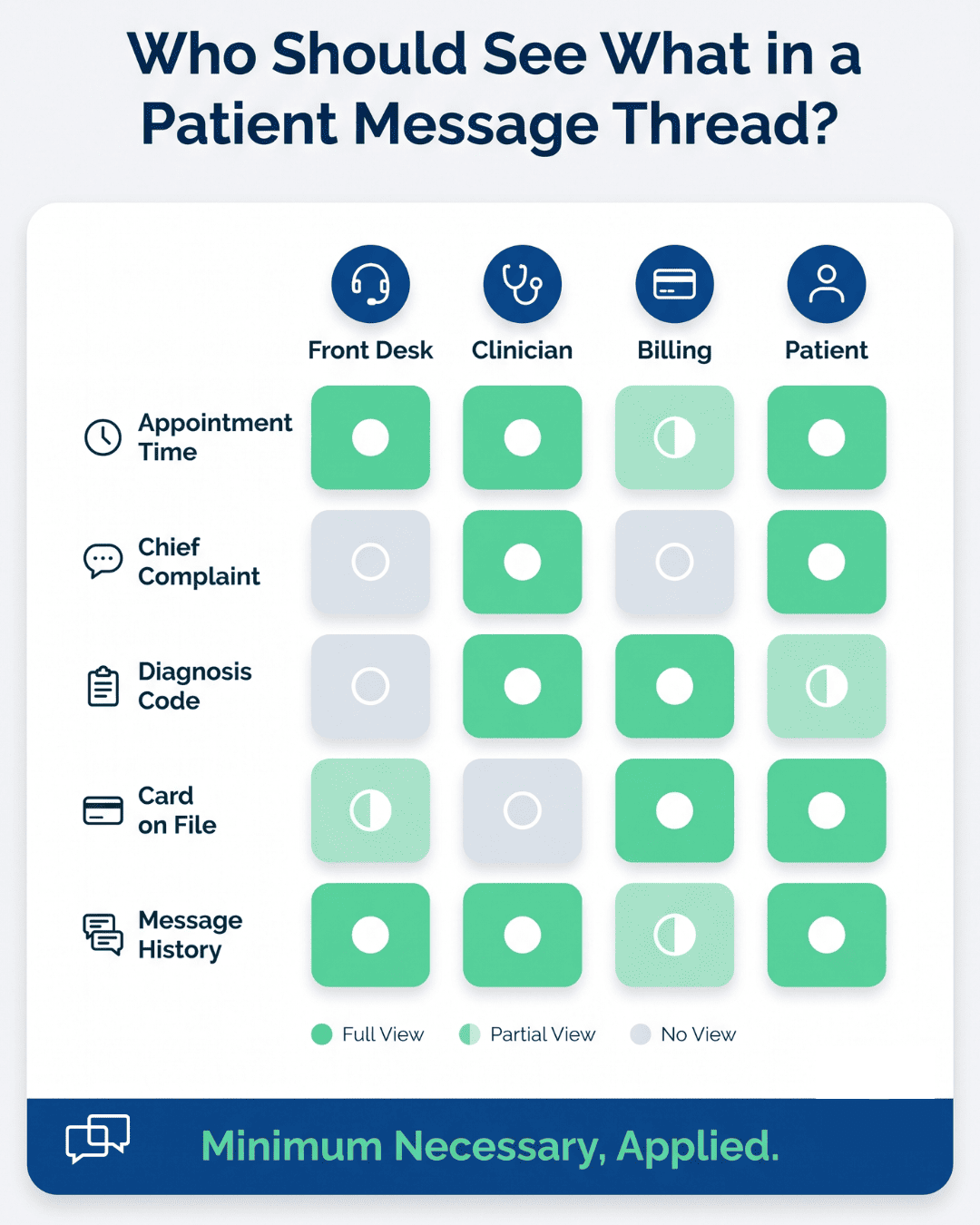
The minimum necessary standard at 45 CFR 164.502(b) says staff should see only what their job requires. Most AI tools ship with permissions set far wider than that.
Shared logins break all of this. When four people sign in as "frontdesk," your audit trail can't name anyone, and you've lost the ability to answer the only question an investigator asks.
Pull the user list quarterly. Departed staff with live accounts are common and easy to miss.
Every vendor touching PHI needs a signed BAA on file before go-live. Keep them in one place, with renewal dates, so nobody has to search email during an audit.
Reviews should happen yearly and after any major product change. AI vendors ship new features fast, and a model swap or new subprocessor can change where your data goes without changing your contract.
Four things to request at each review:
Offboarding gets skipped most often. When you drop a vendor, get written confirmation that your PHI was deleted, and revoke every API key and staff login the same week. Dormant integrations keep working long after anyone remembers they exist.
Nobody reviews every transcript. Sample instead. Twenty conversations a month, pulled at random, tells you more than a policy saying all interactions are monitored.
Read for four things: PHI that got captured but wasn't needed, urgent messages the tool handled instead of escalating, identity verification that didn't happen before clinical detail went out, and staff entering data into fields meant for something else.
Set flags where your platform supports them. Common triggers include a message containing a Social Security number, a bulk export of chat history, and after-hours access from an unfamiliar location.
Write down what you found and what changed because of it. A review log with no corrections in eighteen months suggests nobody's reading, and that's the version an investigator will assume.
Start the sampling in month one. Patterns are easier to fix before they've been running for a year.
Our platform connects with your EHR and handles patient communication inside it, so staff aren't switching between a scheduling system and a personal phone. One of its key strengths is secure, two-way texting with patients, which covers reminders, test result notifications, and post-visit instructions.
Patients reply from their regular messaging app. No download, no login, no portal password they'll reset three times. Anything carrying clinical detail opens through a secure link rather than sitting in the message body.
Volume tells you whether this works. Covina Arthritic Clinic runs more than 1,100 appointment confirmations a month through Curogram texting, with confirmation rates above 75% (based on our internal data).
Curogram’s group messaging feature puts a provider, staff members, and the patient in one thread. A referral coordinator, the ordering physician, and the patient can sort out a specialist appointment without three separate phone calls and a voicemail nobody returns.
Every message carries a timestamp and the user ID of whoever sent it. When an auditor asks who told a patient to stop a medication and when, the thread answers directly.
Permissions run per user. Your billing team can be kept out of clinical threads, and front desk access can stop short of chart notes.
Messages are encrypted in transit and at rest. Standard SMS runs over carrier networks that no vendor controls, so anything sensitive moves through a secure link the patient opens instead of appearing in the text itself.
Encryption isn't the whole control, though. Access limits decide who inside your practice can read a thread, and the audit log records every time someone does. Those three together are what an OCR investigation actually examines.
We sign a Business Associate Agreement with every client before any patient data moves.
Compliance work rarely shows up in a revenue report, so it's worth pointing at the part that does.
Atlas Medical Center brought no-shows from 14.20% down to 4.91% in three months using automated confirmations through the same encrypted channel (based on our internal data). The security architecture is what let that run without a separate risk review.
Compliance gaps in small practices are usually clerical. A texting app gets added during a staffing crunch. The BAA never gets signed. Permissions stay on the default that shows every user everything.
None of that requires new software to fix. It requires someone to open a list of the channels your practice already uses and mark which ones have an agreement on file. Whatever's unmarked is the work.
The tools in this article are worth adopting, but sequence matters. Sign the agreement, set access by role, confirm the audit log records who opened what. A tool running inside those three controls is safer on day one than a more secure product bolted on without them.
Patients notice the result before they notice the compliance. Replies arrive the same day. Nobody repeats their date of birth to three different people. Test results land somewhere they can actually open.
Curogram runs patient texting, group threads, and telemedicine with a signed BAA, per-user permissions, and a timestamped log of every message.
Book a demo bring your current channel list. We'll walk through which ones are covered and which ones aren't.

Is texting HIPAA compliant? Uncover rules, privacy concerns, and tips for safe communication with patients while staying secure.

Implement HIPAA-compliant workflows for small practices to enhance patient trust, reduce errors, and meet regulatory standards.

HIPAA violation consequences, updated for 2026. Current OCR penalty tiers, criminal charges, corrective action plans and what happens if you violate...