
Is Texting HIPAA Compliant? Everything You Need to Know
Is texting HIPAA compliant? Uncover rules, privacy concerns, and tips for safe communication with patients while staying secure.
9 min read
Based on our internal data, practices that move routine patient questions to automated texting take 24% fewer inbound calls. For a front desk run by one or two people, that's a real share of the workday handed back.
Most of those calls sound alike. "What time is my appointment?" "Do you take Blue Cross?" "Where do I park?"
Each one takes a few minutes and pulls someone away from the patient standing at the window. Calls that come in after closing go to voicemail. A new patient who can't get through often books somewhere else.
Small private practices follow the same HIPAA rules as large hospital systems. They rarely have the staff to keep up with patient messages, though.
Conversational AI for small private practices fills that gap. It answers routine questions by text or chat, sends reminders, collects intake forms, and passes anything urgent to a person on your team.
We think small offices should start in one place: automate the routine messages first, run them through a platform built for HIPAA, and keep your staff on the conversations that need judgment. A patient asking about a bill they don't understand, or one who's anxious about test results, still needs a human voice.
The sections below cover what conversational AI is and why it fits a small practice. You'll also see what makes a HIPAA-compliant AI chat safe to use, how an AI chatbot for medical offices takes pressure off your front desk, and how to set one up in five steps.
Conversational AI is software that holds a back-and-forth conversation with a patient. It works through chatbots, voice assistants, and text messages. It reads plain language, so a patient can type "Can I come in Thursday afternoon?" and get a direct answer.
For a small practice, that means many routine patient tasks can run without adding people to the front desk.
Most small clinics have one or two people covering the phones, the schedule, and check-in at the same time. When a patient steps up to the window, the phone rings out. After 5 p.m., nobody answers at all.
Conversational AI covers those gaps. It acts as a digital front desk that's open 24/7. It answers common questions, sends reminders, handles pre-visit tasks, and collects feedback while your staff takes care of the patients in the room.
These are the tasks conversational AI for small private practices handles most often:
| Task | What it looks like |
|---|---|
| Patient intake and screening | Forms and screening questions go out by text, so they're done before the patient arrives. |
| Common questions | Hours, location, and services are answered at any hour, with no callback needed. |
| Follow-ups | A message goes out after the visit, or right after a call your team missed. |
| Copays | The patient gets a secure text-to-pay link and pays from their phone. |
Each row is a call your front desk no longer has to take or return. Fewer of those calls means less strain on a small team. It also lets a three-person office keep pace with large health systems that already automate this work.
In a small private practice, one or two people often run the phones, the schedule, and check-in. When the waiting room fills up, calls roll to voicemail, and some of those messages sit until the next morning. Patients can wait days for a reply.
Those delays turn into missed appointments, lost revenue, and sometimes a poor review. Five problems show up again and again.
Patients have questions after 6 PM and on weekends, when nobody is at the desk. A parent who wants to know whether you take walk-ins on Saturday won't wait until Monday to find out. If no one answers, that parent may book with a clinic that does.
Your front desk answers the same few questions all day: "Are you open Friday?" "Did my appointment move?" "Do you take my insurance?"
Every one of those calls pulls attention from the patient standing at the window. Over weeks, that repeat work wears people down and makes the job less satisfying.
Based on our internal data, automated texting has cut inbound calls by 24% and lifted front desk productivity by 30% or more.
A small team can't catch every ring. Each missed call could be a new patient who never books or a current one trying to reschedule. Calling back hours later delays payments and makes it more likely the patient goes elsewhere.
With a short staff, response time depends on the day. One patient gets a callback in ten minutes. Another waits three days because the message came in during a packed Monday. Patients notice that gap, and it costs you their trust.
Clipboard forms take time to fill out and more time to type in. Handwriting gets misread, and fields get skipped. Someone on your team then has to fix the errors and enter everything into the EMR before the visit can start.
A HIPAA-compliant AI chat system gives a small team a faster way to handle these messages while keeping patient data secure. The next section covers how these systems work.
A 3-doctor clinic follows the same HIPAA rules as a 500-bed hospital.
Every text, chat, and form that carries protected health information (PHI) has to be stored and sent securely. That applies to AI tools too. If a chat system handles a patient's name, appointment, or symptoms, it has to meet HIPAA requirements.
Before you trust a chat tool with patient messages, check that it has these four safeguards:
| Feature | What it does for your practice |
|---|---|
| End-to-end encryption | Scrambles messages and data so only the sender and receiver can read them |
| Access control | Limits which staff members can see PHI |
| Audit trails | Records who opened or changed a message, and when |
| HIPAA-compliant cloud storage | Keeps stored data on servers that meet HIPAA rules |
General-purpose apps like Facebook Messenger or WhatsApp aren't built for patient care.
These consumer apps don't sign a business associate agreement (BAA), which HIPAA requires from any vendor that handles PHI for you. Texting a patient about lab results through one of them can count as a HIPAA violation.
The fines are real. Manasa Health Center paid $30,000 in an OCR settlement after sharing PHI in replies to Google reviews.
For a small practice, a penalty that size, plus the hit to its reputation, is hard to absorb. Patients also expect you to keep their information private, and a breach makes them less willing to share it.
Patients share more when they know their information is safe. With a HIPAA-compliant AI chat system, a patient can ask about a prescription refill, get pre-visit instructions, or confirm an appointment by text. They don't have to wonder who else can read it.
That trust makes patients more likely to answer messages and keep in touch between visits. The next section covers how an AI chatbot built for medical offices adds to this.
An AI chatbot for medical offices is built around clinic work. It understands that "I need to move my Tuesday visit" is a scheduling request, and that "my chest has been tight since last night" needs a person, fast. A general chatbot made for retail or banking isn't set up for either.
For a small practice, that means a lot of front-desk work can run on its own:
| Task | What the chatbot does |
|---|---|
| Appointment requests | Takes the request and passes it to your schedule |
| Reminders | Sends them out without anyone dialing |
| Urgent questions | Routes them to the right staff member |
| Insurance details | Collects them before the visit |
Based on our internal data, practices using our automated texting have cut phone volume by up to 50%. That's hours each week your team gets back.
Picture a Monday morning: three patients at the window, a walk-in asking about wait times, and two lines ringing. Many of those calls are questions like "Do you take walk-ins?" "What insurance do you accept?" or "How do I send my medical records?"
An AI chatbot answers those by text, so your staff can stay with the patients in front of them and the tasks that need a person.
With Curogram's Online Chat Request, a visitor on your website can send you a text in real time. They can book an appointment, ask a question, or check whether you offer a service.
Instead of a bounced call or a contact form nobody checks, that visit turns into a text thread your team can answer.
Patients who would rather not call get a faster path to booking. Built-in smart routing sends each message to the right person. After-hours automation replies when your office is closed, so the patient isn't left waiting until morning.
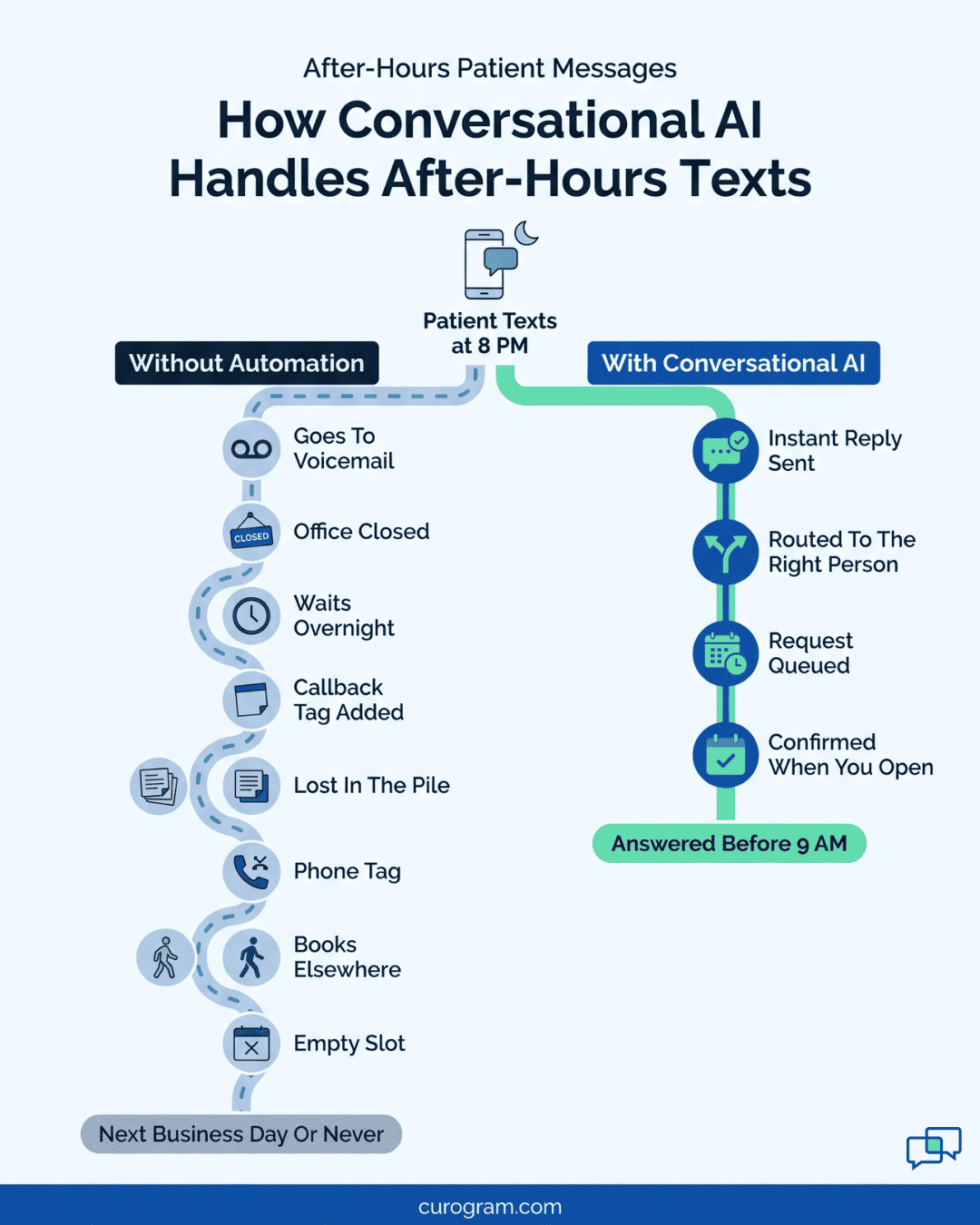
A patient who texts at 9 PM gets an automatic reply that confirms the message came in and says when someone will follow up. Because the system is HIPAA-compliant, every message stays protected, from the first text through the post-visit follow-up.
The last step is getting conversational AI set up in your clinic, which the next section walks through.
Rolling out conversational AI for small private practices takes a clear plan and a vendor built for healthcare. With both in place, you can see real benefits in as little as a few weeks. These five steps cover the setup.
Start with what eats your staff's day. Spend one week tracking where the time goes:
The biggest number tells you which feature to turn on first.
Pick a platform like Curogram that's built for healthcare. Before you sign, ask the vendor for a business associate agreement (BAA). If a vendor won't sign one, it shouldn't handle your patient messages.

Check whether the AI chatbot syncs with your EMR, your scheduling and billing software, and your website.
When it does, an appointment booked by text lands on your schedule without anyone retyping it. Patient details stay the same across every system, so there's no double entry.
A short training session is usually enough. Your staff should know two things: where AI-handled chats show up, and how to take over a thread. That way, when a patient asks for a person or a question needs a nurse, someone steps in right away.
Review the numbers every week at first, then once a month. These are the ones to watch:
| What to track | What it tells you |
|---|---|
| Chats resolved without staff | Whether your automated answers cover the common questions |
| Appointments booked through chat | Whether website visitors are turning into patients |
| Reminder confirmation rate | Whether patients are responding; based on our internal data, the platform-wide average is above 75% |
If one question keeps getting passed to staff, rewrite the automated answer for it.
Patient expectations around texting and online booking will keep changing. A system that's already set up and tuned lets your practice adjust to those changes without starting over.
One or two people can't answer every call, text, and after-hours question that comes into a small practice. Most of those messages ask the same few things. Conversational AI for small private practices can answer them without pulling anyone off the front desk.
Our view is simple: automate the routine first. Let the system handle office hours, reminders, confirmations, and intake forms. Keep your staff on the conversations that need a human, like a worried parent, a billing dispute, or a patient who just got hard news.
That split is where results show up. Based on our internal data, Atlas Medical Center cut its no-show rate from 14.20% to 4.91% in three months with Curogram. That's about two-thirds fewer empty slots.
Every one of those messages also has to stay private. Choose a HIPAA-compliant platform that signs a BAA, so speed never comes at the cost of patient trust.
Request a dem with Curogram. We'll show you how two-way texting, Online Chat Request, and after-hours replies would fit your schedule, and which phone tasks your front desk could stop doing by hand.

Is texting HIPAA compliant? Uncover rules, privacy concerns, and tips for safe communication with patients while staying secure.

Explore how AI appointment booking improves healthcare workflow management for small clinics with real-world examples and tools.

 Jo Galvez : 2/21/26, 3:00 PM
Master professional SMS communication in healthcare. Learn HIPAA-compliant messaging, timing strategies, templates, & best practices for medical...