



9 min read

TherapyNotes Virtual Session Setup | SMS-Launched Telehealth for Staff

TherapyNotes Virtual Session Setup | SMS-Launched Telehealth for Staff
💡Behavioral health practices can simplify the TherapyNotes virtual session setup workflow. The trick is to pair TherapyNotes with an SMS video tool like Curogram. Staff sends a secure link by text. Clients tap once to join.

There is no app to download and no portal login. Curogram runs as a separate layer. Clinicians still chart, plan, and bill inside TherapyNotes. Curogram only handles the video link.

This removes the 5 to 10 minutes of tech help staff give before each call. Across 15 to 20 sessions a day, that is 1 to 3 hours. Curogram is HIPAA-compliant and built for private care. Practices see no-show rates 53% lower than the industry average, based on Curogram client data from clinical settings.

A client's 2:00 session starts in three minutes. The phone rings at the front desk. The client cannot get the video to load. A staff member starts a password reset.

Seven minutes pass before the client joins. The 50-minute session is now 43 minutes. Then the next client calls with the same issue. Three in-person clients wait to check in.

This is not a rare bad day. It happens in busy practices every week. The work is not clinical at all. It is tech support.

And it should not fall on your front desk. Staff trained to help clients end up fixing browsers. That trade is costly. The good news is that it is avoidable.

TherapyNotes is a strong behavioral health EHR. It handles charting, billing, and treatment plans well. Its built-in telehealth is a real plus. Not every EHR offers one.

But running video through a portal adds friction. Clients hit logins and browser checks. Staff drop their own work to help. The session pays the price.

That friction has a name. We call it the Tech Support Trap. It turns a practice manager into a help desk. It quietly eats billable time.

Practice owners and office managers feel it most. They want to grow care, not field tech calls. They want a calm front desk and sessions that start on time.

Maybe this sounds like your week. If so, you are not alone. Most behavioral health practices hit the same wall.

There is a better way to run virtual visits. You can keep the TherapyNotes virtual session setup workflow behavioral health teams rely on. You just add a one-tap video layer on top.

Nothing in your clinical routine has to change. This guide walks through the setup, the daily flow, and the payoff. Step by step, here is how to make virtual care simple.

The Villain: The Tech Support Trap

TherapyNotes includes telehealth, and that is a real strength. But the way it runs creates hidden work. The cost shows up before the session even starts. Here is where your time goes, and why it stings.

The trap is easy to miss at first. No single call looks like a problem. The damage is in the pattern, not the one event.

Where Staff Time Disappears

The drain is quiet. It hides in small steps before each call. Add them up, and the total shocks most owners.

The Five-Minute Login Problem

Staff spend 5 to 10 minutes per session on tech help. They reset portal passwords. They check browsers and camera settings. They confirm the audio works.

The causes are always familiar. A forgotten password, an old browser, or a blocked camera. Each issue is small on its own. Yet each one stalls the session.

For a practice with 15 to 20 virtual sessions a day, that is 1 to 3 hours lost. None of it is care. All of it is support, and it is paid staff time.

The work also breaks focus. Staff stop a real task to fix a login. Then they start over once the call connects.

When One Call Becomes Five

Picture a busy Monday morning. One client cannot connect, so the front desk jumps in. Then a second client calls with the same issue. The line backs up.

Meanwhile, in-person clients stand waiting to check in. The desk is underwater. Not from client volume. From tech support that was never their job.

And the clock does not wait. Each fix feels small on its own. Together, they swallow the whole morning.

The ripple spreads past the desk, too. A waiting client grows tense. A clinician sits idle between starts. The mood in the office tightens.

The Real Cost of a Failed Connection

A dropped call does more than waste minutes. It sets off a chain of extra work. That chain reaches the whole practice.

Lost Billable Time

A 50-minute session that starts 8 minutes late loses about 16% of its clinical time. Spread that across a 10-clinician group. Even small delays cost thousands each month.

When a client cannot connect at all, the session gets rescheduled. That means more calls and calendar edits. Sometimes it needs new insurance approval, too.

Now picture this across a full week. The lost minutes turn into lost sessions. Those are slots – and revenue – you will not get back.

Staff Burnout and Turnover

Front-desk staff did not sign up to be IT support. Daily fixes wear them down. In a field already short on workers, that burnout is costly.

Good people leave when work feels pointless. Replacing them is slow and expensive. The trap costs more than time. It costs talent.

One practice manager put it plainly. She spent more time fixing video calls than running the practice. This is the telehealth administration counseling practice staff quietly dreads.

The strain builds day after day. Small fixes feel endless. Over months, that grind pushes good people toward the door.
 

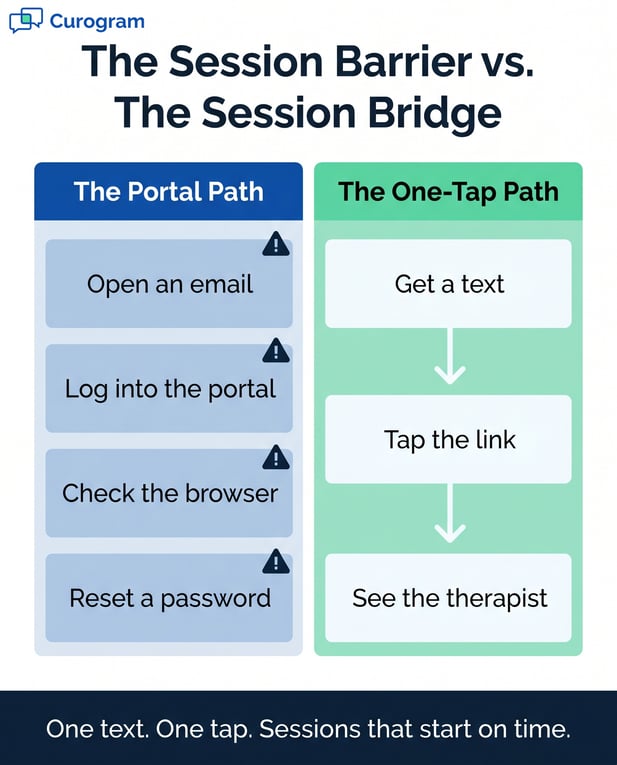
Infographic: Comparing the Portal Path vs. the One-Tap Path for telehealth access

The Guide: The One-Tap Session

You do not need to replace TherapyNotes telehealth. You add a simpler video path beside it. The two work together with no conflict. Here is how the one-tap session works in practice.

Think of it as a bridge, not a rebuild. Your records stay where they are. Only the path your client takes to the call gets shorter.

The Session Barrier vs. The Session Bridge

Portal path (the barrier)

One-tap path (the bridge)

Open an email

Get a text

Log into the portal

Tap the link

Check the browser

See the therapist

Reset a password

Start on time


How the One-Tap Session Works

The goal is to remove every step between scheduled and connected. Fewer steps mean fewer ways to fail. That is the whole idea.

Set Up Without an API

There is no API to connect, and that matters. TherapyNotes offers no public API. Many tools cannot link to it at all.

Curogram works around that gap. Its team sets up your account, builds clinician profiles, and turns on secure messaging. Onboarding is guided, not do-it-yourself.

The TherapyNotes telehealth setup for staff takes minutes. Pick a client. Click send video link. Done.

There is no software to install at the desk. The tool runs in the browser you already use. New staff pick it up on day one.

One Text, One Tap

Curogram offers an SMS video session launch that behavioral health practices love. The client gets a text from a number they know. It is the same line used for reminders.

They tap the link, and the session starts. No portal. No password. No browser fix.

Most clients already text every day. The link works on any phone. There is nothing new for them to learn.

The same number sends reminders and secure notes. So the link feels familiar, not strange. That trust alone lifts the join rate.

Built to Fit Behavioral Health

The video layer stays apart from your records. That keeps your clinical workflow clean and safe. Your data never leaves its home.

It also means less risk and less worry. One system holds the notes. The other handles the link. The line between them stays clear.

Your Clinical Work Stays Put

The TherapyNotes telemedicine clinician workflow does not change. Clinicians still document sessions, codes, and notes inside TherapyNotes.

Curogram handles only the message and the video link. You add a messaging tool without touching your clinical system. Your charting routine stays exactly the same.

Billing flows through TherapyNotes as always. Treatment notes never leave the EHR. That keeps your records in one trusted place.

Nothing about your charting habits has to shift. The screens your clinicians know stay the same. Curogram simply sits beside them.

Hybrid Care Made Simple

Some clients prefer in-person care. Others need video for access, childcare, or distance. Both should be easy to run.

With Curogram, the only difference is a room versus a text. Your team can flex between both with ease. Hybrid scheduling stops feeling like extra work.

A client can switch modes week to week. In-person one week, video the next. The booking flow does not change.

Staff prep stays light either way. Send a text or ready a room. No second system, and no extra steps to track.


The Success: Staff Manage Clients, Not Connectivity

When the tech support trap is gone, your team gets time back. Sessions start on time. Clients stay in care. Here is what that shift looks like day to day.

The change is not just a feeling. It shows up in your numbers and your schedule. It also shows up in how your staff feels at five o'clock.

What Changes for Your Team

The biggest win is simple. Staff manage people again, not technology. And the numbers back it up.

Two shifts stand out most. No-shows drop, and sessions feel calmer. Both start the moment the friction goes away.

Fewer No-Shows

Practices using Curogram see no-show rates 53% lower than the industry average. One clinic cut its no-show rate from 14.2% to 4.91% in just three months.

That is more than three times better than the norm. These figures come from Curogram client data from clinical settings.

When joining is one tap, the could-not-connect no-show fades away. Each kept session is care given, and revenue earned.

Fewer gaps also smooth the schedule. Clinicians keep a full day. The practice plans with more certainty.

Calmer, Faster Sessions

This is the support-free session. Staff no longer act as a help desk before each call. Sessions start on time because there is nothing to fix.

You get the virtual session management therapy practice owners want. The front desk handles clients, not passwords. The mood in the office lifts.

A calm desk serves people better. Wait times shrink. Staff have room to be warm, not rushed.

Clinicians feel it too. They open each session ready, not flustered. The first few minutes go to the client, not the tech.

Small delays used to stack up all day. Now the schedule runs closer to plan. That steadiness is easy to feel and easy to keep.

A Day in the Life

Numbers tell one story. A real morning tells another. Picture how the hours actually move.

A Morning Without Tech Calls

It is Thursday at a 12-clinician counseling group. Eight virtual sessions are booked before noon. Curogram sends each client a video link five minutes ahead.

All eight clients tap and join. Zero calls to the front desk about video. Zero late starts. The morning just flows.

By 9:05, the first session is underway. By 9:10, the second. No one is on hold, and the schedule holds.

The phone still rings, but for the right reasons. A booking here. A question there. Not one panicked call about a frozen screen.

Time Back for Real Work

The practice manager reviews her morning. She spent it on scheduling and new-client intake. She did not walk anyone through a password reset.

The front desk confirmed afternoon clients without one interruption. Hybrid care ran as smoothly as a single-track day.

That time is not small. It is hours each week, given back to the practice. Staff end the day less drained.

And the work that fills it matters more. Outreach to lapsed clients. Cleaner notes. A warmer welcome for everyone who walks in.

Man in a coffee shop scrolling on his smartphone

ConclusionStop Troubleshooting. Start Treating.

TherapyNotes does the clinical heavy lifting. It holds your notes, billing, and treatment plans. Curogram handles the one thing that keeps tripping up your team. The video connection.

Split the work this way, and the friction fades. Your staff stops playing IT. Your clinicians start on time. Your clients join with a single tap.

Think of it like this. TherapyNotes is built for your clinical operations. Curogram is built for your client's path to care.

Your staff should manage schedules, not browsers. Their skill is care, not tech support. Let them use it.

Every minute spent on a password reset is a minute lost with a client. That trade-off adds up fast. Over a month, it costs hours and goodwill.

It also costs access. The clients who struggle most with tech often need care most. A hard login can end a session before it starts.

A one-tap link changes that. Your client already has a phone. Joining their session should feel as easy as opening a text.

Simple access is not just a nice perk. For behavioral health, it is part of good care. Lower barriers keep people in treatment.

The clients who need care most often struggle most with tech. Anxiety, ADHD, and depression make extra steps hard. A single tap meets them where they already are.

The setup is light, and the daily flow is lighter. Your first week looks calmer than your last. Fewer calls. Fewer late starts.

More time opens up for the work that matters. Staff focus on people. Clinicians focus on care.

Your team feels the change, too. Morale lifts when the day is about people, not passwords. That is how you keep good staff in a tight market.

Curogram is also more than video. The same platform sends reminders, secure texts, and intake forms. You replace several tools with one.

That unified setup keeps costs and logins down. Your team learns one tool, not five. Everything clients need lives in one thread.

There are no per-clinician video fees to chase. The math gets simpler, and so does your day.

You do not have to overhaul your system to get there. You keep TherapyNotes exactly as it is. You add a layer that just works.

It works the first time and every time. That kind of reliability is the whole point. It protects your time and their care at once.

Trust grows from that consistency. Clients learn that the link always works. Staff learn the morning will hold. Confidence builds on both sides.

Your team did not train to troubleshoot video calls. Give them their time back. Let them stop troubleshooting and start treating.

See it for yourself. Book a demo with Curogram.


Frequently Asked Questions

How does Curogram keep behavioral health video sessions private and secure?

Curogram video sessions are HIPAA-compliant and encrypted end-to-end. The platform is also SOC 2 Type II certified and meets 42 CFR Part 2 rules for substance use care. Curogram provides a BAA as standard. No session is recorded unless your practice turns that feature on.

How long does it take to train staff on Curogram's video workflow?

Most TherapyNotes video appointment staff training covers logins, browsers, and portal fixes. Curogram needs almost none of that. The workflow is to pick a client, click send video link, and be done. A front-desk team can learn it in one short session.

Why does Curogram work without an API connection to TherapyNotes?

TherapyNotes does not offer a public API, so most tools cannot link to it directly. Curogram avoids that limit by running as a separate layer. Your clinical work stays inside TherapyNotes. Curogram only manages the client message and the video link.

Why does video friction hurt behavioral health clients more?

Many clients seek care for anxiety, ADHD, or depression. The same conditions can make a multi-step login feel like too much. A hard setup can end a session before it begins. A single tap removes that barrier and keeps clients in care.

How does one-tap video support hybrid care in a practice?

Hybrid care mixes in-person and virtual sessions on the same day. With Curogram, the only difference is a room versus a text link. Staff do not learn two separate systems. That keeps hybrid scheduling simple for the whole team.