

7 min read
Roll Out Texting Across Tebra Locations | Playbook
Aubreigh Lee Daculug
:
October 6, 2026
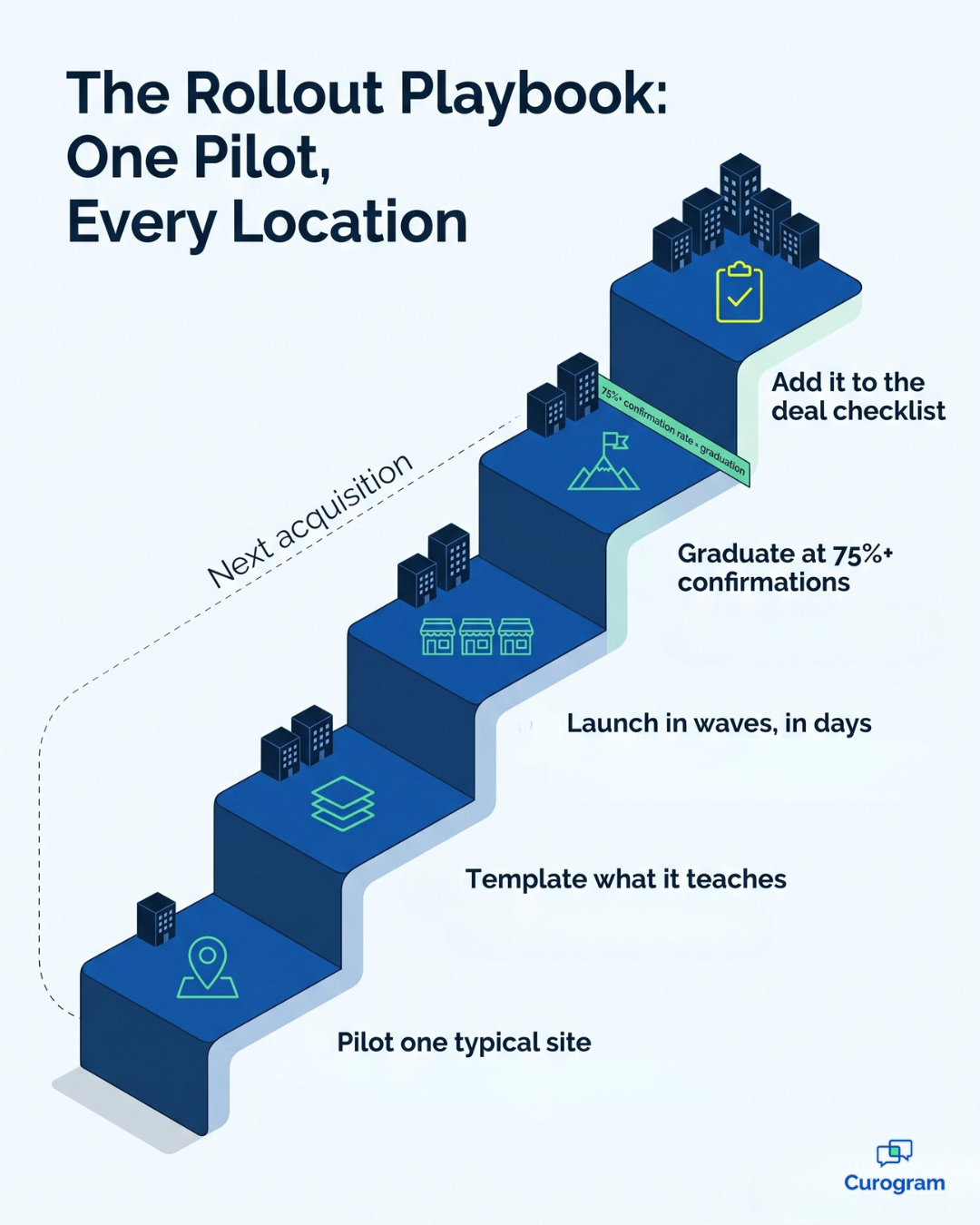
Curogram fills that gap with "The Rollout Playbook." You pilot at one typical location, turn its lessons into a template, and then launch each site in days. Every site must hit the same goal to graduate: a 75%+ confirmation rate.
The template then goes into your deal checklist, so each new site gets governed texting on day one. One clinic using this model grew from 369 to 1,300+ monthly confirmations in five months.
The purchase agreement for location six is signed, and the new signage is already on order. Credentialing is moving, and billing migration has a firm date on the calendar.
Meanwhile, location three still confirms every appointment by phone.
That isn't a failure of effort. Your group is good at integration, and you've done it often enough to have a real playbook for the difficult parts, like payer contracts, staff onboarding, and system transitions.
But patient communication rarely gets its own chapter in that playbook, so each site's texting setup happens whenever someone finds the time.
In a growing group, nobody finds the time.
This is the quiet problem behind rolling out patient texting across Tebra locations. The technical work isn't hard, but the target keeps moving.
By the time the rollout reaches site three, the group has already closed on site six, and the newest location keeps its old habits because "we'll get to it after the current rollout."
Those months cost real money. Every site without automated reminders keeps paying for no-shows, phone tag, and overflowing voicemail boxes. Newly acquired locations feel it most, because their patients are uncertain about the change in ownership.
The solution isn't more effort. It's a better system.
This guide outlines a phased playbook designed for Tebra groups that grow through acquisition.
You'll learn why rollouts stall, how a pilot-then-template model changes the pace, and what success looks like when every location goes live on the same standard. You'll also see how to make communication a permanent line in your acquisition checklist.
That way, the next deal doesn't restart the clock. It inherits a finished process on day one.
If you lead operations for a Tebra group, this is the chapter your playbook has been missing, and it's easier to write than you think.
Why Rollouts Stall When the Group Keeps Growing
Integration Discipline That Skips Communication
Your group already knows how to absorb a new practice.
There's a detailed checklist for signage, a realistic timeline for credentialing, and a careful plan for billing, and each task has an owner and a due date.
Patient texting usually has neither. It gets treated as something each office will eventually sort out on its own. As a result, one location sends reminders consistently, another relies on whatever tool the previous owner selected, and a third doesn't send them at all.
The Finish Line Keeps Moving
Here's where things typically break down. The rollout team reaches location three of five, and then the group closes on location six.
Now the multi-location software rollout group is chasing a finish line that keeps sliding further away. Every new deal adds another site to the queue, and the newest acquisition waits the longest, sometimes an entire year, operating on the previous owner's habits.
It sounds like a scheduling problem. It isn't. It's a missing process.
What Each Waiting Location Keeps Paying
Delay has a price, and every location that's still waiting pays it every month.
For a busy practice, no-show losses can reach $20,000 to $30,000 a month. As an illustrative example, 12 missed visits a day at $100 each over 21 clinic days adds up to about $25,200.
The phones take a significant hit as well. Front desks at these locations often handle 80 or more calls a day, and many of them are simply patients confirming or rescheduling a visit. Multiply the example across five waiting locations for six months, and the losses reach roughly $750,000 in missed visits alone.
Acquired locations carry additional risk. Their patients are already wondering whether their doctor is staying and what else might change. If the only available contact is a busy phone line, some of those patients quietly book somewhere else.
The Wrong Lesson
After a year of this, many leaders conclude that rollouts are just difficult in their organization. That's the wrong lesson.
The group already knows how to write integration playbooks; it simply hasn't written this one. To avoid stalled rollout cycles, treat deployment like every other integration task: templated, owned, and scheduled.
How a Rollout Playbook Turns Deployment Into a Routine Step
Curogram treats deployment as a repeatable product rather than a custom project every time.
We call it "The Rollout Playbook." It begins with one location and ends with a template your group can reuse for every practice you own today and every one you acquire next.
Here's how the phases work:
- Pick a pilot that represents the group. Careful pilot location selection matters, so choose a site with typical volume, a common mix of visits, and a manager who will provide honest feedback.
- Capture what the pilot teaches you. Phone numbers, message routing, reminder timing, user permissions, and staff training are all packaged into one reusable template.
- Launch the next wave in days. Each new location starts from the template, so local effort drops to a few hours instead of several weeks.
- Graduate each location on one benchmark. A site is considered "done" when it holds a 75%+ confirmation rate, which is the same standard for every location.
- Add the template to your acquisition checklist. From that point forward, every new deal deploys texting during integration week.
Keep your Tebra implementation phased rather than all at once. Waves of two or three locations give the onboarding team time to fix small issues before they spread.
Each wave follows the same go-live checklist per location: numbers activated, routing tested, reminder schedule set, permissions assigned, and staff trained.
Your Tebra workflows stay exactly the same.

Staff don't learn a new system;
They learn a simple inbox, which is why adoption holds at both legacy and newly acquired locations.
The final step is where the real payoff lives.
Think of the template as your acquisition integration communication playbook.
On day one of a new deal, texting goes live alongside the new signage, so the patients you just acquired hear from you immediately and the new location adopts your standards instead of keeping the old ones.
What It Looks Like When Every Location Goes Live and Stays Live
Success isn't just every site switched on. It's every site using the tool each day and being measured the same way.
That shared benchmark is a 75%+ confirmation rate, which matches the average across current Curogram clients.
Here's what the results can look like once locations reach it:
| Measure | Before Curogram | After Curogram |
|---|---|---|
| Covina Arthritic Clinic, monthly confirmations | 369 | 1,300+ (five months later) |
| Atlas Medical Center, no-show rate | 14.20% | 4.91% (within three months) |
| Daily front desk calls (illustrative location) | 80+ | About 40, based on a 50% reduction in call volume |
The Covina numbers are the reference curve for each new site. Confirmations more than tripled in five months. In practice, that's about 930 more patients a month who confirmed without a staff phone call.
The Atlas result shows what happens next. When more patients confirm, fewer appointment slots go empty. Curogram clients see no-show rates 53% lower than the industry average, and every recovered visit is revenue that used to walk out the door.
The bigger change is in how the group grows. Before, the rollout was always chasing the group. Now the playbook stays ahead of it, and every future acquisition inherits the template on day one.
For your leadership team, that means full deployment with real momentum. For your operations team, it means fewer exceptions to manage and one scoreboard to watch.
Your communication layer finally scales as quickly as your deal flow.
Five Rollout Mistakes That Slow Growing Groups Down
Even with a solid playbook, a few common mistakes can quietly drag a multi-location rollout off course. Most of them come from good intentions, like wanting to move quickly or giving each location a little independence.
Here are the ones to watch for:
- Starting with your easiest site. A smooth pilot at your best-run office feels encouraging, but it hides the problems your busier locations will eventually face.
- Launching every location at once. A big launch spreads your onboarding team thin, so small issues turn into group-wide headaches.
- Letting each site rewrite the template. Local tweaks seem harmless, but they break the shared standard and make results hard to compare.
- Calling a site "done" as soon as it's switched on. A location that's live but barely used hasn't graduated until it holds a 75%+ confirmation rate.
- Parking new acquisitions until later. Waiting for the current wave to finish is exactly how the finish line starts moving again.
Each of these mistakes has the same underlying cause: the rollout gets treated as a one-time project instead of a repeatable process with clear, consistent rules.
The fix is to protect the template. Let the pilot shape it, let your onboarding team own it, and let every location follow it. When a site needs a real exception, such as a different specialty schedule, record it as a documented variation rather than a quiet local change.
For your operations team, this means fewer surprises and cleaner reporting. Every location can be evaluated fairly, and the lessons from one wave carry directly into the next.
Write the Chapter Your Integration Playbook Is Missing
Your group already knows how to integrate an acquisition. You've handled signage, payer contracts, credentialing, and billing many times before, but patient communication never received its own chapter.
That gap is exactly why rollouts stall.
When texting is left to each office, it waits behind every other priority. When it lives in the playbook, it moves as quickly as everything else. The difference isn't effort or budget; it's whether the step is documented, owned, and repeated the same way at every location.
Here's a simple way to think about it.
Tebra keeps your growth engine running through each change of ownership, while Curogram arrives as the communication upgrade your patients actually notice. That's true at every door you operate today and every door you open next.
The phased model makes this possible. You start with one pilot and turn its lessons into a reusable template. Then you launch each location in days, graduate it at a 75%+ confirmation rate, and add the template to your deal checklist.
Now try a quick test. Open your acquisition integration checklist and look for the line about patient communication.
If it isn't there, that's the whole problem.
The good news is that this chapter is straightforward to write with the right partner.
Curogram's onboarding team handles the configuration work, your staff learn a simple inbox in a single morning, and your patients receive clear, timely texts from the first week.
Ready to add the missing chapter? Schedule a Demo with Curogram. We'll help you choose your pilot location, map a go-live calendar for the entire group, and draft the playbook chapter for your next deal.
Frequently Asked Questions
A pilot proves the model in a few weeks. Once the template is built, each new location goes live in days. Most groups reach full deployment within two months, and future acquisitions deploy during integration week.
Hours, not weeks. Curogram's onboarding team handles the configuration, including numbers, routing, and reminder rules. Most front desk teams learn the inbox in a single morning.
Yes. The template makes texting one of the fastest items on the integration list. Going live early also protects the patient panel you just acquired, right when patient confidence matters most.
Pick a site that represents the rest of your group. It should have typical patient volume, a common mix of visit types, and a manager who will share honest feedback. Skip your easiest office and your most troubled one, since neither will teach you much.
No. Your Tebra workflows stay the same. Curogram adds a simple, HIPAA-compliant texting inbox alongside them, so staff don't have to learn a new system to get started.