
 Mira Gwehn Revilla

- Pick one pilot office with steady volume and a manager who wants the tool.
- Launch the standard reminder sequence, reply routing, and user roles within days.
- Graduate the pilot once it holds a confirmation rate above 75%, the average across Curogram clients.
- Copy the graduated setup to one new office per week.
- Tune templates and routing only where an office’s live numbers show a gap.
Groups that run AdvancedMD well tend to share one skill. They can configure almost anything, from appointment types to provider templates to custom reports. That same skill is why so many of them stall when rolling out patient texting across AdvancedMD locations.
You can spot the pattern early. A project team forms, and someone starts a spreadsheet of open questions about reply routing, reminder timing, and message wording. Every two weeks the team reviews it. A few rows close, new ones open, and four months later no office has sent a single reminder.
Meanwhile, the empty chairs keep adding up. Take an office that books 1,200 visits a month with a 14% no-show rate. That’s 168 missed visits a month. At an illustrative $150 per visit, roughly $25,000 walks out the door each month while the team edits wording.
We think the order is backward. Launch a proven setup at one pilot office in days and hold it to a clear bar: a confirmation rate above 75%. Based on our internal data, that’s the average across current Curogram clients. Once the pilot clears it, copy the setup to the next office, then the next.
Your team’s tuning skill goes to work after launch, on the offices where live numbers show a real gap. A template that’s running at six offices will teach you more in two weeks than a committee can settle in a quarter.
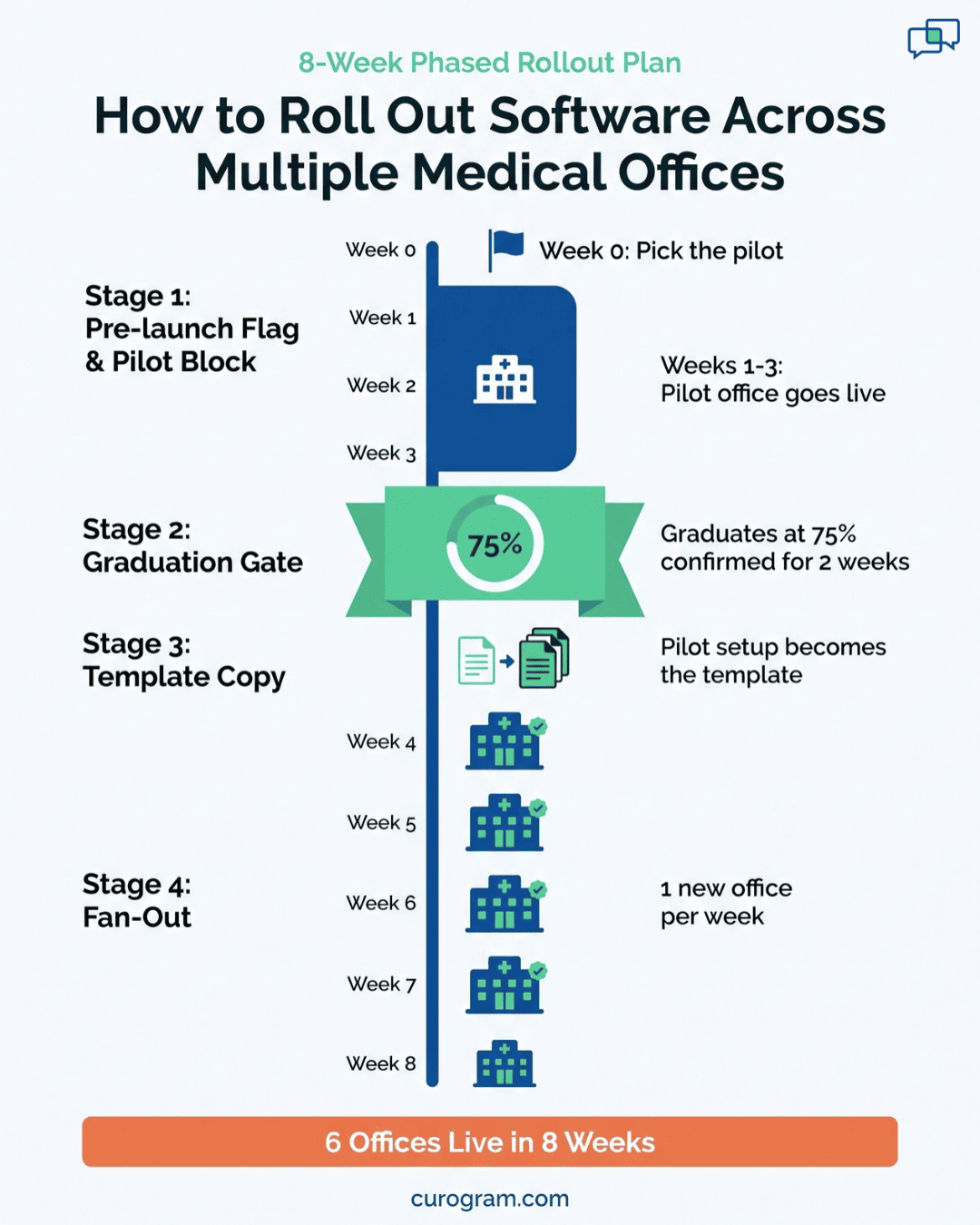
With a three-week pilot and one new office per week, a six-office group is live everywhere in about eight weeks. That’s two months to full coverage, measured from the day you pick the pilot.
The Stalled Rollout
AdvancedMD rewards careful setup. A group that built its own fee schedules, visit templates, and billing rules learned that hours spent up front save weeks of rework later. In billing, that habit pays off. A wrong fee schedule sends bad claims to every payer at once, so you test it twice before it goes live.
Teams carry that habit into a texting project because it has always served them. It looks responsible, and it feels safe.
A reminder text carries a very different kind of risk, though. If one line of wording is off, the cost is a few confused replies, and staff can fix the line in five minutes. Nothing gets billed wrong, and no claim gets denied.
Planning effort should match the size of the risk. For patient texting, that risk is small and easy to undo.
What the Meetings Look Like
Most groups start by forming a multi-office software rollout group. It’s usually the COO, an IT lead, the billing manager, and two office managers who drew the short straw. They meet every other Tuesday, and the open-items list reads something like this:
- Should replies go to each front desk or to a central call team?
- Does the two-day reminder go out at 9 a.m. or 5 p.m.?
- Should patients confirm by replying “C” or “YES”?
- What happens at the satellite office that only sees patients on Thursdays?
Each question is fair. None of them can be settled well in a conference room, because every answer depends on how your patients behave once texts start going out.
Those meetings cost more than they look. Six people meeting for an hour every other week adds up to about 48 staff hours over four months. Two of those people run front desks, so each meeting also pulls a manager off the phones during clinic hours.
By month four, the whiteboard is full. The reporting screen still shows zero messages sent.
What Each Month of Waiting Costs
Waiting has a price, and each office pays it separately. Keep the same illustrative office: 1,200 booked visits a month, a 14% no-show rate, and $150 average revenue per visit.
Reminders won’t save every one of those 168 missed visits, so the honest number is the gap a working rollout would close.
Atlas Medical Center cut its no-show rate from 14.20% to 4.91% in three months with Curogram reminders, based on our internal data. At that rate, our sample office would miss about 59 visits a month instead of 168. That’s 109 kept visits, or about $16,350 a month.
|
Months still in planning |
Kept visits lost, 1 office |
Revenue lost, 1 office |
Revenue lost, 5 offices |
|
1 |
109 |
$16,350 |
$81,750 |
|
2 |
218 |
$32,700 |
$163,500 |
|
4 |
436 |
$65,400 |
$327,000 |
All figures are illustrative, built on the Atlas Medical Center results.
A five-office group that spends four months in planning gives up about $327,000 in visits it could have kept. That money doesn’t come back when the rollout finally starts.
What Launch Day Reveals Anyway
Groups that finally launch after months of meetings tend to learn something awkward in the first few weeks. Live data answers the questions the committee argued about, and it often answers them differently than the vote did.
Say the team chose a 5 p.m. send time. One office’s patients might reply within minutes, while another office’s patients ignore evening texts and answer at 7 a.m.
Or the plan to route every reply to a central team might bury that team in “what’s the gate code for parking?” texts that the local front desk could answer in seconds.
Neither outcome showed up in the meeting notes. Both show up in the reply log during week one. Those four months of meetings bought a setup that still needed tuning on day one, and that tuning is the same work a group would do after a fast launch.

The Rollout Playbook
Six things get decided before any office sends its first text: the texting number, who answers replies, the reminder sequence, user roles, staff training, and the go-live date. Curogram’s playbook settles all six on day one with a standard template, so the pilot office can start in days.
A Template Built to Launch As-is
Each piece of the template has a sensible default and room to change later. Nothing is locked. The difference is timing: you adjust a piece once an office’s numbers show a reason to.
|
Piece |
Set on day one |
Tuned later, if the data calls for it |
|
Texting number |
Each office texts from its own number |
Shared number for a central call team |
|
Reply routing |
Replies land in that office’s inbox |
Overflow rules for busy hours |
|
Reminder sequence |
Standard reminder and confirmation timing |
Timing by appointment type or office |
|
User roles |
Front desk and manager roles |
Custom roles by job |
|
Training |
One short session per office |
Refresher for offices with slow replies |
This is a launch first, tune second deployment. The right-hand column stays empty until real replies give you a reason to fill it.
Pilot Office Selection
Your pick for the pilot sets the pace for everyone else. Good pilot office selection comes down to four traits:
- Enough volume to read results fast. An office with 600 or more visits a month gives you a clear confirmation rate within two weeks.
- A manager who wants the tool and will flag problems early.
- Visit types that look like the rest of your group, so the results carry over.
- Front desk staff who have been in place a while, with no open roles.
Skip your flagship office if it runs the most complex schedule in the group. Leave out the small satellite too, since its numbers move too slowly to prove anything in a few weeks.
Once you’ve chosen, tell the pilot manager what to watch. Three numbers cover it: the confirmation rate, how many replies sit unanswered at noon, and how many patients reply asking to reschedule.
A Go-Live Checklist per Office
A short go-live checklist per office keeps each launch to days. It also gives managers a clear finish line. Before an office goes live, confirm that:
- the office’s texting number is active and tested from a staff phone
- the next 14 days of AdvancedMD appointments are showing up correctly
- every front desk user has logged in at least once
- someone owns the reply inbox on each shift
- the 20-minute training session is done
- the go-live date is on the office calendar
Six items, all checkable in a single afternoon. If an item slips, the date slides by a day or two, and the rest of the plan holds.
Why AdvancedMD Workflows Stay Put
Your group may have handled its AdvancedMD implementation phased office by office, over a year or more. Curogram doesn’t reopen any of that work. Staff still book, check in, and bill in AdvancedMD the same way they do today.
Curogram reads upcoming appointments to send reminders, and patient replies show up in one shared inbox. That inbox is the main new screen staff learn.
Because the core system doesn’t change, a launch carries little risk. If the template needs a fix in week two, nobody’s daily routine in AdvancedMD moves.
That’s also why training fits in 20 minutes. Staff learn how to read a reply, answer it, and mark it done. Rescheduling still happens on the AdvancedMD schedule, the same way it does after a phone call.
Full Configuration, Sequenced After Launch
Power users lose nothing here. Every routing rule, template, and timing choice can still be changed, office by office. The playbook only changes the order of the work.
After launch, each office has its own scoreboard: confirmation rate, reply volume by hour, and unanswered messages. That turns the old “C or YES” debate into a two-week test at two offices. The committee still makes the call, now with two weeks of real numbers in front of it.
Live Everywhere, Tuned by Data
To see how the playbook runs, follow one illustrative group: six offices on AdvancedMD, all with steady volume except a small satellite that opens three days a week.
The 8-Week Walkthrough
|
Week |
Step |
Gate to move on |
|
0 |
Pick the pilot office and set its go-live date at kickoff |
Date on the calendar |
|
1 |
Pilot goes live on the standard template |
First reminders sent |
|
2 to 3 |
Watch the pilot’s confirmation rate and fix only blockers |
Above 75% for two weeks |
|
4 |
Save the pilot setup as the group template |
Template signed off |
|
5 to 8 |
Launch one office per week with the go-live checklist |
Each office live in days |
|
9 and on |
Tune the offices that trail the group |
Data shows a gap |
Weeks 1 to 3: Run the Pilot
During the pilot, the team changes as little as possible. If replies pile up in the inbox at 8 a.m., the fix is a named inbox owner for the morning shift. If a reminder fires for an appointment type that shouldn’t get one, staff remove that type. Wording debates wait.
The gate is one number. Once the pilot holds a confirmation rate above 75% for two straight weeks, it graduates. That bar matches the average across current Curogram clients, based on our internal data.
Weeks 4 to 8: Fan Out
Graduation turns the pilot’s setup into the template for every other office. Save it with a version name and date, such as “Group Template v1, Week 4,” so later changes are easy to trace.
Each new office runs the same six-item checklist. Managers at offices three through six have watched the pilot for a month, so training goes faster and their questions are sharper. Most ask about the inbox, since that’s the one screen that’s new to them.
Launching one office per week keeps support manageable. If office four hits a snag, offices five and six still keep their dates.
By the end of week 8, all six offices are sending reminders. In our illustrative group, that’s six offices live roughly when a configure-first team would still be holding its fourth planning meeting.
Week 9 and Beyond: Tune Where the Numbers Point
Now the tuning starts, and it’s aimed. Say five offices sit near 80% confirmed and one sits at 64%. That office gets a look. Maybe its early-morning schedule means the reminder lands too close to the visit, or a single owner can’t keep up with replies.
You’d fix that one office and leave the other five alone. Test one change at a time, give it two weeks, and keep it only if the rate moves.
Keep a short tuning log for the group. Each line lists the office, the change, the date, and the result. Rolling out patient texting across AdvancedMD locations this way also helps you avoid stalled rollout traps later, because every future change gets tested at one office first.
Curogram Highlight: Templated Go-Lives
Templated Go-Lives is how Curogram packages a texting launch so an AdvancedMD office can start in days. Your texting number, reply routing, reminder sequence, user roles, and staff training all arrive as one ready setup. Your pilot office runs it as-is, and the results tell you what to change.
Once the pilot passes the 75% confirmation bar, its setup becomes your group’s template. Each new office launches from that saved version, so office five starts with everything the pilot already proved. Nobody rebuilds routing rules from a blank screen.
A few things make this work well for AdvancedMD groups:
- Front desk staff keep booking and checking in patients in AdvancedMD. The new screen is a shared inbox for patient replies.
- Each office gets its own confirmation rate, reply volume, and unanswered-message count, so you can compare offices side by side.
- Every setting stays open to change. You can adjust reminder timing for one appointment type at one office without touching the others.
- Our team works through the go-live checklist with each office manager, so launch day doesn’t depend on your IT lead’s free time.
Results are measurable from week one. Based on our internal data, Curogram clients average a confirmation rate above 75%, and no-show rates across our clients run 53% below the industry average.
For a group that has spent months in planning before, the biggest change is the calendar. Your pilot date gets set at kickoff, and every office after it gets a date too.
Conclusion: Launch First, Tune Second
A proven template that’s live at every office this quarter beats a perfect setup that’s still in review. It has real replies behind it, and it’s keeping visits on the schedule while the planned version is still a document.
AdvancedMD rewards your team’s depth with setup. Patients reward something else: a quick, clear reminder they can answer with one tap.
Those two strengths fit together once you put them in the right order. Launch the template, then let your best configuration people tune the offices that need it, using numbers instead of guesses.
Take a minute to count the projects in your group that are in their third month of pre-launch review. If the list has more than one item, your group already knows how these stall. Patient texting doesn’t need to join it.
The math from earlier still applies. For our illustrative office, each month of delay costs about $16,350 in visits that reminders could have kept. Across five offices, that’s more than $80,000 a month.
Book a demo with Curogram. In the first working session, we’ll help you choose your pilot office and set its go-live date, so your first reminders go out in days.