9 min read
Roll Out Texting Across Practice Fusion Offices | Guide
Mira Gwehn Revilla
:
August 25, 2026
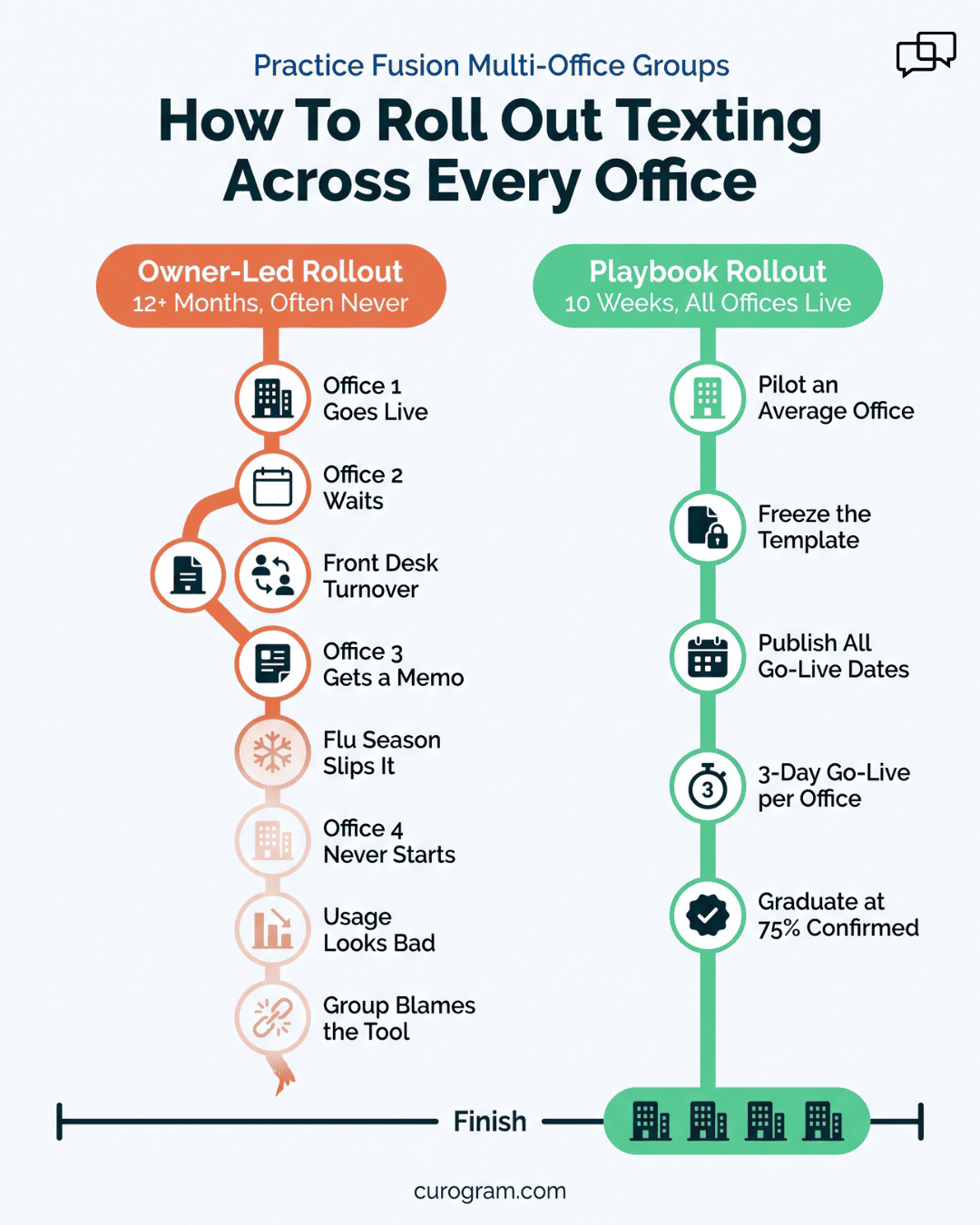
- Pilot at a site that looks like your group average, not the one easiest to win over.
- Freeze what the pilot settles: a texting number per site, inbox routing, reminder timing, staff roles, and one training block.
- Give each manager her own numbers first, pulled from Practice Fusion: the site no-show rate and a week of call counts.
- Grade every office on one mark, a 75%+ appointment confirmation rate, which is the average across Curogram clients based on our internal data.
- Keep Practice Fusion as the clinical system of record, so staff learn one inbox and no new charting habit.
Most growing groups don't have a software problem. They have a fifth-office problem.
Ask a two-to-ten office group what it pays for, and you'll usually find a tool that works well at one site and sits dark at the rest. Kickoff happened where the owner sees patients. That office got the training, the follow-up calls, and the fixes.
Office two hired two new front desk staff in April, and nobody retrained them. At office three, the manager still prints the morning schedule and calls patients between 4 and 6, then stops when the phones back up.
Rolling out patient texting across Practice Fusion offices fails for one structural reason. Deployment runs on the owner's calendar, and that calendar runs out.
Design the rollout and the tool question mostly answers itself. A multi-office software rollout in a small group works when one site proves the model, every setting it settles gets written down and dated, and the next manager gets handed that page with a go-live date on it.
Waiting costs real money. Atlas Medical Center cut no-shows from 14.20% to 4.91% in three months with automated reminders, based on our internal data. Every office still in the queue keeps paying the old rate while the license sits idle.
What follows is the sequence we run with Practice Fusion groups: how to pick the pilot, what the pilot has to settle, what belongs in the template, and the one benchmark that separates a live office from an installed one.
Why Group Rollouts Die at Office Two
Groups are good at the first part. A demo happens, references get checked, and contracts get signed. The owner is engaged the whole way.
Then the work changes shape. Buying is one decision made once. Deployment is the same project run three, five, or nine times, mostly by people who never sat in the demo.
The software side is rarely the holdup. A Practice Fusion administrator can add a facility to the account and book across sites from one login.
Reminder options live on the account's appointment reminders and notifications settings page. Adding office three inside the EHR takes an afternoon.
Getting office three's front desk to change how they confirm appointments takes something else.
Our pilot sites usually get four or five check-in calls in the first six weeks. Office three gets a forwarded email with a login and a subject line that reads "when you get a chance."
Where the Attention Actually Goes
Watch how a group spends owner attention across a rollout and the slope is easy to read. Weeks of it go to the first site, because the owner is standing in the hallway. A visit covers the second. By the fourth, someone forwards a message and hopes.
Turnover finishes the job. An office loses a scheduler in month two, and her replacement learns the old workflow from whoever is free that morning. Training happened before she was hired. Nobody logged that gap, and it shows up later as low usage.
Buy-in fails the same quiet way. The manager at office three wasn't in the demo and didn't pick the vendor. She got a memo announcing a change to her front desk. She's busy, and the change has no owner in her building.
Ask a group which offices are live and you often get a pause. That pause is the whole problem, and it usually arrives about four months in.
Why Next Month Never Arrives
Nobody cancels the second go-live. It just never gets a date.
Flu season starts, so October is out. The biller takes leave in November, and December is short. By January the group is negotiating a new lease and the tool has been live at one site for half a year.
A date on a shared calendar changes that, because a date has an owner and a slipped date has a conversation.
Vague intent has neither. Groups that publish all four go-live dates during the pilot rarely lose one, since the manager at site D can already see her week and plan staffing around it.
What Each Undeployed Office Keeps Paying
Put a number on the delay before your second go-live slips. It changes how the calendar gets treated.
The math below is illustrative. It rests on one verified figure: the 14.20% no-show rate Atlas Medical Center ran before automated reminders, per our internal data. Swap in your own visit value and volume.
|
Illustrative per-office math |
Figure |
|
Scheduled visits per clinic day |
40 |
|
No-show rate before automated reminders |
14.20% (Atlas, pre-Curogram) |
|
Missed visits per month, 20 clinic days |
about 114 |
|
Assumed value per visit |
$150 |
|
Monthly leakage, one office |
about $17,000 |
|
Three offices still waiting |
about $51,000 |
Staff time stacks on top. A manager calling 60 patients a day at 90 seconds each burns 90 minutes before she touches anything else. Two offices left undeployed spend roughly 60 hours a month on work the pilot site stopped doing in week two.
None of that shows up as a line item. It shows up as overtime, as a hiring request, and as the front desk being unreachable between 4 and 6.
The Rollout Playbook: Deployment as a Repeatable Product
A pilot's job isn't proving that patients reply to texts. They do, and that question was settled years ago. The pilot exists to force a short list of decisions and then freeze them, so nobody at office four has to make them again.
Six decisions carry most of the weight:
- One texting number per site, so replies reach staff who can act on them
- Who sees which inbox, and who may send group messages
- Reminder timing, usually 48 hours out with a same-day nudge
- What happens to a "cancel" reply that lands after 5 p.m.
- Roles and permissions for front desk, billing, and providers
- Training length, and who runs it the second time
Pilot office selection decides how useful those answers turn out to be. Choose the easiest site and the template you write will only fit easy sites.
Choose one with average staffing, a mixed patient panel, and a manager who pushes back, and the answers hold up at the other four.
Templated Go-Lives
Once those six answers exist, a go-live stops being a project and becomes a checklist someone follows.
A go-live checklist per office runs about six hours of local work, spread across three days:
|
Day |
Local effort |
What happens |
|
Day 1 |
1 hour |
Number set up, schedule feed confirmed, staff accounts created |
|
Day 2 |
3 hours |
Routing and permissions set, reminder policy applied, front desk trained |
|
Day 3 |
2 hours |
Live send, first-day watching, manager reviews the reply queue |
Practice Fusion Keeps Doing What It Already Does
Curogram doesn't ask a group to move its schedule, its charts, or its billing. Practice Fusion stays the clinical system of record and the source of appointment data. Staff keep booking where they always booked.
That matters for adoption more than any feature list. A scheduler learning a new EMR habit forgets it in six weeks. A scheduler learning to check one message inbox keeps doing it, because it replaces a task she already hated.
Practice Fusion supports scheduling across facilities from a single account, so a group can run several sites and add texting on top without splitting its clinical workflow.
Curogram sits beside the EHR, not in front of it. Your providers chart the same way on go-live day as they did the week before.
One caution worth naming: the schedule connection has to be confirmed per site on day 1. Skip that check and the office looks live while sending nothing, which is the single most common false start we see.

Lean Team Deployment Without a Project Manager
Small groups don't have a rollout department. Two people already cover billing, credentialing, and whoever called in sick.
Lean team deployment of patient communication tools works when the vendor carries setup and the office manager carries only the local pieces.
Our onboarding team handles number setup, routing, and the schedule connection. The manager approves reminder wording and runs one training session.
Buy-in gets built the same practical way. Before go-live, each manager receives her own site's numbers: current no-show rate from
Practice Fusion appointment statuses, plus a one-week count of inbound calls. Managers argue with memos. They rarely argue with their own schedule.
Ownership matters more than enthusiasm. Name one person per site who is accountable for the go-live, ideally the office manager rather than a provider.
Providers have clinic. Managers have the front desk, the phones, and a direct reason to want the call volume down by 5 p.m.
Live Everywhere, Sticking Everywhere
"Live" is a weak word. It usually means the software is installed and somebody logged in once.
Give it a number instead. An office graduates when it holds a 75%+ appointment confirmation rate, the average across Curogram clients based on our internal data.
Below that mark, the office isn't finished. It's mid-training, and it needs coaching rather than a congratulations email.
One benchmark applied to five sites also ends the argument about whether an office is "different." Patient panels do vary. Reply rates barely do.
Covina Arthritic Clinic sits well past the bar, confirming more than 1,100 appointments a month, based on our internal data. That's the shape a graduated office takes: steady volume, steady replies, no one dialing down a printed list.
Set the bar before the pilot starts, not after. A benchmark picked once results are in stops being a benchmark and turns into a negotiation.
A 4-Office Calendar That Actually Runs
Below is how the sequence looks for a group with four sites, run without the owner in daily contact.
|
Weeks |
Site |
What happens |
|
1 to 3 |
Pilot site |
Full setup, staff training, reminder policy tested on real volume |
|
4 |
None |
Template written and frozen; baselines pulled for remaining sites |
|
5 |
Site B |
Three-day go-live straight from the checklist |
|
6 |
Site C |
Same checklist, plus one change: Spanish-language reminder set |
|
7 |
Site D |
Same checklist; manager trains from the pilot's recording |
|
8 to 10 |
All four |
Weekly confirmation-rate review, coaching wherever a site trails |
Templated Go-Lives, Built From Your Pilot
Curogram's Templated Go-Lives turn one office's setup into the setup every other office inherits. Whatever the pilot decided about numbers, routing, reminder timing, roles, and training gets saved as a reusable profile. Office two doesn't rebuild it. Office two receives it.
Each site still gets its own texting number and its own inbox, so a reply about Tuesday's visit reaches the front desk in that building.
Routing rules and role permissions copy across unchanged. Reminder policy applies per site. One office can run a 72-hour lead time for procedures without anyone rewriting the group standard.
Two-way texting, digital intake forms, text-to-pay, and review requests all live in the same inbox. The second office learns one screen instead of four tools. Practice Fusion keeps the schedule and the chart.
Reporting is what keeps a rollout honest. Per-site confirmation rates sit next to each other, so a group can see office four running at 41% while the pilot holds above 75%. That gap has a name and an address, and you see it in week one rather than at renewal.
Setup weight stays with our onboarding team. A manager's share is small: approve the message wording, confirm staff roles, run one training block inside a lunch hour.
Conclusion: Design the Rollout Like It's the Product
The difference between a group that finishes at office two and one that finishes at office ten isn't budget or size. It's whether the second go-live had a written spec or a phone call.
Practice Fusion holds your clinical work steady while this happens. Charts, schedules, and billing stay where your staff already knows them. What changes is the communication layer on top, and it changes one site at a time on a calendar everyone can see.
Try this before your next vendor call. List every tool your group pays for and never fully deployed, then count the offices actually using each one. That list is a rollout-design problem wearing a software costume. It keeps growing until deployment gets treated as the thing you're buying.
Book a demo and we'll run the first working session with you: pick your pilot office, set the graduation benchmark, and draft a go-live calendar with a date next to every site.
Frequently Asked Questions
Pick the site that looks most like your group average, not the one that will say yes fastest. Normal turnover, a mixed patient panel, and a manager who challenges the plan all make the template hold up better. An easy pilot gives you answers that break at the second office.
Attention runs out. The first go-live gets the owner in the building, and the third gets an email. Add mid-rollout turnover and a manager who never sat in the demo, and that site drifts back to phone calls. A written template with a published date replaces the attention the owner can no longer spend.
About six hours of local work over three days: one hour for setup and staff accounts, three for routing, permissions, and front desk training, two for the live send and first-day watching. Our onboarding team handles number setup and the schedule connection, so the manager's share stays small.
Hold every site to a 75%+ appointment confirmation rate, the average across Curogram clients based on our internal data. Send volume tells you the schedule feed works. Confirmation rate tells you patients reply and staff work the inbox. Below the bar, that office is still in training.
Staff drop new charting habits fast, especially after a hire or two. Keeping Practice Fusion as the scheduling and clinical system means the only new behavior is checking one message inbox, and that replaces a task the front desk already disliked. Fewer changed habits means fewer places for a rollout to fall apart.