- Show her own numbers first: her call volume, her no-show rate, her staff's overtime
- Train one trusted staffer per office as the super-user, before go-live week
- Leave Practice Fusion workflows alone, so staff learn one shared inbox in hours
- Build the checklist around clinic hours, not a webinar that assumes a quiet afternoon
- Send her office's results to her, before they reach the group meeting
Most group practices announce a texting rollout the same way. An email goes out from the main office. A webinar gets scheduled. A go-live date lands on the calendar.
Three months later, one office sends 300 texts a week and the other four still call patients off a printed schedule.
Same platform, same training deck, same vendor rep. What differed was who owned the go-live at each site.
Change management for a Practice Fusion patient communication rollout is one conversion, repeated site by site.
An office manager who reads your project as one more thing from the main office becomes the person running her own go-live. She sees her office's numbers, picks her own super-user, and works a checklist built around a full waiting room.
That gap opens wider with Practice Fusion than with most systems. Practice Fusion already includes text, voice, and email reminders with confirmation in the subscription, and admins switch them on from account settings.
So a manager who hears "we're bringing you reminders" has a fair reply ready. She has reminders. What she lacks is a reply she can read, a thread her staff can answer, and a way to stop dialing 40 patients before lunch.
Enrollment starts with those 40 calls, not with a platform tour.
Based on our internal data, Curogram clients average more than 75% appointment confirmation. Offices that get there fast share one trait, and it isn't budget or headcount. Their manager asked for the tool before anyone handed it to her.
Every Office Manager Runs the Same Test
Group initiatives get filtered through one question at the site level: does this help my Tuesday?
Tuesday is when two providers double-book the 10:15 slot. Tuesday is when the recall list gets pushed again.
A memo about a new patient communication platform rarely answers that test, because it was written to answer a different one. It answers "does this help the group?"
Those aren't the same question, and office managers know it. Group-level benefits arrive as averages. Her problem arrives as a specific person at the window while the phone rings twice.
Run rough math for a four-provider office. Sixty visits a day, and staff confirms roughly half of them by phone at two minutes a call. That's an hour of dialing before anyone touches a chart.
She wants that hour back. A slide about group-wide efficiency doesn't promise her that hour, so she files it.
What the Memo Sounds Like Down the Hall
"Exciting new patient communication platform" reads differently when your medical assistant gave notice last week.
She hears three things in it. Training hours she doesn't have. Flu season. Metrics that belong to somebody else's report.
So she complies. Two staffers attend the webinar and accounts get created. Somebody marks the office live in the tracker, and the go-live date passes without incident.
Underneath that, the old workflow keeps running, because nobody ever asked it to stop.
Most groups try to overcome staff resistance to new tools by adding training hours. Ask the front desk directly and you get a plainer answer. They know how to send a text. They can't see whose problem it solves, and nobody told them the answer was theirs.
Compliance Decays on a Predictable Schedule
Watch an announced rollout week by week and the shape repeats.
Week one looks great. Novelty carries it, the vendor rep is still in the thread, and somebody wants to be seen trying.
Week three, a provider calls out and two staffers cover the floor alone. The new inbox is the first thing dropped, because it's the only task nobody will ask about.
By week six, the office has re-formed around the old habit. Reminders still fire from the system, replies still land somewhere, and nobody reads them. Turnover finishes the job.
The two people who sat through training leave within a year, and their replacements get shown the phone list on day one, because that's what the trainer beside them actually uses.
Every step in that sequence is rational for the person taking it. Covering the floor beats learning an inbox every time, at a site where nobody owns the outcome.
Passive Resistance Doesn't Show Up On A Status Report
Adoption failure at a satellite office is quiet. Nothing breaks and no ticket gets filed. The dashboard turns green, then stays green.
|
What the tracker says |
What the floor is doing |
|
Office 3 is live |
Two logins created, one ever used |
|
Reminders enabled |
Staff still calls tomorrow's schedule by hand |
|
Digital forms deployed |
Clipboard at the window, PDFs typed in after close |
|
Training complete |
One webinar attended, notes lost |
|
12 seats licensed |
3 seats opened this month |
That gap can sit undetected for a year. Usage reports get pulled at the group level, where one strong office carries four weak ones and the blended number looks fine. Frontline adoption in a small practice or a satellite site hides easily inside a group average.
Volunteers Outperform Appointees
Yale researchers tracked super users across two hospital units during an EHR go-live and published the results in BMC Medical Informatics and Decision Making in 2015.
On one unit, managers asked for volunteers. On the other, managers picked whoever seemed most comfortable with computers.
Volunteers produced better outcomes. Their coworkers showed greater gains in system proficiency, and the volunteers were the ones who worked proactively, explained more, and shared what they learned. The appointed group answered questions when asked and left it there.
That finding maps onto the front desk almost exactly. Adoption gets decided by whoever the floor asks first. That's usually the person sitting nearest who won't make you feel slow for asking.
So the super-user model in a group practice starts with one question to the office manager: who do people here actually ask? Her answer is usually immediate, and it's rarely the person a spreadsheet would have picked.
Her Numbers, Before Anything Else
We build a one-page baseline for each office before the first conversation. It carries that office's numbers only.
|
Line on her baseline sheet |
Where it comes from |
|
Confirmed appointments last month |
Practice Fusion schedule export |
|
No-show rate by provider |
Her own visit history |
|
Outbound confirmation calls per week |
Front desk estimate, timed for one day |
|
Overtime hours at the front desk |
Her payroll line |
|
Patients overdue for follow-up |
Recall list, unworked |
What The Super-User Actually Learns
Her curriculum is short on purpose, because a long one signals a heavy tool.
Ninety minutes covers five moves. Open the shared inbox. Claim a thread, so two staffers don't answer the same patient twice.
Send an intake form link. Turn a confirmation reply into a reschedule, and learn which questions go back to a provider.
That last one takes the longest and prevents the most trouble.
She also gets a written page of the ten questions coworkers ask in week one, with answers already on it. Every super-user we train hits the same ten, in roughly the same order. Handing her the list saves her from improvising in front of the people she needs to convince.
A Go-Live Checklist Office Staff Can Actually Work
Vendor checklists assume a quiet afternoon. Clinic afternoons don't have one.
So the checklist gets built backward from her schedule. Nothing on it takes longer than 20 minutes. Nothing lands on a Monday. Every item names the person doing it, by name, not by role.
- Two weeks out: super-user named, 90-minute session booked at her slowest hour
- Ten days out: patient phone numbers checked for the top 50 upcoming visits
- One week out: reminder wording written by her, not by the main office
- Three days out: pilot list of 25 patients for tomorrow's schedule only
- Go-live day: one person watches the inbox, everyone else works normally
- Day five: reply rate checked, wording adjusted once
Training the front desk on a new platform gets simpler when the platform is one inbox. Practice Fusion stays exactly where it was. Schedules, charts, and orders stay put. Staff pick up one new habit, and they can verify that in an afternoon.

The Manager Fit: She Gets Graded On Her Own Wins
Go-live succeeds when her numbers improve, and she should see them before anyone else does.
We send per-office results to the office manager first. Confirmed appointments, calls deflected, no-shows, replies handled. She gets a week with her own data before it appears in a group review, which means she walks into that meeting already knowing what she'll say.
That sequence changes her role. She reports the number now, and reporting it in front of peers is what makes her defend it.
Covina Arthritic Clinic confirms more than 1,100 appointments a month through automated texting, based on our internal data. A manager who can point at her own version of that figure has stopped being a rollout target and started being a reference.
One Office, Thirty Days, In Order
A five-site primary care group ran their second office this way, after the first one went live by memo and stalled.
Day minus 14, the manager got her baseline page. Her front desk placed roughly 180 confirmation calls a week.
Her overtime line ran four hours most weeks, nearly all of it Monday and Tuesday. She looked at the call number twice and asked whether it was really that high.
It was.
Day minus 10, she named her super-user. She skipped the staffer who fixes the printer and picked the scheduler everyone already interrupts.
Day minus 7, the super-user did her 90 minutes and got the ten-question sheet. Day minus 3, the office texted a pilot list of 25 patients booked for one day only, so a bad first send would be small and fixable.
Go-live day, one staffer watched replies while the rest of the desk worked normally. Nobody was asked to change two things at once.
What Changed by Day Thirty
|
Her line item |
Before |
Day 30 |
|
Confirmation calls per week |
~180 |
~55 |
|
Front desk overtime |
~4 hrs/week |
under 1 hr/week |
|
Appointments confirmed by text |
0 |
majority of next-day schedule |
|
Reschedules handled by reply |
0 |
routine |
|
Who ran the weekly check |
main office |
her super-user |
Those figures are that office's own, and the group's other sites landed in different places. What repeated across sites was the order. Calls fall first. Overtime follows about two weeks later.
No-shows move last, because a schedule takes a month to reflect anything.
Curogram clients average more than 75% appointment confirmation and no-show rates 53% below the industry average, based on our internal data.
Reaching the confirmation benchmark tends to come fast. The no-show number needs a full booking cycle before it means much. A 30-day review built only on no-shows will make a working rollout look flat.
How Curogram's Super-User Model Fits A Practice Fusion Rollout
Curogram's Super-User Model puts one trained staffer on the floor of every office, chosen by that office's manager, before go-live week.
Her job is the "how do I" question, answered where it actually gets asked. At the desk, between patients, from the coworker beside her. Front desk staff will wait days to email a help desk and will ask the person two feet away in four seconds.
Training stays short because the surface stays small. Curogram runs as one shared inbox that syncs with Practice Fusion, so schedules and charts stay where your team already knows them.
Your staff learn to send, claim, and route messages, which is about an afternoon of practice.
Each super-user gets three things. The 90-minute session, a one-page sheet of the ten questions coworkers ask in week one, and a direct line to our team for anything past those.
Her manager gets a weekly usage view for her office alone, so coaching lands in week one instead of at renewal.
What this buys a group is speed on office two and beyond. Your first site produces a real number, a named super-user, and a manager who will answer questions from her peers. Based on our internal data,
Curogram clients average more than 75% appointment confirmation, and offices that get there quickly tend to be the ones whose manager picked the super-user herself.
Practice Fusion keeps the chart, the schedule, and the orders. Curogram handles the conversation your team currently runs by phone.
Conclusion: Adoption at the Front Desk
Practice Fusion stays their familiar system through all of this. Curogram arrives as the thing that stops the Monday call block, and it's fair to frame it that way because it's true. A manager who hears it framed as her relief will run the go-live herself.
So before your next office starts, spend thirty minutes with that manager and her own baseline. Her call volume, her overtime line, and her no-show rate sitting next to the office that already went live.
Watch what she does with the overtime line. Most managers start proposing changes before you finish the page.
The groups that get this right stop announcing rollouts entirely. They run one office well, hand that manager her own before-and-after, and let her answer the questions at the next quarterly meeting. Office two takes half the time. Office five barely needs you.
Schedule a demo and we'll build the manager-enrollment kit for your first office: her baseline data, her go-live checklist, and the super-user curriculum.
Frequently Asked Questions
Pick an ordinary office. Typical staffing, typical chaos, and a manager who sits in the middle on enthusiasm. A win at your strongest site proves little, since other managers will write it off as a staffing gap. A win at a plain one gives them a template they believe and copy.
Because the savings get promised at the group level while the cost lands on her Tuesday. She pays in training hours and a disrupted routine, and she has heard the promise before. Show her call volume and overtime as her own numbers. The math shifts from a group benefit to her problem getting fixed.
A few hours, spread out. The super-user takes a 90-minute session, and everyone else needs about 30 minutes plus the ten-question sheet. Practice Fusion workflows don't change, so nobody is learning a second chart system. The remaining questions come up in the flow of work, and the super-user handles them at the desk.
Put per-office usage in the review you already run weekly. Confirmation rate, replies handled, and seats actually opened, listed by site. Decay shows up in week one instead of at renewal, and a manager whose office is slipping gets coaching while it's still a small correction. Send her the numbers before the group sees them.
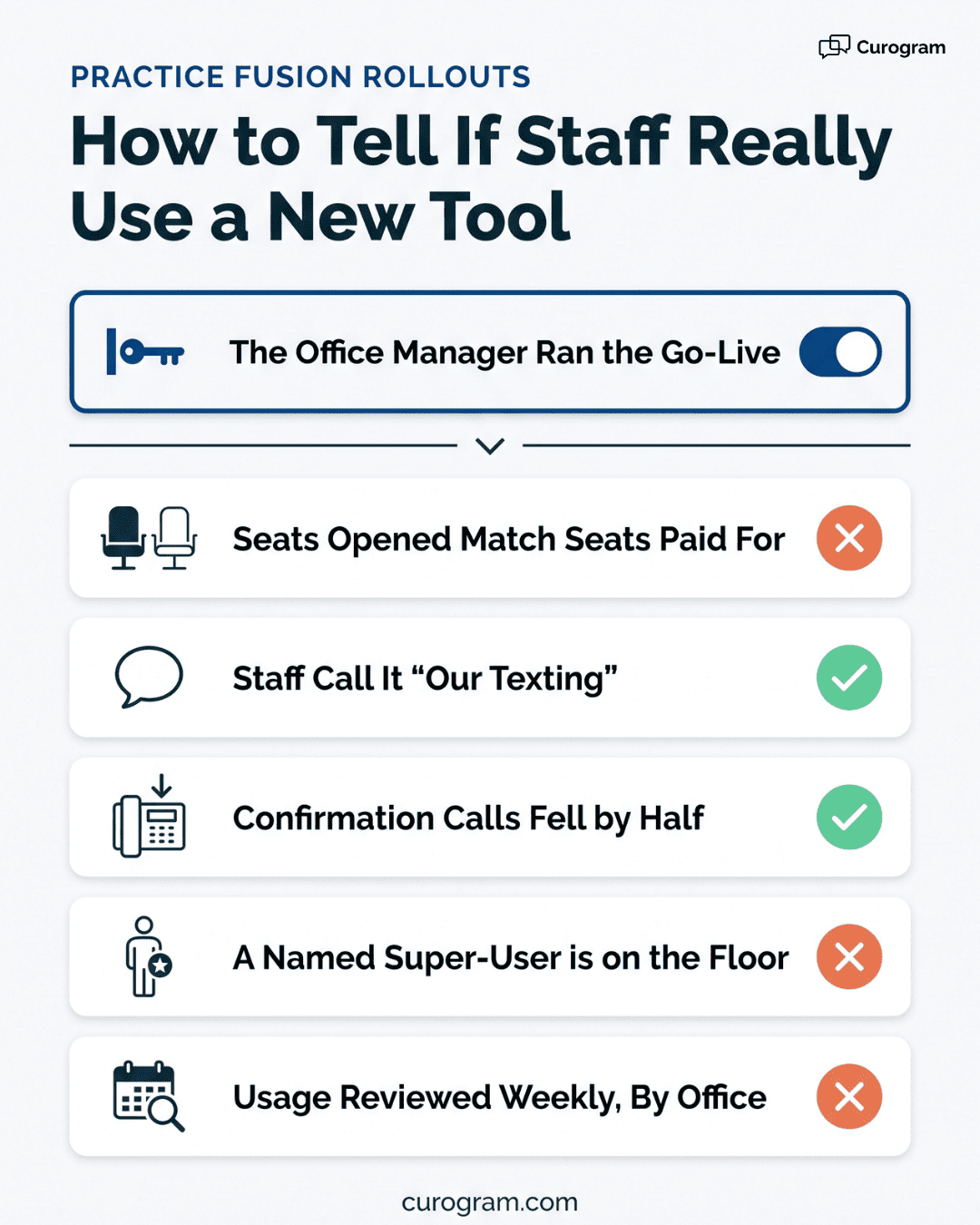
Compare seats licensed against seats opened this month, and listen to how staff describe the tool. Four weeks in, an office that says "our texting" has adopted it. One that says "the system they gave us" has complied. Check outbound confirmation calls too, since a live office should show them falling by half or more.

Mira Gwehn Revilla