
 Jo Galvez

Three things make that happen. Show each manager her own site's numbers, like missed calls, no-shows and the daily confirmation calls.
Train a super-user from her own team before launch, and give her a checklist that fits around clinic hours.
Each site that reaches the 75% confirmation bar, the average in Curogram client data from clinical settings, makes the next manager easier to win.
The memo announces an "exciting new platform" for next month.
The Hillcrest manager reads it with three staff call-outs on the schedule and a waiting room already half full.
What she hears is training time she doesn't have, during her busiest month, for numbers the main office cares about. She'll comply. She'll attend the call, set up the logins and let the old process keep running underneath. In six weeks, the new tool will be "live" at Hillcrest and almost unused.
We call this the headquarters memo. Announcements get compliance, and compliance fades within weeks. Every location manager filters each group project through one question: does this help my Tuesday? Most rollouts never answer it.
Our position is that location managers should own their go-lives. Change management for Office Ally patient communication rollout works when each manager sees her own site's numbers. She also needs a trusted super-user on her own team and a checklist built around clinic reality.
The main office supplies the template. The manager decides when her site is ready and reports the results.
That approach costs a little more time up front, usually a 30-minute meeting per manager. It saves months of non-use later, and it turns early sites into proof for the ones still waiting. A manager who helped design her launch week also tends to defend it when the first busy Monday hits.
None of this changes Office Ally. Staff keep Practice Mate and EHR 24/7 as they are, which makes the ask small enough for a manager to say yes to.
Why the Headquarters Memo Fails
Rollouts announced from the main office tend to get a week of effort and then fade.
The Tuesday Test
Location managers judge every new tool by what it does to an ordinary weekday. Does it add steps at check-in? Staff might get pulled off the phones to learn it. And nobody at the main office may see what it costs her site.
A memo answers none of that. It describes the platform and skips the Tuesday.
Staff Resistance to New Tools Is Quiet
Staff resistance to new tools rarely looks like refusal. The logins get set up. The training call gets attended. Then the front desk keeps confirming by phone at 4:30 every afternoon, because that's the routine they trust.
On paper, the site is live. In practice, the old workflow runs underneath while the group pays for both.
When the Gap Finally Shows
That gap usually stays hidden until renewal. By then, the story at that site is "we never really used it." The manager has no reason to defend a tool she never chose. Location manager buy-in for new software has to happen before launch, when there's still time to shape the plan with her.
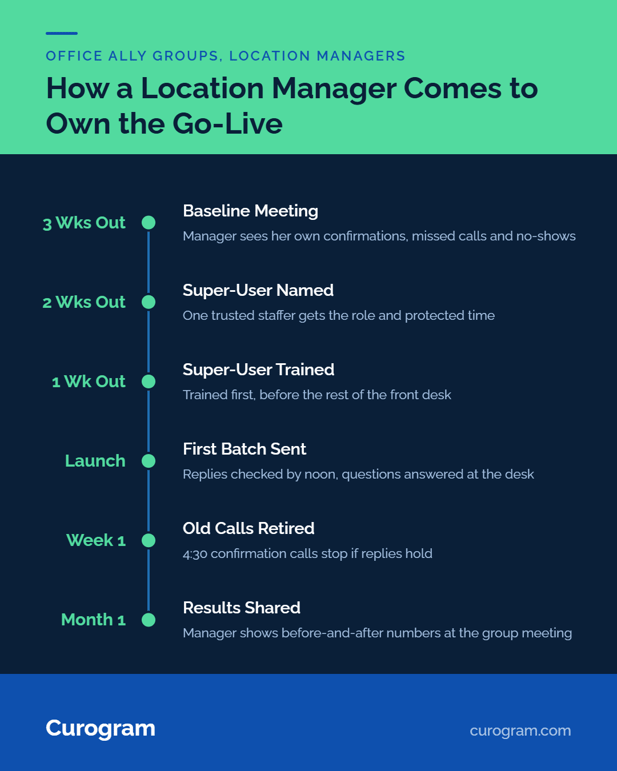
How the Rollout Playbook Puts Managers in Charge
The playbook gives each manager three things: her own data, her own super-user and her own checklist.
Her Numbers First
Start with a 30-minute meeting at her site. Bring her baseline: confirmation rate, missed calls and no-shows from the last month. Put the 4:30 confirmation calls on the table, with the minutes they take each day.
Now the case for the tool is about her Tuesday. Success gets defined by her numbers moving, and she sees them before anyone else.
A Super-User Model Across the Group
A super-user model across the group gives each site one trained staffer. That person answers "how do I" questions at the front desk, where adoption is decided.
A 2024 systematic review in BMC Health Services Research looked at 23 studies of champions in healthcare technology rollouts. It found champions work best with a clear mandate, dedicated time and proper training.
So give the super-user a named role, an hour a week through launch and early training.
Training Front Desk Staff on a New Platform
Training front desk staff on a new platform is short here, because the platform is one inbox. Practice Mate and EHR 24/7 don't change. Curogram's Office Ally integration syncs appointment data from Office Ally and writes confirmations back, so staff don't re-key anything.
Curogram Highlight: The Super-User Model
The Super-User Model trains one respected staffer per location before go-live, so questions get answered at the desk in the moment. Curogram's onboarding team handles configuration and trains the super-user first, then the rest of the front desk.
Each manager gets her site's baseline before launch and her results after. Curogram is HIPAA compliant and SOC 2 Type II certified and signs a BAA; the safeguards are covered in HIPAA-compliant texting for Office Ally users.

From One More Thing to My Win
Buy-in shows up first in how staff talk about the change.
A Go-Live Checklist for Staff
A go-live checklist for staff keeps launch week small:
|
Day |
Task |
Owner |
|---|---|---|
|
Week before |
Super-user trained |
Super-user |
|
Day before |
Announcement script practiced |
Front desk |
|
Launch day |
First reminder batch sent, replies checked by noon |
Super-user |
|
Day 2 to 5 |
4:30 confirmation calls stopped if replies hold |
Manager |
|
End of week 1 |
Baseline vs week-one numbers reviewed |
Manager |
Timing Around the Clinic Calendar
Let the manager pick a launch week that avoids her worst stretch. That might be flu season at a family practice or the January deductible rush at a therapy clinic. It might be a week when two staff are away. A launch moved by two weeks costs little.
A launch forced into her busiest week can cost the whole site's goodwill.
The Language Change at the Front Desk
Frontline adoption in a lean practice shows up in the words staff use. "The main office's new thing" turns into "our texting." Once a front desk says that, the old 4:30 calls usually stop on their own.
Results the Manager Can Show
Each site works toward the same bar: a confirmation rate above 75%, the average in Curogram client data from clinical settings. Covina Arthritic Clinic, for scale, confirms more than 1,100 appointments a month on average.
Per-site results come with Curogram's data analytics package, sold separately; see our guide to enterprise analytics and location benchmarking.
Managers who present their own before-and-after numbers at the group meeting recruit the next site for you. The full rollout plan sits in our guide to rolling out patient texting across Office Ally locations.
Conclusion: Enroll, Don't Announce
Adoption gets decided at the front desk, by people a memo never reached. Enrolling each manager takes 30 minutes and her own numbers.
Office Ally stays the system her staff already know. Curogram adds relief at the busiest point of their day, and the manager can frame it that way because it's accurate.
Before the next go-live, sit with that site's manager and show her the baseline. Ask what would make launch week workable at her desk, and build the plan around her answer. Then let her report the first month's results herself.
Book a demo and we'll build the manager kit for your first location: baseline data, checklist and super-user training plan.
Frequently Asked Questions