
 Jo Galvez

Curogram syncs appointment data from Office Ally and writes Confirmed, Cancelled, No-show and Requested Reschedule back to the schedule, while Practice Mate keeps scheduling and billing and EHR 24/7 keeps the charts.
Setup of the Office Ally connection usually takes about a day, and Curogram client data from clinical settings shows an average confirmation rate above 75%.
For lean family practice, chiropractic and behavioral health groups, it ends phone tag between sites without adding IT staff.
Office Ally runs the back office of a five-location group as one system. Claims from every site go through the same clearinghouse. Practice Mate holds every schedule and every ledger. The front office never got that kind of setup.
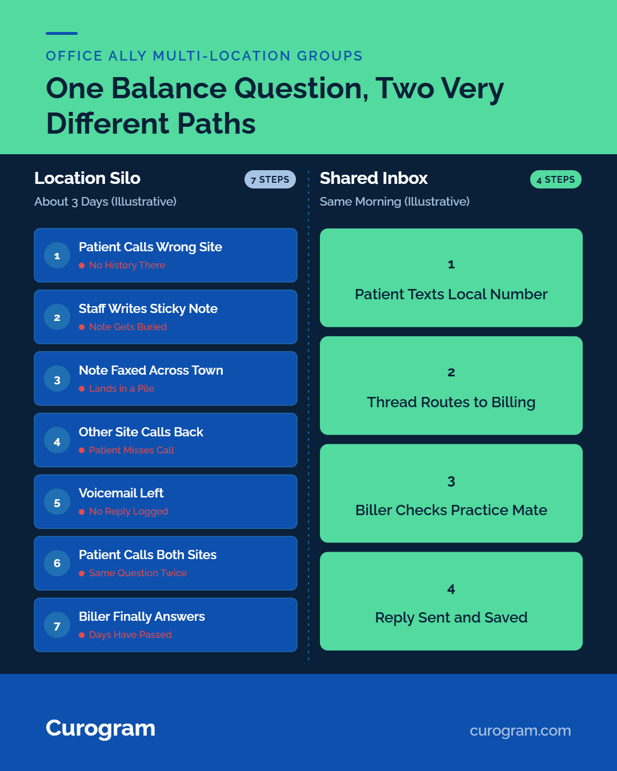
Patient calls still land on five phone lines, five voicemail boxes and five fax queues. A patient with a question about a Hillcrest visit calls Riverside, because that's the number saved in her phone. Riverside can open the ledger in Practice Mate. It can't see what Hillcrest told her on Tuesday.
So someone writes a sticky note and faxes it across town. On Friday, the patient calls both offices again.
We call this the location silo. It's the most costly habit a low-cost group keeps, and it never shows up on a report. Missed confirmations, calls that ring out and patients who give up don't get their own line item. They show up later as open slots and slow collections.
Our view is plain. A group that grew on Office Ally's low software costs should handle patient messages the way it handles claims: in one place, for every site. That's what centralized patient texting across Office Ally locations means in practice.
Each site keeps its local number, and every text lands in one shared inbox. Each thread routes to the desk that can answer it.
Office Ally stays the system of record for the schedule, billing and charts. Staff keep working in Practice Mate and EHR 24/7 the way they do today. What changes is where patient questions go and who can see them.
Why Each Office Ally Location Turns Into Its Own Silo
Office Ally made billing cheap and central. Office Ally multi-location patient communication stayed local, and every site built its own habits.
Five Phone Lines, No Shared History
Each office answers its own phones. Each has its own voicemail box, its own fax line and its own way of logging messages. Riverside keeps a paper log, and Hillcrest uses sticky notes on the monitor. Sunset forwards voicemail to the office manager's email.
None of that history travels. When a patient calls the wrong site, staff start from zero. Practice Mate shows the visit and the balance, but the conversation that led there lives on a note at another desk.
Two Staffers, Every Kind of Call
Lean groups staff each front desk with one or two people. They check patients in, post copays, answer billing questions, reschedule and give directions, all from one line. A 15-minute balance dispute can hold the phone while two reschedule calls roll to voicemail.
Practice leaders feel it. In a December 2025 MGMA Stat poll, 22% of medical group leaders named phone access as their top patient access focus for 2026. Another 27% named no-shows.
Voicemail as the Hand-Off
In a silo, voicemail becomes the way sites pass work to each other. A patient leaves a reschedule request at Sunset on Monday night. Sunset's only scheduler is out Tuesday, so the message waits.
By Wednesday, the open slot has passed, and the patient has booked with the urgent care down the street.
Nobody chose that workflow. Each site set up its own voicemail box the week it opened, and the habit stuck.
What the Silo Costs
|
Illustrative five-site group |
Per day |
Per week |
|---|---|---|
|
Missed calls per site |
10 |
50 |
|
Missed calls, whole group |
50 |
250 |
|
If 1 in 10 was a confirm or reschedule |
5 slots at risk |
25 slots at risk |
These figures are illustrative. Swap in one day of your own call logs. Growing group phone overload follows the same math: a sixth site adds a sixth line, a sixth voicemail box, and a sixth set of habits.
How Centralized Patient Texting Works on Top of Office Ally
Scheduling, billing, and charting stay where they are. Curogram adds a layer for patient messages and connects it to the schedule.
Every Location Keeps Its Own Number
Patients text the same local number they already call. Each text lands in one shared inbox, tagged with the site it came from. That gives a unified patient inbox for a Practice Mate group, without asking patients to learn anything new.
Permissions decide who sees what. A Riverside scheduler sees Riverside threads. An office manager over three sites sees all three.
Routing Sends Each Thread to the Right Desk
Office Ally message routing across offices works by topic. Billing threads go to the billing team, even if it sits at one site and serves all five. Reschedules go to the local desk, and clinical questions go to the nurse line.
A biller who covers two sites sees both queues with one login. We wrote more on separating billing and scheduling calls for groups where one person still holds every kind of call.
What Syncs With Practice Mate
Curogram's Office Ally integration syncs appointment data from Office Ally and writes four statuses back: Confirmed, Cancelled, No-show, and Requested Reschedule. Patient language syncs too, so reminders go out in the language on file. Setup usually takes about a day.
|
Job |
Where it lives |
|---|---|
|
Scheduling and billing |
Practice Mate |
|
Charting |
EHR 24/7 |
|
Records and statements for patients |
Patient Ally |
|
Two-way texts, routing, confirmations |
Curogram |
Per-site results come with Curogram's data analytics package, sold separately. Our guide to enterprise analytics and location benchmarking covers how groups compare sites.
Curogram Highlight: Location-Based Routing
Location-Based Routing gives each site its own textable local number and sends every thread to the right desk from one dashboard. Patients don't log in to anything. They text, and the thread lands with scheduling, billing or clinical staff based on the topic and the site.
Admins set the routing rules themselves, with no IT team. Role-based permissions limit which staff see which sites, and every access is logged.
Curogram is HIPAA-compliant and SOC 2 Type II certified, and it signs a BAA. Detail that shouldn't sit in a text moves through an encrypted, secure link.
For a closer look at the safeguards, see HIPAA-compliant texting for Office Ally users. Larger groups setting staff rules across sites can read our piece on enterprise security and communication governance.

What Changes When the Group Shares One Inbox
The first change is small and visible. Patients stop calling two offices about one question.
Any Authorized Staffer Can Claim a Thread
Go back to the Hillcrest balance question. The patient texts the Riverside number. Routing sends it to the biller, who checks the ledger in Practice Mate and replies before lunch. The thread stays on file, so Hillcrest sees the answer if she asks again.
Patients get the same result at every site. Some will text about a copay or parking without opening a portal. For many of them, texting your clinic without a Patient Ally login is the reason they ask at all.
Coverage Across Sites
Sick days stop shutting down a location's messages. When Sunset's scheduler is out, a scheduler at Riverside picks up the Sunset queue from her own desk. The patient texts the same Sunset number and never knows anyone moved.
Office managers can shift queues during the day, too. A slow morning at one site can absorb a busy morning at another.
Confirmations Stop Eating Phone Time
Curogram client data from clinical settings shows an average confirmation rate above 75%. Covina Arthritic Clinic confirms more than 1,100 appointments a month on average, work its staff once did by hand. Each reply writes back to Practice Mate, so no one re-keys a status.
The Close-of-Day Check
At close, the office manager opens one screen. Open threads sit by site and by desk, and a thread with no reply after two hours stands out. That's multi-site, lean practice communication: one check, where there used to be five voicemail boxes.
Conclusion: Protect the Margins You Built
Office Ally groups made a smart call on software costs. The location silo takes some of those savings back, one missed call and one empty slot at a time.
HIPAA texting for multiple locations on a budget comes down to three pieces. You need one inbox, a local number per site and routing that sends each question to the person who can answer it. None of that requires an enterprise suite or an IT hire.
Office Ally keeps the claims, schedule and charts. Curogram handles the patient side of the conversation.
We'd start with a count. Pull one day of missed calls from every location and add them up. Then pull the reschedule voicemails from the same day and check how many of those slots got filled. Those two numbers are what the silo costs you each day.
Book a demo and bring your busiest location's call log. We'll show which of those calls can move to text in the first week.
Frequently Asked Questions