10 min read

Get Site Managers to Own the eCW Rollout | Curogram

Get Site Managers to Own the eCW Rollout | Curogram
💡 Change management for an eClinicalWorks patient communication rollout works when each site manager runs their own go-live. Managers back what fixes their own Tuesday. Start with their site's numbers.
  • Open with that site's baseline: no-show rate, daily call volume, front desk overtime
  • Train one trusted staffer per site as a super-user, two weeks before go-live
  • Keep eCW scheduling and charting workflows unchanged so training runs in hours
  • Give managers a checklist built around clinic hours, not the project plan
  • Send weekly results to the site first, then roll them up to the network
Curogram clients average more than 75% appointment confirmation, based on our internal data. Give a manager that figure for their own site. It stops reading as a headquarters metric.

A rollout can hit 100% deployment and still fail. Every location is live. Every login works. At three sites, the front desk still calls patients one at a time to confirm tomorrow's schedule.

Change management for an eClinicalWorks patient communication rollout gets decided by whoever owns the go-live at each site.

Executive sign-off moves nothing at the front desk. Your site manager decides whether a new tool becomes the workflow or a browser tab nobody opens.

Managers filter every network project through one question: does this help my Tuesday? Most announcements never answer it.

They arrive as an emailed slide deck, land in the middle of flu season, and ask for training time that doesn't exist. The word rollout, to a site manager, means somebody else's deadline landing on their staffing.

So the manager complies for a week. Then the old routine comes back, and nothing in the status report says so. Six months later, the sites that adopted look nothing like the sites that nodded, and the difference shows up in their no-show rates.

We've watched the reverse work across multi-location groups, and it costs less effort than the memo does.

Show a manager their own no-show rate. Give them a super-user from their own team. Hand them a checklist that assumes the clinic keeps running during go-live week.

Curogram clients average more than 75% appointment confirmation, based on our internal data. As a network average, that figure is wallpaper. As a per-site scoreboard your managers see every Monday, it turns into something they compete over.

The Headquarters Memo

Most site managers have already survived three or four rollouts. Each one added steps at the front desk and sent the results upward. That history is the room your announcement walks into.

Ask ten managers what breaks their week and you'll hear the same short list. The phone never stops. Thursday's schedule has holes nobody filled. Somebody stays late clearing telephone encounters in eCW.

A rollout that names one of those has a manager's attention inside a minute. Standardization language buys a nod on the regional call and nothing after it.

Frontline adoption of healthcare technology runs on plain self-interest, and there's nothing wrong with that.

Think about what the manager is actually being asked for.

Two hours of staff time they have to backfill, a round of questions they can't answer yet, and a metric that shows up in somebody else's deck. The ask is real work. The return, as written in the memo, is a company goal.

Managers who push back here are doing the math you handed them, and it comes out wrong.

What the Memo Sounds Like at the Front Desk

The email says exciting new platform. A manager hears training hours during the busiest quarter, for numbers reported to people who don't work in the building.

That reading is usually accurate. Rollout calendars get built around vendor availability and IT bandwidth, then dropped on clinics in October, when respiratory volume peaks and two medical assistants are out sick.

Nobody planned it that way on purpose. The calendar just never asked the site.

Staff resistance to new tools almost never sounds like refusal. It sounds like we'll start next week. To overcome staff resistance to new tools, answer the schedule problem before the training invite goes out.

Say the quiet part first. Tell the manager which week you want, ask what that week actually looks like at their site, and move it when the answer is bad. One exchange like that buys more goodwill than a full training budget.

Two sites in the same region rarely share a bad month. A pediatric location drowns in August physicals while an orthopedic site runs quiet, so a single network-wide go-live date guarantees you catch somebody at their worst week.

Passive Resistance Never Reaches the Status Report

Adoption reporting counts provisioning, which is the easiest number to pull and the least useful one to read.

Rollout dashboard

Site 4, Wednesday morning

Site status: Live

2 of 14 staff have logged in more than once

Users provisioned: 14

Patient replies unread since Friday

Reminders sending: Yes

Front desk still calling 40 patients a day to confirm

Training complete: 100%

Super-user left in month two, never replaced


Every line on the left is true. Reminders fire, the training box is checked, and the site shows green. Underneath that, the old confirmation call list is still taped to the monitor and the shared inbox holds 60 unread messages.

Nobody is lying here. That report measures the wrong thing, and it keeps measuring the wrong thing until somebody asks a site manager what changed on their floor. Usage counts logins. Adoption means the phone stopped ringing as much, and no dashboard reports that on its own.

The Network Pays Full Price for Partial Use

Your contract covers every location. Returns come only from locations that use the thing.

Our internal data shows Curogram clients running no-show rates 53% below the industry average, with a 10% to 20% revenue increase as freed slots get rebooked.

Both figures assume the messaging is actually running. Two dead sites out of six means you fund the whole network and collect on four.

That gap stays invisible for a long stretch. Usage dashboards look fine, finance sees one line item, and the sites that never adopted keep absorbing the same overtime they always did. Their patients keep getting phone calls instead of texts, so their no-show rate barely moves.

It surfaces at renewal. Somebody asks what the platform returned, and the honest answer is at four of our locations, quite a lot. By then the two holdout managers have a year of habit behind them, and restarting a stalled site costs more than launching a new one did.

Staff at a stalled site have already decided the tool doesn't work. Nobody told them that. They watched replies go unanswered for a month and drew the obvious conclusion.

The Rollout Playbook

Thirty minutes and one screen will do more than a two-hour network kickoff. Pull that location's no-show rate, confirmation rate, inbound call volume, and front desk overtime for the last 90 days. Show the manager where their site sits next to the others.

Site manager buy-in in a software deployment starts the moment those numbers stop being abstract. A regional average is somebody else's problem. A manager looking at their own 13% no-show rate beside a sister site at 6% has a reason to care by Friday.

Let them react before you show a single feature. Some will argue with the data, and that argument helps, because arguing means they're inside the project now.

A manager who asks is that counting same-day cancellations? has already started running the rollout.

Bring the overtime number too. Front desk hours spent on confirmation calls are the cost a manager feels personally, and they're usually the first line to move after go-live.

Skip the feature tour entirely in this meeting. You're not selling software to the manager. You're asking whether those numbers describe their site accurately, and their answer tells you what the rollout has to fix first.

Pick the Super-User the Floor Already Trusts

The super-user model in a multi-location group works or fails on selection, and most groups pick wrong. They choose whoever seems comfortable with technology.

Research from Yale School of Public Health followed super users on two hospital units through an EHR go-live. On one unit, managers asked for volunteers. On the other, managers picked staff they judged to be tech savvy. Four behaviors separated the effective super users: proactivity, depth of explanation, framing, and information-sharing.

Every one of those four is a communication habit. They describe someone who explains things well and wants the job.

Pick the scheduler other schedulers already ask for help. Comfort with the software takes a morning to build, while standing at the front desk takes years to earn.

Ask for a backup name in the same conversation. Super-users get promoted, change shifts, and leave, and a site with no second trained person quietly slides back to phone calls.

Training the Front Desk on a New Platform Takes Hours

Training front desk teams on a new platform gets long when the platform changes the work. Your eCW schedule stays the schedule. Charting, check-in, and billing stay exactly where staff already do them.

What's new is one shared inbox that looks like the texting app on their phone. Staff learn to open a conversation, read a reply, and send one back. That's most of it.

Budget about 90 minutes for the super-user and 30 to 45 minutes for everyone else, with the super-user covering questions on the floor afterward. Managers can check that claim themselves, which is why we make it in plain numbers.

Ask any front desk staffer at a live site how long their training ran. If the answer is most of a day, the promise was wrong and you should push back on it.

Send the Numbers to the Site Before the Network

Reporting order is a change management decision, and most groups get it backwards. Weekly numbers go into the regional deck first, so managers meet their own results in a meeting, sometimes framed as criticism.

Flip the order. A manager sees their confirmation rate, reply times, and deflected calls on Monday morning, before anyone else reviews them. Problems reach the person who can fix them while the week is still fixable, and a good week belongs to the site that earned it.

This also changes what regional meetings sound like. Managers arrive having already seen their own numbers, so the conversation moves past explaining results and into comparing methods.

From One More Thing to My Win

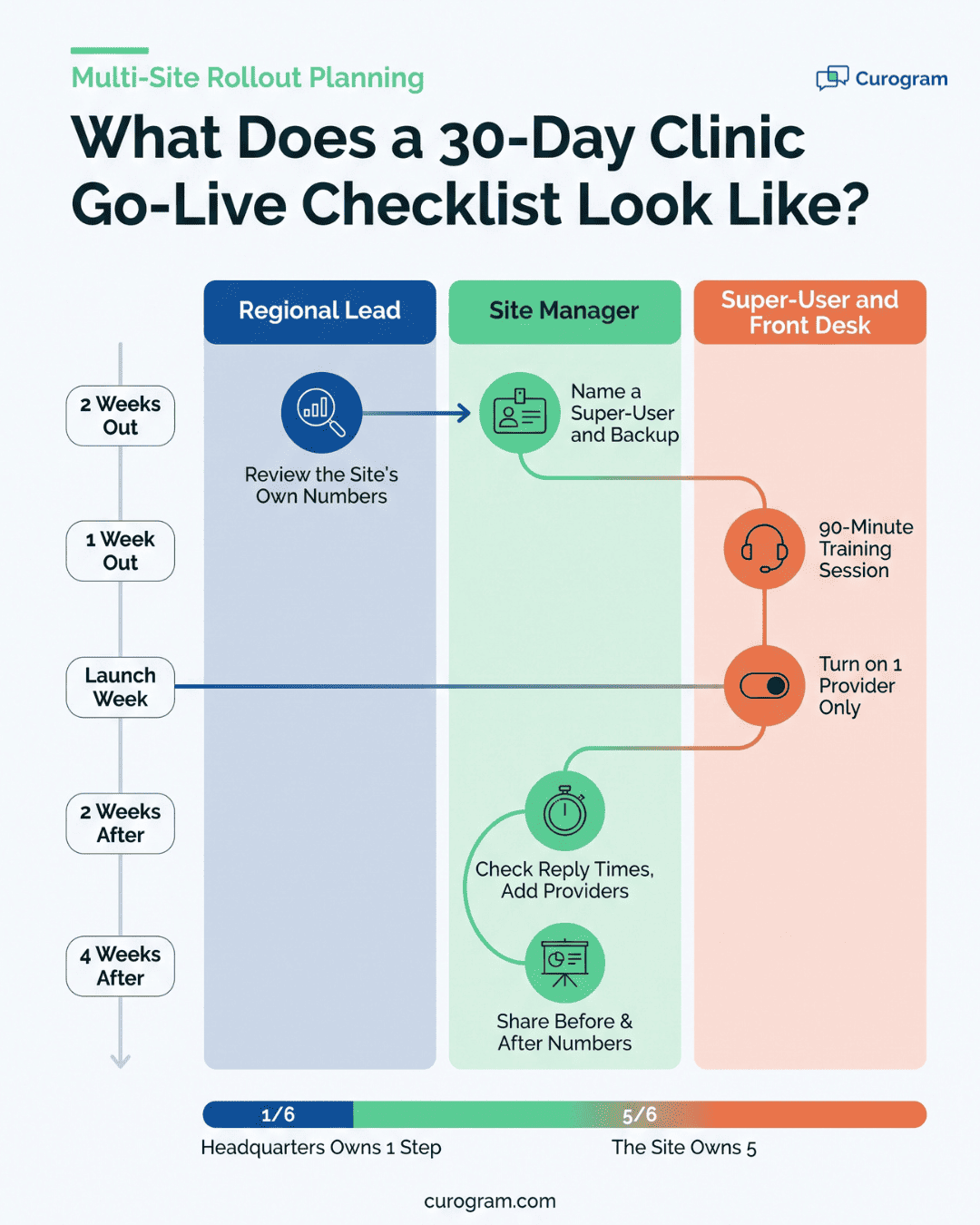
Most go-live plans assume a clinic can pause. A location go-live checklist for staff has to assume the opposite, so ours runs 30 days in short blocks.

Starting with one provider matters more than it looks. A single schedule produces a manageable number of replies, so the front desk learns the inbox on 30 conversations instead of 300.

If a reminder is set to the wrong send time, you find out Tuesday with one provider affected.

What the Benchmark Looks Like at One Location

Atlas Medical Center cut no-shows from 14.20% to 4.91% within three months of turning on automated reminders and two-way texting, based on our internal data.

Apply that spread to a single site as illustrative math. A location booking 220 appointments a week, moving from 14.20% to 4.91%, puts roughly 20 visits a week back on the schedule.

Covina Arthritic Clinic confirms more than 1,100 appointments a month through automated confirmations, which is the volume a front desk stops working through by phone.

A manager who sees 20 recovered visits on their own schedule stops calling this a headquarters project. That conversion usually lands in week three or four, and it's the whole point of the sequence.

Managers Recruit Better Than Headquarters Does

Week four ends with the manager presenting their own before-and-after numbers at the regional ops meeting. Their site, their confirmation rate, their staff, on a slide they built.

The manager of the next site in the wave is sitting in that room. They walked in with the same objection everyone has. They just watched a peer with the same staffing and the same chaos report 20 visits a week back on the books.

That peer will take their call on Thursday and tell them what went wrong in week one.


Infographic showing a 30-day clinic go-live checklist with regional lead, site manager, and super-user swimlanes

The Super-User Model, Built Into How We Launch

Every Curogram go-live at a multi-location group runs through the Super-User Model. One staffer per site trains ahead of the rest of the team. That person answers the how do I questions at the coffee machine, where adoption gets decided.

The reason is timing. A front desk question at 9:40 on a Tuesday has about two minutes before someone gives up and picks up the phone instead. A support ticket takes hours. The person two chairs over takes seconds.

We help each manager choose their super-user, train them before go-live week, and hand them the same reference sheets our support team uses. Managers keep the pick. We push for the person the floor already trusts, and we ask for a backup name, because super-users move on.

Since eCW workflows don't change, the super-user's job stays narrow. They're answering questions about one shared inbox: how to find a patient thread, how to send a form link, what to do with a reply that lands after hours.

Managers get a per-site view of their own numbers, so the super-user has a target they can see.

Our internal data puts the client average above 75% appointment confirmation. A super-user sitting under that number usually knows which provider's schedule is dragging it down.

Conclusion: Enroll, Don't Announce

Adoption gets decided at the front desk, by people the memo never reached. A plan that skips the site manager buys compliance and calls it change.

Your eCW system stays what it already is. Scheduling, charting, and billing all live where they live now. Curogram shows up as the pressure valve on the phones. Frame it that way, because it's true, and because nobody is being asked to learn a second EHR.

Before your next wave, spend thirty minutes with that site's manager and their own baseline: no-show rate, call volume, overtime hours. Watch the posture in the room change when those numbers stop belonging to headquarters.

Pick a representative site for the pilot, not your strongest one. Look for average staffing, average chaos, and an average level of manager interest.

A pilot that works at a typical site gives every other manager a story they believe. Belief is the thing you're rolling out.

Schedule a demo with Curogram and we'll build the manager-enrollment kit for your first wave. That means per-site baseline data, the 30-day checklist, and the super-user training. Bring the site you're most worried about.


Frequently Asked Questions

How much training do front desk staff actually need?

Plan on 30 to 45 minutes for most staff and about 90 minutes for the super-user. The inbox stays simple on purpose. Your eCW scheduling and charting don't change, so nobody has to learn a second system. Your super-user covers the long tail of questions on the floor during the first two weeks.

What makes a good pilot site?

Look for representative, not exceptional: average staffing, average patient volume, average daily chaos. A win at your best location proves nothing to a manager who runs short-staffed. They'll write it off as luck. Success at a typical site gives every other manager a story that matches their own week.

How do we keep adoption from decaying after go-live?

Put per-site usage and outcome numbers into your normal ops meetings, reviewed with the manager rather than about them. Reply times, confirmation rate, and call volume cover it. Decay then shows up in week one instead of quarter three. Coaching lands while the habit is still forming.

Why do site managers resist a rollout they had no part in choosing?

Because the cost lands on them and the credit gets reported upward. Setup questions, error handling, and staff frustration all live at the site. The results show up in a regional deck. Managers who see their own numbers first, and get named for improving them, stop reading the project as somebody else's idea.

How should we handle a site manager who stays skeptical after go-live?

Ask what number would change their mind, then report only that number for six weeks. Most skeptics name something specific, like calls before noon or Monday no-shows. Doubt that survives real data usually points to a real setup problem at that site. Find it before you scale the next wave.