
 Jo Galvez

Start with one typical pilot location, then turn what it learns into a template: local numbers, routing, reminder rules, permissions and training.
Each remaining site then goes live with a few hours of local effort, while Curogram's onboarding team handles setup.
Every location is measured against the same bar, an appointment confirmation rate above 75%, which Curogram client data from clinical settings shows as the average.
Most multi-site groups have a tool like this somewhere in their past. It went live at the main office, where the administrator sits, and staff there used it well. Riverside got it the month two front desk staff quit.
Sunset's manager never warmed to it. By the fourth location, there was no rollout left, only a renewal invoice and a sense that the tool didn't work.
At the main office, that same tool worked fine. The rollout ran on one person's attention, and that attention thinned out with each go-live.
We call this the stalled rollout. It's common in lean groups for a plain reason. The people who bought the software also run the front desk, the billing queue and the schedule. A plan that assumes spare hours fails on day one.
Our view is that the rollout design matters more than the tool choice. Rolling out patient texting across Office Ally locations should follow a playbook. Run one pilot, build a template from what it learned, and set a go-live date for every other site.
Curogram's onboarding team does the setup. Location managers spend hours, and nobody leaves the phones for a training week.
Office Ally stays exactly as it is through all of this. Practice Mate keeps the schedule and billing, and EHR 24/7 keeps the charts. Staff add one inbox to their day and keep everything else the same.
The payoff is a group where every location runs the same way by the end of the rollout, held to one shared result.
Why Lean Group Rollouts Stall
Lean groups buy software well. Deploying it five times is harder, because the fifth go-live gets a fraction of the first one's attention.
The Attention Problem
The kickoff happens where the administrator works. She trains the staff, answers questions in person and fixes problems the same day. That location thrives.
Location two gets a video call. Location three gets an email. By location four, the administrator is back to covering the front desk, and the rollout stops without anyone deciding to stop it.
Groups Without a Process
This pattern shows up across the industry. In a December 2024 MGMA Stat poll, only 40% of medical group leaders said they had a clear process for assessing and selecting new technology. Another 51% said they did not. Leaders without one described tools they paid for and never fully used.
Turnover Mid-Rollout
Lean sites lose staff often, and a rollout that depends on one trained person breaks when she leaves. If the only staffer who knew the new inbox quits in week two, the site slides back to phones.
Training two people per site, a super-user and a backup, keeps the launch alive through normal turnover.
The Double Charge
A stalled location costs twice. The group pays for the license at every site but only collects the return at the ones that went live. The stalled sites keep their old phone tag and manual confirmations, so staff there carry the old workload while the fix sits unused. At renewal, the group sees one number and concludes the tool failed.
How the Rollout Playbook Works
A multi-location software rollout for a lean team has to run without a project manager. The playbook does that by turning the first go-live into a template.
Picking the Pilot
Pilot location selection decides whether the other managers believe the results. Pick a typical site, with average staffing and average chaos. A pilot at the best-run office proves little, and one at the most troubled office proves too much.
Keep the Office Ally implementation phased: one pilot first, then the rest in a planned order.
What Gets Templated
After the pilot, every decision becomes a setting the next site copies:
|
Templated item |
Set once at the pilot |
Local change per site |
|---|---|---|
|
Local textable number |
Text-enable the existing line |
Each site's own number |
|
Routing rules |
Billing, scheduling, front desk |
Staff names per queue |
|
Reminder rules |
Timing and wording |
Site address and parking |
|
Permissions |
Roles by job |
Who holds each role |
|
Training |
One short session |
Session date |
Curogram's Office Ally integration syncs appointment data from Office Ally and writes Confirmed, Cancelled, No-show, and Requested Reschedule back to the schedule. That connection usually takes about a day to set up.
A Go-Live Checklist per Location
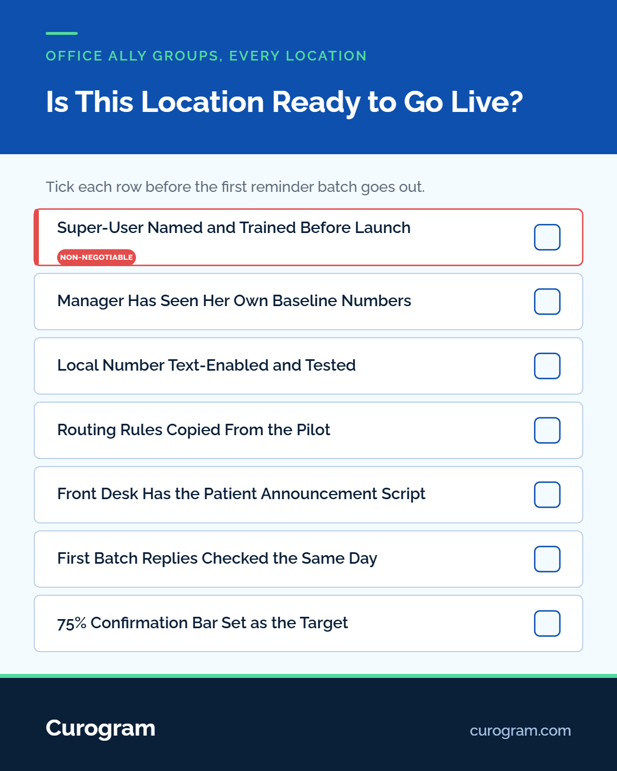
A go-live checklist per location keeps each launch the same size:
1. Manager reviews her site's own baseline: confirmation rate, missed calls, no-shows.
2. Super-user is named and trained before go-live.
3. Local number is text-enabled and tested.
4. Front desk scripts the patient announcement.
5. First reminder batch goes out, and replies are checked that day.
The front desk side of launch is covered in our guide to introducing text communication to patients.
Curogram Highlight: Templated Go-Lives
Templated Go-Lives package everything the pilot learns into settings each new location copies: number setup, routing, reminder rules, permissions, and training.
Curogram's onboarding team does the configuration, so a location manager's job is to review her baseline, name a super-user and approve a date.
Training is short, because staff learn one inbox and keep Practice Mate and EHR 24/7 as they are. Curogram is HIPAA compliant and SOC 2 Type II certified and signs a BAA; see HIPAA-compliant texting for Office Ally users for the safeguards.
Groups setting staff rules across many sites can read our piece on enterprise security and communication governance.

Live Everywhere and Sticking Everywhere
Each site has to stay live after its launch week. One shared bar keeps location six on track three months in.
One Bar for Every Site
Each location graduates at the same benchmark: a confirmation rate above 75%, the average in Curogram client data from clinical settings. A site that's "installed" but stuck at 40% isn't done. The number shows that within weeks, while there's still time to coach.
For scale, Covina Arthritic Clinic confirms more than 1,100 appointments a month on average with Curogram.
Zero-Slack Deployment in Practice
Zero-slack deployment means nobody comes off the phones for a week. Each go-live takes a few hours of the manager's time and a short training for the front desk. An illustrative six-site calendar looks like this:
|
Phase (illustrative) |
Sites |
Typical length |
|---|---|---|
|
Pilot |
1 |
3 to 4 weeks |
|
Template review |
All managers |
1 meeting |
|
Wave one |
2 |
1 week each |
|
Wave two |
3 |
1 week each |
When a Site Falls Behind
Some site will lag, and usually the cause is small. Replies may land in a queue nobody checks. A reminder may go out at a bad hour, or the front desk may still call patients out of habit. The super-user can fix most of these in a day once the number points to them.
Watching the Scoreboard
Per-site confirmation and usage results come with Curogram's data analytics package, sold separately. Our guide to enterprise analytics and location benchmarking shows how groups compare sites.
Managers who see their own numbers early tend to ask for their go-live date. For how to win them over first, see our guide to change management for the Office Ally patient communication rollout.
Conclusion: Design the Rollout Like It's the Product
The difference between location two and location ten is a playbook. Groups that avoid stalled rollouts usually have the same lean staff as everyone else. What they add is a template, a calendar, and one shared result every site is held to.
Office Ally keeps your claims, schedule, and charts steady through the change. Curogram adds patient texting on top, one site at a time, with no new EHR to learn.
Before you start, list every tool your group licensed and never fully deployed. Then pick the location that would make the most honest pilot.
Book a demo and bring your location list. We'll draft your pilot choice and a go-live calendar for the whole group in the first session.
Frequently Asked Questions