10 min read

Automate Review Requests | Tebra Locations

Automate Review Requests | Tebra Locations
💡 Automating review requests across Tebra locations means every completed visit sends the patient a short text with a link to that location’s Google profile. Nobody at the front desk has to remember to ask.
  • The text goes out when the Tebra appointment is marked complete, at a delay you set, such as 90 minutes after check-out.
  • Patients seen at each site land on that site’s own Google Business Profile.
  • Every patient gets the same ask, which keeps you inside Google’s ban on review gating.
  • Owners see requests sent, links clicked, and reviews earned for each location.
  • Based on our internal data, one multi-location group earned 1,064 new five-star reviews in three months this way.
Staff keep their normal check-out routine. Review volume then follows visit volume at every site.

Most practice owners blame thin review counts on patients. Busy people don’t write reviews, the thinking goes, and happy patients stay quiet. In our experience, the gap starts earlier. The ask rarely happens at all.

At a multi-site group, the review request is the first task to go. Your front desk forgets the review ask when one patient is disputing a copay. Two more are waiting to check in, and line 2 is blinking. That slip repeats one visit at a time, at every location, on a different week at each.

So automating review requests across Tebra locations matters more for groups than for solo offices. Each site has its own staff, its own turnover, and its own Google profile. A manual habit has to hold at all of them at once, and it rarely lasts a month.

We think review volume per location should track how many patients you see. Who happens to be working the desk shouldn’t change it.

Once a completed visit in Tebra sends the request on its own, the numbers move fast. Based on our internal data, one multi-location group earned 1,064 new five-star reviews in three months with no added staff steps.

Thin review counts cost you new patients, one town at a time. Based on our internal research, 90% of new patient leads look at your Google Business Profile before your website.

The Manual Ask

Everyone in a group agrees reviews matter. Ask who owns them, and you’ll get a pause.

Your office manager handles staffing, payroll, and patient complaints. Front desk staff check patients in, verify insurance, collect copays, and answer phones. Billing works denied claims.

Review generation shows up in none of those job descriptions, so it lands on whoever has a spare second. In a lean group, that’s nobody.

Providers sometimes mention it at the end of a visit. A provider running 20 minutes behind skips that line first.

Spread that across four or six sites, and the group-wide review habit exists only in a meeting note. Tebra already holds every visit record, so the list of who should be asked is sitting right there. What’s missing is a step that acts on it.

How the Initiative Dies by Week 3

Most groups have run this play at least once. Someone shares a competitor’s review count at a leadership meeting.

A script gets written: “If you had a good visit today, we’d love a Google review.” Table tents go on the check-out counters, and staff get a reminder in the group chat.

Week one goes fine at the location where the owner works most days. The other sites ask a few patients each. By week three, asks are near zero everywhere, and the table tents are propping up a stack of intake forms.

Next quarter, the same meeting happens with the same script. A spoken ask loses every time it competes with a task that has a patient standing at the counter.

The Check-Out Counter Where the Ask Gets Dropped

Look at what one check-out involves at a busy site. The patient needs a follow-up in four weeks, but the provider’s schedule in Tebra is full until the 18th.

Their card declines on a $40 copay. A second patient wants to know if her referral went through, and the phone has rung four times.

By the time the first patient walks out with an appointment card, nobody is thinking about Google. And the review request is the only task on that list with no penalty for skipping it. No patient calls back upset that they weren’t asked.

The manual ask needs the one task with no pressure behind it to get done in the most crowded minute of the visit.

Every Week of Delay Widens the Gap

Some of your local rivals may already send automated requests. Each week, they collect reviews from a share of every visit while your sites collect a handful.

Some illustrative math shows how fast that adds up. A rival site seeing 25 patients a day, 20 days a month, has 500 visits.

If 3% of those visits turn into reviews, that site adds 15 reviews a month, or 180 a year. A site relying on spoken asks that lands one or two a week adds about 50 to 100 a year.

Google’s own help page on local ranking says review count and score factor into how prominent a business looks in local results. Your newer locations feel this most. They start near zero, and every month of manual asking pushes them further behind.

Review Counts That Follow Staffing

In most groups, one location has a front desk lead who asks everyone. Call her Dana. Her site climbs to 200 reviews while the others sit at 30. Then Dana takes a job closer to home, and that site’s reviews stall within weeks.

From the owner’s chair, the pattern makes no sense. One site shows a 4.8 rating with 200 reviews, another a 4.6 with 31, and no report explains why.

Tebra shows visits. Google shows reviews. Nothing ties the two together per location, so there’s no number to coach against and no way to tell a staffing gap from a care problem.

The Network Reputation Desk

Curogram works as the group’s network reputation desk. It’s one system that sends the review ask for every location, so no person has to remember it.

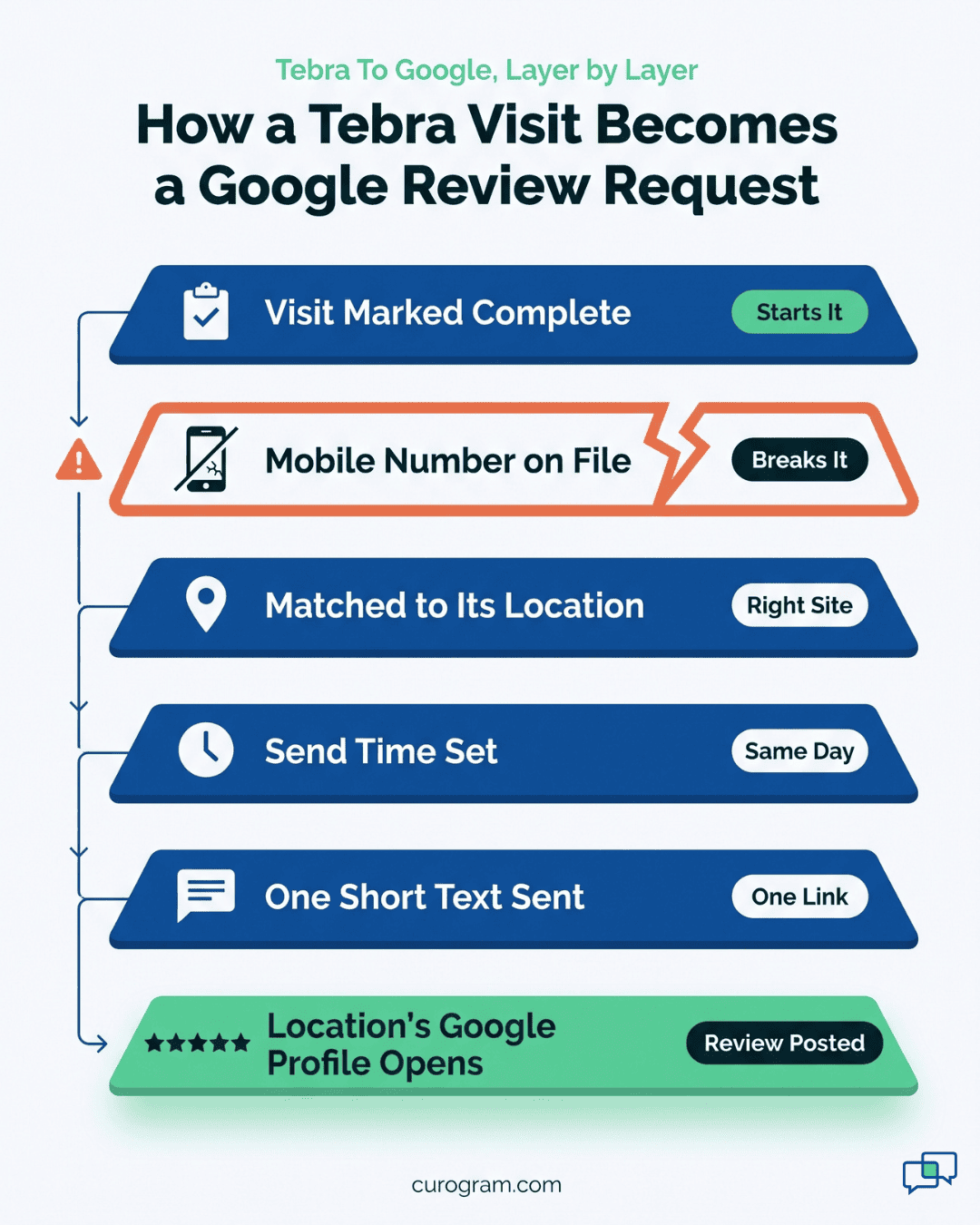
When a Tebra appointment is marked complete, Curogram queues a text for that patient. The message names the location and holds one link. The patient taps it, lands on that location’s Google review form, picks a star rating, and writes. Two taps get them to the form.

Your staff keep doing exactly what they do now. They check the patient out in Tebra, the same click they make today, and the request follows from it.

Post-visit review request automation turns the review ask into a side effect of a step your team already takes hundreds of times a week.

How the Tebra Trigger Works

Curogram reads appointment activity from Tebra. A status change on a real visit starts each request. You have no patient list to export and no weekly campaign to schedule.

Visits that never reach complete send nothing. A no-show, a late cancel, or a reschedule won’t produce a request. Patients who never came in won’t get a “thanks for visiting” text.

A sample message looks like this:

Thanks for visiting Northside Family Care - Eastside today. We’d value your feedback. Leave a review here: [link]. Reply STOP to opt out.

The text leaves out the provider’s name, the reason for the visit, and anything clinical. A review request should never carry PHI, and keeping the wording generic makes that easy to hold at every site.

Getting Review Request Timing Right

Review request timing changes how many patients act on the text. Send it while the patient is still in the lot, and they’re buckling a child into a car seat. Send it three days later, and the visit has blurred into the week.

We recommend a same-day send, often 60 to 120 minutes after check-out. The patient is home or back at work, and the visit is still fresh.

Sites with different rhythms can run different delays. An urgent care site with walk-ins until close may want a shorter gap than a pediatric office whose parents are heading to school pickup.

Keep evening limits in mind. The TCPA bars telephone solicitations before 8 a.m. or after 9 p.m. local time, so late check-outs are better held until morning.

What You Set Per Location

What It Controls

Example

Trigger

Which visit status starts the request

Appointment marked complete in Tebra

Send delay

Gap between check-out and the text

90 minutes

Google link

Which profile opens

The Eastside office’s own profile

Message wording

What the patient reads

Location name, thanks, one link, opt-out


One Google Profile per Location

Routing is where many group setups go wrong. A single review link pointing to the main office piles every review onto one profile. The main site climbs to 400 reviews while a satellite clinic stays at 12.

Every Tebra appointment carries a service location. Curogram maps each service location to its matching Google Business Profile. A patient seen in Northgate reviews Northgate.

All sites still sit in one Google review automation group. Owners manage settings in one place and can tune a single site without touching the rest.

Layered diagram of post-visit review request automation, from Tebra visit status to the location’s Google profile

Review Gating Compliance

Google’s review policy bars businesses from discouraging negative reviews or asking only happy customers.

The FTC’s 2024 rule on consumer reviews also targets review suppression. Review gating compliance comes down to one test: does every patient get the same chance to post?

With Curogram, every completed visit gets the same text with the same Google link. No survey screens patients first. A patient who wants to reach the office privately can reply to the text, and that reply lands with your team. The Google link stays in the message either way.

Per-Location Numbers You Can Coach

Each location gets three counts: requests sent, links clicked, and reviews earned. Divide reviews by completed visits, and you have one rate you can compare across every site.

Say Eastside converts 4% of visits and Westside converts 1%. That gap points to fixable causes. Westside’s mobile numbers may be missing in Tebra demographics, or its link may point to an old profile. Both are settings you can fix in an afternoon, with no staff meeting.

Reviews as a Byproduct of Care

Based on our internal data, one multi-location practice earned 1,064 new five-star reviews in three months after turning on automated requests. That’s about 355 a month, or roughly 12 a day, across the group. No one on staff spent an hour on it.

With requests tied to visits, review count follows visit count, which every location already produces. A busy site sends more requests because it sees more patients, and a quiet week sends fewer.

One Visit, Start to Finish

Take one illustrative visit at a three-location family medicine group on Tebra.

  1. Check-out. The front desk books a follow-up and marks the visit complete in Tebra. No other step is added.
  2. Trigger. Curogram reads the status change and the service location, Eastside, and queues a request.
  3. Wait. Ninety minutes later, the text reaches the patient’s mobile phone with Eastside’s name in the first line.
  4. Tap. The patient opens the link and lands on Eastside’s Google review form. They leave five stars and two sentences about a short wait.
  5. Reply path. A different patient from the same day replies to the text about a billing mix-up. That reply lands in the shared inbox, and the office manager calls back that afternoon. Their Google link still works if they choose to post.
  6. Count. Eastside’s report adds one request, one click, and one review. The owner sees it with every other site’s numbers that week.

Nobody at Eastside’s desk touched steps 2 through 6.

Why Weak Locations Rise First

Automation adds reviews at a similar rate per visit at every site. A newer location with nine reviews gains far more trust from 27 new ones than a flagship with 310 does from 81.

The table uses an illustrative 3% visit-to-review rate over 90 days.

Location

Monthly Visits

Reviews at Start

Added in 90 Days

Growth

Main office

900

310

81

26%

Eastside (2 years old)

500

42

45

107%

Northgate (new)

300

9

27

300%


Northgate goes from looking unproven to holding a credible review count within one quarter. We call this floor-first growth. Your weakest profiles catch up first, which lifts the group’s local search results where they were lowest.


Curogram Highlight: Automated Review Requests

Automated Review Requests in Curogram send a review text after every completed visit at every Tebra location. Your staff add no steps to check-out.

Setup happens once per group. We connect to your Tebra account, map each service location to its own Google Business Profile, and set the send delay and message wording for each site. Most groups finish this in one working session with our team.

After launch, the system runs on visit activity. A completed appointment queues a text. Canceled and no-show visits send nothing. Each message carries the location name, a thank-you, one Google link, and an opt-out line, with no clinical details.

Every patient receives the same request. There’s no sentiment survey in front of the link, which keeps your group aligned with Google’s policy against review gating.

When a patient replies with a concern, the reply arrives in Curogram’s shared inbox, so your office manager can call them the same day.

Owners get a per-location report showing requests sent, links clicked, and reviews earned.

Reviews divided by completed visits becomes the rate you compare across sites. A drop at one location usually traces to a setup issue, such as missing mobile numbers in Tebra, and you can fix it without retraining anyone.

Based on our internal data, one multi-location group earned 1,064 new five-star reviews in three months with this workflow. Review volume per location rose with visit volume, and the group’s newer sites gained the most.

Conclusion: Retire the Manual Ask

Any task that depends on a busy person remembering it will slip, and the review ask slips first. Your group has already tested this. Every script, table tent, and staff reminder faded on its own schedule at each site.

Tebra already records every completed visit. Curogram uses that record to ask each patient while the visit is still fresh, with the right Google profile on the other end of the link. Your front desk keeps checking patients out, and the request follows.

Try one count before you decide. Pull last month’s completed visits from Tebra for each location, then count the new Google reviews each site earned in the same month.

A site with 500 visits and three new reviews scores 0.6. Every visit in that gap was a patient nobody asked. Based on our internal data, one group turned that same visit flow into 1,064 five-star reviews in three months.

Your newest locations have the most to gain. They start with the fewest reviews, so each new one moves them furthest in local search.

Book a demo and we’ll walk through your Tebra setup, map each location to its Google profile, and set request timing for every site in one working session.


Frequently Asked Questions

How much extra work does automated review requesting add for front desk staff?

None beyond what they already do. Staff check patients out in Tebra as usual, and the completed visit triggers the text. Some locations add a quick verbal line at check-out, such as “You’ll get a short text from us later today.” That helps patients expect the message, but the system sends the request whether or not anyone says it.

Why is automating review requests allowed when review gating isn’t?

Google’s rules focus on who gets asked. Gating means steering only happy patients to Google, often through a survey that screens out low scores first. Automation sends the same request with the same Google link to every patient after every completed visit. Since nobody is filtered out, the method stays fair, and every patient keeps an equal chance to post.

How should a group handle a patient who replies to the review text with a complaint?

Treat the reply as a service call. The message lands in your shared inbox, so the office manager at that location can call the patient the same day. Fix the billing error or scheduling problem if you can.
Leave the Google link alone, since the patient still has every right to post. Keep any public response free of visit details to stay within HIPAA.

Why do newer locations gain the most from post-visit automation?

A new site starts with a handful of reviews, so each added review changes its profile more. Twenty-seven new reviews take a location from 9 to 36, which looks established to a patient comparing options. The same 27 barely move a flagship with 300. Because automation sends a request after every visit, smaller sites build volume steadily without depending on one staff member who remembers to ask.

How do you choose the right review request timing for each location?

Start with a same-day send, about 60 to 120 minutes after check-out, then adjust by site. Look at when your patients leave and where they go next. A pediatric office may want a longer delay so parents aren’t driving. An urgent care site open late should hold evening check-outs until morning.
Compare each location’s click rate after a month, and shift the delay if one site lags.