
Automating Review Requests Across Practice Fusion Locations
 Jo Galvez : Sep 2, 2026, 12:00:01 PM
Busy front desks forget to ask for reviews. Automation does not. Curogram triggers post-visit requests at every Practice Fusion office.

One workflow in your network already runs without a human trigger. Appointment reminders fire off the eCW appointment record at all eleven sites, on schedule. Nobody at the front desk has to think about it.
The review request runs on the other model. It fires when a person remembers, which means it fires at whichever sites have slack that week and nowhere else. Nobody designed it that way. It is what remains after a training rollout stops being reinforced.
That difference is the whole article. Same network, same patients, same eCW instance, and two workflows performing nothing alike because only one of them has a trigger.
Ten of the eleven sites will tell you the program is running. Ask what number it produced last month. The answers come back as ranges, as a manager’s impression, or not at all.
The cost shows up as uneven output rather than no output. Some months a site posts 40 reviews, and the regional manager reports a win. The next quarter the same site produces 3, and the explanation is turnover, or flu season, or a manager on leave.
Staff workload in reputation management is the part leaders underestimate. Eleven front desks cannot absorb a new step by being told about it twice. Capacity is the binding constraint, and it decays on a schedule you can predict.
Everyone agrees reviews matter. No location has a person whose actual job is generating them. The work sits in the gaps between other work, and disappears whenever the other work grows.
The initiative launches network-wide. Posters, a script, a slide at the all-hands. Week one produces asks at maybe four sites.
By week six, the count is flat at nine of eleven. The two still producing are the ones where a supervisor personally cares.
Each site dies on its own schedule, which is what makes the pattern hard to see from the roll-up. The network number looks like a slow decline rather than eleven separate collapses.
A quarterly total falling from 180 to 95 reads as softening demand. Underneath it, two sites are doing all of the work, and nine are doing none.
A regional manager is asked why one of their sites produced 9 reviews last quarter, and another produced 61. They have no instrument that answers it.
Visit volumes are similar. Patient satisfaction scores are similar. So is staffing.
So the answer becomes a story about culture, and the fix becomes another training session. Three months later, the same question arrives with different site names in it.
The next idea is to put the ask somewhere patients cannot miss it. A prompt on the eCW Kiosk, or a tablet at checkout. Sometimes a QR code the medical assistant points at while the patient is still standing there.
The intent is never fraud. It is a manager reaching for the only lever within arm’s length.
Google’s Maps content policy bans pressuring users to leave reviews while on the premises. It bans incentives, gating, and staff review quotas too.
Google acts on the profile rather than the person. Google can block a profile from receiving new reviews, unpublish the reviews it already holds, and show consumers a warning that fake reviews were removed. At eleven locations, one rollout decision puts eleven profiles in range of that.
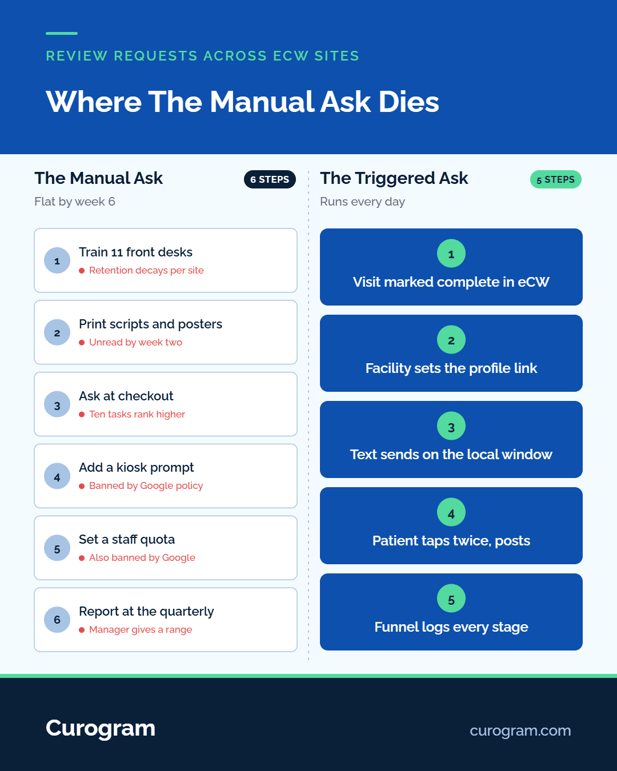
A system needs an event to hang on. In eCW, there is an obvious one already being maintained for billing reasons at every site.
Automated Review Requests fire on visit completion. Curogram connects with eCW and reads appointment activity per facility, so the request goes out without anyone opening a second application. The Visit Status dropdown your staff already maintain on the Resource Schedule is the trigger.
Each request inherits the facility on the appointment, and the link opens that location’s Google profile. Providers rotating between three sites in a week do not break the routing, because the routing follows the appointment rather than the provider. A post-visit review request workflow in eCW is that one dependency, correctly mapped.
Nothing in the chart changes, and nobody signs into a second clinical system. The Visit Status values your billing team already depends on are the ones the request engine watches.
Majority of patients are most likely to post within a day of the visit. Same-day sending beats next-day at every site. One send time does not fit eleven schedules, though.
A walk-in clinic emptying out at 7 p.m. needs a different window than an infusion suite finishing at 2. Sites in a second time zone need their own.
Google review automation for a medical group should expose the send window per location. Quiet hours should follow local time, not headquarters time.
Set it once per site, and it stays set. Send windows are the setting groups revisit least, and a schedule that drifts by an hour moves the whole open rate with it.
Every completed visit gets an identical request. No survey runs first, and no branch diverts unhappy patients before the Google link appears. Central enforcement matters more than the rule itself here, because gating usually reenters a network sideways.
One region signs a local vendor. A manager builds a spreadsheet that only sends to patients who scored well. Neither person intends to break policy.
Unhappy patients still reach you first. Replies route into the shared inbox behind the multi-location command center, which gives your team a day to fix it without blocking anyone from posting.

Once the ask is automatic, the interesting question stops being how many reviews arrived and becomes where they were lost.
Based on our internal data, one multi-location group generated 1,064 new 5-star reviews in 3 months, with 90% of responding patients leaving five stars. No front desk in that group added a step at checkout, and no manager tracked who had been asked.
Every request keyed off a visit the practice was already recording for other reasons.
Automation converts a vague question into a funnel with named stages. Below is one location running 1,900 completed visits in a month, with the drop-off at each step.
|
Stage |
Rate |
Patients remaining |
|---|---|---|
|
Completed visits |
1,900 |
|
|
Mobile number on file |
71% |
1,349 |
|
Request delivered |
96% |
1,295 |
|
Link opened |
22% |
285 |
|
Review posted |
21% of opens |
60 |
Illustrative month at one location. Visit-to-review rate works out to 3.2%.
The largest single loss is the first one, and it has nothing to do with reviews. 29% of patients at that site have no mobile number on file, which is a registration field, not a reputation setting.
Lift intake capture from 71% to 90%, and the same funnel adds about 361 requests. That works out to roughly 16 more reviews a month at one location. Nothing else in the workflow changes.
Every stage in that funnel is measured, which is the real break from the manual version. Nobody could ever tell you the open rate on an ask a receptionist made out loud at checkout.
Run those five stages at every site, and the comparison finally means something. Two locations posting the same visit-to-review rate through different stages need different fixes, and the funnel names which one.
A site losing patients at delivery has a phone data problem. When the drop happens at the open, check timing first and sender name second.
Losses after the open usually mean the link landed somewhere confusing, often a profile pointed at the wrong address. The roll-up view of all of it sits in managing Google reviews for multiple eClinicalWorks locations.
Pull last month’s completed visit count per facility from eCW. Put new reviews per location beside it. The gap between those two columns is reputation the network already earned and never collected.
Then ask which stage is losing them, rather than which staff member is. Do that subtraction per site rather than network-wide.
A healthy total hides sites contributing almost nothing, which is the same failure the blended rating average produces one level up.
eCW records every one of those visits, at every facility, accurately. Public proof was never inside its scope, and no EHR claims it. What sits between the two is a trigger your staff already maintain and a link that has to point at the right address.
Schedule a consultation and we will map every facility in your eCW list to its own profile, set the send window per site, and hand back the funnel baseline.
 Jo Galvez : Sep 2, 2026, 12:00:01 PM
Busy front desks forget to ask for reviews. Automation does not. Curogram triggers post-visit requests at every Practice Fusion office.
 Jo Galvez : Aug 26, 2026, 8:00:02 AM
Satellite clinics with 12 stale reviews lose every 'near me' search. Curogram automates review requests per eCW location.
 Jo Galvez : Aug 19, 2026, 8:00:00 AM
Busy front desks forget to ask for reviews — automation doesn't. Curogram triggers post-visit requests at every AdvancedMD office. 1,064 stars in 90...