
.jpg?width=30&height=30&name=square-formal-photo%20(1).jpg) Mira Gwehn Revilla
Mira Gwehn Revilla
Cut CollaborateMD No-Shows, Fill Empty Slots
 Jo Galvez : Jul 3, 2026, 10:00:00 AM
Reminders that don’t confirm leave staff guessing. See how CollaborateMD two-way reminders cut no-shows 65% and fill cancellations the same day.

Most Prime Clinical offices assume Intellect can't text patients. It can. Intellect has sent SMS appointment reminders for years, and since version 15.05.12, it can take a confirmation reply back.
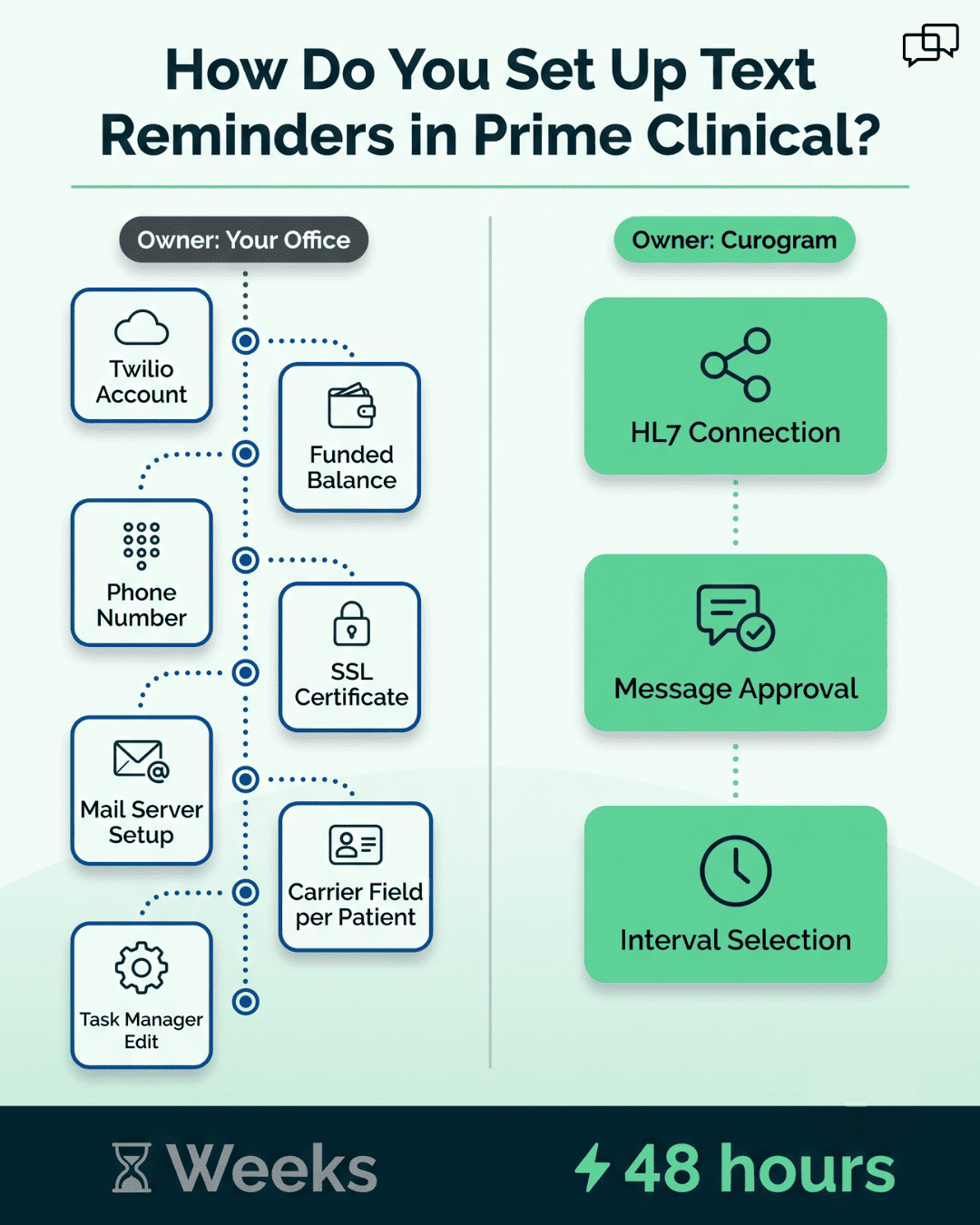
Plenty of practices never switch it on. Prime Clinical's own setup pages explain why. Your office opens a Twilio account and keeps a funded balance in it. You buy a phone number for caller ID and load an SSL certificate onto the Intellect server.
Staff then fill a cell phone carrier field on every patient record and flag each appointment type to allow messages. Last comes a task in Task Manager, pointed at the right schedule.
Practices that finish all of that hit a second wall. Prime Clinical's help documentation states that Intellect gives clinics no screen for checking whether reminder texts actually went out.
What's missing around the text is the attendance system. That means intervals a practice controls, a reply that moves the appointment status, and a record staff can actually look at.
That gap is why the 80-call morning survives in offices that have run Intellect for 20 years. Someone prints the day, starts dialing, and reaches voicemail on a number nobody recognizes.
Atlas Medical Center cut its no-show rate from 14.20% to 4.91% in three months after that gap closed, based on our internal data.
Below we walk through what the built-in reminder does, what a 2-way layer adds on top of it, and how the first week goes for a front desk that has never worked a confirmation queue.
A six-provider internal medicine group books around 80 visits a day. Two staff split the call sheet at 7:45 AM. By 9:30 they've left 40 voicemails, reached 18 people, and confirmed maybe 30 of the 80.
The other 50 stay unknown until someone walks in. Patients see an unfamiliar 626 number and let it ring. Voicemail sits unplayed. Anyone who did want to move an appointment now has to call back during the same hours the phones are jammed.
Front desk staff aren't avoiding the work. They're being asked to reach 80 people by voice during the hour the lobby fills, the fax tray loads, and three patients from yesterday's cancellations need rescheduling. Something gets dropped, and it's usually the back half of the list.
Practices running 2-way texting for the rest of their patient communication already know how the day feels different.
Older patients get blamed for being hard to reach. The blame lands wrong. A 71-year-old cardiology patient with a smartphone answers texts from her pharmacy, her bank, and her grandson all day.
What she won't do is pick up an unknown number. Robocalls trained a whole generation to let calls ring out. A medical office dialing from its main line looks identical to a warranty scam.
Portal messages have the same problem in a different form. Patients need a password they set once in 2019, a login screen, and a reason to check. Nobody opens a portal to find out what time their Tuesday visit is.
Texting sits outside both traps. The message lands on a lock screen with the practice name on it, and answering costs one thumb tap.
Gastroenterology and ophthalmology offices see this most clearly, since their panels combine older patients with visits that can't be casually rescheduled.
Intellect does send appointment reminder texts. Getting there takes more than a checkbox.
|
Step |
What your office has to do |
|
Messaging account |
Open a Twilio account and keep a funded balance |
|
Caller ID |
Buy a phone number through Twilio |
|
Server |
Load an SSL certificate on the Intellect server |
|
Mail settings |
Configure the outgoing mail server, port, user, and password |
|
Patient records |
Enter a cell phone carrier on each patient |
|
Appointment types |
Set the Send Email/SMS field to Y for every type |
|
Scheduling |
Edit the reminder task and its parameters in Task Manager |
Source: Prime Clinical's Twilio user setup and text message reminder help pages.
None of this is unreasonable for a group with an IT contact. For a 4-person front office in a family medicine practice, it's a project nobody owns. The office manager who starts it also handles eligibility, refund checks, and the copier.
Custom message wording adds another layer. Prime Clinical's notes describe multiple customized texts and per-channel messages as custom features, which means a support ticket rather than a settings screen.
Prime Clinical's documentation notes that Intellect offers clinics no screen for verifying that reminder texts were sent. A staff member who wants to know whether Mrs. Alvarez got her Thursday reminder has one option: call her.
Two other limits shape the workflow. No PHI can go in the message, which is standard and fine for logistics. And on versions before 15.05.12, the text carries no reply option at all, so a patient who wants to cancel is told to phone the office.
That last one routes the whole thing back to the call queue. A reminder ending in "call us" produces inbound calls, and the front desk absorbs them at 8:15 in the morning.
None of this makes Intellect a bad practice management system. It schedules, it bills, and it has held up for 30 years in offices that have replaced everything else around it. Sending and tracking patient conversations was never the job it was built for.
Writing in Forbes, physician executive Sachin Jain cited an estimate of about $200 per unused time slot for an individual physician. A primary care visit often lands lower, near $150. A cardiac stress test or a scoped procedure runs far higher, because the room and the equipment sat idle too.
Run it against the group above. Six providers, 80 visits a day, a 12% no-show rate: roughly 10 empty slots daily. At $200 each, that's $2,000 a day and something near $40,000 a month.
Owners rarely see that number as a line item. It shows up as a slow month.

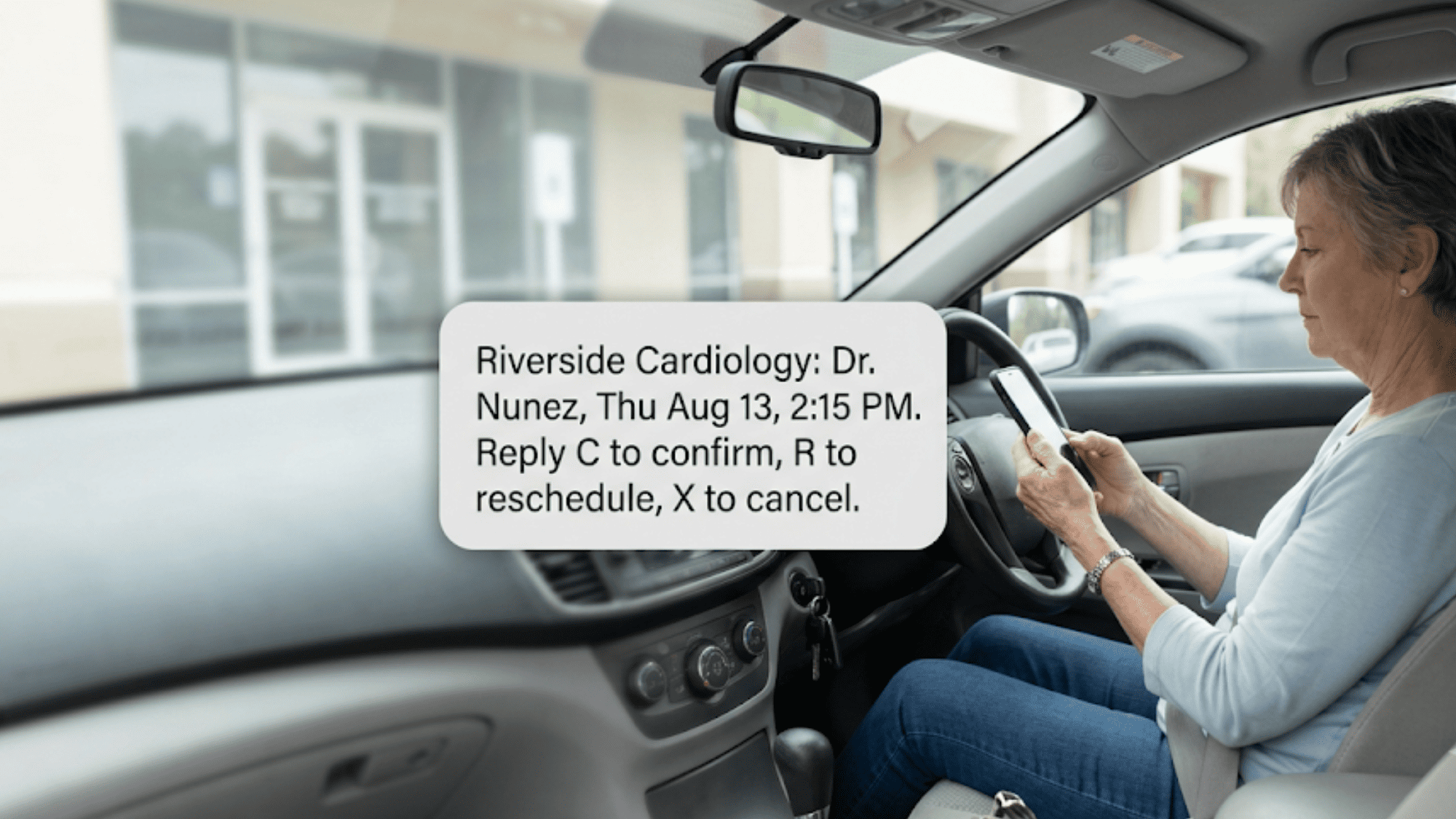
Text reminders work when the patient can finish the task inside the message. A working reminder reads like this:
Riverside Cardiology: Dr. Nunez, Thu Aug 13, 2:15 PM, 3rd floor. Reply C to confirm, R to reschedule, X to cancel.
Date, provider, time, place, and three ways to answer. Nothing clinical, so the logistics stay outside PHI territory. Automated appointment reminder texts give a medical practice something the phone never did: a written trail of who was reached and what they said back.
The wording belongs to your office. A pediatrics practice writes to parents. An ophthalmology practice reminds patients to bring a driver for dilation. Same engine, different voice.
Reminder intervals are customizable, and most practices land on three. A text goes out 72 hours ahead so there's time to refill a cancellation. A second lands 24 hours out. A short one fires 2 hours before the visit for people who confirmed days ago and forgot anyway.
Procedure schedules need a longer runway. Gastroenterology offices often start 7 days out because bowel prep has to be picked up and started. Cardiology testing gets its own window for caffeine and medication instructions from the provider.
Appointment types drive all of it. A 15-minute follow-up doesn't need the same sequence as a colonoscopy, and Curogram pulls those types straight from Intellect rather than asking staff to rebuild them.
A 2-way confirmation text asks for a single character back: C to confirm. R sends the patient into a reschedule thread a staff member can answer in writing. X cancels, and the slot shows as open right then.
Timing is the whole value. A cancellation that arrives at 4:40 PM the day before gives your team an evening and a morning to fill the slot from the waitlist. The same cancellation discovered at 9:05 AM, when nobody walks in, is a lost hour.
Real Prime Clinical no-show reduction starts at that moment. Reminders that can't take an answer only tell you what you already scheduled.
Replies that aren't C, R, or X still get read. A patient who writes back "I'll be 15 min late" lands in the same queue, and staff answer in a thread. STOP opts the patient out, and that opt-out is honored across the practice, which keeps your texting program on the right side of consent rules.
Intellect already speaks HL7. Prime Clinical's own HL7 page describes Intellect generating an HL7 file of patient demographic data whenever a patient is added or updated.
Curogram uses that same standard to bring over demographics, the appointment schedule, providers, and appointment types. Build time runs 48 hours.
Your staff keep booking in Intellect exactly as they do now. New appointments flow into the reminder engine, and changes made in Intellect follow. Nobody double-enters anything.
Training runs about 5 minutes, because the only new habit is watching a confirmation column instead of dialing a list. No server migration, no chart conversion, and no change to how providers document.
A missed office visit costs a slot. A missed colonoscopy costs a slot, a room, an anesthesia block, and a prep the patient already suffered through.
Gastroenterology offices attach prep reminders to the sequence. One message goes out 7 days ahead about picking up the prep. Another lands the night before with the office's own instructions. Cardiology testing gets its own sequence for arrival time and what to bring.
Ophthalmology practices remind patients to arrange a ride when dilation is planned, which prevents the cancellation that happens in the parking lot. OB/GYN offices texting about a glucose test can include the fasting window the provider set.
None of that content is clinical advice from us. It's your practice's existing instruction sheet, delivered where patients will read it, attached to the appointment type that needs it.
Day 1: The HL7 connection goes up and yesterday's schedule imports. Your team checks that appointment types and providers mapped correctly, before a single text sends.
Day 2: Someone from your office writes the reminder text and picks intervals. Most practices spend 20 minutes on wording and argue about whether to include the provider's first name. A cardiology group might choose 72 hours, 24 hours, and 2 hours. Sequences get assigned per appointment type.
Day 3: Reminders run for one provider only. Staff watch replies land in the confirmation queue and answer the R threads by hand. Roughly 10 to 15 messages need a human, and they take seconds each.
Day 4: The remaining providers switch on. The call sheet drops to patients with no mobile number on file, usually a short list.
Day 5: Your team stops printing the call sheet first thing and starts the day with the confirmation column instead. Whoever used to make calls now works a list of non-responders, and that list is short enough to finish before the lobby fills.
One thing to plan for: Patients reply to the first batch faster than staff expect. Assign someone to watch the queue for the first two days so R threads get answered within a few minutes.
|
Practice |
Before |
After |
Window |
|
Atlas Medical Center |
14.20% no-show rate |
4.91% |
3 months |
|
Covina Arthritic Clinic |
369 confirmations a month |
1,300+ |
5 months |
Across our client base, more than 75% of patients confirm, and no-show rates sit 53% below the industry average. All of these figures come from our internal data.
Covina's curve matters more than the headline for a growing group. Confirmation volume tripled while staff headcount held, which is the argument for automating the task rather than hiring for it.
Atlas is the cleaner before-and-after. A 14.20% no-show rate on a full schedule means roughly one visit in seven never happens. At 4.91%, that's one in twenty.
Two staff spending two hours each on calls is four hours a day. Those hours don't disappear into nothing. They go to prior authorizations, to the patients standing at the window, and to calling the waitlist when an X comes in at 4:40 PM.
Track one number in month one: how many patients never respond to any message in the sequence. That list tells you which phone numbers are wrong, which patients need a call, and whether your wording is working.
Practices that fix 30 bad mobile numbers in the first month usually see the confirmation rate jump the next.
Full elimination of front desk confirmation calls isn't a first-month goal, and we'd be careful with anyone who promises it. Patients without a mobile number still get a call. What changes is the size of that list: 80 names down to eight or ten. A single staff member finishes those before the first patient is roomed.
Practices that reduce no-shows fastest tend to be cardiology and internal medicine groups. Panels are older, schedules are dense, and one empty slot is expensive. Recovered visits also mean recovered balances, since a patient who shows up is a patient who can pay at the desk.
Smart Reminders is the piece that turns an imported schedule into confirmed visits. Once the HL7 connection to Intellect is live, every appointment your staff books flows in with its provider, time, and type. The right reminder sequence attaches on its own.
Your office controls the wording and the timing. Set 72-hour, 24-hour, and 2-hour texts for office visits, and a 7-day version for procedure prep. Messages carry logistics only, on a HIPAA-compliant platform covered by a signed BAA.
Replies do the work staff used to do by hand. C marks the appointment confirmed. X opens the slot. R starts a real conversation your front desk can answer in writing, between patients, without holding a phone.
Everything is visible. Staff can see what went out, who replied, and which patients never answered, which is the piece Intellect's built-in reminder leaves out. That list of non-responders becomes the morning call list, and it's short.
Setup takes 48 hours end to end. Training takes about 5 minutes, and it runs alongside Prime Clinical rather than replacing any part of it.
Your charts, your billing, and your scheduling stay exactly where they are. If your practice ever changes EHRs, the communication layer and its message history come along.
Prime Clinical earned its place in your office. Thirty years of schedules, claims, and charts run through it, and none of that has to move.
The confirmation call is a different question. It survives because the attendance layer around the text was never built, so someone still prints the day and starts dialing at 7:45.
Atlas closed that gap and watched no-shows fall from 14.20% to 4.91% in three months. Covina tripled monthly confirmations in five, with the same staff at the same desk. Both practices kept Intellect exactly where it was. Those figures come from our internal data.
Your patients settled this question a while ago. They let unknown numbers ring out, and they answer a text in the parking lot with one letter.
Prime Clinical for charting. Curogram for communication.
Bring your appointment types to the demo. Those are what drive the reminder sequences, and the fastest wins usually come from the ones with prep instructions attached.
See how Curogram fills the communication gap in 48 hours. Schedule a demo and we'll show you your own schedule flowing into a reminder sequence, and your team can be trained before the call ends.
 Jo Galvez : Jul 3, 2026, 10:00:00 AM
Reminders that don’t confirm leave staff guessing. See how CollaborateMD two-way reminders cut no-shows 65% and fill cancellations the same day.
 Jo Galvez : Jul 3, 2026, 9:00:01 AM
Patients get a reminder but can't reply, so they no-show. See how CollaborateMD two-way reminders let patients confirm or reschedule with just one...
 Jo Galvez : Jul 3, 2026, 8:00:00 AM
CollaborateMD reminders notify patients but never confirm them. See how Curogram’s two-way reminders hit 75%+ confirmations and cut no-shows.