
11 min read

PF Automated Review Requests | Zero Staff Effort at Checkout

PF Automated Review Requests | Zero Staff Effort at Checkout
💡 For small clinics running on Practice Fusion, asking patients for Google reviews at checkout is one of those tasks that almost never gets done. Front desk staff are already stretched thin.

Adding one more step to checkout—especially a social one—gets skipped every time. Curogram's Automatic Ask solves this by sending a post-visit text to every patient once their appointment is marked complete in Practice Fusion.

No staff action needed. The message thanks the patient and includes a direct link to leave a Google review.

Based on our internal data, 90% of patients who receive this text leave 5-star reviews. For small practices that want to build their online reputation without adding work to the front desk, this is the practical fix.

Your front desk person is juggling six things at once. Check-ins. Copays. Phone calls. Insurance questions. By the time a patient reaches the door, asking for a Google review is the last thing on anyone's mind.

This is the quiet problem behind low star ratings at small practices. It is not that patients are unhappy. Most are not.

It is that the only patients who leave reviews are the ones who had a bad day, and those reviews sit unchallenged for months.

A Practice Fusion front desk Google review request sounds simple in theory. In practice, it almost never happens.

The front desk staff bandwidth just does not stretch that far. Manual review requests fall through the cracks, and the Google rating stagnates while the practice owner wonders why.

Curogram's Automatic Ask was built to solve this. It connects directly to Practice Fusion and sends a review request text to every patient—automatically, after every visit.

No reminders. No awkward asks. No staff training needed. Just a steady flow of new reviews while your team focuses on running the practice.

This article walks through why the manual ask fails, how the Automatic Ask works, and what real practices have seen after turning it on.

If your online reputation does not reflect the care your team actually delivers, this is worth reading.

The Villain: The Ask That Never Happens

The idea is simple: ask patients to leave a review at checkout. In reality, it almost never works at a small practice.

Here is why the manual approach keeps failing, and why no amount of motivation or printed cards will fix it.

The Front Desk Is Already at Capacity

Every Minute Is Already Spoken For

A small Practice Fusion clinic often runs on one or two people at the front. That means one person handling check-in, checkout, phone calls, copay collection, insurance verification, and appointment scheduling—all at once.

There is no slack time. Every minute is committed before the day even starts.

Adding a review request to checkout means asking staff to tack on an extra 30 to 60 seconds per patient, while the phone is ringing and the next patient is already waiting.

It is not that the staff do not care. There is genuinely no room in the workflow for one more task.

Inconsistency Is Built Into the Manual Process

Even the most motivated front desk person will manage to ask maybe 1 in 10 patients on a busy day. Some days, the count is zero.

The staff bandwidth problem means the ask is always competing with something more urgent, and reputation management loses every time.

The result is a checkout workflow that is wildly inconsistent. Slow days might get a few asks. Busy days get none.

And of the patients who are asked, fewer than half actually follow through. The math simply does not work in the practice's favor.

Why Printed Cards and Verbal Asks Fall Short

The Awkwardness Factor

Asking a patient for a Google review face-to-face is socially awkward for many front desk staff. It can feel like asking for a personal favor rather than a professional follow-up. Staff hesitate, patients feel put on the spot, and the interaction ends without anyone bringing it up.

Printed cards with a "Leave us a review!" message look like a solution. In practice, patients take them politely and throw them away. The card ends up in the trash, not Google.

Reputation Management Competing for Bandwidth That Does Not Exist

The real drag here is not laziness or lack of effort. It is a structural problem. Small practice teams are not built to absorb extra tasks.

Reputation management—however important—gets crowded out by the 15 other tasks that feel more urgent in the moment.

The Google rating stagnates not because patients are dissatisfied, but because the ask never happens consistently enough to generate a stream of positive reviews.

The few reviews that do exist are often the negative ones, because unhappy patients are always motivated to speak up. This imbalance is what the automated ask model is designed to correct.

Manual vs. Automated Review Requests at a Glance

Factor

Manual Ask

Automated Ask

Consistency

Varies by staff and day

Every patient, every visit

Staff time required

30–60 seconds per patient

Zero

Awkwardness

High — face-to-face ask

None — sent via text

Monthly review volume

0–2 reviews

15–30+ reviews

Negative review filter

None

Sentiment routing available


The Feature: The Automatic Ask

The Automatic Ask is not a workaround or a manual reminder system. It is a fully automated feature that connects to Practice Fusion and handles review requests without any staff involvement. Here is how each part of the system works.

From Completed Visit to Sent Text—No Staff Action Needed

The Trigger: Practice Fusion Appointment Completion

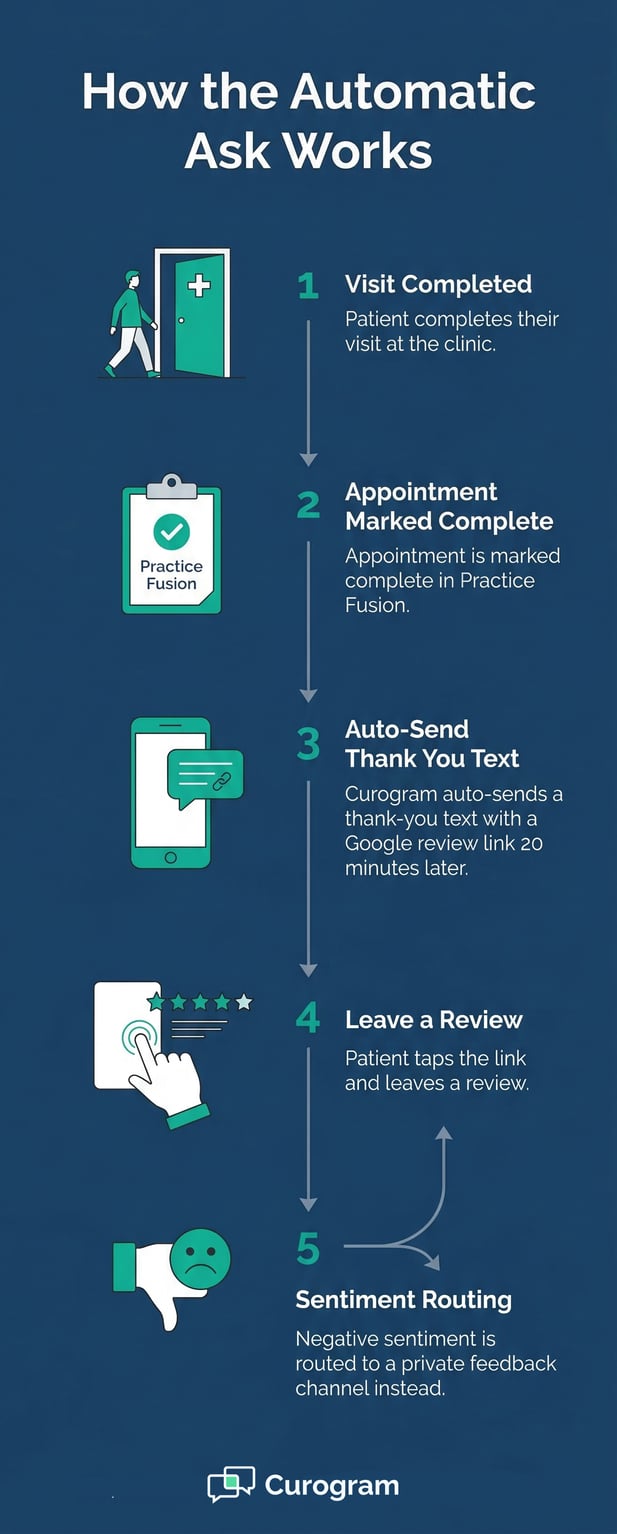
When a patient's appointment is marked complete in Practice Fusion, Curogram picks up that signal automatically.

No one needs to click a button, pull up a patient record, or compose a message. The system does it all.

The post-visit text goes out on a set delay, typically around 20 minutes after the visit is marked complete. This timing feels natural to patients. It arrives while the visit is still fresh, which increases the chance they will act on it.

What the Patient Receives

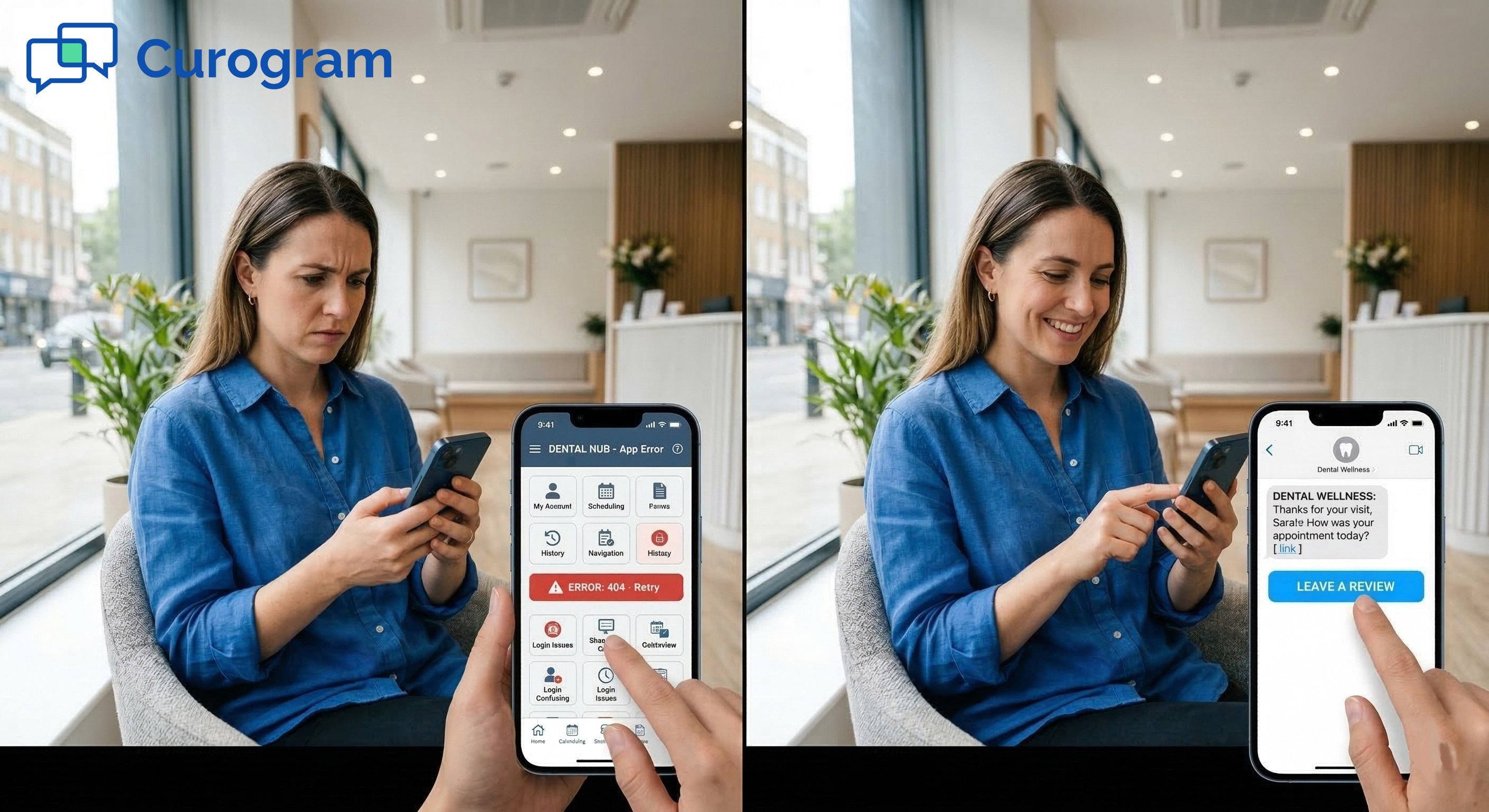
The patient gets a short, friendly text from the practice's phone number. It thanks them for their visit and includes a direct link to the practice's Google review page.

There is no friction; one tap opens the review form. The message does not feel like marketing. It feels like a simple follow-up from a practice that cares.

Because the text comes from a familiar number, patients recognize it and engage with it. It lands in the same thread as other messages from the practice, which builds trust.

Built-In Safeguards: Sentiment Routing and Consistency

Protecting the Rating With Sentiment Routing

Not every patient will have a perfect visit. Curogram's Automatic Ask includes an optional sentiment check. Before the patient is shown the Google review link, they can be asked a simple satisfaction question.

Patients who had a positive experience are directed to leave a Google review. Patients who had concerns are routed to a private feedback channel instead.

This means the practice can address issues privately before they become public reviews. It protects the star rating while still giving every patient a voice, which is the right way to handle reputation management for a small clinic.

Consistent Across Every Patient, Every Day

The biggest advantage of the Automatic Ask is not the technology. It is the consistency.

Every completed visit generates a review request. There are no exceptions for busy Mondays or short-staffed Fridays. Every patient gets the same experience.

This consistency is what transforms a trickle of reviews into a steady, growing stream. Manual asks produce 0 to 2 reviews per month for most small practices.

The Automatic Ask typically produces 15 to 30 or more per month—all without the front desk lifting a finger.

Setup takes under 10 minutes and runs without any ongoing maintenance. Once it is configured, the system generates reviews every day while your team focuses on patients.

Flowchart: 5 steps to automated Google reviews for a medical practice

The Narrative: How Lucia Stopped Feeling Guilty About Reviews

Numbers tell part of the story. But the real impact of automating review requests shows up in how it changes the day-to-day experience for front desk staff.

This is Lucia's story—an office manager at a small Practice Fusion clinic who was stuck in the exact situation many small practice teams know well.

The Practice and the Problem

A Strong Practice With a Weak Google Rating

Lucia managed a two-provider family medicine practice in suburban Tampa. She ran the front desk with one part-time assistant.

The practice had strong patient retention and consistently positive satisfaction feedback. But the Google profile told a different story.

The practice had a 2.8-star rating with 11 reviews—8 of which were negative. Dr. Herrera asked Lucia to start collecting reviews at checkout. Lucia tried. She really did.

But between copays, scheduling, phone calls, and check-ins, she would get to the end of the day and realize she had asked maybe two patients. Some days, zero.

The Weight of the Unfinished Task

"I felt guilty every time Dr. Herrera brought it up," Lucia said.

She had printed cards with a "Please review us on Google!" message. Patients took them politely. None of them left reviews. The stack of cards sat untouched near the checkout window.

The manual review request was not failing because Lucia was not trying. It was failing because the workflow did not have room for it. This is the reality for most small practice front desk teams.

What Changed After Activation

Fast Results, Zero Extra Work

Lucia activated Curogram's Automatic Ask. Post-visit texts were set to go out 20 minutes after each visit was marked complete in Practice Fusion.

The message was short: a thank-you and a direct link to the Google review page. Lucia did not need to change anything about her checkout workflow.

In the first two weeks, the practice received 14 new Google reviews—more than the previous two years combined. Thirteen of those were 5-star reviews. By the end of the second month, the practice had 45 new reviews and a 4.6-star rating.

The Long-Term Impact

"I stopped thinking about reviews entirely," Lucia said. "The system handles it. I haven't asked a single patient since we turned it on, and we're getting more reviews than ever."

New patient calls increased by an estimated 15 to 20% in the months after the rating improved—patients who mentioned seeing the reviews before calling.

Based on our internal data, practices using Curogram's automated review feature see 90% of recipients leave 5-star reviews.

Dr. Herrera showed Lucia the Google page and was beaming. Lucia was not feeling guilty anymore. She was feeling relieved.

This is what reputation management looks like when it is removed from the staff's plate. Not just more reviews, but a team that can do their actual job without the weight of one more unfinished task.

Why This Matters for Practice Decision-Makers

Lucia's story is not unique. It plays out in small practices every day. But beyond the personal relief, there are three clear operational reasons why automating your Google review requests is a smart move, especially if you are running on Practice Fusion.

Staff Bandwidth Is Fixed—And That Will Not Change

You Cannot Ask More From a Team That Is Already Full

Small practice front desks operate with very little room. A one or two-person team handling every patient-facing task during business hours is already running at or near capacity. Every new task competes with existing ones, and something always gets dropped.

Reputation management is almost always what gets dropped. It is important, but it is not urgent in the way that a ringing phone or a waiting patient is urgent.

Automation solves the problem by removing it from the staff's task list entirely. The Automatic Ask does not compete for bandwidth because it does not need any.

Automation Is Not a Workaround—It Is the Right Model

Asking a stretched front desk team to add a verbal review request to every checkout interaction is not a sustainable strategy. It works for a week, maybe two. Then the habit breaks, the ask gets forgotten, and the practice is back to 0 to 2 reviews per month.

Automation is not a shortcut. It is the only model that actually delivers consistent results at a small practice. When the system handles the ask, every patient gets the same experience—regardless of how busy the day is.

Consistency Is What Drives the Rating Up

The Numbers Behind the Difference

Manual asks produce uneven results. Busy days get no asks. Staff with different comfort levels ask at different rates.

The reviews that come in are random and sparse. Most practices with this approach see 0 to 2 new reviews per month, mostly from unhappy patients.

The Automatic Ask treats every completed visit the same way. Based on our internal research, practices using this system typically go from fewer than 2 reviews per month to 15 to 30 or more—all 5-star. That volume is what moves the needle on a Google rating.

The Updox Gap

Practices comparing patient communication tools should know this: Updox offers some engagement features, but it does not include dedicated automated Google review requests as part of its core offering.

Curogram fills this gap directly—adding reputation management to the same platform that handles texting, reminders, forms, and payments.

For a Practice Fusion clinic that wants one tool to handle patient communication and online reputation, this distinction matters. You get everything in one place without stitching together multiple platforms.


Operational Metrics: Measuring the Automatic Ask Effect

Once the Automatic Ask is live, you need to know what to track—and what good results look like. These are the four metrics that matter most for small practices using Practice Fusion.

Reviews Per Month and Staff Time on Reputation

Reviews Per Month: The Primary Output Metric

This is the most direct measure of the system's impact. Track new Google reviews per month before and after activation.

Most small practices running manual requests see 0 to 2 reviews per month—often skewed negative. After activation, the typical range is 15 to 30 or more per month, with the vast majority being 5-star.

This metric alone tells you whether the Automatic Ask is doing its job. If the number is not climbing in the first month, check your timing settings and message language. Most practices see meaningful volume within the first two weeks.

Staff Time on Reputation: The Target Is Zero

Track any front desk time spent on review-related tasks. The goal is simple: zero. With the Automatic Ask running, your front desk should not be spending a single minute on reputation management.

If staff are still sending manual follow-ups, still handing out printed cards, or still fielding questions about reviews, the workflow has not been fully handed off. The system should be handling it all—and if it is, this metric hits zero and stays there.

Review Request Conversion Rate and Rating Trajectory

Conversion Rate: How Many Recipients Leave a Review

Not every patient who receives the post-visit text will leave a review. Track the percentage who do. Based on our internal data, practices using Curogram's automated system see around 90% of recipients leaving 5-star reviews—a figure that far outpaces what any manual process can achieve.

Timing and message language both affect conversion. If your rate is lower than expected, test a slightly later send window or adjust the tone of the message. Small changes can meaningfully lift this number.

Rating Trajectory: The Weekly View

Track the Google star rating on a weekly basis once the system is live. Most practices see real improvement within four to six weeks as new positive reviews begin to outweigh the older negative ones.

The rating does not jump overnight, but it moves steadily in the right direction when the review volume is consistent.

Use this trajectory to set expectations with the practice owner or clinical staff. A steady upward trend over six to eight weeks is a sign the system is working exactly as it should.

Tracking the Automatic Ask: Key Metrics at a Glance

Metric

Before Activation

After Activation

Target

Reviews per month

0–2 (often negative)

15–30+

Maximize

Staff time on reviews

30–60 min/week

0 minutes

Zero

Conversion rate

< 5% (manual ask)

~90%

Maximize

Google star rating

2–3 stars (typical)

4.5+ stars

Ongoing growth

Time to first improvement

N/A

2–4 weeks

< 6 weeks


Patient smiling and texting in bright, modern clinic waiting areaLet the System Ask So Your Staff Does Not Have To
The manual review request was never going to work long-term. It was always going to compete with everything else on the front desk's plate—and lose.

For small Practice Fusion clinics, the Automatic Ask is not just a nice feature. It is the only way to build a consistent stream of Google reviews without burning out your staff or letting reputation management fall through the cracks year after year.

The checkout workflow does not need to change. Staff do not need to be trained on a new script. The setup takes under 10 minutes, and after that, the system runs on its own.

What changes is the outcome. Your Google rating starts to reflect the quality of care your practice actually delivers.

New patients find you. Existing patients feel heard. And your front desk gets to do the work they were actually hired to do.

Schedule a demo to see Curogram's Automatic Ask connects to Practice Fusion and generates reviews without any front desk involvement.

Frequently Asked Questions

How does the Automatic Ask connect to Practice Fusion?

Curogram integrates directly with Practice Fusion and monitors appointment status in real time. When a visit is marked complete, the system automatically triggers the post-visit text—no manual step needed from the front desk.

The integration is set up once during onboarding and runs continuously after that. There is no need for staff to log into a separate system or manage the process.

Why do automated review requests outperform verbal asks at checkout?

Verbal asks at checkout are easy to forget, feel socially awkward, and depend entirely on staff consistency—all three of which break down in a busy small practice. An automated text removes the human variable.

Every patient gets the same message at the same point after their visit, regardless of how busy the day was. Based on our internal data, this consistency is what drives conversion rates as high as 90%.

How does sentiment routing protect the practice's Google rating?

Before a patient is shown the Google review link, they can be asked a simple satisfaction question. Patients who had a positive experience are sent to the review page. Patients who flag a concern are routed to a private feedback channel instead.

This gives the practice a chance to address issues directly before they become public reviews. It protects the star rating without silencing patient feedback.

Why does staff bandwidth matter so much for reputation management?

Small practice front desk teams operate with almost no spare capacity. Every task competes with every other task—and anything that is not urgent tends to get pushed aside.

Asking for a Google review at checkout is important, but never feels urgent in the moment. Automation removes it from the staff's task list entirely, so it happens every time without consuming any bandwidth.

How long does it take to see results after activating the Automatic Ask?

Most practices start seeing new reviews within the first two weeks of activation. Based on our internal research, meaningful improvements to the overall star rating typically appear within four to six weeks as new positive reviews begin to outweigh older negative ones.

The pace depends on patient volume—higher-volume practices tend to see faster progress. Either way, the trajectory is upward once the system is running.


Practice Fusion Reputation Management | Automated Google Reviews

Practice Fusion Reputation Management | Automated Google Reviews

💡 Practice Fusion automated Google review requests, powered by Curogram's Review Engine, send a post-visit text to every patient after each...


Read More
Reputation Management in StreamlineMD for Radiology Teams

Reputation Management in StreamlineMD for Radiology Teams

💡 Reputation management in StreamlineMD helps radiology, vascular, and IR practices build a stronger online presence through automated feedback...

Read More
Why eCW Patients Review by Text | Post-Visit Timing That Works

Why eCW Patients Review by Text | Post-Visit Timing That Works

💡 When a patient leaves a good visit, that positive feeling fades fast. An eClinicalWorks patient text review request sent 1–2 hours after the...

Read More