12 min read

How Opus EHR Broadcast Alerts Keep Patients Safe in a Crisis

How Opus EHR Broadcast Alerts Keep Patients Safe in a Crisis
💡 Opus EHR broadcast alerts through Curogram let behavioral health centers send urgent SMS updates to patients in seconds.
  • Notify all scheduled patients of facility closures, weather events, or safety issues instantly
  • Reach specific groups like residential clients or outpatient programs using Opus EHR data filters
  • Replace slow manual phone trees with mass medical alerts for Opus that land on 98% of phones within moments
  • Keep a full audit trail of every message for risk management and state compliance
  • Free up staff to focus on on-site care instead of making dozens of phone calls
When every second matters in addiction treatment crisis communication, Curogram turns your Opus EHR into a one-click alert system. Schedule a demo to see how it works for your facility.

It is 6:45 a.m. A pipe burst overnight in the detox wing. Your first group session starts in two hours, and 30 patients are about to drive through a snowstorm to reach a building that cannot open its doors.

Your front desk has two options. They can start calling each patient one by one, which could take over an hour. Or they can send a single broadcast text that reaches every affected person in under ten seconds.

This is not a rare scenario for behavioral health centers. Facilities that treat addiction and mental health deal with the unexpected every week. A clinician calls out sick.

A pharmacy delays a shipment. A severe weather warning hits the region. Each of these events demands fast, clear contact with patients who may already be in a fragile state.

Behavioral health emergency messaging is not just about convenience. For patients in early recovery, showing up to a locked door can break trust. It can cause stress that puts their progress at risk. Silence from a care team is not neutral. It is harmful.

That is why Opus EHR broadcast alerts through Curogram exist. They give clinical directors, operations managers, and risk managers a simple tool to reach every patient at once. No phone trees. No email chains that sit unread. Just a fast, targeted SMS that arrives on the patient's phone within seconds.

Curogram connects to your Opus EHR data. This means you can filter your message by program type, location, or schedule. You only alert the patients who need to know. The result is less noise, less confusion, and a faster path back to normal operations.

In this article, you will learn when and how to use broadcast alerts. We will cover real use cases, best practices, and the tools that make it all work. If your facility still relies on manual calling during a crisis, this guide will show you a better way.

The "Information Gap" Villain: The Danger of Slow Crisis Response

When something goes wrong at a behavioral health center, the clock starts ticking. Every minute that passes without clear mass messaging contact creates risk.

Patients may show up to a closed building. Staff may waste hours on tasks that a single text could handle. This gap between the event and the response is where real harm takes shape.

The Delayed Update Risk

Picture this.

A group therapy session for an intensive outpatient program is canceled due to a staffing issue. The facility knows by 7:00 a.m., but the session is at 10:00 a.m. Without a fast alert system, the front desk starts calling patients one at a time.

By 9:30 a.m., they have reached 12 of 20 patients. The other eight are already in their cars or sitting in the parking lot. They walk in, find a locked group room, and leave confused. For patients in early recovery from substance use, this kind of letdown is not just an annoyance. It can be a trigger.


Trust between a patient and their care team is fragile. When a person commits to a treatment schedule, they expect the facility to hold up its end. A no-show from the clinic side—even for a good reason—can feel like a broken promise. Over time, these small cracks lead to missed sessions, dropout, and relapse.

Now, scale that up. A rehab center with 100 active patients and a single phone line could take four to five hours to call everyone. That is an entire morning lost. And during that time, the front desk cannot answer incoming calls or handle walk-ins.

The Staff Saturation Point

During any facility event, your staff should focus on the people in the building. If a power outage hits your detox unit, nurses need to monitor patients, not sit on hold leaving voicemails.

Think of it this way:

A residential facility with 40 beds loses power at 2:00 a.m. The overnight team has three staff members. One is checking on patients. One is working with the building manager. That leaves one person to call every outpatient client scheduled for the next morning.


If each call takes two minutes and there are 25 outpatient clients on the books, that is 50 minutes of nonstop dialing. And that assumes every person picks up. In reality, most calls go to voicemail. So now the staff member has to call back, leave a message, and hope the patient checks it before driving in.

This is the staff saturation point. It is the moment when the number of calls exceeds what your team can handle. When you hit it, something gives. Either patients do not get the message, or on-site care suffers.

Rehab facility closure notifications need to go out fast and wide. A broadcast text sent through Curogram reaches all 25 patients in one click. That frees your overnight team to focus on the residents who are right in front of them.

The "Unread Email" Crisis

Some facilities try to solve this problem with email. On paper, it makes sense. You can reach a large group at once, and you have a record of it. But in practice, email fails during a crisis.

The average person checks email a few times a day. A text message, on the other hand, is read within three minutes of delivery by most people.

For urgent patient updates, you need that kind of speed. An email about a facility closure sent at 6:00 a.m. may not be opened until noon—long after the patient has already made the trip.

In behavioral health, you need the direct, hard-to-miss nature of a text. It vibrates in a pocket. It lights up a screen. It demands a quick look. That is exactly the kind of reach you need when the stakes are high and the window is short.

Critical Use Cases for Urgent Broadcast Messaging

Knowing you need a fast alert system is one thing. Knowing when and how to use it is another. Below are the most common and most critical reasons behavioral health facilities rely on Opus EHR broadcast alerts through Curogram.

Weather and Facility Closures

Severe weather is one of the most frequent causes of sudden closures. A snowstorm, flood warning, or even a broken HVAC system in a treatment wing can force a facility to shut down for the day.

For example:

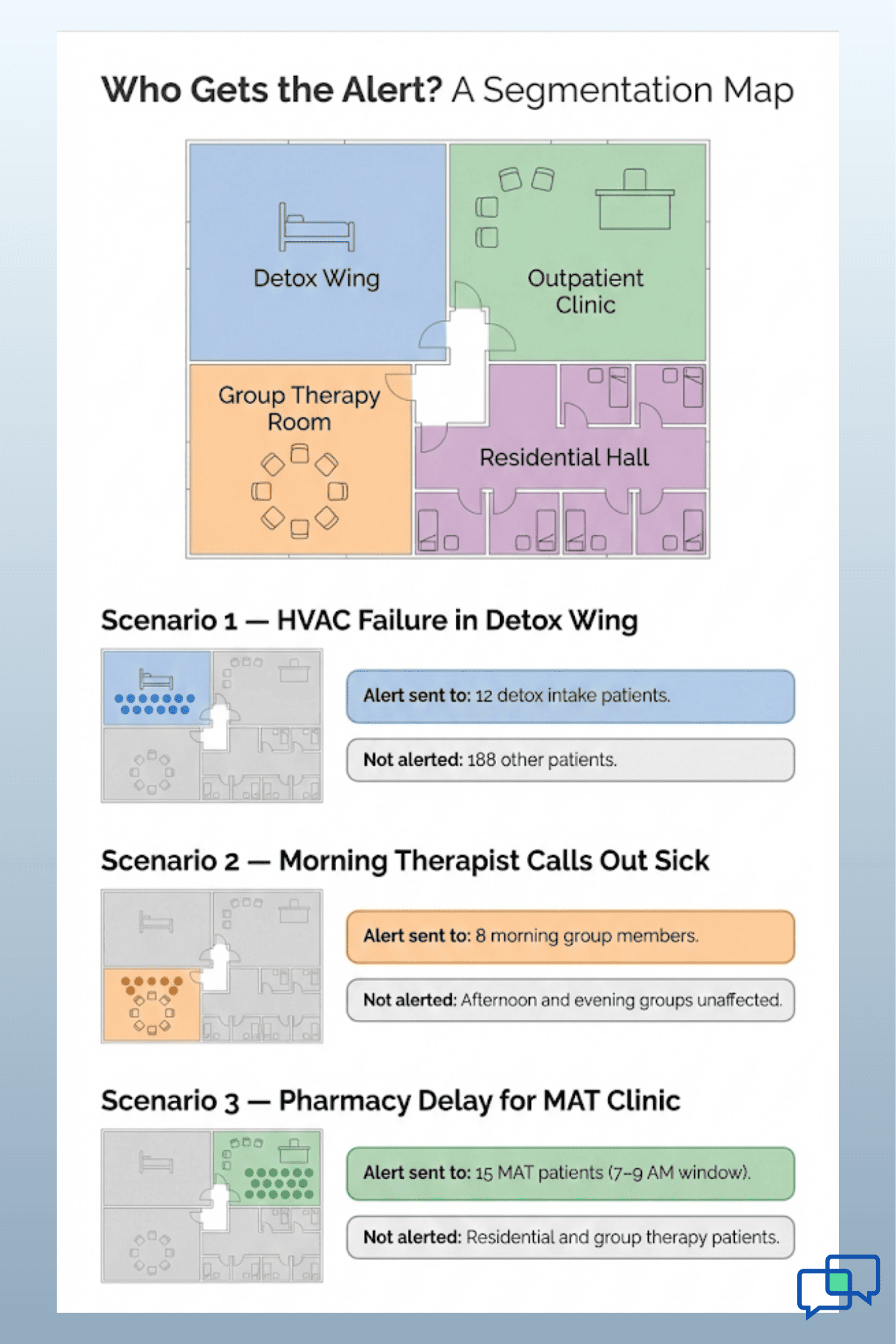
Say, your detox unit relies on climate control to keep patients safe during withdrawal. If the HVAC system fails overnight in January, that unit cannot operate. You need to notify all patients scheduled for intake that day, plus anyone with medication appointments in that wing.


With Curogram, you can filter your Opus EHR data by appointment type and location. So instead of texting your entire patient list, you send rehab facility closure notifications only to those affected. A residential client in a different building would not get the message. An outpatient client with a session in the closed wing would.

This kind of targeted contact saves time, reduces confusion, and avoids over-texting patients who do not need to act. It also helps your front desk manage the situation with fewer follow-up calls.

Weather closures happen fast. A forecast can shift overnight. By the time your team arrives in the morning, the decision to close may already be made. Having a pre-built template in Curogram means you can send that alert in under a minute, even from a mobile phone at home.

Medication and MAT Schedule Changes

For patients on Medication-Assisted Treatment, timing matters. A missed dose of methadone or buprenorphine can lead to withdrawal symptoms within hours. If your pharmacy has a delay, or if a dosing schedule shifts, patients need to know right away.

Imagine a scenario where a pharmacy vendor is late on a shipment:

Your morning MAT clinic, which serves 15 patients between 7:00 a.m. and 9:00 a.m., cannot open on time. Without an alert, those patients arrive, wait, and grow anxious. Some may leave and miss their dose entirely.


Urgent patient updates SMS through Curogram let you send a simple, clear message. Something like: "Your MAT appointment has been moved to 11:00 a.m. today due to a supply delay. Reply YES to confirm or call us to reschedule." That one text can keep 15 patients on track and out of withdrawal.

This use case shows why mass medical alerts for Opus matter so much in addiction treatment. The stakes are not just about scheduling. They are about patient safety and clinical outcomes.

Staffing and Schedule Adjustments

Staff changes happen in every healthcare setting. A lead therapist gets sick. A psychiatrist has a personal emergency. A group facilitator is stuck in traffic. These events affect the patients who are counting on that session.

In a rehab or outpatient setting, group therapy is often the anchor of a patient's day. If a session is canceled without notice, it leaves a gap that can be hard to fill. For someone in early recovery, unplanned free time is a risk factor.

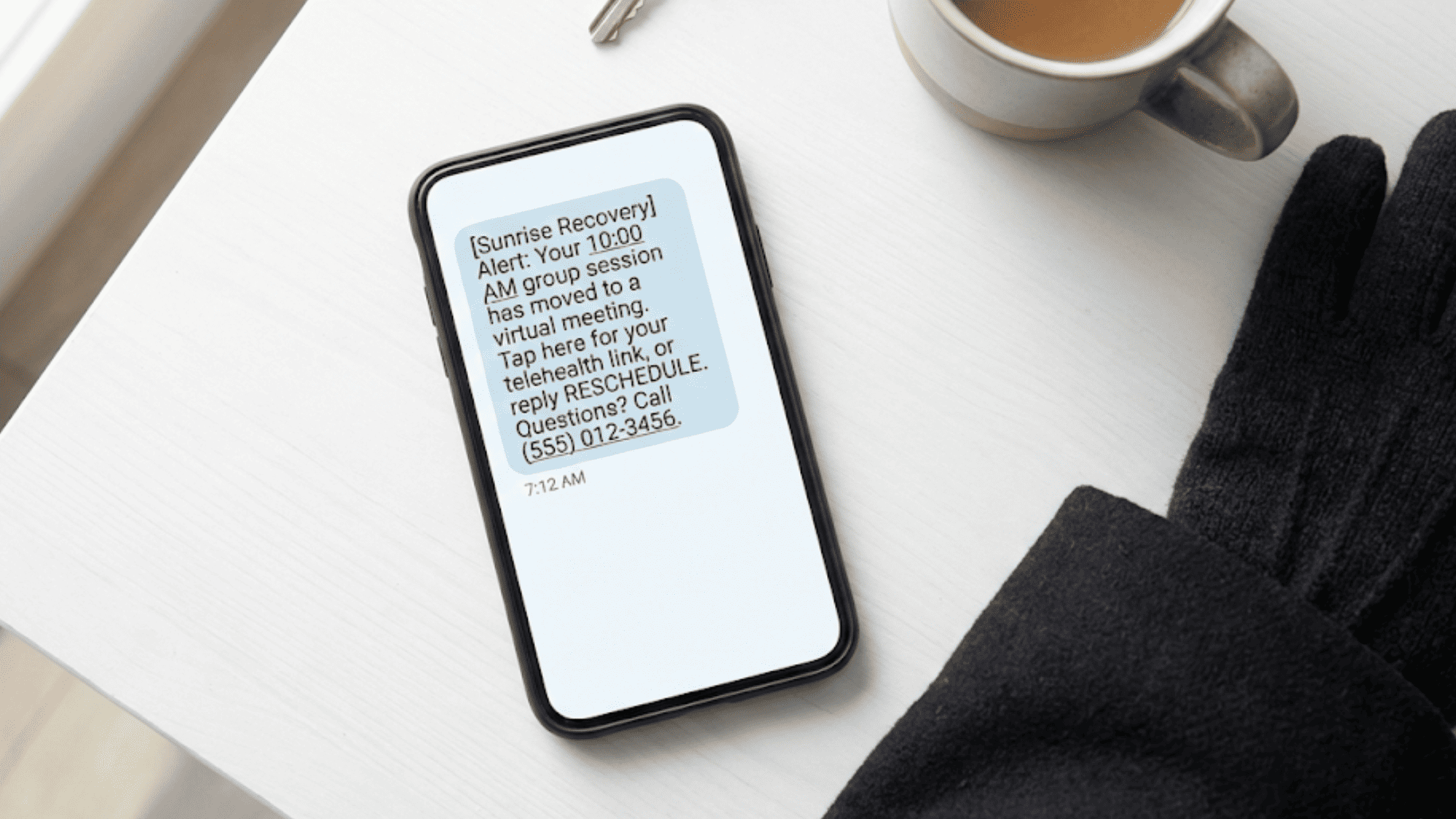
With Opus EHR broadcast alerts, you can quickly pivot. Instead of canceling the session outright, you send a text that offers an option. "Today's 10:00 a.m. group with Dr. Lopez is now a virtual session. Click here for your telehealth link." This keeps the patient engaged and the schedule intact.

Curogram also lets you segment by group. If only one therapist's caseload is affected, you alert just those patients. Everyone else carries on as planned. This is addiction treatment crisis communication at its most practical—fast, specific, and built around the patient's needs.

Infographic showing how Opus EHR broadcast alerts target specific patient groups by facility zone during three crisis scenarios

Best Practices for High-Impact Emergency Alerts

Sending a broadcast alert is easy. Sending one that actually works takes a bit more thought. The best alerts are clear, targeted, and designed to get a response. Below are the practices that turn a good alert into a great one:

Write Actionable Messages

The biggest mistake facilities make with urgent texts is being vague. A message that says "There is an update to your schedule" tells the patient nothing. It creates more questions than it answers, and it often leads to a flood of return calls that tie up your phone lines.

Every alert should include three things: what happened, what the patient should do, and how to get more help.

Here is an example of a strong message:

"Our facility is closed today due to weather. Click here for your telehealth link, or reply RESCHEDULE to book a new time."

Compare that to a weak version:

"Please be advised that there may be changes to today's schedule. Contact the office for details."


The first message is direct. It gives the patient a clear next step. The second message forces the patient to call in, which defeats the purpose of using a broadcast alert in the first place.

When writing your alert, keep the language simple. Use short sentences. Avoid medical jargon unless it is needed. Remember, your patients may be reading this text in a stressful moment. The easier it is to understand, the faster they can act on it.

Here is a practical template you can adapt:

"[Facility Name] Alert: [What happened]. [What to do next]. Reply HELP or call [phone number] for questions."


That structure works for almost any situation. Swap out the details, and you have a ready-made message for closures, schedule changes, or medication updates.

Segment Your Alerts

One of the most powerful features of using Curogram with Opus EHR is the ability to segment your audience. This means you do not have to send the same message to every patient in your system.

Think about why this matters:

A facility with 200 active patients might have residential clients, intensive outpatient groups, MAT patients, and alumni. If a group therapy room floods, only the patients in that specific group need to know. Texting all 200 patients would cause needless concern and erode trust in your alerts over time.


When patients get too many texts that do not apply to them, they start to ignore them. This is the "cry wolf" effect. By the time a message that truly matters arrives, the patient has tuned out. Over-texting is almost as risky as not texting at all.

Curogram pulls patient data directly from Opus EHR. You can filter by program type, appointment date, provider, or location. For example, you could send a message only to patients who have appointments between 8:00 a.m. and 12:00 p.m. at Building A. Everyone else stays in the clear.

Here is a real-world example of how this works in practice:

A facility runs three outpatient groups: morning, afternoon, and evening. A therapist for the morning group calls in sick. The operations manager opens Curogram, filters by the morning group roster, and sends a targeted alert. The afternoon and evening groups get no message because their sessions are not affected. The whole process takes less than two minutes.


This level of precision is what separates a good communication system from a great one. It also keeps your patients engaged with your texts because they know each message is meant for them.

Build an Immediate Feedback Loop

Sending the alert is only half the job. The other half is knowing who got it and who did not. This is where Curogram's delivery tracking comes in.

After you send a broadcast, the Curogram dashboard shows you real-time delivery receipts. You can see which messages were delivered, which ones failed, and which patients have not yet opened the text. This gives your team a short list of people who need a direct follow-up call.

For example:

Say, you send a closure notice to 40 patients. The dashboard shows that 37 messages were delivered. Three failed, possibly due to a bad phone number or a phone that is turned off. Your front desk can now focus only on those three patients instead of calling all 40.


This feedback loop is critical for risk management. If a patient did not receive the alert and shows up to a closed facility, you need to know about it.

Delivery receipts give you that data. They also create a record you can show to state licensing boards or auditors if the need arises.

Here is a step-by-step workflow for using the feedback loop:

  1. Send the broadcast alert through Curogram.

  2. Wait five minutes and check the delivery report.

  3. Flag any failed deliveries.

  4. Assign a staff member to call those patients directly. Fifth, note the follow-up in the patient's chart within Opus EHR.

This process takes about ten minutes total and covers your entire patient list. Without it, you would spend hours calling everyone and still miss a few.

Pre-Build Your Templates

Do not wait for an emergency to write your first alert. Build a library of templates in advance so your team can act fast when the moment comes.

Common templates to have on hand include:

  • Facility closure due to weather

  • Facility closure due to maintenance

  • Session cancellation with telehealth option

  • Session cancellation with reschedule option

  • Medication delay notice

  • General safety update

Each template should follow the structure outlined earlier: what happened, what to do, and how to reach out for help. Store them in Curogram so any admin can access and send them in under a minute.

This kind of preparation is what turns reactive crisis management into proactive planning. When your team knows exactly what to send and how to send it, the entire facility runs smoother under pressure.

Smartphone displaying an Opus EHR broadcast alert SMS about a rescheduled group therapy session with a telehealth link

Protect Your Patients, Empower Your Team

Every behavioral health facility will face the unexpected. The question is not if something will go wrong, but when. The difference between a smooth response and a chaotic one comes down to one thing: how fast you can reach your people.

Opus EHR broadcast alerts through Curogram put that speed in your hands. They let you reach every affected patient in seconds, not hours.

They let your staff focus on care, not phone calls. And they give your risk management team a clear, documented trail of every action taken.

When you combine the clinical data in Opus with the communication power of Curogram, you get a system built for real-world crises. Your team does not have to scramble. Your patients do not have to guess. Everyone stays informed, and your facility stays in control.


What Makes Curogram the Right Fit for Behavioral Health Facilities


Curogram is a HIPAA-compliant patient communication platform built to work with your existing EHR, including Opus. It gives behavioral health and addiction treatment facilities the tools to reach patients instantly through two-way texting, broadcast alerts, and automated reminders.

For facilities that use Opus EHR, Curogram connects directly to your patient data. This means you can build targeted text lists based on program type, provider, appointment time, or location.

There is no need to export spreadsheets or build contact lists by hand. The data flows from Opus to Curogram in real time.

Beyond broadcast alerts, Curogram helps your front desk reduce phone call volume by up to 50%. Patients can text the office to confirm appointments, ask questions, or request prescription refills. Staff can respond from a single dashboard without switching between tools.

Curogram also supports telehealth links, online patient forms, automated review requests, and secure messaging for sensitive health information. Every feature is designed with HIPAA compliance at its core, so your facility can communicate freely without risking a violation.

For teams handling addiction treatment crisis communication, the platform offers the speed and precision that phone trees and emails cannot match. Whether you are sending mass medical alerts for Opus during a facility emergency or following up with a single patient after a missed session, Curogram keeps the process simple and documented.

Conclusion

In behavioral health and addiction treatment, the unexpected is part of the job. Weather closures, staffing changes, medication delays, and facility issues can happen at any time. What matters is how fast your team responds.

Manual phone calls are too slow. Emails go unread. Neither option protects your patients or your staff when time is short.

Opus EHR broadcast alerts through Curogram give your facility a single, fast, and documented way to reach every patient who needs to know. You can segment by program, schedule, or location. You can track delivery in real time. And you can do it all from any device, at any hour.

The result is a facility that stays calm under pressure. Your staff focuses on care. Your patients stay informed. And your records are clean for any audit or review.

If your center still depends on phone trees and email chains for urgent patient updates SMS, it is time for a better system. Curogram was built for moments like these.

Keep your team ready for anything. Book a quick demo with us to see how Opus EHR broadcast alerts can transform your facility's crisis communication.


Frequently Asked Questions

Can we send alerts after hours?
Yes. Curogram's dashboard works on any device with a web browser. That means an administrator can log in from a phone, tablet, or laptop at home. You can send a broadcast from your couch and know it will reach patients before they leave for their appointments.
How do we handle patients who do not speak English?
Curogram supports multi-language templates. When you set up your broadcast, you can create versions in Spanish, Mandarin, Haitian Creole, or any language your patient population needs. The system pulls language preference data from Opus EHR, so each patient gets the alert in their preferred language without any extra steps.
Is there an audit trail for these messages?

Every broadcast you send through Curogram is logged with a timestamp, a recipient list, and delivery status. This creates a complete paper trail that is ready for review at any time. Whether you need to show documentation to a state licensing board, an insurance auditor, or your own risk management team, the data is there.

How does Curogram filter broadcast alerts by patient group in Opus EHR?

Curogram pulls live data from Opus EHR and lets you filter recipients by program type, provider, appointment date, or facility location. This ensures only the right patients receive each alert, reducing unnecessary texts and follow-up calls.

How can facilities use broadcast alerts to support Medication-Assisted Treatment patients during schedule changes?

Administrators can send targeted texts to MAT patients when a dosing time shifts or a pharmacy delay occurs. The alert includes updated times and a reply option, so patients can confirm or reschedule without missing a critical dose.


Broadcast Messaging for Opus EHR: Mass Texting for Rehab Clinics

Broadcast Messaging for Opus EHR: Mass Texting for Rehab Clinics

💡 Broadcast messaging for Opus EHR lets addiction treatment centers and behavioral health clinics send mass texts to filtered patient groups...
Read More
Fill Schedule Gaps in Prime Clinical | Revenue on Demand

Fill Schedule Gaps in Prime Clinical | Revenue on Demand

💡 To fill schedule gaps in Prime Clinical Systems, the most direct method is targeted broadcast messaging through Curogram. Practices filter...

Read More
Broadcast Messaging for Cerbo: Scaling Community via Bulk SMS

Broadcast Messaging for Cerbo: Scaling Community via Bulk SMS

💡 Broadcast messaging for Cerbo lets integrative and functional medicine practices send bulk SMS to their entire patient base at once. SMS has a...

Read More