10 min read
Staff Workflow Guide: Medstreaming OBL Telehealth Virtual Consults
Mira Gwehn Revilla
:
May 15, 2026
- API verification with your IT or EHR admin (30 minutes)
- SMS template setup in the Curogram dashboard (45 minutes)
- Notification routing and phone escalation rules (1.5 hours)
- One 90-minute all-staff training before go-live
- Role-based workflow redesign for coordinators and front desk
Your nurse coordinator just spent 18 minutes on one phone call. The patient could not log into the portal. Her password reset link expired. She is 74, lives alone, and has a pre-procedure vascular consult tomorrow morning.
This scene plays out 40 to 60 times a week in most outpatient labs. It is the quiet tax on small clinical teams. And it is the reason so many Medstreaming OBL telehealth setup staff workflow virtual consultation projects stall before they help anyone.
The fix is not a fancier portal. The fix is removing the portal from the patient side of the equation. SMS-launched video sends the patient one text. They tap a link. They are in the call.
For coordinators, the shift is just as big. Instead of chasing logins, they spend that time on what only nurses can do: med holds, transport plans, and imaging coordination. The workflow does not get bigger. It gets shorter.
This guide is built for the people who actually run the lab. Administrators, nurse coordinators, schedulers, and operations directors. It walks through the full vascular telehealth staff deployment in plain steps, from API check to go-live.
You will see how to set up Medstreaming telemedicine integration in about two to three hours of tech work. You will see how to run a 90-minute training that staff will not dread. And you will see the role splits that make an OBL virtual visit workflow actually stick.
The same playbook works for ASC telehealth setup and cardiac telehealth staff training. The tools are the same. The roles shift slightly by procedure type. By the end, your team should be able to plan a go-live date with confidence.
Medstreaming Integration Setup (2–3 Hours Total)
The full tech setup is shorter than most people expect. You are not building a new system. You are connecting Curogram to the Medstreaming instance you already use. Three steps, done in order, get you ready for staff training.
Step 1: Verify Medstreaming API Access (30 Minutes)
Start with your IT person or EHR admin. Ask them to confirm that API credentials exist for your Medstreaming instance. You do not need to know what every field means. You just need a yes or no.
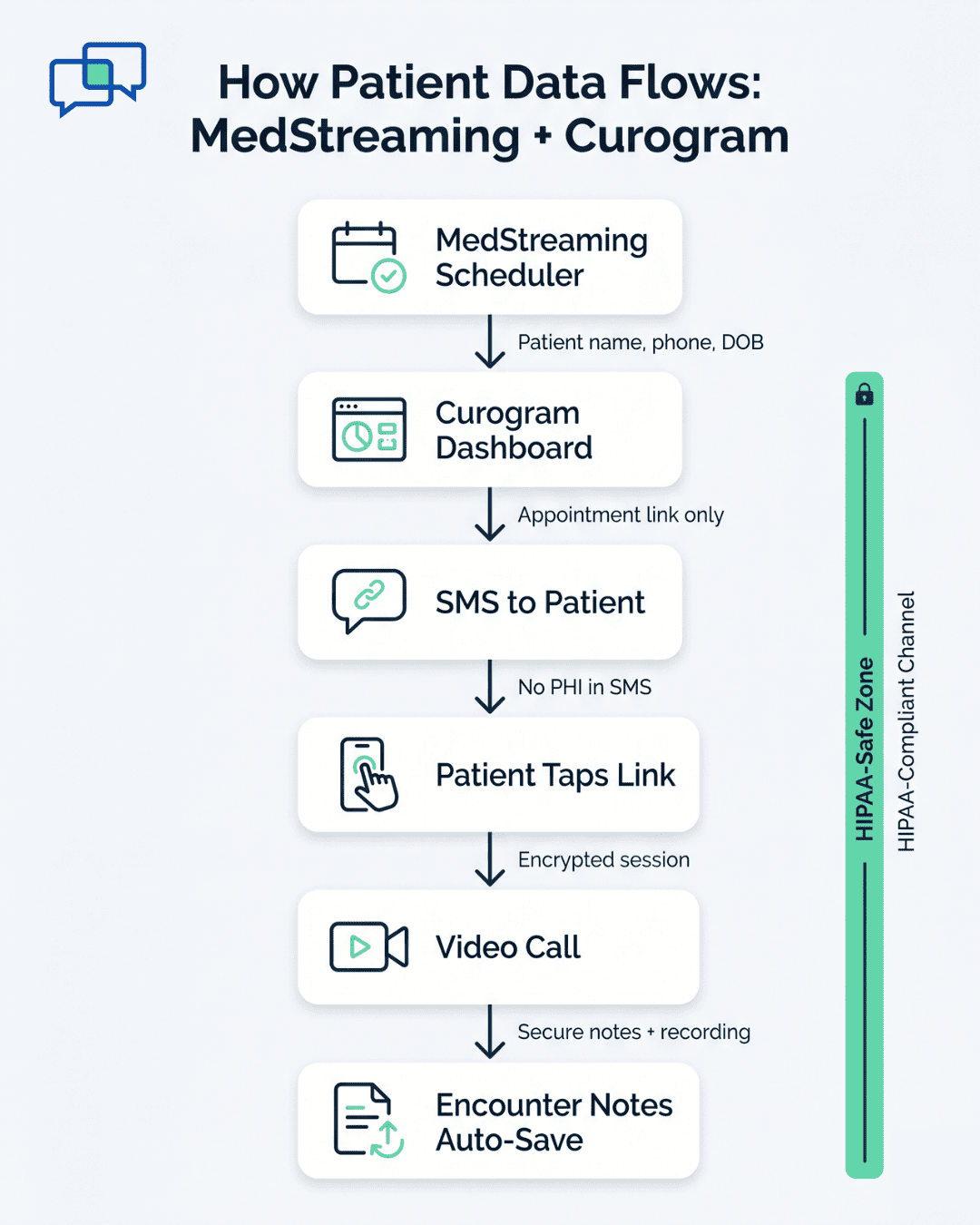
Curogram needs two types of access. Read access pulls patient contact details like phone number, name, and date of birth. Write access lets the system save encounter notes back to Medstreaming after each visit.
Most Medstreaming instances set up after 2020 have API enabled by default. If your instance was deployed between 2018 and 2020, you may need to request API turn-on from Harris Healthcare support. That request usually takes one to two business days.
If your admin is unsure, the fastest move is to email Harris support with your instance ID. Ask: "Is the API endpoint active for this account?" Once you have the green light, you are ready for Step 2.
Step 2: Configure SMS Templates in Curogram Dashboard (45 Minutes)
Log into the Curogram dashboard your team got during onboarding. You will build two SMS templates here. Both are short on purpose.
The first is the Consultation Invite. Use this text:
"Hi [Patient Name], your pre-procedure consultation is [Date/Time]. Join here: [Video Link]. No app needed—tap the link to start."
The second is the Reminder, sent 30 minutes before the visit:
"Reminder: Your consultation starts in 30 minutes. Tap here: [Video Link] to join."
Test both before you go live. Send each one to yourself first. Then send them to one or two other staff members. Check three things: the link works, the wording is clear, and the message fits within standard SMS character limits.
Step 3: Configure Notification Routing and Escalation (1.5 Hours)
This is the step where most clinics overthink it. The goal is simple. Map each SMS event to a role on your team. Three decisions need answers.
The table below shows the choices most labs make:
|
Decision Point |
Most Common Setup |
|
Who triggers the SMS? |
Auto-send 24 hours before the appointment |
|
Who gets confirmation alerts? |
Nurse coordinator and front desk |
|
Where do recordings save? |
Auto-save to Medstreaming secure folder |
|
When does phone escalation start? |
No SMS reply within 2 hours |
The auto-escalation rule matters most. If a patient does not respond to the text within two hours, Curogram can trigger a phone call from your coordinator. This is the safety net that protects elderly patients and rural users.
Pick the contact list for phone fallback now. Usually it is the nurse coordinator first, then the scheduler if the coordinator is in another visit. Set it once and the system handles the rest.
By the end of these three steps, your Medstreaming telemedicine integration is fully wired. The system can pull patient data, send the right text, and escalate when needed. The tech side is done. The next focus is your people.

Staff Roles, Training, and Workflow Redesign
Tech setup is the easy part. Workflow change is where most rollouts succeed or stall. The key is to redesign the coordinator role, not just add new tools on top. This section shows what each role looks like after go-live and how to train your team in 90 minutes.
Nurse Coordinator Workflow: 8–12 Minutes Per Consultation
The old portal workflow ate 25 to 35 minutes per patient. Most of that time was lost to login support, voicemail tag, and reschedules. The new SMS-based flow cuts that to 8 to 12 minutes.
Here is what the new coordinator workflow looks like end to end:
- Book the consultation in the Medstreaming scheduler and confirm the patient phone number.
- At T-24 hours, generate the SMS link in Curogram and send it to the patient.
- Monitor the dashboard for delivery and opt-in confirmation.
- At T-15 minutes, check that the patient joined the call without trouble.
- During the call, handle clinical intake, medication holds, and transport plans.
- After the visit, document in Medstreaming while the recording auto-saves.
The math on time savings adds up fast. If your coordinator handles 20 to 30 consults per week, that is 6 to 10 hours weekly recaptured. Across a month, that is roughly 25 to 40 hours per coordinator freed for higher-value clinical work.
Based on our internal data, automated reminder and texting workflows have helped clinics reduce no-show rates by as much as 53% below the industry average. That same automation drives the coordinator time savings above.
90-Minute All-Staff Training Session
Hold this training before go-live. Make it mandatory. The agenda below is built to keep people engaged and to surface real questions before they become live problems.
|
Time Block |
Topic |
Who Leads |
|
0–15 min |
Live demo: SMS link sent, patient taps, call starts |
Curogram lead |
|
15–35 min |
Medstreaming scheduler walkthrough |
Operations director |
|
35–60 min |
Role-specific breakouts |
Team leads |
|
60–80 min |
Q&A and scenarios |
Whole group |
|
80–90 min |
Go-live timeline and escalation contacts |
Administrator |
The role-specific breakouts are the most important block. Coordinators practice sending SMS links in the live dashboard. Administrators learn how to pull no-show and conversion reports. Schedulers rehearse the front-desk consent script: "Would you prefer your visit by video link via text, or phone only?"
Use the Q&A block for the awkward edge cases. Common ones to plan for: What if a patient texts back asking about meds? What if the video fails five minutes before the call? What if someone is calling from a flip phone?
For each scenario, give staff a one-line answer they can use. For example: "For med questions by text, reply with 'Please save that question for the start of your call.'" This stops staff from freezing in the moment.
Why This Workflow Holds Up
The reason the new workflow sticks is that it does not ask staff to learn a second system. The Curogram dashboard sits alongside Medstreaming, not on top of it. Coordinators still live in their scheduler. They just have one extra button to send the SMS.
That shift, small as it sounds, is what makes the vascular telehealth staff deployment, ASC telehealth setup, and cardiac telehealth staff training plans all run on the same core playbook. The clinical context changes. The workflow shell does not.
Go-Live Execution and Patient Onboarding
The first two weeks of go-live shape the next six months. If patients have a smooth first experience, word spreads.
If they hit friction, you will hear about it from the front desk every morning. This section walks through the go-live week, the first patient cohort, and the metrics to watch.
The Go-Live Week Plan
Pick a Monday for go-live. Avoid Fridays. If something breaks, you do not want to find out heading into a weekend.
Here is the day-by-day plan for the first week:
|
Day |
Activity |
Goal |
|
Monday |
Soft launch with 5 patients only |
Catch live workflow gaps |
|
Tuesday |
Add 5 more patients, debrief at lunch |
Refine staff scripts |
|
Wednesday |
Open to full schedule, watch dashboard |
Spot pattern issues early |
|
Thursday |
Full schedule, mid-week metrics check |
Compare to baseline |
|
Friday |
Team debrief, log all edge cases |
Document for week two |
The Monday soft launch is the most important day. Hand-pick five patients who tend to be tech-friendly. Their feedback will be honest, fast, and useful. Save the trickier patients for week two.
By Wednesday, the team should feel the rhythm. If they do not, pause and run a quick 20-minute huddle to find the snag. Most issues at this stage are about timing, not technology. For example, when exactly the SMS goes out, or who responds first to a missed message.
Onboarding the First Patient Cohort
The patient script at the front desk matters more than the tech. When a patient is told about the new video option, the words should be simple and offer choice.
A script that works in most labs:
"For your pre-procedure visit, you have two options. You can join by video using a link we text you—no app needed. Or you can keep it as a phone call. Which works better for you?"
Two things make this script land. First, the phrase "no app needed" lowers the wall for elderly patients. Second, offering phone as an equal choice removes the pressure to commit to something new.
Based on our internal data, when this kind of choice is offered clearly, roughly 65 to 70% of patients pick video once they understand there is nothing to download.
Older patients adopt SMS-launched video at much higher rates than portal-based video. The difference is the portal login that no longer stands in the way.
What "Success" Looks Like at Week 12
By the end of week 12, the workflow should feel routine. Coordinators stop talking about the new system because it is just the system. Patients stop calling the front desk asking how to join their video visit.
The numbers tell the rest of the story. A 9 to 10 percentage point no-show reduction is realistic and well-supported. Coordinator hours freed often land between 30 and 50 per month, depending on volume.
Consultation-to-imaging conversion typically lifts 20 to 24% because patients who actually attend their pre-procedure consult are far more likely to follow through on imaging.
These outcomes are not promises. They are the patterns we see across labs that follow the steps in this guide and stick to the 12-week measurement plan. Labs that skip the soft launch, change templates aggressively, or assign rollout ownership to a committee tend to see slower gains.
Hand-Off to Daily Operations
Around week eight or nine, shift from "launch mode" to "daily operations." This means the weekly check-ins drop to bi-weekly. The dashboard review shifts from the rollout lead to whoever owns ongoing operations.
Document everything you learned in the first 12 weeks in a short internal playbook. Include the patient script, the front-desk choice prompt, and the escalation contact list. New hires should be able to read it and run the workflow within their first week.
This is the point where the OBL virtual visit workflow becomes part of the lab's identity, not just a new tool. The system runs in the background. Your team focuses on patient care.

Why Curogram Fits the OBL and ASC Staff Workflow
Curogram was built after Curogram engineers spent time watching real front-office and call-center workflows. That is not marketing language. It is the reason the platform feels different in daily use.
The dashboard takes less than 10 minutes for most coordinators to master. There is no separate app for patients to download. There is no portal password for elderly patients to forget. The platform integrates with almost any EMR, including Medstreaming, so your team does not switch between systems all day.
For OBL and ASC operations, three Curogram features carry most of the workload:
- HIPAA-compliant SMS for appointment invites, reminders, and recalls
- SMS-launched video that opens with one tap, no app required
- Auto-escalation to phone calls when patients do not respond on time
Based on our internal data, Curogram clinics see no-show rates that are about 53% lower than the industry average across specialties. Many practices also report a 10 to 20% revenue lift, with each recovered appointment going straight to the bottom line.
One case study captures the pattern well. Atlas Medical Center brought their no-show rate from 14.20% down to 4.91% in three months using Curogram's automated reminder system. That is roughly three times better than the industry average over the same period.
For OBL and ASC administrators, the staff impact is just as real. Coordinators stop spending mornings on portal login support. Schedulers stop playing voicemail tag. The work that staff are actually trained for, like clinical prep and insurance coordination, gets the time it deserves.
That shift is what makes a vascular, cardiac, or general OBL telehealth program sustainable. Not just live. Sustainable.
Conclusion
Setting up SMS-launched telemedicine inside Medstreaming is not a months-long project. It is a focused two to three hour tech setup, one 90-minute training, and a careful 12-week measurement period.
The work that takes longer is not technical. It is the workflow redesign that gives coordinators back their time. That redesign is where the real return shows up, both in staff well-being and in lab revenue.
The numbers worth keeping in mind are simple. Pre-procedure no-shows can drop from 15 to 20% down to single digits in 12 weeks. Coordinators can recover 30 to 50 hours each month. Consultation-to-imaging conversion can lift by 20 to 24%.
Those outcomes are not unique to one specialty. They show up in vascular, cardiac, and general OBL settings when the same staff-first playbook is followed. The technology adapts. The workflow shell stays the same.
If your lab is ready to start, the first move is small. Confirm your Medstreaming API access with your IT lead. That single 30-minute task tells you whether you are days away from a soft launch or a week or two away.
From there, the path is well-worn. Build the two SMS templates. Set the escalation rules. Run the 90-minute training. Pick a Monday for soft launch. Watch the four core metrics for 12 weeks.
Find out what a 9–10 point drop in pre-procedure no-shows would mean for your bottom line. Schedule a demo and map out your Medstreaming integration.
Frequently Asked Questions
Curogram SMS includes embedded support link ('Trouble joining? Click here'). Routes to minimal-friction support page: (1) Camera/microphone permission check with visual guide, (2) Three large buttons: 'Join Video Call Now,' 'Call Curogram Support,' 'Schedule Phone Consultation.'
This resolves 95% without coordinator intervention. Remaining 5% have direct Curogram support included.
Yes. Front desk asks: 'Virtual (video link via text) or Phone Only?' Phone-only fully supported, still receive SMS reminders. In practice, 65–70% opt video once they understand zero app-download requirement.
Curogram codec optimized for low-bandwidth (1.5 Mbps minimum). Audio+Screen Share mode available for severe connectivity issues. Successfully serves isolated rural patients.
Portal-based workflows force coordinators to troubleshoot logins, send reset links, and play voicemail tag. SMS removes those steps entirely. The 17 to 23 minutes saved per consult adds up to 6–10 hours weekly per coordinator, based on our internal data.
Track four numbers weekly: no-show rate, coordinator hours on telehealth admin, consultation-to-imaging conversion, and patient feedback scores. Compare them to your baseline. If three of four are trending in the right direction by week eight, the rollout is on track.