9 min read

Boost Elation Health Front Desk Staff Efficiency With 2-Way Texting

Boost Elation Health Front Desk Staff Efficiency With 2-Way Texting
💡 Elation Health practices that field too many routine calls can shift most of that work to text. Two-way HIPAA-compliant texting moves simple tasks off the phone line and into a faster channel staff can manage at scale. A strong front desk SMS workflow inside an Elation practice delivers:
  • Up to 50% fewer inbound calls each day
  • A 30%+ lift in front desk staff productivity
  • 98% open rates on patient text messages
  • Staff training in under 10 minutes
  • 3 to 4 chats handled at once per team member
  • A simple text reconnects survivors with the care that keeps them well.

The front desk phone rings 80 times a day. Most of those calls ask the same five questions. Is my visit on Tuesday? Is my refill ready? What do I owe? Where are you? Can I see my labs?

Each call eats 3 to 5 minutes of staff time. That adds up to 4 to 7 hours of phone work each day. Meanwhile, patients in the waiting room watch the front desk staff fight the queue. It feels less like care and more like crisis control.

Elation Health was built to keep your providers focused on charting and clinical work. It does that job well. But the patient portal was not built to absorb daily inbound traffic from busy panels. Most patients skip the portal login and reach for the phone instead.

That is where the trouble starts. Each missed call costs revenue. Each long hold time costs trust. And every Office Manager who has tried to fix it knows the truth: hiring more front desk staff is not a real fix. It just moves the cost from one column to another.

A better answer exists. Reducing phone calls in Elation Health practices does not require a bigger team. It requires a faster channel that patients already use every day. Two-way HIPAA-compliant texting is that channel.

This guide explains how an Elation Health front desk texting workflow can lift staff efficiency without adding payroll. You will see why phones break under the load.

You will learn how two-way texting operations replace voice traffic with quick chats. And you will see how Curogram’s front desk SMS workflow plugs into your day without slowing it down.

The goal is simple. Fewer calls. Faster replies. Happier staff.

The Villain: The 80-Call Day

Every Elation practice has one. The 80-call day is the daily flood of routine calls that buries your front desk before lunch. It is not a one-time event. It is the steady state of most mid-market primary care groups.

The Phone Wall

Elation Health is strong on clinical work. It keeps your providers focused on the chart and the patient. But its portal was not built to absorb the daily wave of routine asks.

Patients call to confirm visits, ask for refills, check lab status, and clarify a bill. The portal needs a login most patients forgot. So they reach for the phone.

That choice creates a wall. Staff sit behind it all day. Each call ties up one phone line and one team member at a time.

The Workflow Breakdown

A typical front desk call lasts 3 to 5 minutes. Multiply by 80 calls, and you lose 4 to 7 hours of staff time each day. That is one full FTE spent on tasks that a text could solve in 30 seconds.

Worse, patients who reach voicemail rarely leave a message. They no-show. They call a rival clinic. Or they delay care until a small problem becomes a costly one. Your phone tree is leaking patients you already worked hard to earn.

The Staffing Squeeze

A practice scaling from 5 to 15 providers faces a hard choice. Hire more front desk staff at $35,000 to $45,000 a year per seat. Or find a way to deflect calls to a faster channel. Most groups hire. The payroll line grows. Margins shrink.

The math gets worse as panels grow. A primary care provider with 2,000 patients in the panel will generate far more calls than the original staffing plan assumed. The 80-call day soon becomes the 120-call day. Hiring keeps chasing volume, but it never catches up.

The Burnout Reality

Front desk staff in busy Elation practices often say the same thing. They feel like “human answering machines.” They repeat the same five answers all day. They watch lobby patients grow frustrated. They take the blame for hold times they cannot control.

The toll is real. Front desk turnover at primary care groups can reach 25% to 40% per year. Replacing one trained team member costs 50% to 100% of their yearly pay in hiring and training fees.

Here is a quick view of what the 80-call day actually costs a 10-provider practice each month, based on common industry math:

Cost Bucket

Volume

Monthly Cost

Staff phone time (1 FTE)

4–7 hours/day

$3,500–$4,500

Missed-call no-shows

~120 visits

$18,000–$24,000

Front desk turnover

1 hire/year

$1,500–$3,000 (amortized)

Total

$23,000–$31,500


Numbers like these explain why so many Office Managers tell us they need a better channel, not more chairs. The fix is not more phones. The fix is fewer of them.

Reducing phone calls in Elation Health practices starts with naming the villain out loud. The 80-call day is not a productivity problem your team can “push through.” It is a structural one. As long as the phone stays the default channel for routine asks, your staff will keep drowning. No amount of grit fixes a broken channel.

The next section shows what a better channel looks like, and how it slots into the work your team already does inside Elation each day.

The Guide: The Virtual Front Desk Assistant

If the 80-call day is the villain, the guide is the channel that replaces it. Curogram acts as a virtual front desk assistant for Elation Health practices. It moves routine calls to two-way text chats your staff can run in parallel, without adding seats.

The Solution

Curogram is a HIPAA-compliant two-way texting platform built for medical practices. It works alongside Elation Health and turns the front desk phone queue into a text-based dashboard. Patients send a quick message. Staff send a quick reply. Done in 30 seconds, not 4 minutes.

The shift sounds small. The impact is not. Based on our internal data, practices that move to Curogram cut inbound calls by up to 50% within the first 60 days.

The Feature: Multi-Thread Management

This is the core of Curogram’s edge. A phone call locks one staff member into one chat. A Curogram dashboard lets that same person manage three to four chats at the same time.

Picture the math. One staff member used to handle 12 calls per hour (5 minutes each). With multi-thread texting, that same person handles 30 to 40 chats per hour. Throughput triples, and labor costs stay flat.

Here is what that looks like side-by-side:

Channel

Chats Per Hour

Staff Time Per Patient

Wait Time For Patient

Phone call

10–12

5 minutes

4–7 minutes on hold

Curogram texting

30–40

30–60 seconds

Under 2 minutes


That is the basic case for two-way texting operations as the new default channel. The phone still exists for complex chats. The text channel handles the routine 80%.

The Integration

Curogram is built to work with Elation Health, not around it. Patient phone numbers, visit data, and chart context flow from your Elation EHR into the Curogram dashboard. Staff do not need to flip between two tabs to find what they need.

Staff communication in your Elation EHR setup stays clean. Notes about a text chat can be logged back into the patient’s chart so the provider sees the full picture at the next visit. Nothing gets lost in a side channel.

This matters more than it sounds. Many texting tools sit outside the EHR and force staff into double data entry. Curogram avoids that trap. The front desk SMS workflow feels like a natural plug-in to Elation, not a second system to learn.

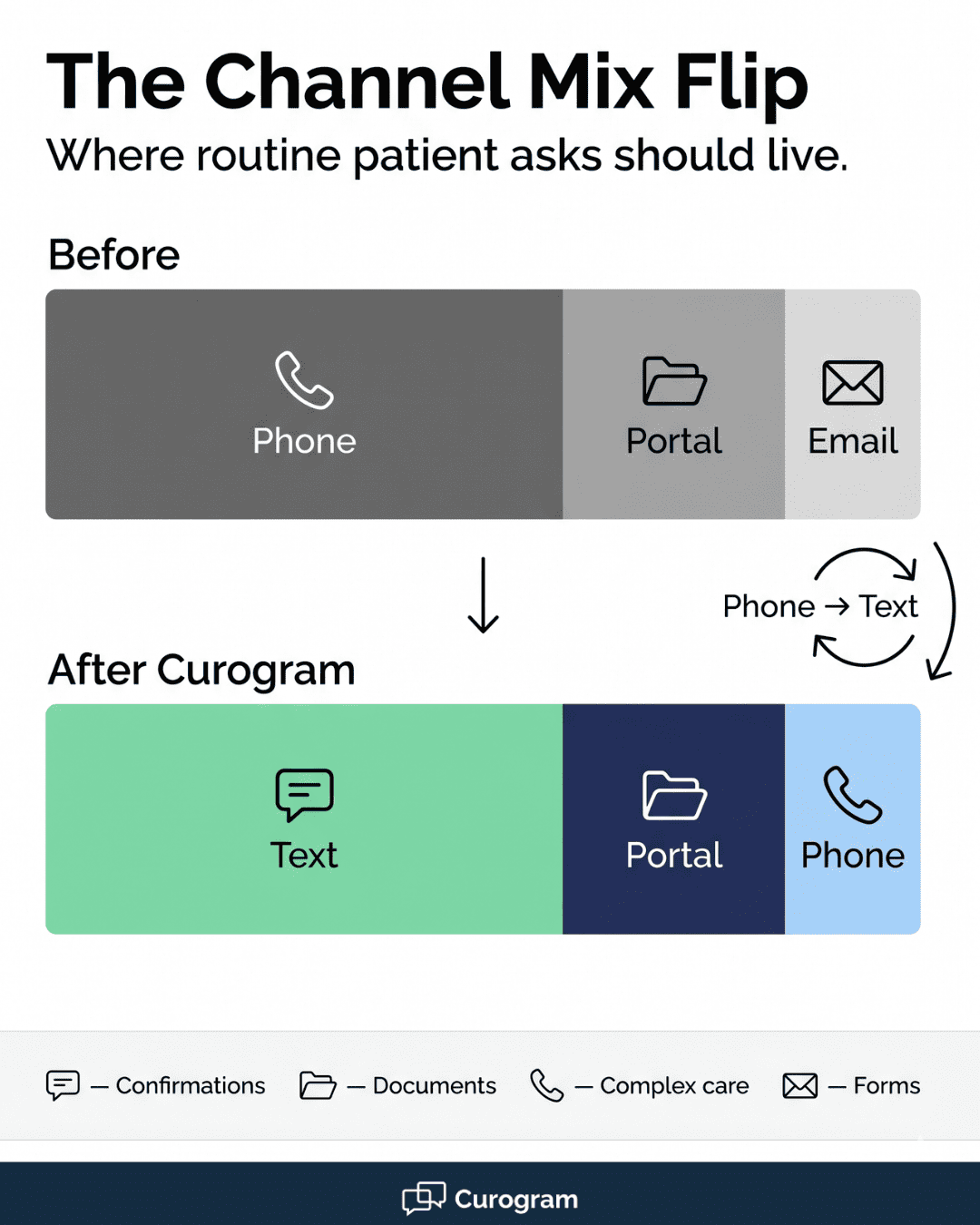
Before and after bar chart of patient communication channels in Elation Health practices using Curogram

The Primary Care Fit

Primary care and Direct Primary Care (DPC) practices on Elation Health are the perfect fit for this model. Panels are large, often 1,500 to 2,500 per provider. Visit types are routine. Most calls are simple, repeating asks.

A DPC group with 8 providers and 16,000 patients in the panel will generate 100+ calls a day. That volume crushes a 3-person front desk. Curogram lets the same 3 people handle the load by turning the channel mix upside down.

The new default looks like this:

  • 70% of patient asks handled via text
  • 20% handled via portal or email
  • 10% handled via phone (the truly complex ones)

That is what real Elation Health front desk texting workflow staff efficiency looks like in practice. The phones still ring, but only when they should. The team has time to greet the lobby patient, prep the next visit, and follow up on the recall list.

The guide does not replace your staff. It multiplies them. That is the role Curogram plays inside an Elation practice, and it is why front desk teams keep the tool open all day.

The Success: The Efficient Front Desk

What does an efficient Elation front desk actually look like once two-way texting takes over the routine work? The numbers are clear, the daily rhythm changes, and the staff finally get to do the work they trained for. This is where the payoff lives.

The Metric

The headline numbers are simple to track. Based on our internal data and Curogram’s benchmarks across mid-market primary care practices, the gains land in three places: call volume, productivity, and patient response time.

KPI

Before Curogram

After Curogram (90 Days)

Inbound calls per day

80–120

40–60

Staff productivity

Baseline

+30%

Patient text open rate

N/A

98%

Average reply time

30–120 minutes

Under 5 minutes

Staff training time

1–2 weeks

Under 10 minutes


The 50% call drop is the most visible win. Staff feel it within the first week. The phone rings less, the lobby clears faster, and the queue of voicemails shrinks fast.

The 30%+ jump in productivity is the win that hits the budget. A practice that was about to hire one more FTE can hold off for another year of growth. The savings are real, not theoretical.

The Shift: From Answering Machine to Engagement Hub

The bigger change is in how staff use their time. Before Curogram, the front desk works in reactive mode. The phone drives the day. Staff jump from call to call without a chance to plan or follow up.

After Curogram, that mode flips. Staff shift from answering machines to engagement coordinators. They send pre-visit prep texts before the patient even calls. They confirm visits in batch. They run a recall list each Friday.

Here is the new daily rhythm:

  • Morning batch: Send 30 confirmation texts in 5 minutes
  • Mid-morning: Reply to refill requests in 30-second chats
  • Afternoon batch: Send pre-visit prep notes for tomorrow’s schedule
  • End of day: Run a recall sweep for patients overdue for annual visits

That kind of work used to be impossible. The phone queue ate every minute of the day. Now it is built into the standard front desk SMS workflow because the time exists to do it.

The shift changes the team’s mood as much as it changes the math. Staff who used to dread the 9 a.m. rush now own their day. They get through their list. They go home on time. They stop crying in the break room.


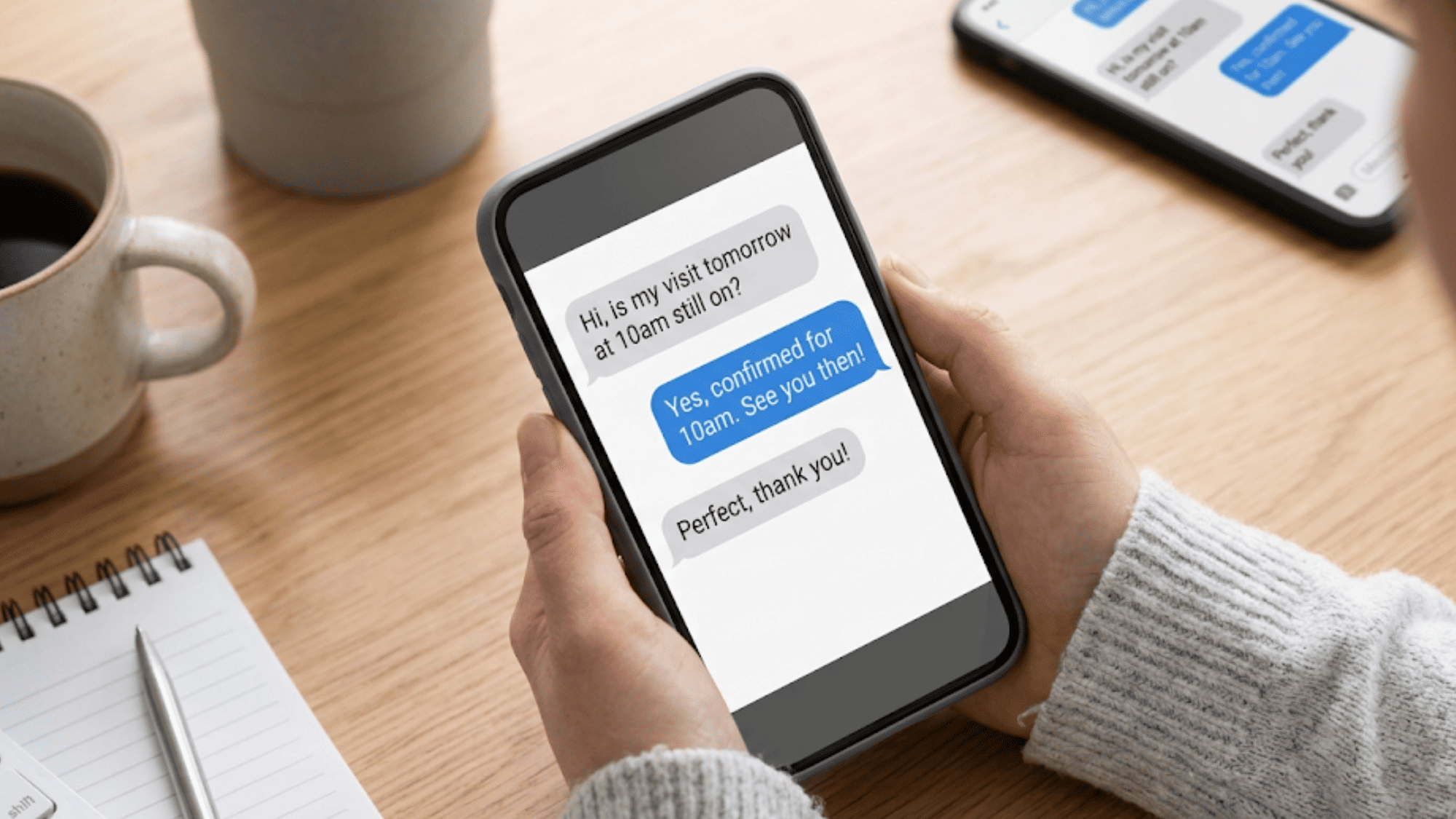
Curogram two-way texting chat between front desk staff and patient confirming a primary care visit
How Curogram Plugs Into Your Elation Health Day Without Disrupting It


The biggest fear Office Managers raise about new tools is the same one every time. Will my team have to learn another system? With Curogram, the answer is no.

Curogram was built by engineers who sat at real front desks in real practices. They watched the workflow. They timed the calls. They saw which steps wasted hours each week. Then they built a dashboard that matches how staff already work, not how a software vendor wishes they did.

The result is a tool your team can learn in under 10 minutes. Most front desk staff are fully fluent by lunch on day one. There is no two-week training plan. There is no certification course. There is no consultant on retainer.

Curogram pairs with Elation Health as a true plug-in. Patient phone numbers and visit data flow from Elation into the Curogram dashboard. Staff do not enter the same info twice. Notes from a text chat can be logged back into the chart so providers see the full picture.

Every feature ties back to one promise: simpler, faster, more secure communication. That includes:

  • Two-way HIPAA-compliant texting
  • Automated visit reminders with custom rules
  • Online intake forms sent by text
  • Text-to-pay for bills
  • Secure internal staff messaging

You get a full communications stack, not a single feature. And it costs less than the patchwork of 2 to 3 tools most practices stitch together to do the same job.

Conclusion: Fewer Calls, More Care, One Platform

Reducing phone calls in Elation Health practices is not about working harder. It is about working through a faster channel. Two-way HIPAA-compliant texting gives your patients what they already prefer and gives your staff back the hours they need.

Elation Health is built for your clinical work. Curogram is built for your daily front desk reality. Together, they create a practice where the phone serves the complex chats and texts handle the rest. That split is the future of front desk operations in primary care.

The numbers back it up. A 50% drop in calls. A 30%+ lift in productivity. A 98% text open rate. A team that can learn the platform in under 10 minutes and stay fluent for years.

The villain in this story is the 80-call day. The fix is not a bigger team. The fix is a better channel that turns 80 calls into 40 quick chats. Same staff. Half the noise. Twice the throughput.

If your team is buried under phone volume, the time to act is now. Each month of delay is another $20,000 to $30,000 in lost revenue and burned-out hours. The next hire you avoid pays for the platform many times over.

Cut your front desk call volume by up to 50% without changing your EMR. Book a quick demo and see the results before your next staff meeting.


Frequently Asked Questions

How does Curogram integrate with Elation Health to cut front desk call volume?

Curogram pulls patient data from Elation Health into a text-based dashboard your front desk uses all day. Staff handle confirmations, refills, and billing chats by text instead of phone. Most practices see calls drop by up to 50% within 60 days.

Why do patients prefer texting over the Elation Health patient portal?

Texting needs no login, no password, and no app download. Patients reply from the same inbox they use for friends and family. Text messages see a 98% open rate, while portal logins often sit below 30% on most Elation practices.

How fast can front desk staff learn the Curogram two-way texting platform?

Most staff learn it in under 10 minutes. The dashboard is designed to feel like a normal text inbox, not a clinical software tool. Full team fluency usually lands by the end of day one, with no formal training plan needed.

What happens when a patient replies to an automated Curogram reminder?

Every reply lands in the live front desk dashboard, not a black hole. Staff see the response in seconds and can chat back inside the same thread. Patients never feel ignored, which is the most common complaint with one-way reminder tools.

Why is HIPAA compliance non-negotiable for two-way texting in Elation practices?

HIPAA covers all patient data, including text chats about visits, refills, and bills. Curogram offers a signed Business Associate Agreement, end-to-end encryption, and SOC 2 certification. That keeps your practice protected from fines and your patients’ data safe from leaks.