
6 min read

Easy Telemedicine for eCW Practices | No App Needed

Easy Telemedicine for eCW Practices | No App Needed
💡 Easy telemedicine for eClinicalWorks practices with no app download starts by trading the download-and-login barrier for a single text link. Curogram layers onto eClinicalWorks.      

A provider texts the patient a link, the patient taps it, and the visit opens in their phone's browser — no app, no healow login, no portal. 

This removes the most common reason virtual visits fall apart. When joining takes one tap, no-exam follow-ups happen by video. And the patient who might have drifted to urgent care stays with your practice instead.


You booked a quick video follow-up. The patient wanted it too. Then everything stalled.

They couldn't download the app. The login failed. The visit turned into a phone call — or it simply never happened.

If that sounds familiar, you already know the real problem with telehealth. It isn't the video. It's everything standing in front of it.

eClinicalWorks offers virtual visits through the healow app, and on paper that works fine. In practice, asking a patient to download software and create a login is exactly where things break. Older patients get stuck. Busy parents give up.

The app was meant to open a door. Too often, it becomes a wall. A five-minute medication check that needed no exam room turns into a scheduling headache instead.

That patient still needs care. When they can't join this week, they don't wait patiently — they head to urgent care. You lose the visit, the revenue, and a little of the relationship.

Multiply that across a month and the cost is real. Empty video slots. Exam rooms tied up by appointments that never needed one. Front-desk staff fielding calls that a link could have solved.

It sounds simple to fix. For most practices, it isn't.

Here's the good news, though. The barrier is not the technology — it's the friction wrapped around it.

Remove the download, remove the login, and virtual care starts working the way it was meant to. That's the whole idea behind easy telemedicine for eClinicalWorks practices with no app download.

Instead of sending patients to an app store, you send them a text. They tap once, and they are in. There is no account to create and no password to reset.

This article breaks down why the app barrier costs you, and how a single link quietly fixes it.

Why Telehealth Breaks Before the Visit Even Starts

eClinicalWorks offers telehealth through the healow app. The provider is ready, the patient is willing, and then a download request stops everything cold.

This is the app wall. It's the single spot where virtual visits quietly fail — not during the video, but before it ever begins.

Think about a routine medication check.

It needs no exam, no vitals, no room. Yet when the patient can't get into healow, that five-minute visit becomes a phone call or falls off the schedule entirely.

The frustrating part is that patients aren't refusing care. They're just stuck at a login screen. Many practices want eClinicalWorks telehealth with no healow login for exactly that reason — 

Here's where the app wall shows up on an ordinary day.

What should happen What actually happens What it quietly costs
A quick video follow-up The patient can't download healow The visit drops to a phone call — or a no-show
A same-day virtual request No portal login, no way in The patient leaves for urgent care
A no-exam med check The patient is told to create an account An exam room and a slot get tied up for nothing

Each row is a small loss. On its own, none of it looks alarming. Stack them across a full month, though, and the pattern is clear.

You get empty video slots, wasted rooms, and patients drifting to the competitor down the street. That's the real price of the app wall. It doesn't announce itself — it just trims your schedule and your revenue, one abandoned login at a time.

This is why practices increasingly look for virtual visits without app download for eCW patients — visits people can actually complete.

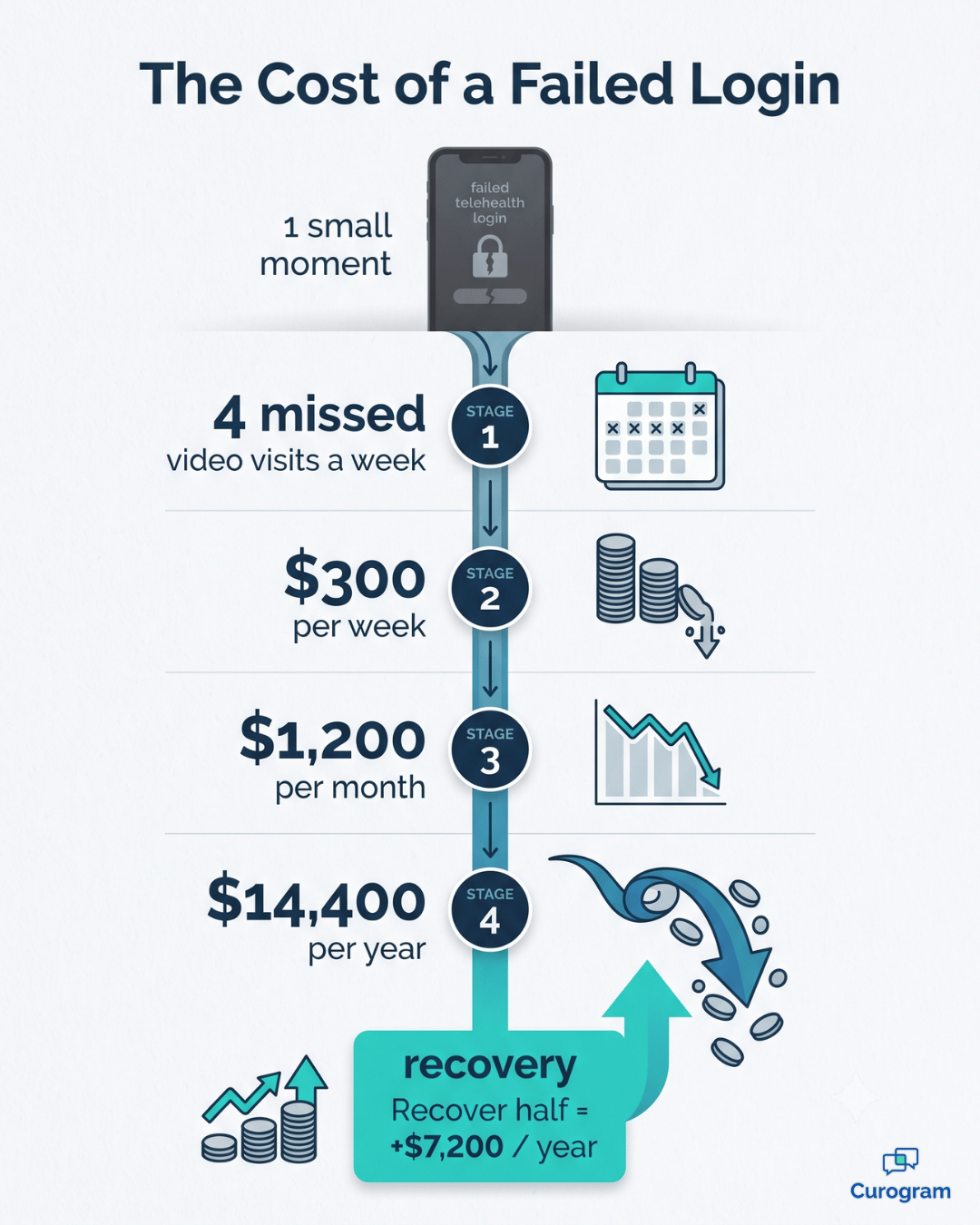
Infographic: yearly revenue eCW practices lose to failed telehealth logins

One Text Link, and the Visit Just Opens

So what does the fix actually look like?

It's less dramatic than you'd expect. Instead of pointing patients to an app store, you point them to a text message.

Curogram works as your virtual front-desk assistant — one platform running alongside eClinicalWorks, not a separate telehealth vendor to manage. The provider launches a video visit, and the patient gets a text. They tap the link and join right from their phone's browser.

That's the whole flow. No app, no login, no portal. These are browser-based video visits for eCW practices, and they open with a single tap.

If a caregiver or an interpreter needs to be there, the multi-user setup lets them join the same session. Because it's text link telemedicine for eClinicalWorks, the visit rides the same channel your patients already use for reminders, messages, and intake forms.

There's nothing new for them to learn, and nothing new for your team to babysit.

Here's how that plays out across different practices.

Home laptop open to a browser-based eClinicalWorks telehealth visit

Behavioral health

A teletherapy session shouldn't collapse because someone can't log in. Because these are no portal video visits, eClinicalWorks behavioral-health clinics keep sessions steady.

The patient taps once, and the conversation starts.

Primary care

A provider runs a medication check by video in a few minutes, no exam room required. The slot that visit would have eaten stays open for a patient who truly needs to be seen in person.

Pediatrics

A parent handles a quick follow-up from home instead of packing up a restless, sick child for the drive in.

That means fewer missed visits and less stress on both sides.

OB/GYN

A postpartum check-in happens from the couch, days after delivery, when leaving the house feels like a lot.

The patient stays connected during a stretch when connection matters most.

What Changes When Joining Takes One Tap

When the barrier disappears, the math changes fast. The exam room and same-day slot that a no-exam follow-up used to swallow are suddenly free. The patient who would have wandered to urgent care stays with you — and nobody downloaded a thing.

There's also a simple reason a text link works when an app doesn't. People actually open texts. SMS messages see open rates near 98%, so the link lands in front of the patient instead of sitting unread.

Telehealth for follow-up appointments in eCW practices stops depending on whether someone can survive a login screen.

Let's put rough numbers on it. Say the app wall costs your practice just 4 virtual follow-ups a week, at an average of $75 per visit.

That's $300 a week, about $1,200 a month, or roughly $14,400 a year — gone to a download screen. Recover even half of those and you've added around $7,200 a year, without adding a single hour to the schedule.

In practice, that's revenue already sitting inside your patient list — you're just not capturing it yet.

With the app wall down, three things come back to your practice:

  • Exam rooms — no-exam visits move to video, freeing rooms for patients who need hands-on care.
  • Same-day access — a virtual slot opens for the patient who'd otherwise bounce to urgent care.
  • Provider time — quick follow-ups slot neatly between in-person visits instead of clogging the day.

For your team, this is the shift from a wall to open access. A video visit becomes as easy as tapping a text — for the patient and for you.

So instead of a day spent chasing failed logins, three follow-ups happen by video between in-person patients. The schedule absorbs more visits. And a patient joins from their kitchen table instead of an urgent-care waiting room.

Make Virtual Care Something Patients Actually Use

Telehealth only helps when patients can actually get in. And they will — when joining is a text link instead of an app download.

That's the quiet shift behind everything above. The video was never the hard part. The download, the login, and the portal were. Take those away, and virtual care stops gathering dust and starts being something your patients reach for.

Here's the clean way to think about it.

eClinicalWorks is built for your clinical visit — the charting, the coding, the record. Curogram is built for their effortless access — the tap that gets them into the room.

Healthcare everywhere! Launch a pervasive telehealth platform that's easy for both providers and patients with Curogram.

One handles the medicine. The other handles the moment of joining.

Together, they make virtual care something patients use instead of avoid. The payoff shows up in ordinary places. A behavioral-health session that isn't derailed by a failed login. A postpartum check-in from a mother's own couch.

A medication follow-up handled between two in-person patients frees the exam room for someone who truly needs it. A same-day request stays with you instead of walking into urgent care.

None of it requires an IT project. There's no new system to install, and no disruption to the eClinicalWorks workflows your team already knows. The link does the work, and your day keeps running the way it already does.

So stop letting an app store stand between you and the patients you could see today. The fix is already sitting one text message away. You have watched the problem play out above; now watch the fix.

The best way to understand it is to watch it happen. Schedule your eClinicalWorks integration demo and see a live video visit launch from a single text link — no app, no login, no portal, and no change to how your practice already runs its day.


Frequently Asked Questions

Are Curogram video visits secure and HIPAA-compliant?

Yes. Curogram is built for healthcare, so video visits are run in a HIPAA-compliant way. Patients join a secure session straight from their browser, with nothing exposed on an unsecured channel.

Does the patient need the healow app or a portal login to join?

No — and that's the whole point. The patient taps the text link and joins from their phone's browser, with nothing to download and no login to remember. Removing that step is what makes virtual visits actually happen.

Does it work alongside our eClinicalWorks workflow?

Yes. Curogram runs alongside eClinicalWorks, and the same platform that already handles your texts, reminders, and forms launches the video visit. So it's one tool to learn, not a separate telehealth system to manage.

Can a caregiver or interpreter join the same video visit?

Yes. The multi-user setup lets a family member, caregiver, or interpreter join the same session from their own device. Everyone taps a link — no shared screens and no extra software.

Which appointments work best as a text-link video visit?

Any visit that needs no hands-on exam is a strong fit. Medication checks, follow-ups, teletherapy sessions, and postpartum check-ins all work well by video. The rule of thumb: if you don't need a room, you probably don't need one in person.


NextGen Telemedicine via Text | Video Visits, No App Required

NextGen Telemedicine via Text | Video Visits, No App Required

💡 Curogram's One-Tap Video Visit enables NextGen Enterprise organizations to launch HIPAA-compliant telemedicine directly from the NextGen schedule...
Read More
Lytec Telehealth Without a Separate Video Platform to Manage

Lytec Telehealth Without a Separate Video Platform to Manage

💡 Lytec telehealth without a separate video platform lets your team run video visits straight from the Lytec schedule. There is no new system to...

Read More
How Tebra Patients Join a Video Visit from a Text Message

How Tebra Patients Join a Video Visit from a Text Message

💡 Tebra patients can join a video visit from a text message — no app, no download, and no portal login needed. Curogram sends patients a text...

Read More