SMS Telehealth Setup Workflow for Sigmund AURA Staff Operations
💡 Setting up an SMS telehealth workflow alongside Sigmund AURA is simple for staff operations. Curogram adds video as its own delivery layer, so no...
10 min read
Mira Gwehn Revilla
:
July 1, 2026
Your front desk did not sign up to run IT. Yet that is what telehealth often becomes. Every video visit can start with the same scramble. Patients call, confused about logins and downloads.
One patient cannot find the app. Another typed the password wrong. A third gave up and asked to reschedule. The doctor waits, and the schedule slips.
This is the hidden cost of bolting on a video tool. Lytec handles your scheduling and billing well. But it has no built-in video of its own. So telehealth means a second system to set up and learn.
That second system brings its own logins, its own bills, and its own support calls. Your team ends up coaching patients through tech, visit after visit. The morning fills with "I can't connect" instead of care. None of it has anything to do with the patient's health.
There is a simpler path. You can offer Lytec telehealth without a separate video platform. The visit starts from the same schedule you already use. The patient gets a text link and taps it. No app, no account, no login screen.
That is the whole setup. Staff learn it fast, and patients need zero prep. The pre-visit tech scramble just goes away.
This guide is for the people who feel that pain most. Front-desk staff, schedulers, and managers at lean clinics. You want video visits, not a new help desk.
We will cover why the extra platform hurts your workflow. Then we will show how a text-link visit fixes it. You will see the staff steps, the patient steps, and the time saved each day.
By the end, you will know how to run virtual care from Lytec. No new vendor, no logins, and no support tickets. Just the visit, starting on time for both sides.
Lytec is built for the back office. It manages your schedule, your claims, and your billing. It does these jobs well, and your team relies on it daily.
But Lytec has no built-in video for visits. So the moment you want telehealth, you need a second tool. That tool sits outside Lytec, with its own login and its own rules.
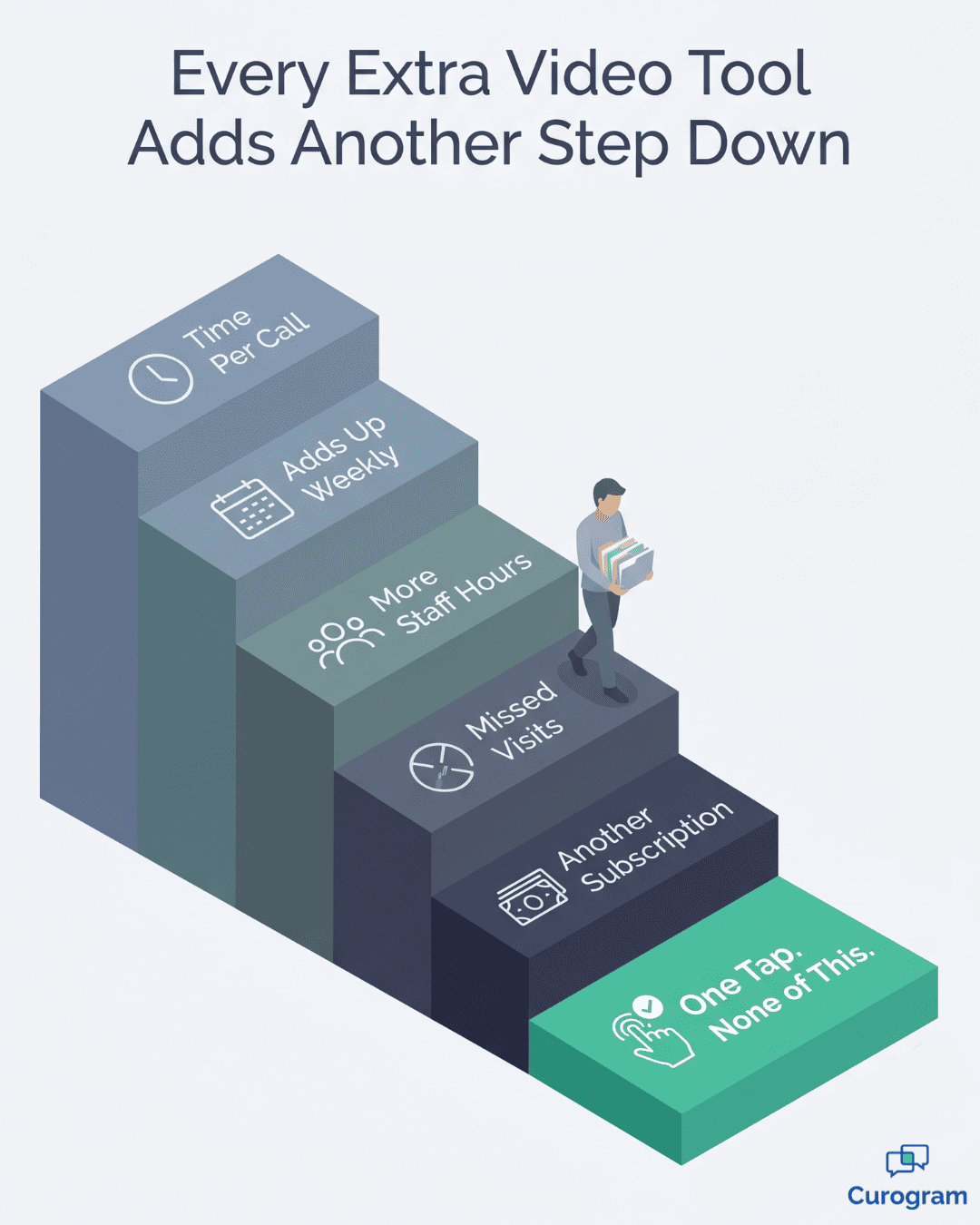
On paper, this sounds minor. In practice, it reshapes your whole morning. The extra platform turns simple visits into a string of small tech tasks.
First, staff set up patient accounts on the video tool. Then they send the patient a separate link or invite. Then they wait to see if the patient can actually get in.
That last step is where the day breaks down. One patient cannot find the email. Another cannot install the app. A third clicks the link, sees a login screen, and calls the desk for help.
The calls are rarely quick. An older patient may need help finding the app store. A busy parent may be driving and cannot click yet. Each call eats five or ten minutes you did not plan for.
Consider one common call to feel the cost. The phone rings five minutes before a visit. The patient says the app keeps asking for a code. Staff stay on the line, reading steps out loud, while the lobby fills.
That one call rarely stays contained. While the desk helps online, a walk-in waits to check in. The phone keeps ringing, and now two patients feel ignored. One small login issue spreads stress across the whole front office.
Now your front desk is doing tech support. They walk patients through downloads, passwords, and browser pop-ups. Meanwhile, the provider sits idle, and the next patient waits.
When a connection fails, the visit often slips. The slot gets pushed or canceled, and a reschedule goes on the list. That is lost care and lost revenue in one move.
A failed visit does not just lose one slot. It also takes a future slot, which crowds out a new patient. The schedule gets tighter for days, not just minutes.
There is a money cost on top of the time cost. The video tool is its own subscription. So you pay one bill for Lytec and another for video.
|
Let us put rough numbers on the time: Say five video visits a day each need five minutes of setup help. That is 25 minutes daily, or more than two hours a week. Over a month, that is close to ten staff hours spent on logins alone. That time does not bill. It does not heal anyone. It just keeps the extra platform running. |
The burden grows with each location. Two clinics mean two sets of accounts and two help queues. The same login problem repeats in every office you run.
There is a security cost as well. A second system is one more place that holds patient data. That means one more vendor to vet, one more contract to track.
The hidden tax is morale. Staff did not train in healthcare to run a help desk. Yet the extra platform makes them IT support, day after day.
This is the real villain in the story. It is not video care itself, which patients love. It is the second system standing between the schedule and the visit. Fix that, and the whole flow gets calmer.

The fix is not a better video tool. It is no separate tool at all. The visit should start from the schedule you already use.
That is the idea behind running telehealth from the Lytec schedule. The appointment lives where it always has. When it is time, you launch the visit right from that record.
There is no app for the patient to install. There is no account for your staff to set up. The visit travels to the patient as a plain text message.
Think of the text as the door to the visit. The patient gets a message with a single link. They tap it, and the video room opens in their browser. No password, no download, no login screen.
This is what "one tap" really means. The patient does nothing but tap. Your staff do nothing but start the visit. The tech that used to cause calls simply disappears.
Because it runs in the browser, it works on almost any phone. An old phone, a new phone, an Android, an iPhone. If it can open a web page, it can join the visit.
Here is the staff side, step by step:
Notice what is missing from that list. There is no second portal to log into. There is no separate video login for Lytec to remember. One workflow carries the visit from start to finish.
The video is encrypted and meets HIPAA rules by default. There is no extra checkbox for your team to manage.
It helps to name the real difference here. A platform is a system you run, with logins and upkeep. A feature is a tool inside the system you already trust. Curogram makes video a feature, not another platform.
The reminder system carries the link, too. The same text that confirms a visit can deliver the join link. So patients get the link in a message they already expect and trust.
This is also how you keep your tech stack lean. You do not add a vendor; you add a feature to the texting you use. The visit and the schedule stay in one place.
Most staff are comfortable in under 10 minutes. There is no thick manual, because there is no new platform to master.
That speed matters for lean teams. A front desk of two or three cannot absorb a heavy rollout. This fits into the day they already run, not on top of it.
It also fits new hires. When the workflow is one tap, training is quick. A new team member can run a visit on day one.
Patients feel the ease as much as staff do. They are used to tapping links from texts every day. A doctor visit that works the same way feels natural, not technical.
The guide here is simple to sum up. Keep the schedule in Lytec, and let one tap handle the visit. No extra system, no extra login, no extra stress.
The payoff of this setup is easy to feel. The visit starts on time, and no one fights with tech first. Let us look at exactly what changes for staff, for patients, and for the schedule.
Start with patient setup, because that is where most pain lives. With a second platform, setup is a project for every visit. With a text link, setup is zero. The patient taps and joins.
That single change removes the biggest source of failed visits. Patients do not get stuck at a login. They do not give up and call to reschedule. They just arrive in the room.
A new video platform can take hours to teach. Curogram's text-to-video flow takes under 10 minutes. Staff learn three steps and they are ready.
Here is a clear before-and-after view:
|
What happens |
Extra platform |
One-tap text visit |
|
Patient setup |
Install app, make account, log in |
Tap one text link |
|
Staff steps |
Provision, invite, troubleshoot |
Open, start, done |
|
Logins to manage |
Two systems |
One workflow |
|
Training time |
Hours, with a manual |
Under 10 minutes |
|
Failed-connection calls |
Common |
Rare |
|
Extra subscription |
Yes |
No |
The table shows the shift in one glance. Every row on the left adds friction. Every row on the right removes it.
Let us walk through a real visit to make it concrete:
A patient has a 10:00 follow-up booked in Lytec. At 9:55, the front desk opens the appointment. They start the visit, and Curogram texts the link.
The patient taps the link from the waiting message. The room opens, and the provider joins from their own screen. By 10:01, the visit is underway. No one called the desk for help.
Compare that to the old way:
At 9:45, staff would email a platform invite. At 9:55, the patient calls, lost in a login. By 10:05, they are still troubleshooting, and the slot is slipping.
The difference is not small. It is the gap between a smooth morning and a stressful one.
The less tech-savvy patient, too. An older patient may dread a new app. With a text link, there is nothing new to fear. They tap, just as they would tap a message from family.
The same ease helps across many locations. Every clinic runs the identical one-tap flow. There is no per-site setup and no per-site help queue to staff.
The visit and the schedule live in one connected flow. So it is easier to see what happened and follow up. You are not stitching notes across two separate tools.
Patient trust grows with each easy visit, as well. When access is simple, people keep their appointments. They also feel more open to booking the next one. Easy tech quietly builds loyalty over time.
This calm has a knock-on effect on no-shows. When joining is easy, more patients actually show up. The reminder carries the link, and the link just works.
Our internal data backs this up. Across current clients, automated reminders drive an average confirmation rate above 75%. The same reminder can carry a video link, so patients arrive ready.
Reminders also cut missed visits sharply. Based on our internal research, Curogram clients see no-show rates 53% below the industry average. That benchmark sits across the client base as a whole.
One client shows the effect up close. Atlas Medical Center cut no-shows from 14.20% to 4.91% in three months. That came from automated reminders and two-way texting, the same tools that carry a visit link.

Curogram adds video to the system you already run. It does not ask you to consolidate telehealth in Lytec with a clunky bolt-on tool. Instead, the visit launches from the Lytec schedule and reaches the patient as a simple text.
The feature is called Text-to-Video Visits. There is no app to download and no account to provision. The patient taps the link in the text, and the video room opens in the browser. Both sides connect in just a few seconds.
For staff, the steps are short and clear. Open the appointment, start the visit, and Curogram texts the link. That is the full staff workflow for Lytec virtual visits. No one logs into a second portal, and no separate video login for Lytec is needed.
The video itself is built for healthcare. It is HIPAA compliant and encrypted, and it runs under a signed BAA. So you get virtual care that meets privacy rules without any extra steps.
This setup is easy to adopt. Most teams are ready in under 10 minutes, since there is no new platform to master. New hires tend to pick it up just as fast.
It also removes the cost of a second vendor. You get Lytec telemedicine with no extra vendor and no extra subscription to track. One bill, one workflow, one place to work.
Best of all, it ends the pre-visit help desk. Patients stop calling for login help, and your front desk stops troubleshooting. The visit simply starts when the patient taps the link.
The result is telehealth that feels like a natural part of your day. The schedule lives in Lytec, and the visit lives one tap away. Your team can focus on patients, not on tech support tickets all morning. Patients notice the difference too, and so do you.
Video visits should not turn your front desk into a help desk. With the right setup, they really do not have to. You can run virtual care from one place, with one tap, and no support tickets.
The split is simple to picture. Lytec runs the schedule, and Curogram runs the visit. Your team works in the system they already know and trust.
That means no second platform to buy or learn. It means no logins for patients to fumble with. And it means no morning lost to "I can't connect" calls.
Think back to the old way for a moment. Staff provisioned accounts, sent platform links, and fielded failed logins. Each step added minutes and pushed the visit off track. Each reschedule cost a slot and some patient goodwill.
The text-link approach flips that whole pattern. The patient gets a link, taps it, and the visit begins. Staff stay focused on care, not on coaching tech. The schedule holds, and visits start on time.
This is what it looks like to stop telehealth tech support for Lytec for good. You keep the billing and scheduling you already trust. You add video that needs no app, no account, and no extra vendor.
The payoff shows up across your whole day. Fewer support calls, fewer reschedules, and a calmer front desk. Patients get care from home, and staff get their time back.
Find out how your team can offer telehealth without another vendor or monthly bill. Request a demo and see the one-tap workflow in action today.
Curogram adds video as a feature inside the system you already use. You start the visit from the Lytec schedule, and the patient gets a text link to tap. No separate platform runs alongside it.
Most support calls come from app installs, accounts, and logins. A text link removes all three. The patient simply taps and joins, so staff stop coaching patients through downloads and password screens before each visit.
The patient receives a secure link by text and taps it. The video room opens right in their phone's browser. There is nothing to install, no account to make, and no password to remember.
Most teams are ready in under 10 minutes. The flow is only three steps: open the appointment, start the visit, and let Curogram text the link. New hires learn it just as quickly.
The video is encrypted and HIPAA compliant, and Curogram operates under a signed BAA. Patient data stays protected during the visit, so your practice can offer virtual care while meeting privacy rules without extra steps.
💡 Setting up an SMS telehealth workflow alongside Sigmund AURA is simple for staff operations. Curogram adds video as its own delivery layer, so no...
💡 Easy telehealth for behavioral health consumers, no app needed, works when a practice pairs an SMS-launched video tool like Curogram with...
💡 Lytec stores your lapsed patients. It cannot text them in bulk. Here is the faster way to bring them back. Curogram filters your CGM Lytec...