10 min read

How to Run CureMD Telehealth Without Front Desk Tech Support

How to Run CureMD Telehealth Without Front Desk Tech Support
💡 CureMD telehealth without front desk tech support means patients join a video visit by tapping a text link. Your staff stop coaching app installs and portal logins before every appointment. The change shows up in a few concrete places:
  • A one-tap link skips the app download and the portal password, the two steps behind most pre-visit calls.
  • The link can ride out with the appointment reminder, so nobody sends it by hand.
  • Fewer failed joins means fewer telehealth visits that slip or turn into no-shows.
  • Older and less tech-comfortable patients get in without a walkthrough call.
  • Curogram runs alongside CureMD, so your charting and clinical work stay put.
Your front desk goes back to running the schedule. The phone stops doubling as a help desk.

Your front desk didn't sign up to run an app store tutorial. Yet that's how a lot of telehealth mornings begin. A patient calls fifteen minutes before the visit, stuck on the download. Someone at the desk talks them through it while the lobby line grows and two lines blink on hold.

The friction in CureMD telehealth lives in the join, before the provider ever appears on screen. When joining means an app install or a portal login, that setup becomes the wall. Staff climb it for the patient, one call at a time.

A missed telehealth slot rarely reschedules cleanly, either. The provider sat idle, the slot is gone, and a patient who couldn't get in often won't try again. That's a lost visit wearing a no-show's name tag.

We've watched this play out across primary care, behavioral health, and specialty schedules. Older or less tech-comfortable panels feel it worst.

Each failed connection is a phone call, and each call pulls a person off the desk and off the schedule. One stuck patient can throw a whole morning behind.

None of this is the front desk doing anything wrong. They're being asked to fix technology on a phone they can't see, for a patient who's already stressed. Good staff still lose that fight, because the setup was never theirs to win.

So this is about running CureMD telehealth without front desk tech support. A one-tap text link removes the setup patients get stuck on. The visit still lives in CureMD, but the way in stops being your job. Staff stay on the schedule, and the video starts when it's supposed to.

The Villain: When the Join Needs an App or a Login

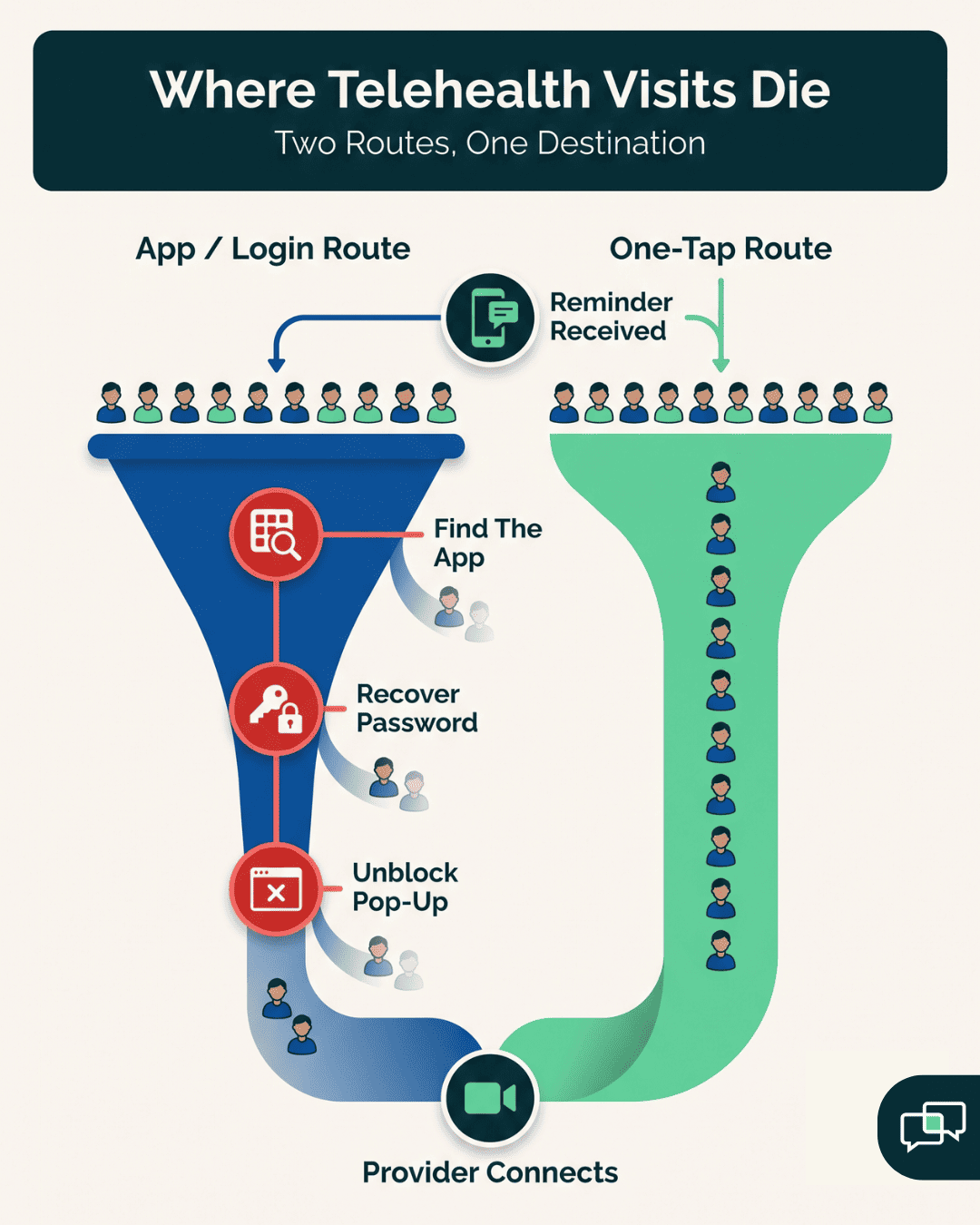
Most CureMD video visit join failures happen before the provider connects. Maybe they can't find the app in the store. A portal password reset email lands in spam, or never arrives.

On some phones, the browser blocks the pop-up the link tries to open. None of that is a clinical problem. It's a setup problem, and it surfaces the moment a patient tries to get in.

Portal-based joins bring their own trap. A patient expects to sign in with their phone number, then hits a username and a password they created a year ago and never used again. That reset flow becomes its own support call, stacked on top of the first one.

The front desk telehealth setup in CureMD tends to fall on whoever picks up the phone. That person becomes the install guide, the password helper, and the "tap the blue button" coach. They're doing IT support they were never trained for, on a device they can't see and can't touch.

The Pre-Visit Call That Eats the Morning

Consider the shape of a rough telehealth morning. A patient calls ahead because the reminder said "download the app," and they can't.

You spend six minutes on the app store, spelling out the name and waiting on a slow connection. Then a second patient calls mid-visit because the video froze on join.

You're narrating a screen you can't see.

"What does it say now?"

"A gray box."

"Okay, is there a blue button?"

Five minutes vanish that way, and the provider is still waiting in an empty room.

That's two calls for two visits, and the block still has ten more. Each rescue attempt runs long because you're troubleshooting blind, guessing at what the patient sees. Meanwhile the check-in line stalls, and the schedule quietly slides ten minutes behind where it started.

Unscheduled, Unbillable, and It Scales

This labor has a nasty property: it grows with your telehealth volume. Add more virtual visits and you add more join attempts, more failures, and more calls.

None of it shows up on a schedule or a claim. It's pure overhead, and it lands on the same one or two people every single day.

Leadership rarely sees the cost, because it never reaches a report. No line item reads "twelve minutes on a password reset." It just bleeds out of every telehealth day, invisible until someone quits over it.

A clinic running twenty telehealth visits a week can lose an hour or more just walking patients into rooms. That hour isn't planned for. It gets stolen from check-in, from callbacks, from the recall list nobody has time to work.

Then telehealth grows, the hour becomes two, and the same two people absorb all of it.

Why Staff Dread Telehealth Days

Ask a front desk team how they feel about telehealth and you'll hear it plainly. They don't dread the patients.

They dread the connection calls, the frozen screens, and the provider messaging "where's my 10 o'clock?" while a patient reads a password aloud over the phone.

The dread is rational. When the job on telehealth days is fixing technology instead of running a clinic, people burn out on it fast. And the patients who need virtual care most, the ones who can't drive in, are often the ones who struggle hardest with the setup.

So the friction lands on your most vulnerable patients and your most stretched staff at the same time, which is exactly backwards.

Turnover makes it worse. A new hire learns the schedule in a week, but the telehealth troubleshooting takes months to get comfortable with. Until they do, every failed join becomes a longer call.

The Guide: What a One-Tap Join Actually Removes

Take the whole setup layer out and there's nothing left to troubleshoot. A one-tap join means no app to download, no account to create, and no portal password to recover. The patient taps a link in a text, their phone browser opens, and they land in the waiting room.

That single change deletes the three failure points behind most connection calls. No download step, so no app store detours. No login, so no reset emails sitting unread in spam.

There's no operating system to update and no app version to match, so a patient who hasn't opened their app store in three years never has to start now.

The patient doesn't prepare for the visit at all, which means your staff don't prepare them either. There's simply no walkthrough to give when there's nothing to walk through.

How the Text Link Works

Mechanically, it's simple on purpose. Curogram sends the patient a text with a secure video link. They tap it. A browser tab opens straight into the visit, and the provider joins from their side. Nothing installs, and nothing asks the patient to recall a credential they set up months ago.

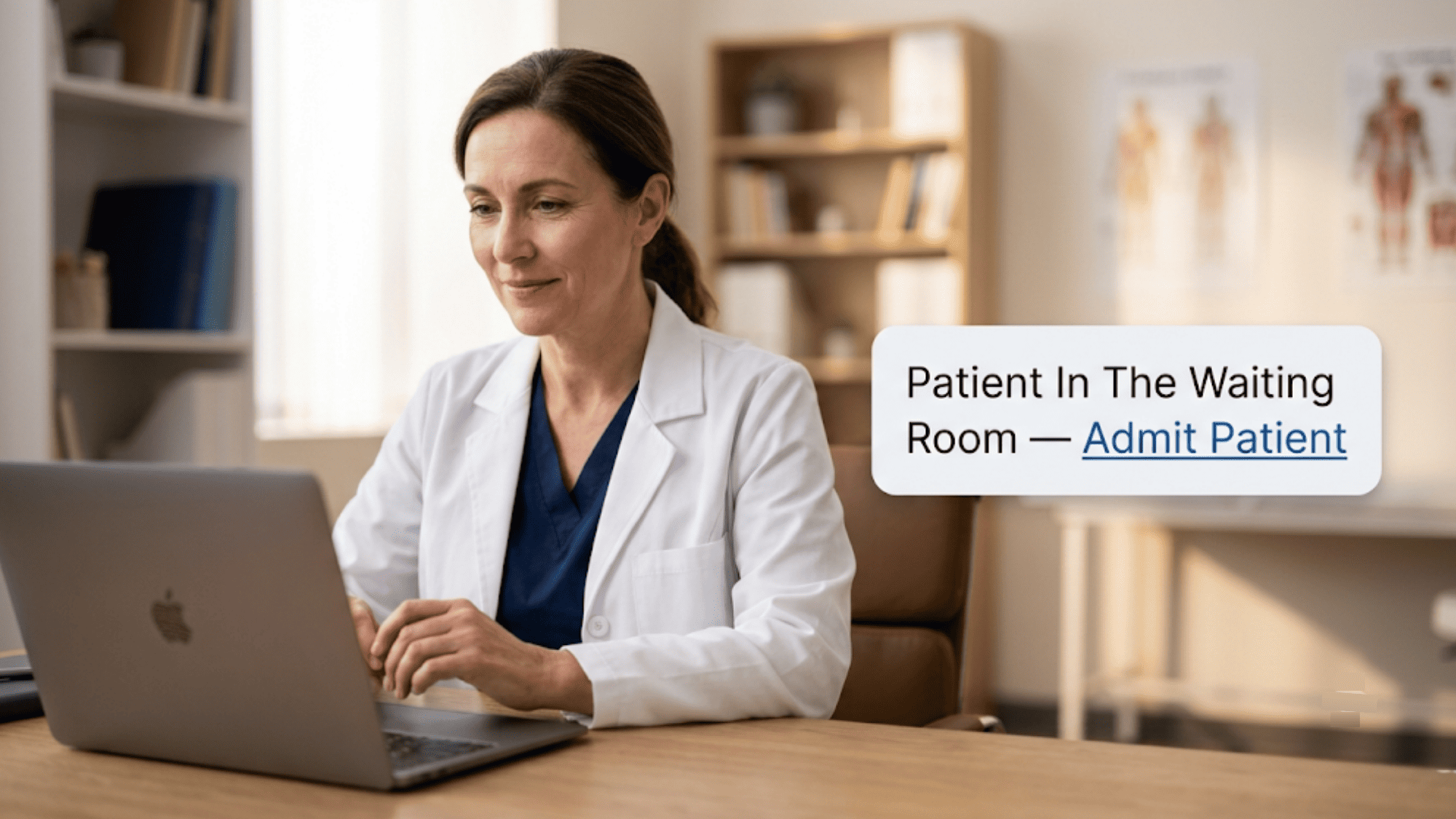
The provider sees the patient arrive in the waiting room and admits them, the same as walking someone back from a lobby. A boring join is exactly what you want on a busy morning.

Because the patient joins from a plain browser, the same flow works on an old iPhone, a borrowed Android, or a laptop. You send one link, and it behaves the same way for everyone who taps it.

That consistency is what makes the join predictable enough to stop babysitting. When every patient takes the same path in, staff stop guessing which device or app version they're dealing with.

Funnel diagram of telehealth join failures: patients lost at find app, recover password, and unblock pop-up versus one-tap joining

How it Runs Alongside CureMD

Curogram works with CureMD rather than replacing any of it. Your scheduling, your charting, and your clinical record stay exactly where they are. The video link is the one piece Curogram handles, and it rides on the messaging your practice already sends.

You keep the CureMD scheduling and the reminders you already trust. Curogram adds the link and steps out of the way.

Staff can send the link on demand, or attach it to the appointment reminder so it goes out automatically. Either way, the CureMD telehealth workflow your staff run gets shorter.

The reminder does the delivering, the patient does the joining, and your team keeps the schedule moving instead of keeping patients online. Nobody has to learn a new system to run this, since the link travels on the texts your front desk already sends every day.

Why it Fits Practices with Older Patients

For a panel that skews older, one-tap joining changes the math. A 78-year-old doesn't need to find the App Store, spell out an email, or invent a password with a capital letter and a symbol. They tap a blue link the way they'd tap a link from a grandchild, and the visit opens.

A practice that fielded ten setup calls on a telehealth morning can watch that number fall toward zero. Whatever calls remain tend to be real clinical questions, which is what a front desk should be answering anyway.

That's the difference between a virtual visit that happens and one that becomes a phone call. Behavioral health, primary care, and specialty practices serving less tech-comfortable patients feel this most, because those panels drove the highest call volume before.

A patient who used to need a ten-minute coaching call now needs zero, and that time goes straight back to the schedule.

The Success: What Changes on a Telehealth Morning

Take a Monday block of twelve telehealth visits, and set two versions of it side by side. In the first, joining needs an app or a login. In the second, patients tap a text link. The visits are identical; only the way in differs.

The contrast, using illustrative time math for a single morning, looks like this:

Part of the visit

App or login join

One-tap text link

Getting the patient ready

Pre-visit "how do I install this" call, ~6 min each

Link arrives with the reminder, no call

Joining

Patient hunts for the app or resets a password

Patient taps once, browser opens

When it fails

Mid-visit rescue call, blind troubleshooting

Rare, since there's no setup to fail

Staff time on 3 stuck patients

~20 to 30 minutes gone

Close to zero


Those minutes are illustrative, not a case figure. Any front desk that runs telehealth knows the pattern, though, and knows exactly where that lost half hour goes.

Repeat it across every telehealth day and the small per-visit cost adds up to real hours by Friday.

From Tech-Support Desk to a Visit That Starts Itself

When the join carries no setup, the front desk stops being telehealth support. Nobody's coaching a download at 9:45. The reminder sent the link, the patient tapped it, and the provider connects to someone who's already waiting.

That's how a CureMD virtual visit starts on time instead of ten minutes late. Start the first visit on time and the whole column stays on time, since one late join no longer pushes every appointment behind it.

That knock-on effect reaches your no-show numbers too. In the schedule, a failed join and a true no-show look identical: an empty slot and a patient who didn't appear.

A lot of "telehealth no-shows" were never refusals, though. The patient tried, got stuck, and gave up before the provider ever saw them.

For CureMD practices trying to reduce telehealth no-shows, closing that join gap recovers visits that were only ever lost to setup. Those patients wanted care. They just couldn't reach it through the login screen.

Telehealth Days the Desk Doesn't Dread

The link travels on the same reminder rail that already lifts confirmations. Based on our internal data,

Curogram clients average above 75% appointment confirmation rates, with no-show rates running about 53% below the industry average. Those figures come from the reminder and texting flow that the join link rides along with.

Put the join on that rail and telehealth days stop being the ones people avoid. Staff stop troubleshooting telehealth, and CureMD days run on their schedule instead of the phone's.

The provider waits less between visits, the patient struggles less to get in, and the desk works the schedule it was actually hired to run.

The gain compounds quietly. Every setup call you don't take is time back for check-in, callbacks, and the recall work that actually brings patients in. That's the same desk, on the same day, getting more done.


Physician at a laptop during a telehealth visit with a floating notification to admit the patient from the waiting room

How Curogram Turns One Text into a Started Visit

The feature behind this is Text-Link Telemedicine. It sends the patient a secure video link by text, and a single tap opens the visit in their phone's browser.

There's no app to install and no account to create. That's the whole reason there's nothing for your front desk to walk them through.

Setup is where telehealth support usually starts. Remove the setup and you remove the support with it.

The patient taps the link, lands in the waiting room, and the provider joins from the CureMD side as usual. Staff don't prep the patient, reset a password, or stay on the line coaching a download.

You can trigger the link two ways. Send it on demand when a patient needs it, or attach it to the appointment reminder so it goes out on its own. Tied to the reminder, the join becomes automatic. The confirmation text a patient already expects now carries their way into the visit.

Because it's browser-based, the link works the same on an old phone, a new one, or a laptop. Your staff aren't matching patients to app versions anymore.

And the video is HIPAA-compliant and encrypted under a signed BAA, so the ease of use doesn't cost you on privacy. Your clinical work stays in CureMD, while Curogram gets the patient into the room without a phone call.

Conclusion: Take Telehealth Tech Support Off Your Front Desk's Plate

The telehealth problem on your schedule isn't your staff, and it isn't your patients. It's the join. When getting into a visit means an app, a login, and a password, someone at the desk has to close that gap by hand, every single time.

CureMD is built for the visit. Curogram is built for getting the patient into it without your help. A one-tap text link takes the setup off the table, so there's nothing for the front desk to troubleshoot and nothing for the patient to install.

That's what running CureMD telehealth without front desk tech support really looks like. The reminder carries the link, the patient taps it, and the video starts on time. Staff coach nothing, because there's nothing left to coach.

Your desk gets its telehealth mornings back. The phone stops being a help desk, the schedule holds, and the visits that used to die at the login screen actually happen. That's worth seeing with your own patients.

Give your older patients a way to join that needs no app, password, or coaching call. Book your CureMD integration demo and see the one-tap visit in action.


Frequently Asked Questions

How does a text-link video visit stay HIPAA-compliant?

The video runs on Curogram's encrypted, HIPAA-compliant platform under a signed BAA. Dropping the app and login removes setup friction, not security, so patient information stays protected across the entire visit, from the first tap to sign-off.

How much does staff have to set up for each telehealth visit?

Close to nothing. You either send the link with one tap or attach it to the appointment reminder so it goes out automatically. After that, patients join themselves, and your team runs the schedule instead of the connection.

Why add Curogram when CureMD already includes telehealth?

You're not paying for telehealth twice. You're removing the join friction that eats staff time and drives no-shows. The reclaimed front desk hours, plus the visits you stop losing to failed logins, more than cover the cost.

Why do so many telehealth visits fail at the join instead of the visit itself?

Because the hard part comes first. App installs, portal passwords, and blocked browser pop-ups all sit between the patient and the provider. Many patients get stuck there, give up, and become a no-show that was really a setup failure.

How does one-tap joining help older or less tech-comfortable patients?

It matches how they already use a phone. There's no app to find and no password to invent, just a blue link to tap. That removes the exact steps that generated the most pre-visit calls from older panels.


How Digital Intake Forms Save Your DrChrono Staff Hours

How Digital Intake Forms Save Your DrChrono Staff Hours

💡 DrChrono digital intake forms let patients fill out forms on their phone before they arrive, saving front desk staff hours of manual data entry...
Read More
Telemedicine Without the Front-Desk Tech Support

Telemedicine Without the Front-Desk Tech Support

💡Low-friction telemedicine for the Azalea Health front desk workflow lets patients join a virtual visit from a text link. There is no app to...

Read More
Cloud 9 Ortho Telehealth | Zero Tech Support, Full Utilization

Cloud 9 Ortho Telehealth | Zero Tech Support, Full Utilization

💡 The Cloud 9 orthodontic telehealth workflow powered by Curogram's Telehealth Schedule Integration lets practices schedule and launch virtual...

Read More