Join an Azalea Health Virtual Visit by Text Link
💡Text-link telemedicine visits for rural Azalea Health patients let a person see their provider from home. They tap one link in a text. No app and...
10 min read
Mira Gwehn Revilla
:
July 12, 2026
Most practices treat telehealth as a switch. Turn it on in CureMD, and virtual visits happen. Turning it on is the easy part. The harder part is getting a patient into the room once the appointment arrives.
That's where visits break. A 71-year-old with a 9 a.m. follow-up taps his reminder, hits a prompt to install an app, can't recall a password, and calls the front desk. The clock keeps running. By the time someone talks him through it, the slot is half gone or lost.
Multiply that one patient across a week of virtual slots, and a pattern shows up. The visits your schedule counts on are the ones leaking out through setup, one failed install at a time.
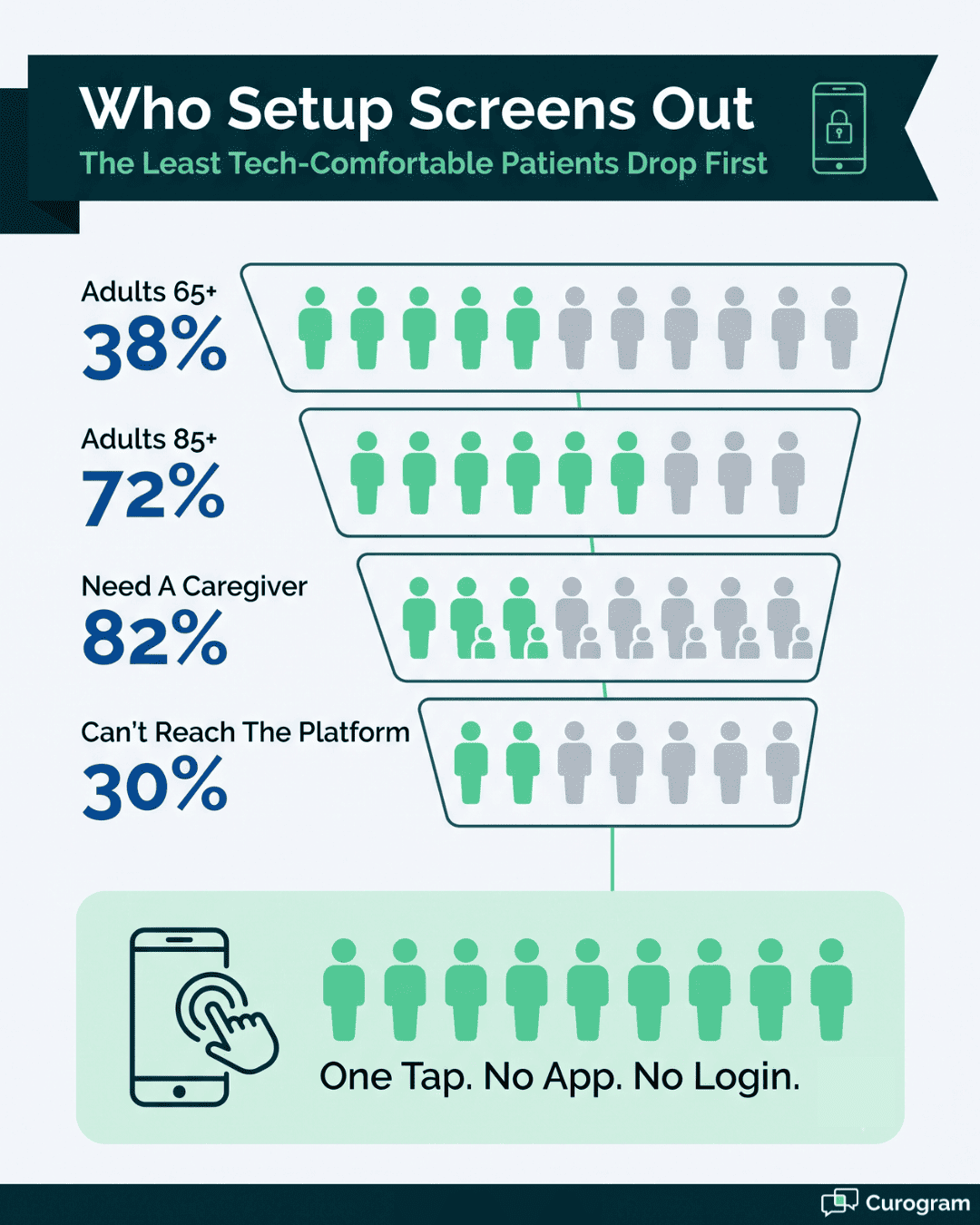
This isn't a rare edge case. About 38% of US adults over 65 aren't ready for a standard video visit, and that figure climbs to 72% for adults over 85, according to a JMIR barriers study.
Hearing, vision, and unfamiliar apps all play a part. The patients who gain most from virtual care are the ones setup trips up first.
So here's the claim we'll back up. When joining a CureMD telehealth video visit takes an app download or a portal login, your least tech-comfortable patients drop off, and a text link that opens the visit in one tap fixes it. CureMD handles the clinical side well. The gap is the patient's way in.
We'll show where the join breaks, how a one-tap link changes it, and what shifts on your schedule once patients can connect without a maze in front of them.
Telehealth doesn't fail at the video. It fails at the front door. A patient who can't get into the visit is a patient you don't see, no matter how good the platform behind it is.
Count what a patient does before a face ever appears on screen:
Find the right app in a store.
Pick the correct one from the near-copies next to it.
Install it.
Create an account.
Verify an email, often on a computer they're not sitting at.
Log into a portal.
Recall which password goes with it.
Each step is a place to stall, and every stall lands on your front desk. For a younger patient with the app already installed, none of this registers. For a 68-year-old joining their first video visit, any single step can end the attempt.
There's also the "which login" trap, where the portal password and the app account are different things, and the patient tries the one that doesn't work.
Each of those maze steps is invisible to the person who built it and huge to the person facing it cold. The problem wasn't the doctor. It was the door.
The usual fix is to have staff walk each patient in by phone. That holds up until the morning gets busy. A front desk checking in a waiting room, answering the main line, and chasing a prior auth can't also spend eight minutes per patient reading install steps out loud.
Think about the volume. Based on our internal data, one Curogram client, Covina Arthritic Clinic, confirms more than 1,100 appointments a month. A share of those are virtual.
If even a handful of video joins fail each day, and each one pulls a staffer off the floor, the phone-support approach caps how much telehealth a practice can actually run.
Every minute spent on a reset is a minute not spent on the next patient. You don't scale hand-holding. You remove the step that needs it.
The people setup blocks are the same people who lean on virtual visits most:
Older patients - primary-care patients
Chronic-care patients - people in rheumatology, cardiology, and endocrinology who check in often
Behavioral-health patients - value joining from the privacy of home, without a waiting-room lobby
The JMIR data is blunt about it. Roughly 38% of adults over 65 aren't ready for a video visit, and 72% of those over 85 aren't either. One home-based primary-care program found 82% of patients needed a caregiver just to take part in a virtual visit.
When your telehealth requires an install and a login, you've built a filter that screens out the exact patients you meant to reach. The sicker and older the panel, the harder that filter bites.
A join that fails isn't neutral. It becomes a late start, a rescheduled slot, or a no-show. Staff who should be checking in the waiting room are on the phone reading install instructions instead.
And the patient remembers the hassle, so the next virtual visit gets booked as an in-person one, which undoes the point of offering telehealth at all.
Put the drop-off next to a normal schedule and the cost is easy to see.
|
Where patients drop |
What it costs the practice |
|
Can't find or install the app |
Call to front desk, visit starts late |
|
Forgot the portal password |
Reset loop, provider waits |
|
No account yet |
Visit abandoned, slot goes empty |
|
Caregiver can't get patient in |
No-show for a high-need patient |
Weak CureMD telehealth patient adoption usually traces back to this table, not to the video quality. The tool works. Getting into it doesn't.

Cut the store, the account, and the portal, and the join shrinks to a single action: tap a link. That's the whole design. A text lands, the patient taps it, and the video opens.
Opening the link launches the visit in the phone's own browser. Nothing to download from a store. No username or password to set up. No portal to sign into first. The patient taps and waits in a room, the way they'd open any link a friend sent.
That's what a CureMD telemedicine one-tap link does in practice. It moves the technical work off the patient and onto the system. A person who can tap a text message can join.
That's a much wider group than the one that can install an app, verify an email, and recall a password on the first try. The skill you're asking of the patient drops from "set up an account" to "open a text," and almost everyone clears that bar.
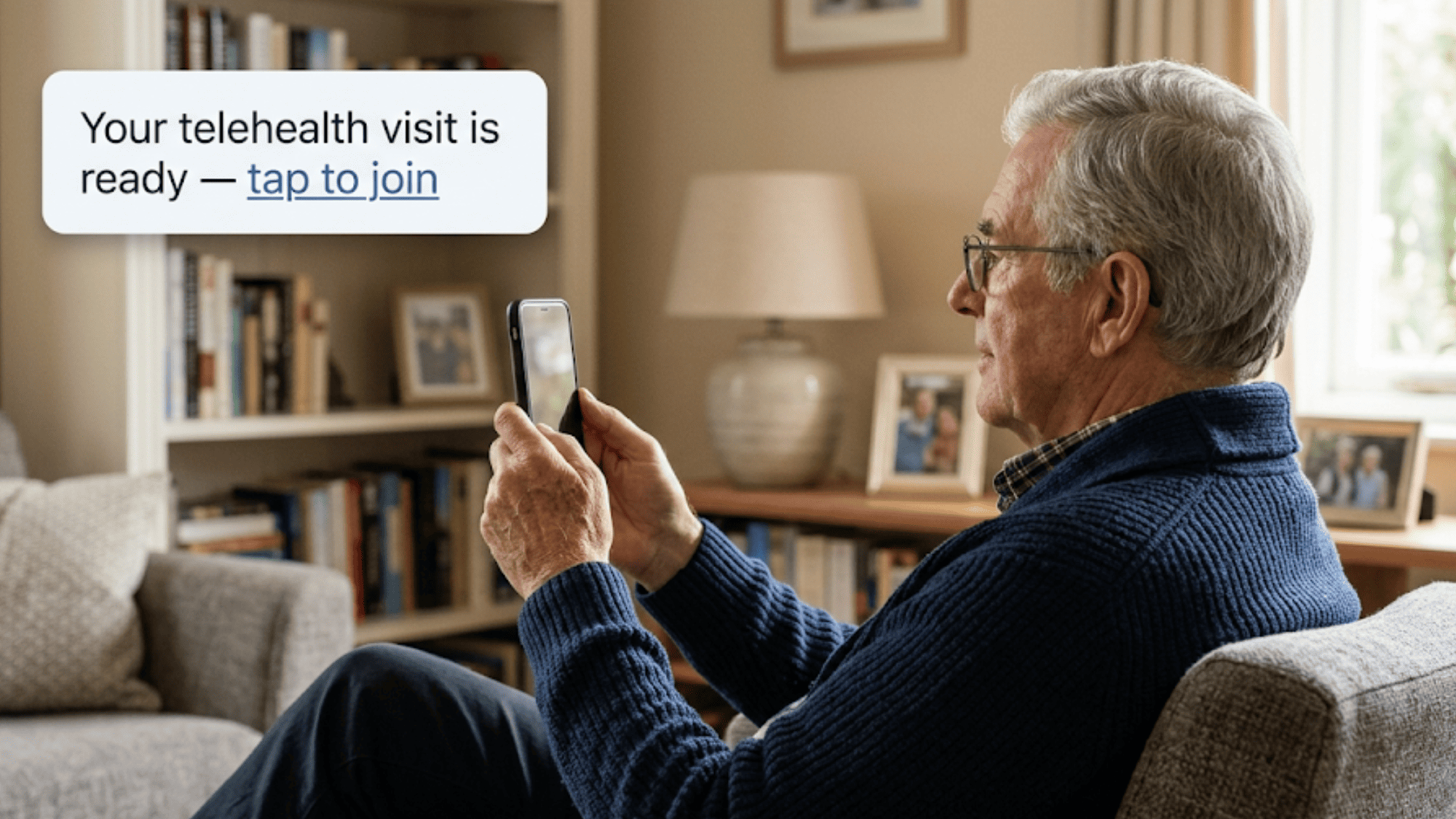
Keep the patient's view in mind, since that's where adoption is won or lost. A text arrives from the practice. It has one line and one blue link. A single tap, and it opens. Their browser lands on a simple screen that says the provider will be with them shortly.
No store search. No sign-in box. No choice to get wrong. A patient who has ever tapped a link to a photo or a news story already knows how to do this. That familiarity is the point.
You're meeting people on a motion they've made a thousand times, not teaching them a new app under time pressure. Fewer decisions on the patient's side means fewer places for the join to fall apart.
Compare that to a first-time app install, where a patient can get lost at the store, the account screen, or the email check, and each screen is a fresh chance to give up.
Curogram sits next to CureMD rather than replacing any of it. Your clinical record, coding, and documentation stay in CureMD, where they belong. Curogram provides the patient entry point: the text that carries the link and the video that opens from it.
Because the visit runs as text-link telehealth alongside CureMD, there's no second portal for patients to learn. The link can ride along with the same appointment reminder they already get, so it arrives in a message they're used to opening.
A CureMD video visit with no portal in front of it removes the step that stalls people most. Staff send the link, the patient taps, and the visit begins.
You keep the system your billers and providers already know, and you add a way in that your patients can handle. Nothing about the chart moves, and no one has to learn a second tool to run a virtual visit.
This one-tap approach earns its keep with the hardest-to-reach patients. It's a HIPAA video visit alongside CureMD, encrypted and covered under a signed BAA, so privacy holds even though joining is simple.
It's also multi-user, which matters more than it sounds. Remember that 82% of homebound older patients who need a caregiver? The caregiver can tap the same kind of link and join the visit too.
A daughter across town helps her father connect, and neither of them installs a thing. For geriatric, behavioral-health, and chronic-care patients, dropping the download and login step is the line between a connected visit and an empty slot.
Payoff here isn't abstract. Walk one appointment through, start to finish, and the difference is easy to feel. The steps are the whole story, so it helps to see them in order rather than described in the aggregate.
Take a Tuesday-morning rheumatology follow-up for a 74-year-old on a biologic. Here's how the one-tap version runs:
No call to the front desk. No password reset. No slot lost to troubleshooting. A staff member who'd normally be talking her through an install is checking in the next patient instead.
One tap did what a five-minute phone call used to. And her son didn't have to drive over, because his own tap put him in the same room.
For a patient on a biologic who needs regular check-ins, that ease is the reason she keeps her virtual slots instead of skipping them.
Set the old path and the new one side by side, and the shift is plain.
|
Same appointment |
Setup maze |
One-tap link |
|
How the patient joins |
Installs app, logs in |
Taps a text link |
|
Front-desk role |
Phone support mid-visit |
None needed |
|
Typical start |
Late or missed |
On time |
|
Caregiver |
Often can't help in time |
Joins with one tap |
Same patient, same provider, same appointment. What changed is how she got in, and that one change decided whether the visit happened at all. Every row in that table used to be a phone call your staff had to make.
Now run that across a full clinic day. Every join that used to fail was a call, a callback, or a reschedule.
Take those off the front desk and the whole morning loosens. Providers start on time, and the phones move faster because fewer people are stuck on tech support.
Stronger CureMD telehealth patient adoption follows, because the patients who used to give up now get in.
Based on our internal data, automated reminders and two-way texting already help Curogram clients hold a confirmation rate above 75% and keep no-show rates 53% lower than the industry average.
That same reminder channel now carries the visit link. When one tap opens the visit, the patient who confirmed actually shows up on screen, rather than confirming and then vanishing at the install prompt. Confirmed and connected stop being two different things.

Text-Link Telemedicine is the feature doing the work behind everything above. It launches a multi-user, HIPAA-compliant video visit from one text link. There's no app, no account, and no portal in between.
The mechanics are simple by design. Staff send a link by text, either on its own or inside the appointment reminder. The patient taps it.
Their phone's browser opens straight into the visit. Nothing installs, and no sign-in screen loads, so the steps that usually strand older patients never appear.
Privacy isn't traded for that ease. The video is HIPAA-compliant and encrypted, and it runs under a signed BAA. The link opens a private visit, not a public room. A HIPAA video visit alongside CureMD holds the same security standard patients expect from any clinical tool.
Multi-user support is what makes it work for high-need patients. A caregiver, an interpreter, or a family member can join the same visit from their own phone with their own tap.
It runs next to CureMD, so nothing about your clinical workflow changes. CureMD keeps the record. Text-Link Telemedicine gives the patient a door they can open.
The visits you lose to telehealth rarely fail because the video is bad. They fail before the video ever loads, at the install prompt, the account screen, or the forgotten password. The patients who fall through are the ones you most wanted to reach.
CureMD gives you a capable clinical platform for the visit itself. What it can't do is guarantee the patient gets in. That's the split worth holding onto. CureMD is for the clinical side of the visit, and Curogram is for the patient's way in, the one-tap link that just works.
A text link that opens the video in a single tap changes who can actually attend. The 71-year-old drops the panic call. The caregiver joins from across town. The slot that would've gone empty gets used, and your front desk gets its morning back.
Bring your hardest telehealth case with you, the patient who never quite makes it into the room, and we'll show you how they get in.
Reserve a demo slot and see how a caregiver and patient both join the same video visit with one tap each.
The patient taps the link in their text message. It opens the visit right in the phone's browser. There's no app to find in a store, and no account to set up before the visit starts.
Older patients face more setup steps, and each one can end the attempt. Installing an app or recalling a password can stop them. A JMIR study found about 38% of adults over 65 aren't ready for a video visit.
The video stays HIPAA-compliant and encrypted, and it runs under a signed BAA. The text carries only a private link. A tap opens a secure visit, so health data stays inside the safe session.
CureMD holds the clinical record, coding, and notes, which you don't want to move. Curogram adds the easy entry point on top. More of your patients then reach the visit that CureMD is built to run.
The visit allows more than one person. A caregiver taps their own link on their own phone and joins the same session. A family member can help an older patient connect, and neither one installs anything.
💡Text-link telemedicine visits for rural Azalea Health patients let a person see their provider from home. They tap one link in a text. No app and...
💡 Rural patients using Azalea Health clinics can now attend a video visit with their doctor by tapping a single link in a text message. No app...
💡 Lytec patients can join a video visit with no app download. Curogram texts a secure link that opens the visit in one tap.Here is what that looks...