11 min read

How to Confirm Your DrChrono Appointment With One Easy Text

How to Confirm Your DrChrono Appointment With One Easy Text
💡 You can confirm your DrChrono appointment with a simple text reply — no phone call, no portal login needed.
  • Reply YES to the text reminder your practice sends you
  • The system reads your reply and locks in your visit right away
  • You can also text CANCEL or RESCHEDULE if plans change
  • The whole process takes about 5 seconds from your phone
  • Reminders arrive 24–48 hours before your visit at a normal time of day
DrChrono SMS confirmation works for patients at chiro, PT, mental health, podiatry, and urgent care clinics. Just text back and you're done.

Your doctor's office sent you a text about your next visit. All you have to do is reply YES. That's it — your appointment is locked in.

Confirm your DrChrono appointment with one text reply instead of calling back, logging into a portal, or leaving a voicemail. Whether you see a chiropractor, a therapist, a physical therapist, or a podiatrist, the process is the same. You get a text. You reply. You're confirmed.

This matters because most of us don't have time to call the office back. You're at work. You're with your kids. You're driving. A phone call takes planning. A text takes three seconds.

DrChrono appointment text confirmation is easy for a reason. The old way — phone tag, portal logins, hold music — doesn't work for most people.

Studies show that texts have a 98% open rate, while voicemails sit unheard for hours or even days. When all you need to do is text back your appointment status, you actually do it.

This article walks you through exactly how one message appointment confirm works with DrChrono. You'll see why patients who reply by text confirm at far higher rates than those who rely on phone calls or patient portals. You'll also learn what to do if you need to cancel or change your visit.

If your DrChrono practice has text reminders turned on, you already have this option. If they don't, you can ask at your next visit. Either way, this guide shows you how simple it is to confirm, reschedule, or cancel — all from your phone, in seconds.

Let's start with the problem: the phone call you never got around to making.

The Villain: The Phone Call You Don’t Have Time to Make

Picture this. Your chiropractor's office calls to confirm your Tuesday visit. You're in a meeting. You don't know the number. You let it ring. They leave a voicemail asking you to call back and confirm.

You meant to return the call. You didn't.

Now you're not sure if the visit is still on the books. This is what happens when no phone call confirmation is the only option, and it fails more often than it works.

The Missed Call Problem

Here's how it usually plays out. The office calls you during work hours. You can't pick up. They leave a message. You tell yourself you'll call back at lunch. Lunch comes, and you forget. By the time you remember, the office is closed.

Now it's the morning of your visit. You don't know if you're still on the list. You drive to the office anyway — only to find out they gave your slot to someone else. Or worse, they marked you as a no-show even though you planned to be there all along.

This isn't rare. Based on our internal data, no-show rates run as high as 19%–30% in many clinics when the only option is a phone call to confirm. That's nearly one in three visits at risk because the confirmation step broke down.

The Portal Nobody Uses

Some DrChrono practices use the OnPatient portal for visit management. In theory, you log in, find your visit, and click "confirm." In practice, most patients never log in at all.

Here's why: You signed up for the portal six months ago. You don't recall the password. You'd need to reset it, check your email, create a new one, then find the right page. That's five steps before you even confirm.

Most patients skip it. The office marks them as "not confirmed." The visit may get bumped. The patient shows up confused. The front desk is frustrated. Everyone loses.

A DrChrono patient appointment reply by text skips all of that. No app. No login. No password reset. Just a text.

The Missed Confirmation Cascade

When visits go unconfirmed, the effects stack up fast. Your physical therapist may give your Friday slot to a waitlisted patient. Your mental health provider might assume you're not coming and close the slot.

You show up on Friday morning. The office says you were marked as a no-show. You say you never canceled. They say they never heard back from you. Both sides are right — and both sides are frustrated.

This cascade starts with one thing: a broken confirmation step. The visit was real. You planned to go. But because you didn't return a phone call or log into a portal, the system treated you like you weren't coming.

The Feeling We All Know

It's Monday night. You got a voicemail last week about your Wednesday therapy session. You meant to call back. Now it's after hours. The office is closed. You have no way to confirm until tomorrow morning — and by then, your slot might be gone.

That anxious, helpless feeling is the result of a system built around phone calls and portals. It puts the burden on you to jump through hoops at the right time, during business hours, with the right login or phone number.

No phone call appointment confirmation should ever leave you guessing like that. The fix is simple: let patients confirm by text. One reply, done. No hold time. No login. No guessing.

That's exactly what DrChrono's text-based system does. Let's look at how it works.

The Guide: One-Reply Confirmation

The fix for broken confirmations is simple. Your DrChrono practice sends you a text. You reply. Your visit is confirmed. Here's how it works, step by step:

Step 1: You Get a Text Reminder

Your practice sends a message to your phone. It looks something like this:

"Hi Sarah, you have an appointment on Tuesday at 2 PM. Reply YES to confirm or contact us at (555) 123-4567."

The text comes from the same number your office uses for patient appointment texting. It arrives at a normal time of day — not at 2 AM, not on a Sunday night. Most practices set reminders to go out 24 or 48 hours before the visit. Some also send a same-day nudge in the morning.

Step 2: You Reply

You text back "YES." That's it. You don't need to call. You don't need a portal. You don't need to spell out your full name or date of birth. Just reply to the text and move on.

Step 3: Your Visit Is Confirmed

The system reads your reply and marks your visit as confirmed — right away. The front desk sees it in real time. Your chart is updated. No one has to call you. No one has to check a voicemail. The DrChrono SMS confirmation is logged and done.

Total time: about 5 seconds.

What If You Don't Reply "YES" Exactly?

This is where the system gets smart. You don't have to type the exact word "YES" in all caps. The system uses what's called natural language understanding. That means it reads your reply in context and figures out what you mean.

Here are replies that all count as a confirmation:

Your Reply

System Reads It As

Yes

Confirmed

Yep

Confirmed

See you then

Confirmed

Confirmed

Confirmed

👍

Confirmed


And if you reply "CANCEL" or "RESCHEDULE," the system picks up on that too. You don't need exact keywords. You can text back something like "Can I move that to Thursday?" and the system flags it for your office to follow up.

This is a one-reply confirmation in the truest sense. You say yes however you normally would, and the system handles the rest.

When Do Reminders Go Out?

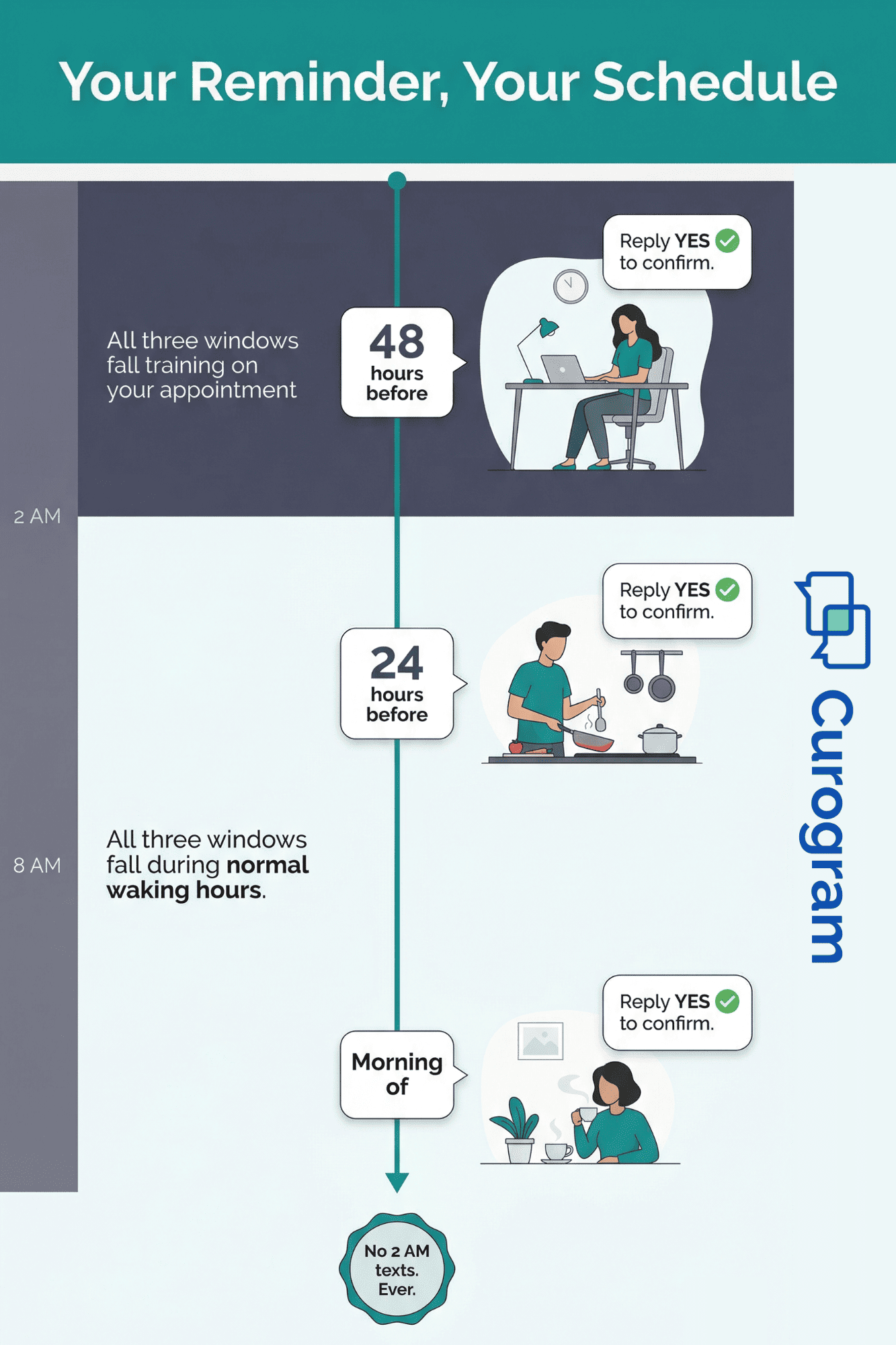
The timing is up to your practice. Most offices pick one or more of these windows:

  • 48 hours before gives you time to adjust plans if needed
  • 24 hours beforea timely nudge the day before your visit
  • Morning of a same-day check-in for last-minute peace of mind

You won't get texts at odd hours. The practice picks the schedule, and it's always set to reach you when you're likely awake and able to respond.

Timeline infographic showing when practices send appointment text reminders during the day

Where Can You Confirm From?

Anywhere. That's the whole point. You can confirm your DrChrono appointment by text while you're:

  • In line at the store
  • Waiting to pick up your kids
  • On your couch after dinner
  • At your desk between meetings

No quiet room needed. No hold music. No browser. No login. Just your phone and your thumb.

This is what makes DrChrono appointment text confirmation easy — it meets you where you already are. It works with the way you already use your phone. And it takes less time than reading this sentence.

Next, let's look at what happens after you confirm — and the real results patients and practices see.

The Success: Confirmed in 5 Seconds, From Wherever You Are

You replied YES. Your visit is locked in. Now what?

Let's talk about what that simple text reply actually changes — for you as a patient, and for the practice that serves you.

The Confirmation Rate Difference

When the only options are phone calls or portal logins, most patients don't confirm. It's not because they don't want to come. It's because the process asks too much at the wrong time.

Text-back confirmation flips that. Based on our internal research, practices using text-based confirmations see an average appointment confirmation rate above 75%. Compare that to phone-only systems where offices are lucky to confirm half their schedule.

Why? Because a text reply removes every barrier. No hold time. No passwords. No business hours. You see the text, you tap reply, you type three letters, and you're done.

Here's how the methods stack up:

Confirmation Method

Typical Confirmation Rate

Time Required

Phone call to office

30–50%

5–15 minutes

Patient portal login

20–40%

3–10 minutes

Text reply (one message)

75%+

5 seconds


The gap is massive. And it's not because patients don't care. It's because the old methods demand too much effort for a simple yes or no.

What Changes for You

Let's walk through a real scenario.

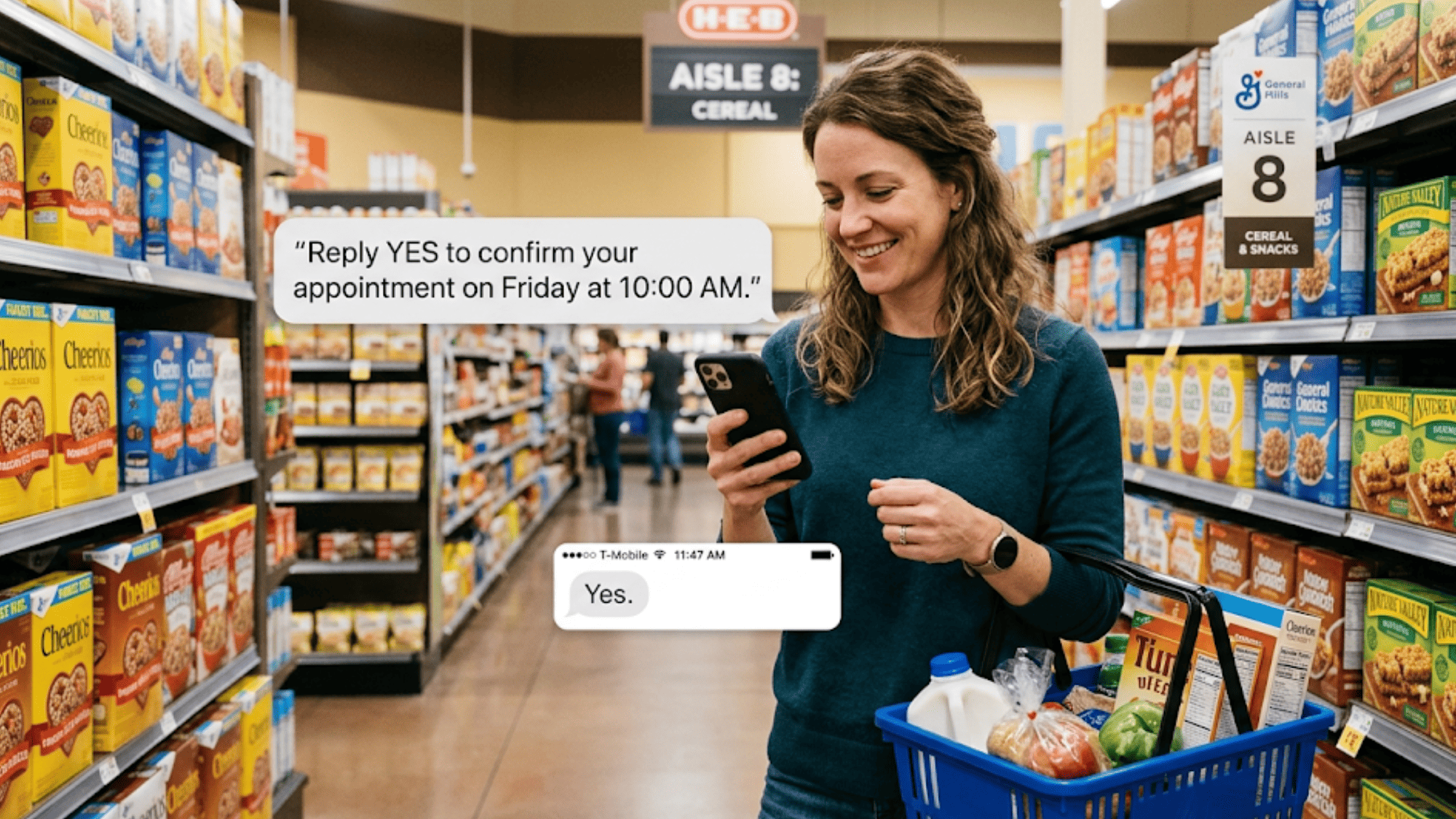
Your physical therapist sends a reminder on Wednesday for your Friday session. You're standing in line at the grocery store. Your phone buzzes. You glance at the text. It says you have PT on Friday at 10 AM. You reply YES.

You put your phone back in your pocket. Your visit is confirmed. You keep shopping.

Compare that to the old way. You get a voicemail on Wednesday. You're busy. You tell yourself to call back. Thursday comes, and you forget. Friday morning, you drive to the office. The front desk says you're marked as unconfirmed. Your slot went to someone on the waitlist.

Same patient. Same visit. Same intent to show up. The only thing that changed was how you confirmed.

That's the power of patient appointment texting. It doesn't ask you to change your day. It fits into the day you already have.

What Changes for the Practice

When patients confirm by text, the practice wins too. Here's how.

  • Fewer No-Shows - Based on our internal data, practices using text-based reminders and two-way texting see no-show rates that are 53% lower than the industry average. That means fewer empty chairs, less wasted time, and more patients getting the care they need.

  • More Revenue - Every empty slot is lost income. When patients confirm and show up, practices see a 10–20% boost in revenue. That's not a guess — it's what happens when confirmation friction drops to zero.

  • Less Phone Work - Front desk staff spend hours each day calling patients to confirm visits. With text-based confirmation, that work is done by the system. Based on our internal research, one clinic confirmed over 1,100 visits per month through automated texts alone. That's time the staff can spend on patients in the office instead of chasing people by phone.

The Emotional Shift

There's a feeling that comes with text-based confirmation that's hard to measure but easy to notice.

When you reply YES to a text, you know your visit is set. There's no "I think I confirmed" or "I'm pretty sure they got my voicemail." The text is right there in your message thread. You can scroll back and see your reply. It's a record.

That certainty matters. It means you're not second-guessing on the morning of your visit. You're not calling the office "just to make sure." You're not anxious about whether you still have your slot.

For patients with mental health appointments, this is especially important. The last thing you need before a therapy session is stress about whether the session is even happening. A quick text confirmation the day before removes that worry entirely.

Works Across Every Specialty

The beauty of DrChrono's iPad EHR SMS system is that it works the same way no matter what kind of practice you visit. Whether you're seeing a:

  • Chiropractor for a spinal adjustment
  • Physical therapist for rehab after surgery
  • Mental health provider for a weekly session
  • Podiatrist for a foot exam
  • Urgent care clinic for a walk-in follow-up

The text looks the same. The reply works the same. The confirmation happens the same way. You don't need a different app for each doctor. You don't need to learn a new portal. You text back and you're done.

This is what makes text back appointment confirmation so powerful. It's one simple action that works the same way across every provider you see.

No Updox Reliability Worries

Some practices use older tools like Updox for their messaging. Patients often run into glitches — messages that don't send, confirmations that don't register, or reminders that arrive too late.

With a modern DrChrono SMS confirmation system, the message goes out on time, the reply is logged right away, and the status updates in real time.

When every reply registers the first time, fewer visits slip through the cracks. Curious how much that could save your practice? Try our No-Show Reduction Calculator to see the impact.

You shouldn't have to wonder if the system actually got your reply. With text-based confirmation, you'll see the sent message in your phone's text thread. If you replied, it's confirmed. Simple.


Patient confirming DrChrono appointment by replying YES to text reminder while shopping

How Curogram Makes One-Reply Confirmation Work With DrChrono

Curogram is the platform that powers text-based visit confirmations for DrChrono practices. It connects to the DrChrono iPad EHR and sends reminders on the practice's behalf. When you reply, Curogram reads your response and updates the visit status in real time.

Curogram isn't locked to one system. It plugs into DrChrono, eClinicalWorks, CharmHealth, and many other EHRs. So even if you see doctors at different clinics, the text confirmation experience stays the same.

Based on our internal data, Curogram's system is 100% automated. That means no staff member has to press "send" on each reminder. The system pulls your visit details from the EHR and sends the text at the right time. When you reply, the confirmation logs itself. Staff don't have to lift a finger.

Practices on Curogram see an average confirmation rate above 75%. No-show rates drop by as much as 53% compared to the industry average. One clinic alone confirmed over 1,100 visits per month through automated texts.

Your text won't include private health details. A typical reminder says your name, the date, and the time — nothing about your diagnosis or treatment. Sensitive info stays behind secure links, not in open texts.

Curogram also handles two-way texting, patient forms, review requests, and text-to-pay. So the same number that sends your reminder can also collect a copay, share a form, or let you message the front desk.

If your practice uses DrChrono but hasn't set up Curogram yet, they're leaving the easiest confirmation tool on the table.

Conclusion: Just Reply YES

Here's the bottom line. Your visit is already on the calendar. The office has it in their system. The only missing piece is a "yes" from you. A text reply is the fastest, simplest way to give it.

You don't need to call back during business hours. You don't need to remember a portal password. You don't need to sit on hold. You just need to reply to one text.

That shift — from phone calls to texts — changes everything. It means fewer missed visits, less stress for you, and less phone work for the office. It means your slot stays yours. It means you show up knowing your spot is secure.

Next time your doctor, chiropractor, therapist, or PT sends a reminder, reply YES. See how fast and easy it feels. That's how every confirmation should work.

If your DrChrono practice doesn't send text reminders yet, bring it up at your next visit. Ask the front desk about turning on text-based confirmations. Once they do, you'll confirm every visit from your phone in seconds — no more voicemail tag, no more portal struggles, no more guessing if you're still on the books.

One message. One reply. Done.

Turn every reminder into an instant confirmation. Request a demo with us to see what your front desk gains back.


Frequently Asked Questions

What if I need to reschedule, not just confirm?
Reply RESCHEDULE. The practice will text you back with available appointment times, and you can pick a new slot directly through text. No phone call, no checking their online scheduler, no back-and-forth emails.
Will I get reminders for every appointment?
Your practice sets the reminder schedule. Most practices send reminders 24–48 hours before your appointment or on the morning of. You won’t get reminders for every single appointment if you don’t want them—ask your office about their reminder preferences and opt-in or opt-out based on your preference.
What if I accidentally confirm the wrong appointment?

Text the practice directly through the same phone number to correct it. Say something like “I accidentally confirmed the wrong appointment—I meant to cancel that one.” The office can correct it in your chart.

How do I know my text reply actually confirmed my appointment?

The system logs your reply the moment you send it. Your confirmation shows up in the office system right away, and your sent text serves as your own record.

What happens if I don't reply to the text reminder at all?

Your visit stays on the schedule, but the office may mark you as unconfirmed. Some practices call unconfirmed patients, and others may open your slot for other patients.