11 min read
DrChrono Appointment Reminders That Close the Confirmation Loop
Mira Gwehn Revilla
:
April 8, 2026
- Patients reply YES, CANCEL, or RESCHEDULE by text — your schedule updates in real time
- Practices using smart SMS see 75%+ confirmation rates, based on our internal data
- Atlas Medical Center cut no-shows from 14.20% to 4.91% in 90 days
- Smart sequencing sends texts first, then emails, then calls — never at 2 AM
- No per-user fees, no ecosystem bloat, no reliability surprises
You set up DrChrono appointment reminders to save time. Instead, you're still making phone calls every morning.
Here's the problem. You paid for an engagement platform. You turned on SMS reminders. And then one night, 150 of your patients got texts at 2 AM. That's not a made-up story. A verified G2 user reported exactly that about Updox. The result? Many practices turned reminders off and went right back to manual calls.
That's the trap. You bought a tool to cut phone work. The tool broke your patients' trust. Now you're doing more phone work than before.
But there's a better way to handle DrChrono SMS appointment confirmations. It starts with closing the loop — not just firing off a text and hoping for the best.
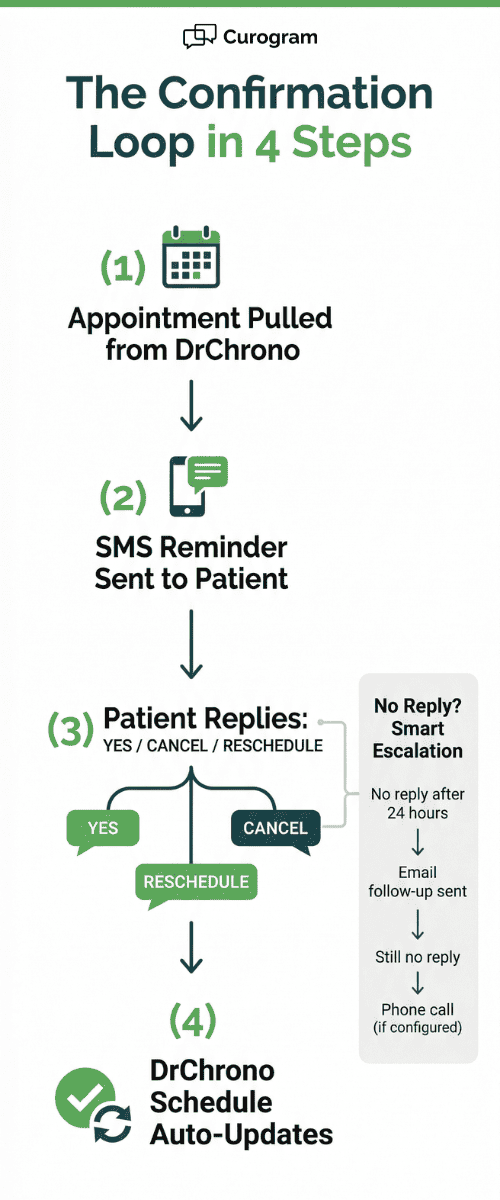
What does "closing the loop" mean? It means the patient gets a text. They reply YES, CANCEL, or RESCHEDULE. And your DrChrono schedule updates on its own. No one on your team has to touch it. No data entry. No guesswork.
Practices that use two-way text reminders for DrChrono EHR practices see results fast. Based on our internal data, Atlas Medical Center dropped no-shows from 14.20% to 4.91% in just 90 days. Covina Arthritic Clinic went from 369 to over 1,300 confirmed visits per month in under six months.
This article breaks down why most reminder tools fail DrChrono practices, what the confirmation loop engine actually looks like, and how you can get 75%+ confirmation rates without the ecosystem tax.
Whether you run a chiropractic office, an urgent care clinic, or a mental health practice, this guide shows you how reliable appointment reminders for DrChrono iPad clinics work in the real world.
Let's start with what went wrong.
The Villain: The Reminder That Fires at 2 AM
On paper, Updox checks all the boxes. It sends reminders by phone, text, and email. Patients can confirm, cancel, or request a callback. It plugs into DrChrono. It looks great in a demo.
But demos don't wake up your patients at 2 AM.
What Actually Happened
A verified G2 reviewer shared this story. One night, 150 patients received text reminders at 2:00 in the morning. Not 8 AM. Not noon. Two in the morning.
Think about what that does to a practice. Your patients — many of them elderly, some with chronic pain, some with anxiety — get jolted awake by a text from their doctor's office. They're confused. They're upset. Some of them call your office the next morning to complain. Others just lose trust in you.
Updox said they were aware of the issue. But there was no clear fix date. No public promise it wouldn't happen again. No apology that made things right.
The Trust Collapse
Here's what happens next in most practices. The office manager logs in and turns off SMS reminders. Just shuts them down. And the team goes back to making phone calls by hand.
This is the worst outcome. You're paying $49 or more per user per month for an engagement platform. You're not using its core feature. And your front desk is buried in calls again.
The math makes it worse. Say you have 40 patients on your schedule. Your front desk spends an average of 3 minutes per call. That's 2 hours of staff time every day — just for reminders. At $18 per hour, that's $36 a day, or about $750 a month in labor alone.
Now add the no-shows. The industry average for missed visits is around 5-7% for well-managed practices. But without reminders? That rate climbs fast. If just 5 extra patients skip their visits each week, and each visit brings in $150, that's $3,000 in lost revenue per month.
Why This Keeps Happening
The core issue with platforms like Updox isn't the feature set. It's the architecture. When you bundle reminders inside a massive engagement ecosystem, there are more moving parts. More things that can break. More updates that can cause conflicts.
DrChrono reminder texting vs Updox comes down to this: Updox tries to do everything — reminders, fax, video, secure messaging, forms, and more.
When one piece fails, it can take others down with it. That 2 AM blast wasn't a simple glitch. It was a sign that the system's complexity had outgrown its ability to stay reliable.
And here's the real cost. It's not the $49 per user. It's the trust you lost with your patients. It's the staff time you wasted going back to phone calls. It's the no-shows that crept back up because you couldn't rely on your own tool.
The Feeling Behind the Frustration
If you're a practice owner, this hits hard. You did the right thing. You invested in tech. You set up your workflow. You trained your team. And then the platform let you down at the worst possible moment.
You didn't just lose a feature. You lost confidence. You lost time. And you may have lost patients who now question whether your office has its act together.
The good news? There's a fix. And it doesn't require another bloated platform. It requires a focused tool that does one thing really well — close the confirmation loop, every time, on time.
The Guide: The Confirmation Loop Engine
The fix for broken reminders isn't more features. It's a smarter loop. Here's what the confirmation loop engine looks like when it works right.
How the Loop Works
Step 1: Your system pulls tomorrow's appointments from DrChrono.
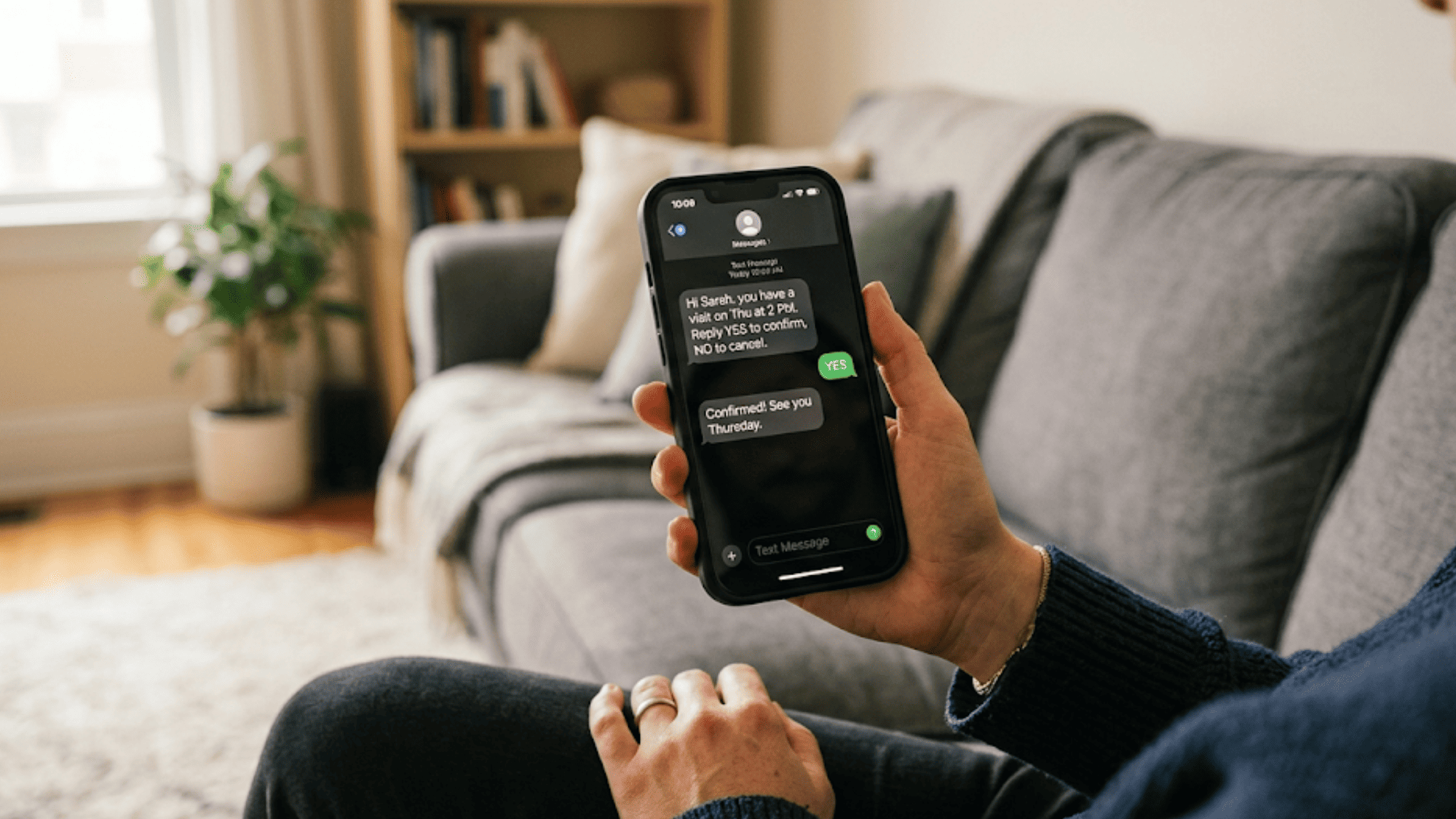
Step 2: It sends each patient a text. Something simple like, "Hi Sarah, you have a visit on Thursday at 2 PM. Reply YES to confirm, NO to cancel, or RESCHEDULE."
Step 3 is where most tools fail — and where this one shines. The patient replies. The system reads the reply. And it updates your DrChrono schedule in real time. No one on your staff has to do anything.
That's the DrChrono patient confirmation loop, and it works as an Updox alternative because it skips the complexity. There's no bloated platform. No bundled fax or video features getting in the way. Just a clean, reliable loop: send, receive, update.
Smart Sequencing: Text First, Then Escalate
Not every patient replies to texts right away. That's okay. The system uses smart sequencing to follow up without being pushy.
Here's how it works in practice:
|
Time Frame |
Action |
Channel |
|
48 hours before visit |
First reminder sent |
SMS text |
|
24 hours, no reply |
Follow-up reminder |
|
|
Same day, still no reply |
Final reminder |
Phone call (if set up) |
Each step is logged with a time stamp. Your team can see exactly when a reminder was sent and which channel was used. And there's a key difference from Updox: every message goes out during normal hours. No 2 AM blasts. No surprises.
This smart sequencing is what makes two-way text reminders for DrChrono work across different practice types. A chiropractic office might only need texts. A mental health clinic might prefer email follow-ups for privacy. An urgent care center might want phone calls as a backup for same-day slots.

Real Results From Real Practices
Let's talk numbers.
Based on our internal research, Atlas Medical Center — a chiropractic and wellness practice — saw their no-show rate drop from 14.20% to 4.91% in 90 days after switching to a confirmation loop engine. That's a 65% cut in missed visits.
Covina Arthritic Clinic tells a similar story. Before automation, they confirmed about 369 appointments per month.
After turning on automated confirmations, that number jumped to over 1,100 per month on average. Their staff stopped spending hours on phone calls and started spending time on patient care.
Across all Curogram clients, the average confirmation rate sits above 75%. And no-show rates run 53% lower than the industry average, based on our internal data.
Why It Works for Multi-Specialty Practices
The confirmation loop isn't one-size-fits-all. It bends to fit your specialty.
Chiropractors get adjustment reminders that stick because patients reply with a quick YES. PT practices see higher session follow-through because the text goes out at the right time.
Mental health clinics keep things private — the text only says "you have a visit," with no details about the type of care. Podiatrists send wound-care follow-up reminders. Urgent care sends discharge confirmations.
Every specialty has a different workflow. But the core loop stays the same: send, receive, update. That's what makes reliable appointment reminders for DrChrono iPad clinics work across the board.
The Success: Your Reminders Work, Your Schedule Fills
Let's paint a picture of what your morning looks like when the confirmation loop is working.
The Morning Scene
It's 7:45 AM. You walk into your clinic. Your front desk manager is already at her station, but she's not on the phone. She's reviewing the dashboard.
Today's schedule shows 38 appointments. Of those, 32 are already confirmed — that's an 84% confirmation rate. The system handled all of it overnight through text replies. Six visits are still pending, but follow-up emails went out an hour ago.
Two patients canceled last night by replying NO to their reminder. But here's the key part: the system already pulled two names from your waitlist and filled those slots. By the time you walk through the door, your schedule is full.
Your front desk didn't make a single phone call. No sticky notes. No "I think Mrs. Johnson said she'd come in." Just clean, confirmed data.
That's the shift. From chaos to clarity. From guessing to knowing.
The Numbers Tell the Story
Let's break down what this means in dollars and hours.
-
Time Saved Per Day - If your staff used to spend 3 minutes per call for 40 patients, that's 2 hours of phone time daily. With automated confirmations, that drops to near zero. Over a month, you get back roughly 40 hours of staff time.
-
Revenue Protected - Say your average visit brings in $150. If you were losing 6 patients a week to no-shows (about 14% of a 40-patient daily schedule), that's $900 per week — or $3,600 per month in lost revenue.
Cut that rate to under 5%, and you're losing maybe 2 patients a week instead. That's $300 per week, saving you about $2,400 per month.
Here's a simple table to show the difference:
|
Metric |
Before (Manual Calls) |
After (Confirmation Loop) |
|
No-show rate |
~14% |
~5% |
|
Missed visits per week |
6 |
2 |
|
Lost revenue per month |
$3,600 |
$1,200 |
|
Staff time on calls (daily) |
2 hours |
~10 minutes |
|
Monthly labor cost (reminders) |
~$750 |
~$60 |
|
Monthly confirmation rate |
~50% |
75%+ |
That's not a small improvement. That's a shift in how your practice runs.
The Mindset Change
The biggest win isn't on a spreadsheet. It's in your head.
Before, you dreaded Monday mornings. You knew the no-show list would be long. You knew your staff would be frustrated. You knew there'd be gaps in the schedule that cost you money.
Now? You trust the system. You don't wonder if reminders went out. You don't worry about 2 AM texts. You don't second-guess whether your patients got the message.
The shift goes from "I turned off reminders because I can't trust the platform" to "My confirmation rate is 78% today, and I didn't make a single phone call."
That trust changes everything. It frees your mental energy for clinical work, for growing your practice, for actually helping patients instead of chasing them down.
How Cancellations Become Opportunities
Here's something most practices miss. Cancellations aren't just bad news. With the right system, they're a chance to fill your schedule.
When a patient texts CANCEL, the system doesn't just log it. It triggers your waitlist. The next person in line gets a text: "A slot just opened up for Thursday at 2 PM. Would you like to book it? Reply YES."
This happens in seconds. No staff involvement. No phone tag. The slot fills before you even knew it was empty.
Think about what that means for a busy urgent care or PT office. On a given week, you might get 8-10 cancellations. Without a waitlist trigger, those are empty chairs. With it, you recover 60-70% of those slots based on how active your waitlist is.
That's the difference between a schedule with holes and a schedule that heals itself.
Specialty-Specific Wins
Different practices see different benefits, but the pattern is the same.
-
Chiropractic - Adjustment patients often need 2-3 visits per week. If they miss one, the whole care plan slips. Text reminders with a reply-to-confirm option keep these patients on track. Based on our internal data, chiropractic practices using the confirmation loop see some of the highest response rates — often above 80%.
-
Physical Therapy - PT plans can run 8-12 weeks. Each missed session delays progress. Smart sequencing works well here because you can set reminders at different intervals depending on how far out the visit is. A session 3 days away gets a text. A session tomorrow gets a text and an email.
-
Mental Health - Privacy matters most here. The reminder text says nothing about the type of visit. It just says, "You have a visit at 10 AM on Wednesday. Reply YES to confirm." Patients feel safe replying, and clinics maintain HIPAA compliance without extra steps.
-
Podiatry - Wound-care follow-ups are critical. If a patient misses a check-in after a procedure, outcomes suffer. Automated follow-up reminders ensure these patients come back on time.
-
Urgent Care - Same-day and next-day confirmations are the norm. The system sends a quick text after discharge: "You have a follow-up visit set for Friday at 9 AM. Reply YES to confirm." This keeps post-visit care on track without burdening your already-stretched staff.

How Curogram Closes the Confirmation Loop for DrChrono
Most reminder tools stop at sending a text. Curogram starts there and keeps going.
The difference is what happens after the text goes out. When a patient replies, Curogram reads the response and pushes it straight back to your DrChrono schedule. A YES marks the visit as confirmed. A CANCEL removes it and triggers your waitlist. A RESCHEDULE opens a self-service link for the patient to pick a new time.
This is the core of the confirmation loop engine. There's no in-between step. No staff member copying a response into a spreadsheet. No sticky note that says "Call Mrs. Rivera back." The loop closes on its own.
What makes this work is the FHIR API sync with DrChrono. Appointments pull into Curogram in real time. Reminders go out on a schedule you set — during hours you choose. Patient replies flow back and update the calendar without delay.
For practices running DrChrono on iPads — which is common in chiropractic, PT, and urgent care settings — this is a big deal. Your providers can glance at the schedule between patients and see live confirmation status. No refreshing. No logging into a second platform.
Curogram also respects your patients' time. Texts go out during business hours or at times you configure. If a patient doesn't reply, the system follows up through email or phone on a set timeline. Every message is logged and time-stamped.
And unlike platforms that charge per user, Curogram prices per practice. A 5-provider clinic pays the same flat rate whether one person manages reminders or five do. That's a clear savings over Updox's $49+ per user per month model.
The result? You get a focused, reliable tool that does DrChrono SMS appointment confirmations to reduce no-shows — without the ecosystem tax. You get confirmation power. You get peace of mind. And you never have to worry about a 2 AM text blast again.
Conclusion: Run the Reminder Engine
DrChrono handles charting well. But charting alone doesn't fill your schedule or stop no-shows.
The gap between a good EHR and a full schedule is the confirmation loop. When that loop is open — when reminders go out but no one tracks the replies — you're stuck making phone calls. You're guessing who's coming in. You're losing revenue to empty chairs.
Closing that loop means every text gets a reply, and every reply updates your calendar. It means your front desk stops playing phone tag and starts focusing on the patients who are already in the office.
Based on our internal data, practices using this approach see 75%+ confirmation rates and no-show rates 53% lower than the average. Atlas Medical Center went from 14.20% no-shows to 4.91% in 90 days. Covina Arthritic Clinic went from 369 confirmed visits per month to over 1,100.
These aren't small gains. These are practice-changing results.
The best reminder platform isn't the one with the longest feature list. It's the one that works the first time, respects your schedule, and doesn't wake your patients up at 2 AM.
Stop chasing patients by phone. Schedule a demo to see how your DrChrono schedule can fill itself with automated text confirmations — no extra staff needed.
Frequently Asked Questions
Curogram is a focused reminder and confirmations tool, priced per practice, not per user. You pay a fraction of what Updox charges for the entire engagement platform, without the ecosystem tax or the reliability surprises. Get confirmation power without the overhead.
You set the send window. Curogram only sends texts during the hours you choose. Every message is time-stamped and logged, so you always know exactly when and what was sent.
Curogram charges per practice, not per user. A 5-provider clinic pays one flat rate. Updox charges $49+ per user per month, which adds up fast when multiple staff members need access.